
Story bible (continuity)

The story bible is one machine-readable document that names your whole cast, every set and prop, and the second-by-second scene timeline — so a 12-scene AI video keeps the same person, the same jacket, and the same kitchen from the first shot to the last. It is rebuilt automatically every time the storyboard changes, costs nothing, and calls no provider.
What it does
- Locks continuity once, reads it everywhere. Cast, settings, props, and the scene timeline live in a single file every later stage can consult, instead of "same jacket" living only in your head and being re-typed (or forgotten) per scene.
- Builds itself. You never run a "make story bible" command — it is derived from the brief, the storyboard, and your character profiles, and regenerated whenever the storyboard is (re)written.
- Is deterministic. Run it twice on the same inputs and you get a byte-identical file (apart from the timestamp). No model, no randomness, no credits spent.
- Gives every scene a clock. Each scene gets
startSeconds,endSeconds, anddurationSeconds, plus a rolled-uptotalDurationSeconds— an authoritative timeline that assemble and narration-fit can trust. - Writes per-scene continuity notes. Synthesized hints like "Keep Nova visually consistent with the character bible" and "Continue cleanly from scene 2" are ready to fold straight into generation prompts.
- Never blocks. It is a read surface, not a gate. A project that has never made a storyboard simply has no story bible, and that is fine.
How it does it
The bible is a pure derivation — every field is computed mechanically from three inputs:
- Title, intent, production mode come straight from the brief.
- Style, genre, mood, music, aspect ratio are pulled from the brief metadata (each optional, omitted when absent).
- Cast is the union of character names across storyboard scenes, brief metadata, and registered character profiles, sorted alphabetically. Each character's
descriptionis taken from the matching profile first, then brief metadata;voicecomes from brief metadata only;referenceAssetscome from the character profile only. - Settings and props come from brief metadata, keeping only entries that have both a name and a description.
- Scenes are the storyboard scenes sorted by index, with
start/endseconds accumulated in order. Each scene'snarrationis its dialogue (or description), andvisualPrompt/motionPrompt/diegeticAudioare lifted from the scene's prompt block when present.
How to use it
You do not call the story bible directly — it is emitted by any command that writes or rewrites a storyboard. Run those, then read the file. All commands are shown as node dist/cli/vclaw.js ...; if you installed videoclaw globally you can type vclaw ... instead.
node dist/cli/vclaw.js video storyboard --project my-projectGenerates (or rewrites) the storyboard and, as a side effect, writes story-bible.json. The JSON it prints includes a storyBiblePath field pointing at the file.
node dist/cli/vclaw.js video create "30s product teaser" --project my-projectCreates a project end-to-end through the storyboard stage; the story bible is written at storyboard-write time. The first positional is the creative intent string (not the slug — the slug derives from it, or pass --project). create already defaults to director mode.
node dist/cli/vclaw.js video storyboard-review --project my-project --apply-content-fixesRuns storyboard preflight without starting a paid run. The bible is rewritten only when --apply-content-fixes rewrites the storyboard in director mode; a plain storyboard-review (no --apply-content-fixes) does not regenerate it.
node dist/cli/vclaw.js video director-preflight --project my-project --apply-content-fixesWhen content-fixes rewrite the storyboard, the story bible is regenerated afterwards so it reflects the post-fix scenes, not the pre-fix ones.
cat projects/my-project/artifacts/story-bible.jsonReads the derived continuity bible directly off disk — its fixed, predictable location.
Other storyboard-producing commands that emit the bible the same way: vclaw video clone-execute and vclaw video storyboard-from-clone.
How it flows
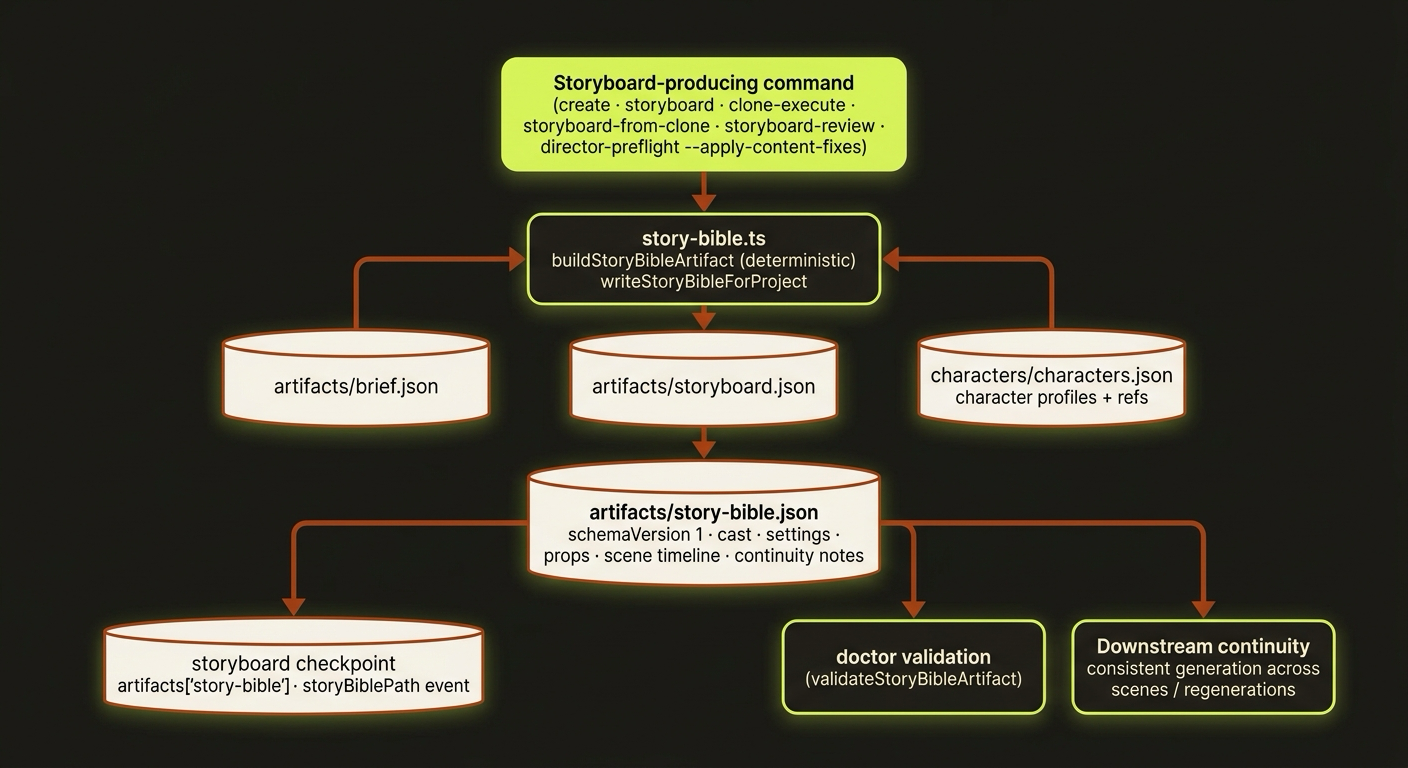
Diagram source (live Mermaid)
Artifacts & outputs
The single artifact lands at a fixed path, written through the standard artifact store (so it also gets an append-only artifacts/history/ snapshot on each write):
projects/<slug>/
  artifacts/
    brief.json          # input
    storyboard.json     # input
    story-bible.json    # <- derived continuity bible (schemaVersion 1)
  characters/
    characters.json     # input (character profiles, optional)
After each write, the bible is recorded in three places so you or a script can find it:
- The storyboard checkpoint, under
artifacts['story-bible']. - The
artifact.storyboard.writtenevent payload, asstoryBiblePath. - The command's JSON output, surfaced as
storyBiblePath.
The artifact (canonical schema schemas/video/artifacts/story-bible.schema.json) carries schemaVersion, projectSlug, generatedAt, title, intent, productionMode, then characters[], settings[], props[], scenes[], and a timeline. Each scene includes sceneIndex, startSeconds, endSeconds, durationSeconds, description, narration, charactersPresent, continuityNotes, and optional visualPrompt / motionPrompt / diegeticAudio.
Tips & gotchas
Read it by path or by field
Two safe ways to locate the bible: its fixed path projects/<slug>/artifacts/story-bible.json, or the storyBiblePath field on the JSON result of whichever storyboard command you just ran. Agents should prefer reading storyBiblePath off the command output.
Use the continuity notes in your prompts
The per-scene continuityNotes ("keep X consistent", "continue cleanly from scene N", "maintain the visual style") are written to be pasted into generation prompts. They are the cheapest way to fight cast and set drift across a multi-scene render.
It always mirrors the current storyboard
The bible is rebuilt every time the storyboard is written — including after director-preflight --apply-content-fixes. Do not hand-edit story-bible.json; the next storyboard write overwrites it. Edit the brief, storyboard, or character profiles instead and let it regenerate.
Partial settings and props are dropped
settings[] and props[] keep only entries that have both a name and a description. If a prop is missing one of those in brief metadata, it silently won't appear in the bible. The schema is additionalProperties: false at every level, so stray fields are rejected too.
No storyboard means no bible — and that is fine
A project that has never produced a storyboard simply has no story-bible.json. The doctor treats its absence as a non-issue; it only validates the file (schema + malformed-JSON guard) when it exists.
Driving it from an agent
An AI agent (e.g. Claude Code) never invokes the bible directly. It runs a storyboard-producing command — vclaw video storyboard --project <slug> or vclaw video create "<intent>" --project <slug> — then reads storyBiblePath from that command's JSON output (or the fixed path) to pull the canonical cast, settings, props, and timeline before composing scene prompts. The bible is a read surface, not a runtime gate: it never changes exit codes and never blocks a stage, so an agent can rely on it for context without it ever halting the pipeline.
Related
- concepts — where the story bible sits in the project lifecycle.
- characters — the character profiles that feed the bible's cast and
referenceAssets. - modes — storyboard vs director mode (the bible records
productionMode). - assemble — the stitch stage that consumes the bible's timeline.
- providers — the render routes that benefit from cast continuity.
- with Claude Code — driving videoclaw from an AI agent.
- Deep reference: STORY_BIBLE.