
Briefs & intent

The brief is the one place you tell videoclaw what you actually want — a title, a plain-English intent, and the technical shape of the final video (aspect ratio, quality, resolution, audio, how many takes). Every later stage reads back from this single brief.json, so getting the brief right steers the entire pipeline downstream.
What it does
- Captures your title and a free-text intent (the creative goal in your own words) as a canonical, machine-readable artifact.
- Locks in the delivery shape of the video — aspect ratio, fast-vs-quality, 720p/1080p, audio on/off, and how many output variations (1–4) to render.
- Tags the project with a platform (e.g.
tiktok,youtube), which auto-fills sensible execution-profile defaults for that platform. - Can seed itself from a brand with
--from-brand-dna: pull title and intent straight out of a previously extractedbrand-dna.jsonso a client website becomes a brief in one step. - Advances the project from the
briefstage to thestoryboardstage and writes a checkpoint, sovclaw video statusknows exactly what to do next. - Is safe to re-run: a second
briefcall merges new flags over the existing brief's metadata instead of wiping it — explicit flags always win.
How to use it
All commands below use node dist/cli/vclaw.js video .... If you installed videoclaw globally, you can type vclaw video ... instead — they are identical.
node dist/cli/vclaw.js video brief --project my-promo --title "Spring Launch" --intent "Energetic 15s teaser for our new running shoe"Writes the brief with your title and intent in storyboard mode, then moves the project to the storyboard stage.
node dist/cli/vclaw.js video brief --project my-promo --title "Spring Launch" --intent "Vertical teaser for socials" --platform tiktok --aspect-ratio 9:16 --quality quality --resolution 1080p --audio on --outputs 2Same brief, but pins the full delivery shape: vertical 1080p, high-quality render, audio on, two output variations. These land under brief.metadata.executionProfile.
node dist/cli/vclaw.js video brief --project my-promo --from-brand-dnaSeeds title and intent from artifacts/brand-dna.json (run video brand-extract first). Errors loudly if no brand DNA exists — no silent fallback.
node dist/cli/vclaw.js video brief --project my-promo --from-brand-dna --title "Custom Hero Title" --quality qualityBrand-seeds the intent but keeps your title, because any flag you supply overrides the brand-seeded value.
TIP
You don't have to call brief directly. vclaw video create "<intent>" writes the brief (and storyboard) for you in one shot, accepting the same --platform, --aspect-ratio, --quality, --resolution, --audio, and --outputs flags. Use standalone brief when you want precise, reviewable control over just the intent and delivery shape.
How it flows
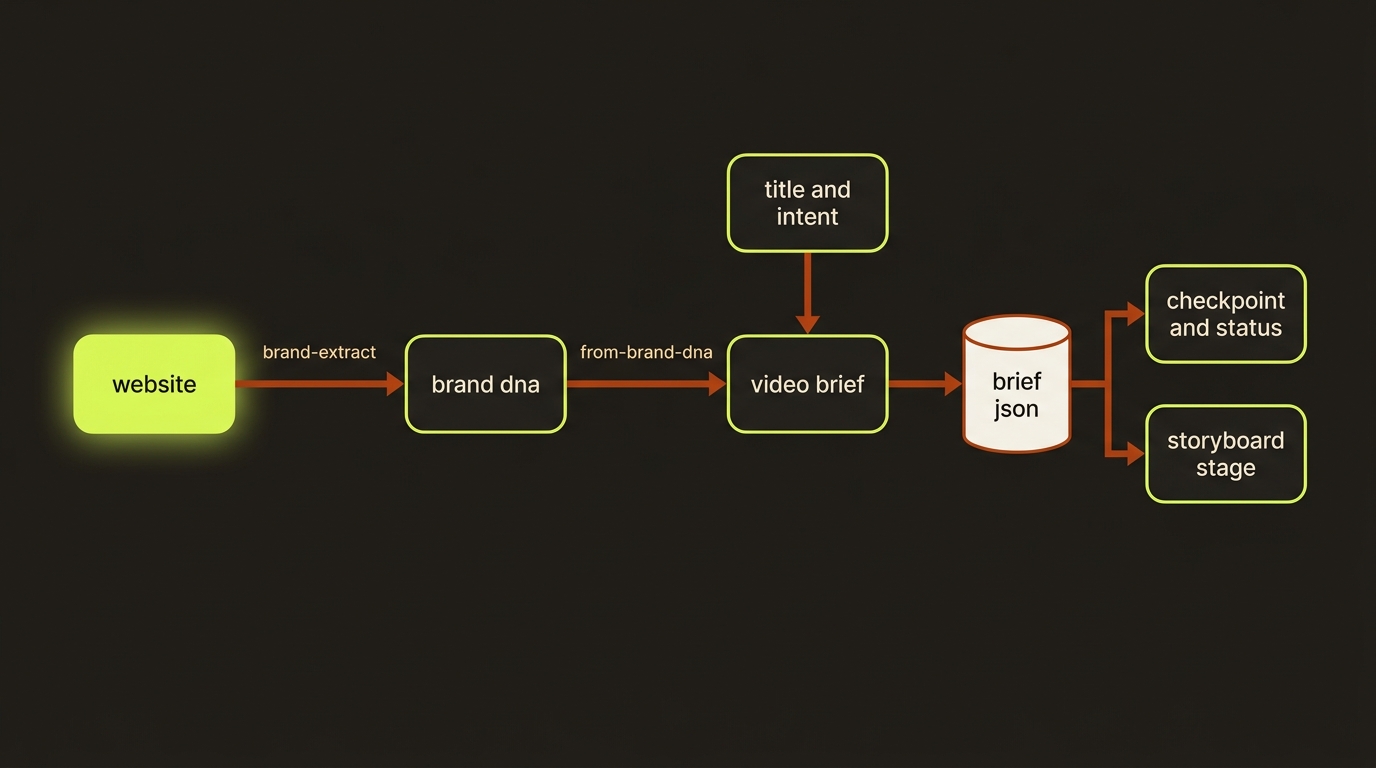
Diagram source (live Mermaid)
Artifacts & outputs
projects/<slug>/artifacts/brief.json— the canonical brief. Shape:{ title, intent, productionMode, createdAt, metadata }. Your delivery flags live atmetadata.executionProfileasaspectRatio,quality,resolution,generateAudio(boolean), andoutputCount(number) — note the CLI flags--audio on|offand--outputs Nmap to thegenerateAudioandoutputCountkeys respectively;metadata.platformrecords the target platform;--from-brand-dnaparks richer brand fields undermetadata.brandDna.projects/<slug>/checkpoints/brief— stage checkpoint marking the briefcompleted.projects/<slug>/events/events.jsonl— appends anartifact.brief.writtenevent.- The command also prints the full
{ workspace, artifactPath, artifact }JSON to stdout.
The project manifest is advanced to currentStage: storyboard, lastCompletedStage: brief.
Tips & gotchas
Re-running is non-destructive
Calling brief again merges your new flags over the existing brief metadata. To change just the resolution later, re-run with only --resolution 1080p and the rest is preserved.
--from-brand-dna needs brand DNA first
--from-brand-dna reads artifacts/brand-dna.json. If it's missing, the command fails with a clear error telling you to run video brand-extract first. It never silently invents a brief.
Title and intent must resolve to something
With --from-brand-dna, title comes from brandName and intent from valueProposition. If the brand DNA lacks those fields and you didn't pass --title/--intent, the command errors rather than writing an empty brief.
Platform sets smart defaults
Passing --platform applies that platform's execution-profile defaults (aspect ratio, etc.). Any explicit --aspect-ratio/--quality/etc. you also pass override those defaults.
Driving it from an agent
An AI agent (e.g. Claude Code) invokes node dist/cli/vclaw.js video brief --project <slug> --title <t> --intent <i> [flags] and parses the JSON on stdout. The command exits non-zero when required inputs are missing (--project, and either --title+--intent or --from-brand-dna), or when --from-brand-dna is used without a brand-dna.json present — so an agent can gate on exit code and read artifactPath from stdout to confirm the brief landed before moving to the storyboard stage.
Related
- providers — where the execution profile gets routed.
- characters — identity-locked cast referenced from the brief onward.
- storyboard — the next stage the brief unlocks.
- studio — the
brand-campaigngoal chainsbrand-extractthenbrief --from-brand-dna. - Deep reference: CLI_REFERENCE.md (see "Brand DNA ingest").