
Skills catalog
Skills are ready-to-run, agent-invokable workflows. Instead of remembering a long chain of vclaw video ... commands, you (or an AI agent like Claude Code) invoke a single skill that knows the whole job: make a presenter video, clone an ad, build a character, run an overnight batch, ship a release. Each skill is a folder of instructions that an agent reads and follows — so the same workflow runs the same way every time, whether a human or an agent drives it.
videoclaw bundles a curated skills library, split into two categories:
- Video skills — production workflows (storyboard, clone, presenter, director, UGC, thumbnails…).
- Workflow skills — orchestration and repo ops (the concierge front door, improvement runs, deep search, knowledge graphs, anti-slop cleanup, skill audits…).
The one rule of thumb
Start broad, specialize later. Begin at a canonical entry skill and let it route you into a specialist only once the mode is clearly known. Don't reach for a deep specialist (or a personal/legacy alias) as your first move.
The two canonical entry points
The library is not a flat bag of equally-preferred skills. Two skills are the front doors for almost every request:
| You want to… | Start with | It routes into specialists like… |
|---|---|---|
| Any video at all (create, copy, narrate, film, UGC) | video-framework | video-storyboard, video-analyze-template, video-clone-ad, movie-director, video-production-handoff, video-review-ui-qa, video-portfolio-ops, video-release-readiness, higgsfield-generate, ugc |
| A narrated presenter / host-led deck video | brand-presenter | davendra-presenter, nex-presenter, bunty (compatibility aliases) |
Everything else — video-storyboard, movie-director, ugc, the presenter aliases — sits underneath these two as a specialist or an alias. Pick the entry point that matches your intent, and let it hand off.
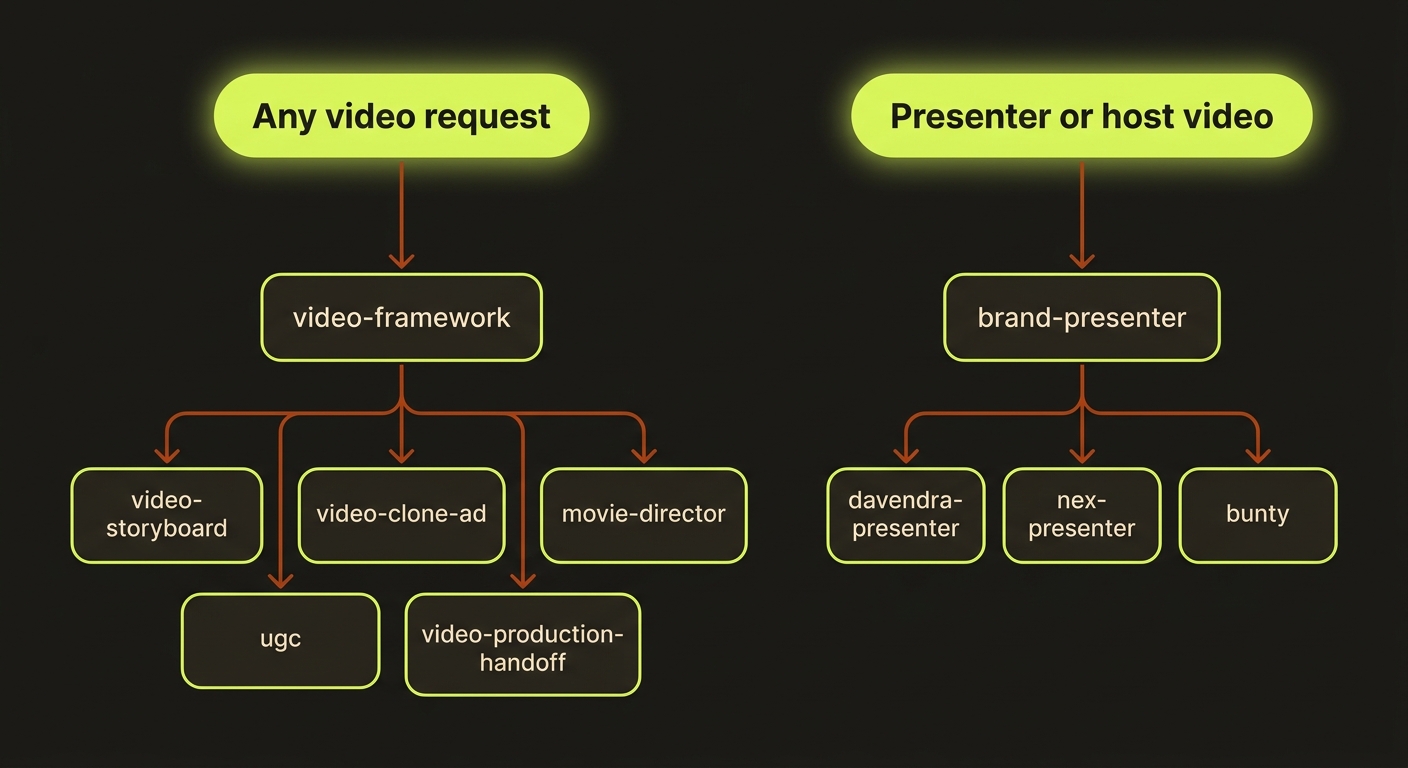
Diagram source (live Mermaid)
Aliases are not first choices
davendra-presenter, nex-presenter, and bunty are compatibility aliases over the generic brand-presenter surface. They exist for discoverability and muscle memory — but reach for the canonical brand-presenter first so your workflow stays portable.
Install skills into Claude Code
The bundled skills ship as Claude Code skill templates under mcp/skills-pack/. To make them invocable from an agent host, copy the pack into your project's (or home) .claude/skills directory:
# from the videoclaw repo root, into the current project
mkdir -p .claude/skills
cp -R mcp/skills-pack/. .claude/skills/

# …or install globally for every project
mkdir -p ~/.claude/skills
cp -R mcp/skills-pack/. ~/.claude/skills/
Restart Claude Code (or reload skills) and the canonical entry points appear as invocable workflows. For the full agent-host setup — schema discovery via vclaw schema --json and the read-only MCP server (vclaw mcp serve) — see Use it with Claude Code.
For AI agents
The machine-readable surface is skills/catalog.json. Parse it instead of scraping markdown — it records every skill's id, category, alias relationships (aliasOf), and the canonical-entry / specialist structure (role, specializes, specializations). Resolve a request to a role: "canonical-entry" skill first, then descend its specializations.
Browse the full lists
- Video skills — every production workflow, with roles and one-liners.
- Workflow skills — orchestration, review, diagnostics, and ops utilities.
The canonical structure means you rarely need to memorize the whole catalog: name your goal, start at video-framework or brand-presenter, and let the library do the routing.