
Director Mode, Preflight & the Approval Gate

Director mode turns videoclaw into a careful film studio: before it spends a single credit on a real provider, it scans your storyboard for hazards, refuses to run on a stale plan, and waits for a human (or agent) to explicitly approve the shot list. Nothing reaches Veo, Seedance, or Runway by accident.
What it does
- Adds a hard approval gate. With
--mode director(a.k.a.--production-mode director),execute/producewill block before any provider submission and write a human-readablestoryboard.mdfor review. Real generation only proceeds once approval is set. - Runs a preflight hazard scan over the storyboard, catching the things that quietly waste credits:
- Content-filter hazards — wording like "spectral blade", "katana clash", combat verbs ("stab/slash/strike"), "taser", or "fires a gun" that providers reject. These are reported as errors and can be auto-rewritten to safe phrasing (e.g. "radiant staff of light").
- Pronoun drift — a scene calls a character "she" then "he"; flagged so identity stays consistent.
- Near-duplicate scenes — adjacent scenes that overlap >= 75% of their words and won't look visually distinct.
- Prompt-quality and dialogue-vs-duration fit — words that won't fit the clip length.
- Broken character references — unreachable reference image URLs, missing Go Bananas character ids, characters with no reference image, and reference-sheet role collisions.
- Refuses to run on a stale plan. If you edit the storyboard after it was approved, the review goes
staleand execution is blocked until you refresh it — even if approval is still set. - Stays plan-safe. Preflight and
storyboard-reviewspend no credits and call no providers. They are pure checks plus on-disk artifact writes.
How to use it
Examples use the source-checkout form node dist/cli/vclaw.js video .... If you installed the CLI, just type vclaw video ... instead.
node dist/cli/vclaw.js video director-preflight --project demoRuns the hazard scan and prints a JSON result with pass, errors, and warnings. Fix every error before you can execute.
node dist/cli/vclaw.js video director-preflight --project demo --apply-content-fixesSame scan, but first auto-rewrites known content-filter wording in the storyboard (and regenerates the story bible), then re-checks.
node dist/cli/vclaw.js video storyboard-review --project demo --mode directorRuns preflight, writes storyboard.md for human review, and moves the project into awaiting-approval — without starting a run. Add --apply-content-fixes to clean wording first.
node dist/cli/vclaw.js video execute --project demo --mode directorTries to produce, but blocks at the approval gate: it writes storyboard.md and exits with a "Storyboard approval required" report. Nothing is submitted.
node dist/cli/vclaw.js video produce --project demo --mode director --approveThe approved run: the same produce, with --approve carrying the storyboard approval. Preflight must pass and the review must be fresh; only then does the asset stage proceed to the provider (add --dry-run to validate without spending). It is the exact command the blocked-gate report prints in blockers[]. Two older spellings still work: video approve (one deprecation line on stderr) and exporting VIDEOCLAW_APPROVE_STORYBOARD=1 before an execute.
How it flows
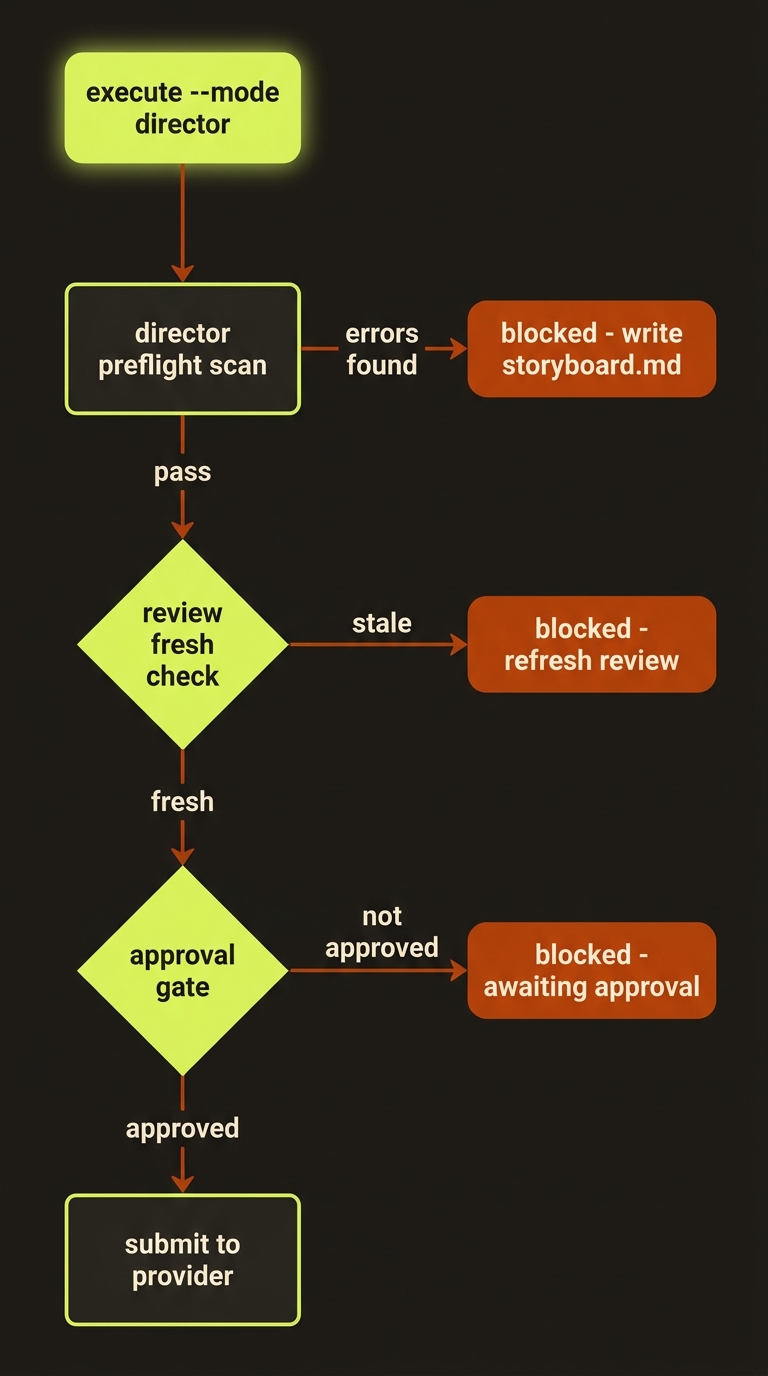
Diagram source (live Mermaid)
Artifacts & outputs
projects/<slug>/storyboard.md— the human-readable review file the gate writes before blocking. Lists scenes plus any preflight errors and suggestions.projects/<slug>/artifacts/execution-report.json— the blocked (or proceeding) run report;statusisblockedwithblockers[]until the gate is satisfied.projects/<slug>/artifacts/storyboard.json— rewritten in place when--apply-content-fixes/DIRECTOR_AUTO_FIX_CONTENT=1substitutes hazard wording.projects/<slug>/artifacts/story-bible.json— regenerated after content auto-fixes so continuity stays consistent.projects/<slug>/events/events.jsonl— appendsdirector.preflight.blocked,storyboard.review.stale.blocked,storyboard.approval.required, ordirector.storyboard.auto-fixedso the timeline records exactly why a run stopped.
Tips & gotchas
Use the two-step in CI/agents
Run director-preflight (or storyboard-review) first to get a clean pass, then run execute with approval. Splitting the check from the spend keeps failures cheap.
Stale review blocks even when approved
Editing the storyboard after approval flips its review-state to stale. The runtime checks freshness before honoring --approve (or VIDEOCLAW_APPROVE_STORYBOARD), so a stale plan is blocked regardless. Refresh the review (re-run storyboard-review) after any storyboard edit.
Escape-hatch env vars — know what they do
DIRECTOR_AUTO_FIX_CONTENT=1— auto-applies content-filter rewrites at execute time (same as--apply-content-fixes).SKIP_DIRECTOR_PREFLIGHT=1— skips the hazard scan entirely. The run records adirector.preflight.skippedevent; use only when you have already verified the storyboard.DIRECTOR_STRICT_PROMPT_QUALITY=1andDIRECTOR_STRICT_DIALOGUE_FIT=1— promote those checks from warnings to hard errors, so weak prompts or over-long dialogue block the run.
Content hazards are about provider policy, not taste
The rewrites (weapon clashes, body-shatter, firearm verbs) exist because Veo/Seedance/Runway content filters reject them — fixing the wording is what lets the shot generate at all. See providers for route-specific filtering.
Driving it from an agent
An AI agent (e.g. Claude Code) runs video director-preflight --project <slug> and parses the JSON: a non-empty errors[] (or pass: false) means stop and fix before spending credits. To proceed it re-runs produce with --approve (or, for an unattended run, sets VIDEOCLAW_APPROVE_STORYBOARD=1 on the call). The gate is fail-safe: every block path returns an execution-report.json with status: "blocked" and a blockers[] array naming the exact next command, so an agent can self-correct without a human in the loop — preflight errors, stale review, and missing approval each surface their own remediation string.
Related
- storyboard — the artifact preflight scans
- story bible — regenerated after content auto-fixes
- projects lifecycle — where the review-state ladder lives
- Deep reference: Production Workflow