
Review & Delivery Portal

One command turns your raw project folder into polished, share-ready web pages: an internal editor review, a clean client approve/decline page, and a final showcase — then publishes them to the web with content hashes and a public URL.
What it does
- Generates four standard HTML surfaces from a project's on-disk assets, with no hand-written HTML:
edit.html/review.html— the page you review on yourself, with approve and regenerate controls. Decisions copy out as aVIDEOCLAW_REVIEW_DECISIONSblock for agent handoff.client-review.html— lightweight client approve/decline/comment page. Feedback copies out as aVIDEOCLAW_CLIENT_FEEDBACKblock.preview.html— polished final showcase: every production image is click-to-fullscreen (lightbox), a soundtrack<audio controls preload="none">player appears only when an audio track is discovered, plus downloads.
- Adapts section labels and ordering per project type:
music-video,story-film,documentary,product-ad,sports-recap, orgeneric-video(unknowntemplatevalues fall back togeneric-video). - Builds a portfolio index across all projects, optionally filtered to one client.
- Surfaces the real generation inputs reviewers care about — the exact Seedance start-frame images (
Seedance Input Frames) and the prompt packets fromartifacts/filmmaking-prompts.json(Seedance Prompt Packets) — beside the resulting clip. - Publishes any surface (or an index) to a Cloudflare R2 bucket: deterministic upload plan, per-file SHA-256 hash, content type, and public URL.
- Keeps the on-disk project the source of truth — approve/regenerate/feedback decisions flow back through copy-paste env-var blocks, not a server round-trip.
How to use it
All examples use node dist/cli/vclaw.js; once installed on PATH the same commands run as vclaw ....
node dist/cli/vclaw.js video portal --project my-filmGenerates edit.html, review.html, client-review.html, and preview.html inside projects/my-film/.
node dist/cli/vclaw.js video portal --project my-film --surface previewRegenerates a single surface only — pick from edit, review, client-review, preview, compare, or index.
node dist/cli/vclaw.js video portal-index --client acmeBuilds a client-filtered portfolio index at projects/clients/acme/index.html; omit --client for the global projects/index.html.
node dist/cli/vclaw.js video publish-preview --project my-film --client acme --bucket vclaw-reviews --public-base-url https://review.example.com --dry-runPrints the exact R2 upload plan (local paths, remote keys, content types, SHA-256 hashes, public URL) without uploading anything.
node dist/cli/vclaw.js video publish-preview --project my-film --client acme --bucket vclaw-reviews --run run-002 --public-base-url https://review.example.comUploads the surface and its local assets to clients/acme/my-film/runs/run-002/ via wrangler r2 object put and appends a surface.published event.
node dist/cli/vclaw.js video publish-portal-index --client acme --bucket vclaw-reviews --public-base-url https://review.example.comPublishes the client index to clients/acme/index.html, linking to each published project run.
TIP
Use --wrangler-bin <path> to pin a specific Wrangler executable in CI or agent automation, and always run publish-preview / publish-portal-index with --dry-run first to inspect the plan before spending uploads.
How it flows
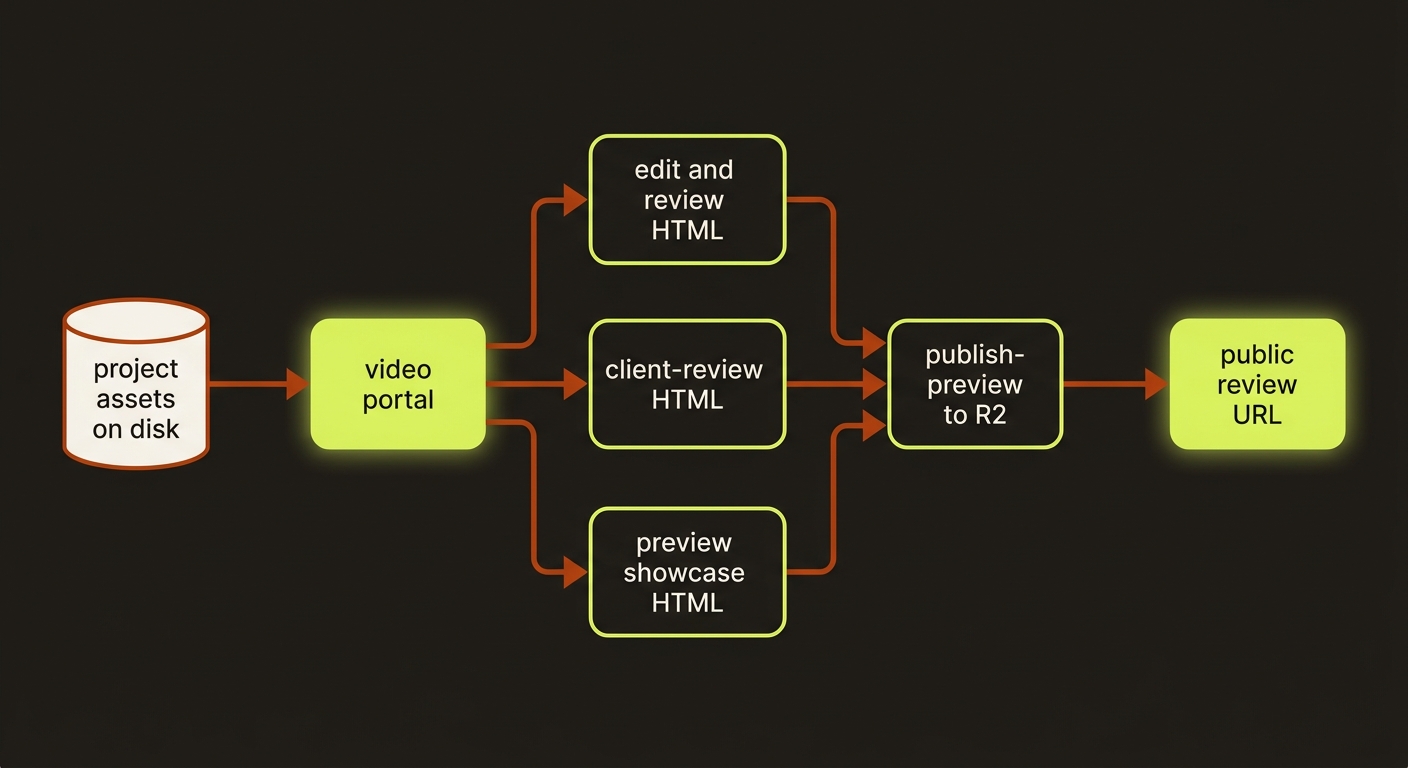
Diagram source (live Mermaid)
Artifacts & outputs
Generated into projects/<slug>/:
edit.html,review.html,client-review.html,preview.html— the four review surfaces (compare.htmlandindex.htmlare also available via--surface).project-audit.jsonl— append-only audit log; each generate writes asurface.generatedevent and each non-dry-run publish writes asurface.publishedevent (withhtmlHashand publicurl).
Portfolio indexes:
projects/index.html— global index.projects/clients/<client>/index.html— client-filtered index.
The portal reads (but does not write) artifacts/asset-manifest.json for image assets and artifacts/filmmaking-prompts.json for prompt packets. Each command prints its result as JSON on stdout (output paths, project count, or the publish plan).
Tips & gotchas
WARNING
publish-preview requires --project, --client, and --bucket, and publish-portal-index requires --bucket — a missing required flag throws and exits non-zero. --run defaults to run-001 if you don't pass one.
TIP
Set a project soundtrack (or audio) field in project.json, or just drop an .mp3/.m4a/.wav/.aac into the project; the preview showcase auto-discovers it and renders the audio player. No audio found means no empty player is emitted.
TIP
Set template or previewTemplate in project.json to control section labels and ordering — e.g. music-video relabels the prompt-packet section as Seedance Prompt Packets.
Driving it from an agent
Every command emits machine-readable JSON on stdout and exits non-zero on a missing required flag, so an agent can generate surfaces, parse the output paths, then call publish-preview --dry-run to validate the upload plan before committing real R2 uploads. Editor and client decisions return as copyable VIDEOCLAW_REVIEW_DECISIONS / VIDEOCLAW_CLIENT_FEEDBACK blocks the agent can read back to drive the next regenerate pass.
Related
- Projects & lifecycle — the on-disk project layout the portal reads from.
- Director mode — the storyboard-approval gate that precedes client review.
- Filmmaking prompts — produces the
filmmaking-prompts.jsonpackets the portal surfaces. - Seedance assets — the input frames shown beside each clip.