
Storyboards & Scenes

Turn a list of scene descriptions (or a ready-made template) into a structured, machine-readable storyboard — and get a deterministic story bible for free, so every scene and regeneration stays visually consistent.
What it does
- Takes the scenes you want — either typed out one by one with
--scene, or stamped from a built-in--template(chase, reveal, product story, dance, food tutorial, and more) — and writes them into one canonicalstoryboard.jsonartifact. - Numbers every scene in order (
sceneIndexstarting at 0) and keeps an exact description per scene. - Binds characters to scenes: tag which cast members appear in which scene with
--scene-character <sceneIndex:name>, and that mapping is saved on the scene. - Auto-writes the story bible: every run also emits
story-bible.json— a no-cost, no-provider continuity reference (cast, settings, props, per-scene timeline) derived from your brief + storyboard + character profiles. This is what keeps scene 1 and scene 9 looking like the same world. - Updates the project so it knows the storyboard stage is done and the next step is attaching assets.
- Spends zero credits and calls no AI providers — it is pure planning. It just shapes your intent into the contract the rest of the pipeline reads.
How to use it
All examples use node dist/cli/vclaw.js video .... If you installed videoclaw globally, you can type vclaw video ... instead — they are the same thing.
node dist/cli/vclaw.js video storyboard --project my-film \
  --scene "Wide desert dawn, lone rider crests a dune" \
  --scene "Close on weathered hands gripping the reins" \
  --scene "Rider gallops toward a distant storm wall"
Writes a 3-scene storyboard plus the story bible. You get storyboardPath and storyBiblePath printed as JSON.
node dist/cli/vclaw.js video storyboard-template-listLists the built-in scene templates you can stamp from (each has a <template-id>).
node dist/cli/vclaw.js video storyboard --project my-film \
  --template chase-pursuit \
  --environment "neon-lit rain-slicked alley" \
  --character-a "Vega" --character-b "The Collector"
Builds a full scene sequence from the chase-pursuit template, filling in the environment and the two named roles.
node dist/cli/vclaw.js video storyboard --project my-film \
  --scene "Two strangers meet at a rooftop bar" \
  --scene "They argue over a stolen ledger" \
  --scene-character "0:Mara" --scene-character "1:Mara" --scene-character "1:Dossier"
Same as above, but pins which characters appear in which scene (Mara in scenes 0 and 1, Dossier in scene 1).
node dist/cli/vclaw.js video storyboard-template-show --name product-commercial-4Shows the scene blueprint of one template before you use it.
TIP
You must pass either --scene (repeatable) or --template — not neither. Mixing characters in is optional and additive.
How it flows
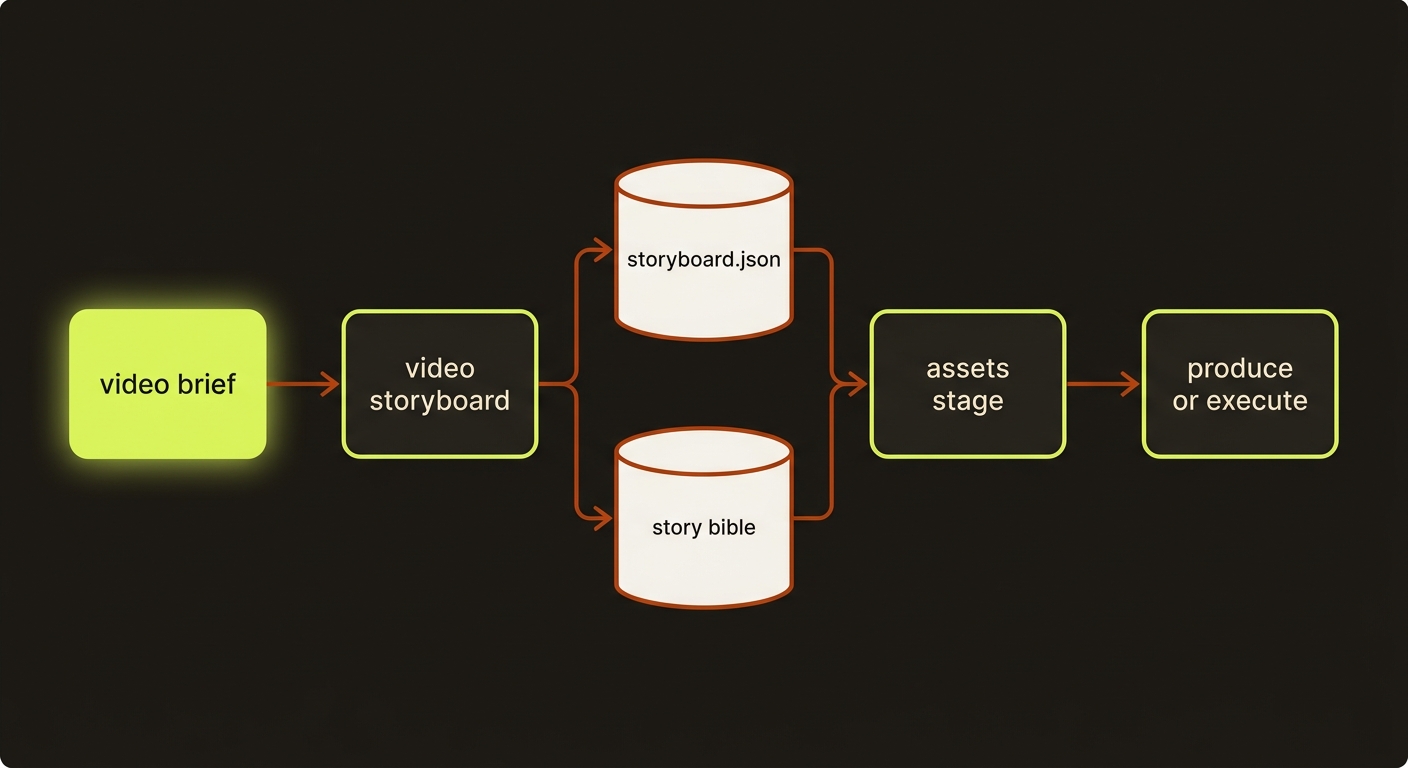
Diagram source (live Mermaid)
Artifacts & outputs
Written into the project on disk:
projects/<slug>/artifacts/storyboard.json— the canonical storyboard:projectSlug,productionMode, andscenes[](each withsceneIndex,description, optionalcharacters[], and an optionalscenePromptblock carryingimagePrompt/animationPrompt/cameraMove/styleFooter).projects/<slug>/artifacts/story-bible.json— the deterministic continuity bible (cast withreferenceAssets,settings[],props[], per-scene timeline withstartSeconds/endSeconds/durationSeconds,charactersPresent,visualPrompt/motionPrompt/diegeticAudio,continuityNotes[], plus a rolled-uptimeline).
The command also writes a storyboard checkpoint (recording both artifact paths), appends an artifact.storyboard.written event carrying storyBiblePath, and advances the project's current stage to assets. The command's stdout JSON includes artifactPath, storyBiblePath, and the full artifact.
Tips & gotchas
TIP
The story bible is regenerated by every storyboard-producing command, including after director content-fixes are applied — so it always reflects the corrected storyboard, not a stale draft. Downstream generation (Seedance, Veo, Runway) reads it so regenerated scenes don't drift.
WARNING
This command does not generate images. The matching storyboard-grid command renders a deterministic shot-spec sheet (CAM / MOVE / MOOD panels) — that is the layout contract, not a finished cinematic frame. To get a real cinematic 3×3 grid, generate it with an image model and re-attach it via filmmaking-prompts --storyboard-grid <path>.
WARNING
In director mode the wider workflow adds a storyboard-approval gate before any provider submission. Submission stays blocked until the run carries --approve (or VIDEOCLAW_APPROVE_STORYBOARD=1 for unattended runs), and a stale director review re-blocks execution even after approval. Keep the review fresh after editing scenes.
Driving it from an agent
An AI agent (such as Claude Code) calls node dist/cli/vclaw.js video storyboard --project <slug> --scene "..." [...] and parses the JSON on stdout to read artifactPath and storyBiblePath. Missing --project or missing both --scene and --template exits non-zero with a missing_required_flag error (missing lists which). The command never spends credits, so it is safe to run, inspect, and re-run while iterating on a scene list.
Related
- brief — the upstream stage that seeds title, intent, and execution profile.
- characters — define the cast you bind into scenes with
--scene-character. - story-bible — the continuity artifact this command auto-writes.
- providers — where these scenes get turned into real clips.
- assemble — stitch the rendered clips into a master.
- Deep reference: CLI_REFERENCE.md.
Shared film plans
New agent-led productions should use the shared filmmaking workflow. Author explicit plans with storyboard --film-plan <json-path>; create still produces legacy storyboards. The shared runtime validates planned scenes and prompt freshness, including local attached-reference changes. Rebuild stale prompt packets before execution. Product-category prompt compilation and cinema-deliver reject explicit film plans; use the documented cinematic planning and normal review/publish route.