
Portfolio, Ops & Reporting
One command turns a folder of dozens of video projects into a single dashboard that tells you exactly what is blocked, what needs a human review, what is overdue, and — crucially — the single safest next step for every project, ranked by urgency.
What it does
- Sees every project at once.
indexandreportscan everyprojects/<slug>/folder and roll them up into one machine-readable picture: ops status, quality score, owner, due date, platform, character cast, review state, and stage progress. - Classifies each project's health into one normalized
opsStatus:missing,planned,active,needs-review,blocked, orcomplete. A failed checkpoint becomesblocked; an awaiting-approval or retry-required checkpoint becomesneeds-review. - Tells you the next safest step.
next-actionsproduces an urgency-ordered queue — overdue and blocked projects float to the top (priority: high), planned projects sit atmedium— each with a plain-Englishactionand areason. - Aggregates the whole portfolio with
metrics: completion rate, average quality score, counts by ops status, by platform, by priority, by due-risk (none/soon/overdue), by score band, by next stage, plus how many storyboards are unreviewed or stale. - Surfaces stale reviews. The review-state ladder (
missing/current/stale) flows through every surface, so a storyboard edited after its last review is flagged everywhere — a stale director review blocks execution even if approval is set. - Exports to spreadsheet.
export-csvwritesprojects.csvandtimeline.csv(plus the full JSON report) so non-technical stakeholders can open the portfolio in Excel or Sheets.
How to use it
Each command is shown as node dist/cli/vclaw.js ...; once the CLI is installed on your PATH you can run the same thing as vclaw video ....
node dist/cli/vclaw.js video listLists every project slug discovered under the workspace root — the quickest "what do I even have" check.
node dist/cli/vclaw.js video indexBuilds the portfolio index (status, score, stages, review state, cast for every project) and writes it to projects/index.json.
node dist/cli/vclaw.js video metricsPrints the rolled-up portfolio aggregates: completion rate, average score, and counts grouped by ops status, platform, priority, due-risk, score band, and next stage.
node dist/cli/vclaw.js video next-actionsEmits the urgency-ordered action queue — the single most important command for "what should I work on next" across all projects.
node dist/cli/vclaw.js video status <slug>Shows the deep per-project status report (stages, checkpoints, review verdict, execution profile) for one project.
node dist/cli/vclaw.js video reportProduces the full machine-readable portfolio report: metrics + portfolio health + the project index + the cross-project timeline, all in one JSON payload.
node dist/cli/vclaw.js video export-csvWrites exports/projects.csv, exports/timeline.csv, and exports/portfolio-report.json for spreadsheet-friendly review and sharing.
How it flows
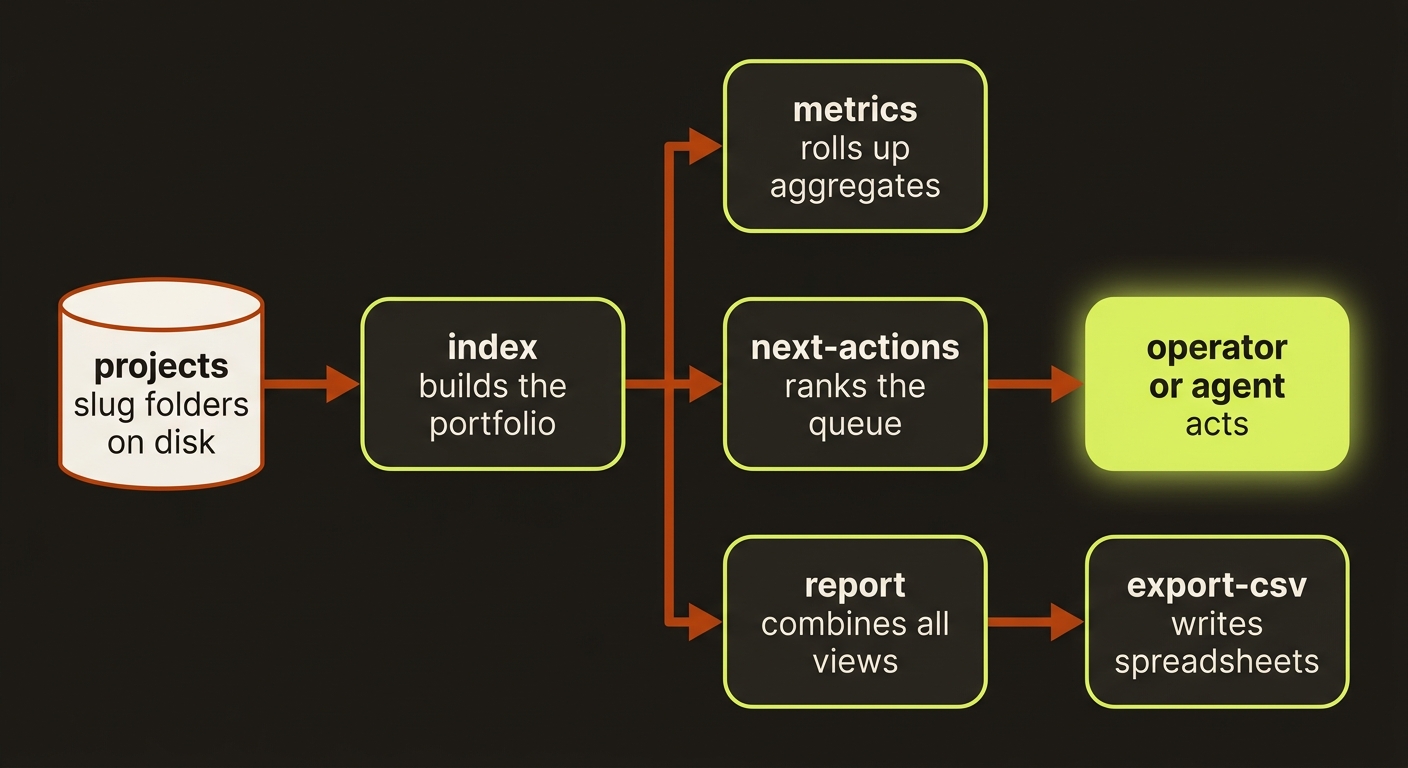
Diagram source (live Mermaid)
Artifacts & outputs
projects/index.json— the portfolio index written byindex(one entry per project: ops status, score band, stages, review state, character bindings).exports/portfolio-report.json— the full report (metrics, health, index, timeline) written byexport-csv.exports/projects.csv— one row per project with ~40 columns (slug, opsStatus, score-adjacent fields, owner, dueDate, review verdict, execution profile, character counts, stage/artifact/checkpoint counts).exports/timeline.csv— the flattened cross-project event timeline (recordedAt,slug,type,payload).metrics,next-actions, andreportprint their JSON to stdout by default; the per-project source of truth stays in eachprojects/<slug>/artifacts/folder.
Tips & gotchas
Run this as a maintenance loop
The recommended ops loop is metrics → next-actions → doctor-portfolio → report-snapshot → sync-obsidian. Run it whenever you sit down to triage, and the safest next move surfaces itself.
Set project metadata so triage works
owner, priority, dueDate, tags, blockedBy, and blockedReason all feed the index. Set them and next-actions will auto-prioritize overdue, due-soon, and dependency-blocked projects to the top of the queue.
Stale storyboard reviews block execution
If a storyboard is edited after its last generated review artifact, its review state goes stale and next-actions will tell you to refresh the review before continuing — even when approval was already granted. This is intentional and load-bearing; do not bypass it.
Index reflects disk, not live jobs
These commands read the on-disk project state. For in-flight provider polling use execute-status; portfolio commands report the last persisted state, not a live submission.
Driving it from an agent
All four reporting commands emit clean JSON on stdout, so an agent can parse next-actions to pick the highest-priority action, then dispatch the matching stage command (brief, storyboard, assets, review, publish). A project with opsStatus: "blocked" or dueRisk: "overdue" always yields a priority: high action with a human-readable reason — use that as the gate for whether autonomous work should proceed or escalate.