
Templates & Ad Cloning
Find a video ad that already works, distill its DNA into a reusable template, then stamp out a fresh version for a brand-new product or brand — without copying a single claim or logo.
What it does
- Turns a reference video you already analyzed into a saved template: its pacing, beat structure, motion style, hook, plus "keep" and "change" lists and reusable variables (product, audience, offer, proof, objection, CTA).
- Lets you list every template in your workspace and inspect any one of them as machine-readable JSON.
- Builds a clone plan: the template's winning structure re-pointed at your new intent, with a workflow checklist that forces you to swap brand-specific wording for your own.
- Clone plans preserve the shape (pacing, beats, style layers, beat-compression rules) but never copy claims or brand language — that is the whole point of legal, repeatable ad cloning.
- Plays nicely with the rest of the pipeline: a clone plan can seed a brief, a first-pass storyboard, and a full project.
How to use it
The CLI is vclaw once installed; the copy-paste form below uses the built-in entrypoint directly.
node dist/cli/vclaw.js video analyze --project ref-project --source <url-or-path> --title "Reference"Analyzes the reference video into analyze-output.json (pacing, beats, motion, keep/change lists, reusable variables). Add --auto to have Gemini fill the richer fields.
node dist/cli/vclaw.js video template-save --project ref-project --name launch-templateDistills that analysis into a saved, reusable template at templates/video/launch-template.json.
node dist/cli/vclaw.js video template-listLists every saved template name in the workspace (sorted).
node dist/cli/vclaw.js video template-show --name launch-templatePrints the full template JSON — pacing, beat structure, motion mode, keep/change, reusable variables, style layers, and workflow checklist.
node dist/cli/vclaw.js video clone-plan --template launch-template --project new-project --intent "Make a launch teaser for a smart bottle."Generates a clone plan that re-aims the template's structure at your new intent and prints it as JSON to stdout — it does not write clone-plan.json to disk. Use clone-init (below) to persist the plan into a project.
node dist/cli/vclaw.js video clone-init --template launch-template --project new-project --intent "Make a launch teaser for a smart bottle."Initializes a brand-new project seeded from the template and intent (brief metadata + the persisted clone-plan.json in one step). This is the step that actually writes clone-plan.json to disk.
node dist/cli/vclaw.js video storyboard-from-clone --project new-projectTurns the persisted clone plan's beats into a first-pass storyboard — one scene per beat, pre-loaded with "keep this, adapt for your intent" guidance. (It reads clone-plan.json from disk, so run clone-init first.)
node dist/cli/vclaw.js video clone-execute --template launch-template --project new-project --intent "Make a launch teaser for a smart bottle."The one-shot variant: template + intent straight through clone → brief → storyboard → execute in a single command (add --dry-run to plan without spending credits).
node dist/cli/vclaw.js video template-validate --name launch-templateValidates a saved template against its required fields and exits non-zero if anything is missing.
How it flows
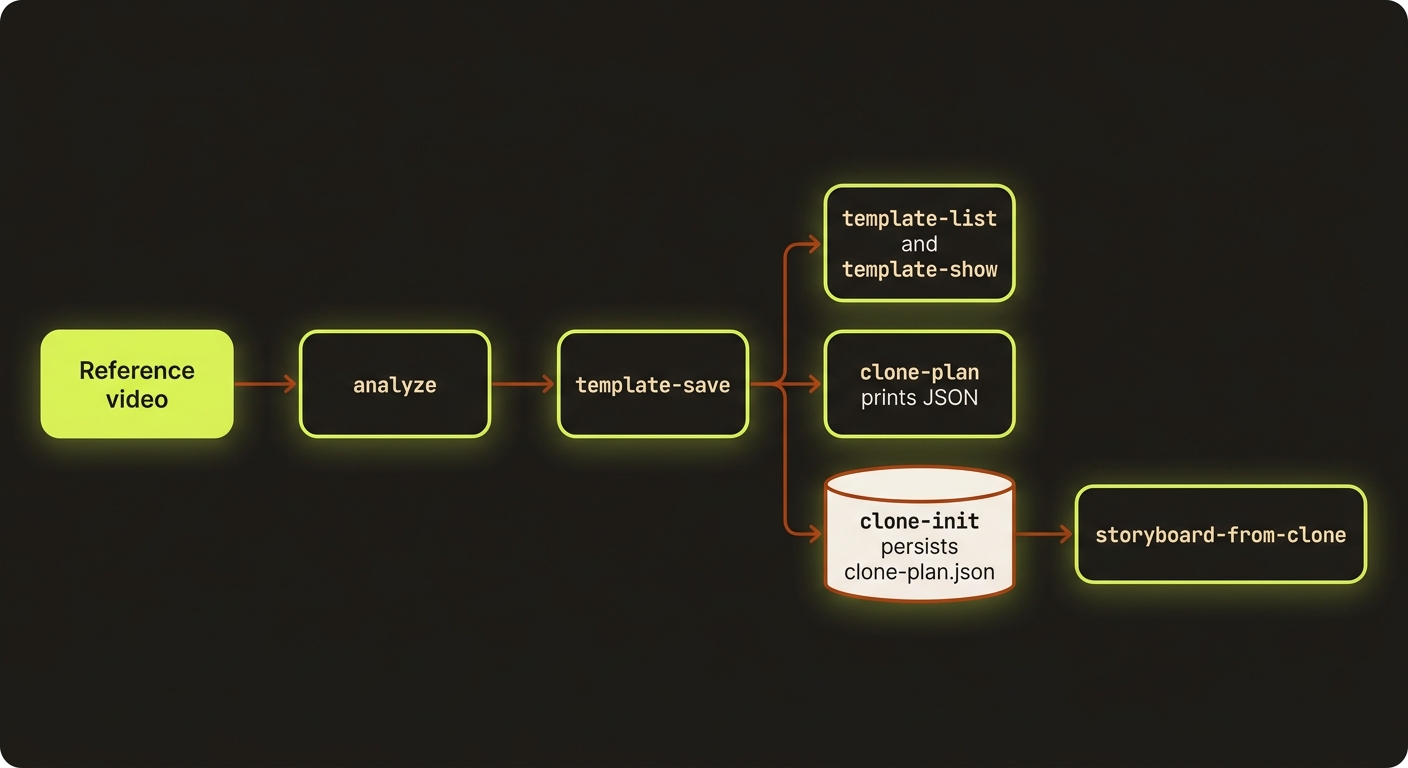
Diagram source (live Mermaid)
Artifacts & outputs
- Template:
templates/video/<name>.json— workspace-level, shared across projects. Capturespacing,structure(beats + hook),motionClassification,keep,change,reusableVariables,styleLayers,beatCompression,technicalNotes,dialogueNotes, and aworkflowChecklist. - Analyze output:
projects/<slug>/artifacts/analyze-output.json— the source the template is built from. - Clone plan:
projects/<slug>/artifacts/clone-plan.json—templateName,intent, recommended pacing + motion mode,keepFromReference,adaptForIntent,reusableVariables,beats, and the carried-over style layers, compression rules, and checklist. - Storyboard:
projects/<slug>/artifacts/storyboard.json— the first-pass scaffold emitted bystoryboard-from-clone.
Tips & gotchas
Templates live above projects
A template is saved to the workspace templates/video/ folder, not inside a project — so one great reference ad can seed dozens of cloned campaigns. Run template-list from your workspace root.
Fill the variables, keep the shape
The clone plan's workflowChecklist is your script: preserve the hook and beat order, but replace product, audience, offer, proof, objection, and CTA with your own. The plan deliberately carries no source claims or brand names.
Templates don't run providers yet
A template seeds the clone plan, brief metadata, and storyboard scaffold — it does not drive runtime execution directly. After storyboard-from-clone, continue through the normal storyboard → assets → produce pipeline.
Save needs an analysis first
template-save reads analyze-output.json; if you skipped analyze, it throws "Analyze artifact not found." Likewise clone-plan throws if the named template doesn't exist.
Driving it from an agent
Every command emits JSON on stdout and exits non-zero on a missing template or missing analyze artifact, so an agent can chain analyze → template-save → clone-plan → storyboard-from-clone and branch on exit code. A clone plan's reusableVariables array tells the agent exactly which fields to fill before authoring; pair with characters for continuity and story bible for deterministic continuity locking.