
How videoclaw works — for agents
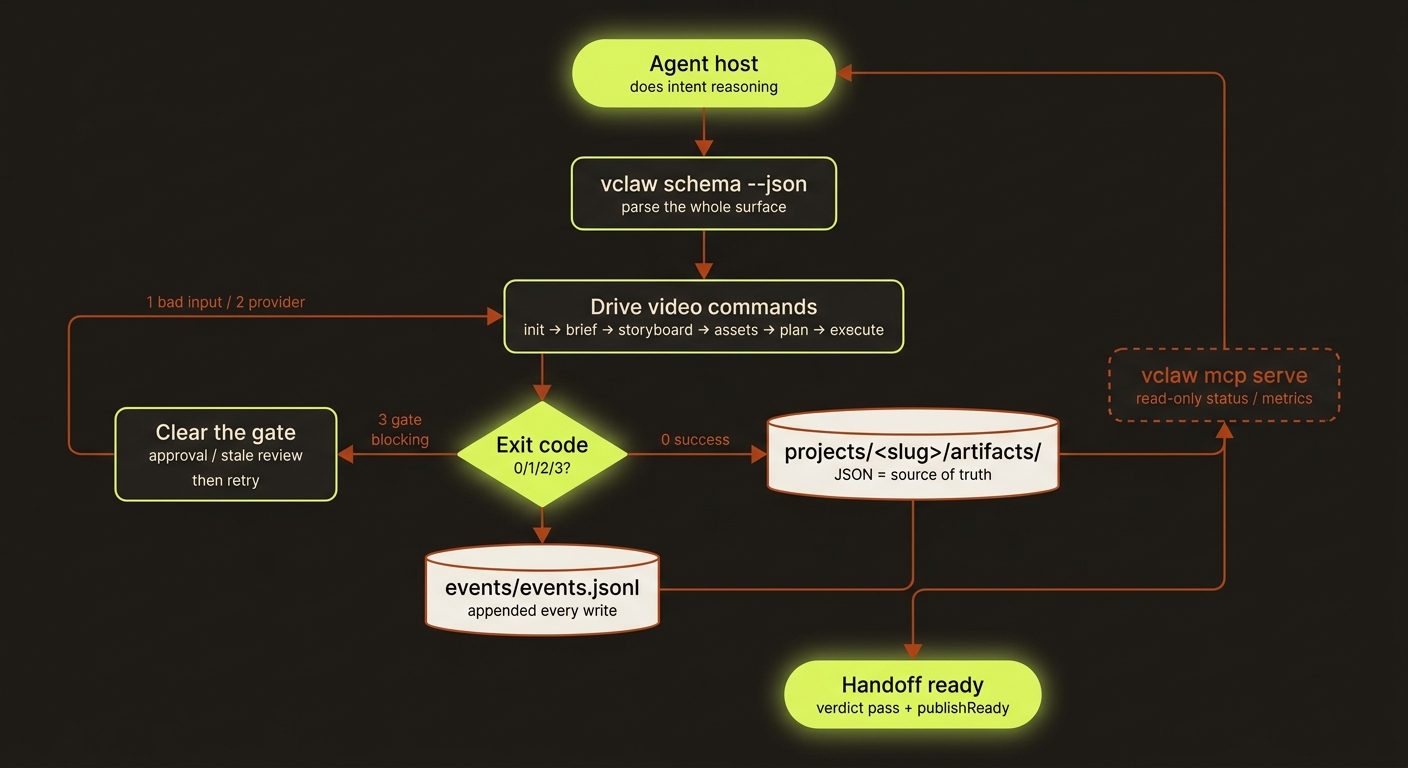
Diagram source (live Mermaid)
This page is written for an AI agent or orchestration layer that will drive videoclaw on a user's behalf — Claude Code, Claude Desktop, OpenAI Codex, or any other agent host. videoclaw is a neutral target: it doesn't care which assistant is driving, only that the driver can run a CLI or speak MCP. If you're a person, the Guide is friendlier — but you're welcome to read on.

The one idea that explains everything
videoclaw is a deterministic toolkit, not an orchestrator.You (the agent) do the intent reasoning.
vclawexecutes explicit, inspectable steps. The on-disk project folder is the single source of truth — not the chat, not memory.
videoclaw deliberately contains no model calls for "deciding what the user wants." That's your job. videoclaw's job is to turn a decided plan into artifacts and provider calls, reproducibly, with every step written to disk.
Discover the surface in one call
Before driving anything, learn the contract:
vclaw schema --jsonThis returns the entire command tree: every command, every flag, every artifact JSON schema, every exit code, and every error code. Parse it once and you know the whole surface — don't guess flags.
For hosts that prefer MCP:
vclaw mcp serveexposes read-only project introspection as MCP tools (status, metrics, artifacts).
The exit-code contract (read this on every call)
vclaw communicates with you through exit codes, and emits machine-readable JSON on stdout:
| Exit | Meaning | What you do |
|---|---|---|
0 | Success | Continue. |
1 | Your input was wrong | Fix the flags/args and retry. |
2 | System / provider error | Investigate; a retry may help. |
3 | A gate is blocking | Clear the gate first, then retry. |
On any non-zero exit, stdout is {"code": "...", "message": "...", "details": {…}}. Read code and act on it — do not just re-run blindly.
The canonical flow
init → brief → storyboard → assets → review → publish
                    │
        readiness · plan · produce(execute) · execute-status · execute-cancel
                    (the runtime layer, between assets and review)
Aliases you'll see: plan = execution-plan, produce = execute. A typical end-to-end drive:
vclaw video init <slug> --mode storyboard|directorvclaw video brief --project <slug> --title "…" --intent "…" [--aspect-ratio 16:9|9:16|1:1]vclaw video storyboard --project <slug> --scene "…" [--scene "…" …]vclaw video assets --project <slug> --asset image:path:0vclaw video readiness --project <slug>— check blockers before spendingvclaw video plan --project <slug>— see the recommended provider routevclaw video execute --project <slug> [--dry-run]vclaw video assemble --project <slug>— stitch the final narrated MP4
Always --dry-run first. It plans the whole thing and spends nothing.
Invariants you must respect
These are load-bearing. Violating them is a bug, not a shortcut.
- No silent fallback. Provider routes hard-fail (exit
2) rather than quietly switching to a different route. If a route isn't configured, surface that — don't paper over it. - The director approval gate. In director mode,
executestops before any provider call and returns a report withstatus: "blocked"on exit0; itsblockers[0]is the exactproduce … --approvecommand. It is not an error exit — read the report. Do not set the approval yourself on the user's behalf without their say-so — show them the storyboard, get explicit approval, then retry with--approve. - Review freshness. A project has a review-state ladder (
missing → current → stale). A stale director review blocksexecute(ablockedreport on exit0naming thestoryboard-reviewcommand) andexecute-status(exit3,storyboard_review_stale) even when approval is set. If you edit the storyboard after approving, re-run the review. - Characters by visual descriptor, not name. Proper names don't survive across generations and some providers reject photoreal real-person faces. Describe characters by appearance; lean on the story bible and reference sheets for continuity.
- Reference budget. Submissions cap references (≤9 image / ≤3 video / ≤3 audio). The toolkit preflights this; respect the failure rather than retrying blindly.
Artifacts are the contract
Every stage writes a canonical JSON artifact under projects/<slug>/artifacts/ (brief, storyboard, story-bible, asset-manifest, execution-plan, execution-report, review-report, publish-report, …). Every write also appends an event to events/events.jsonl. To know the true state of a project, read the artifacts — they're the source of truth, and their shapes are defined by the JSON Schemas in schemas/video/.
A handoff is ready only when review-report.json has verdict: "pass" andmetrics.publishReady: true. Don't claim "done" on anything weaker.
Skills: where to start
videoclaw ships agent skills so you don't have to rediscover the surface each time:
- Canonical entry skills — start broad, specialize later:
video-framework— any video request.brand-presenter— narrated presenter / host-led videos.
- Starter skill pack — copy-paste templates in
mcp/skills-pack/(videoclaw-create-video,videoclaw-check-status,videoclaw-portfolio-review). - Machine-readable index —
skills/catalog.json. Don't scrape the markdown; read the catalog.
Read these next (in the repo)
CLAUDE.md— the conventions, the single-test command, the review-state invariant.AGENTS.md— the autonomy directive, coding style, commit/PR format.docs/AGENT_INTEGRATION_RESEARCH.md— why intent classification is the host's job, not videoclaw's.docs/ARCHITECTURE.md— the layer map and the canonical flow.
This page exists so an agent can orient in one read. The human-facing version of the same workflow is Use it with Claude Code.
Shared filmmaking and completion evidence
Use the shared filmmaking contract by default for new productions. The external agent plans, implements and reviews bounded phases; VideoClaw remains its target CLI. Record purpose, audience, format and per-shot observable direction through storyboard --film-plan. create and clone authoring remain legacy entry points.
A planned project or one with film-edit review history also needs a current passing full-playback review before completion. Inspect review --film-edit <source.json> without a verdict, then save actual observations with --film-review <review.json>. All five criteria must pass after playback with sound. An earlier review-report.json does not override stale media.
produce --auto-chain, pool and batch-submit compile durable work without provider submission. Use the installed cinema-work-quote, cinema-authorize and cinema-work contracts for execution. Plain produce retains direct submission. Do not assume a universal dry-run or spend flag.