
Veo Native CLI Passthrough

Drive Google Veo through your Google Flow account without leaving vclaw — check batches, resume paused jobs, upscale clips to 4K, and turn videos into GIFs, all from one command surface.
What it does
- Bridges the
vclaw veo *subcommands to the Bun-basedvclaw-cli/flow.ts, which signs in to Google Flow in a real browser and calls useapi.net for the account-level verbs. - Standard batch verbs:
status,list,history,resume,reset,cancel— inspect and steer Veo jobs that are already running. - UseAPI verbs: manage accounts, register CAPTCHA providers, check account health, generate and upscale images, upscale videos, and convert video to GIF.
- Keeps the underlying tool's colon-separated form (e.g.
useapi:accounts list) so existing scripts keep working. - The same Veo route also powers full pipeline runs via the native in-process transport (
native-veo.ts), which drivesflow.tsunder the hood when youproduce/executea project on theveo-useapiroute.
How to use it
All examples use node dist/cli/vclaw.js video ...; once the bin is on your PATH you can shorten this to vclaw .... The veo family lives directly under vclaw veo (not vclaw video).
node dist/cli/vclaw.js veo statusShows the status of the current Veo batch (pass a batchId to target a specific one).
node dist/cli/vclaw.js veo listLists every Veo batch the CLI knows about.
node dist/cli/vclaw.js veo history --limit 20Prints recent job history, capped to the last N entries.
node dist/cli/vclaw.js veo resumeResumes a paused batch (optionally pass a batchId).
node dist/cli/vclaw.js veo resetResets failed jobs back to pending so they can be retried.
node dist/cli/vclaw.js veo cancelCancels the current batch.
node dist/cli/vclaw.js veo useapi:accounts listLists your registered useapi.net accounts (use useapi:accounts add to register one).
node dist/cli/vclaw.js veo useapi:healthReports account health and history so you can confirm the route is live before spending credits.
node dist/cli/vclaw.js veo useapi:captcha --provider 2captcha --key <key>Registers a CAPTCHA-solving provider (or run useapi:captcha list to see what's configured).
node dist/cli/vclaw.js veo useapi:image --image-prompt "a neon-lit alley at dusk"Generates still images through useapi.net.
node dist/cli/vclaw.js veo useapi:image:upscale --media-id <id> --resolution 4kUpscales a generated image to 2k or 4k.
node dist/cli/vclaw.js veo useapi:upscale --media-id <id> --resolution 4kUpscales a generated video to 1080p or 4k.
node dist/cli/vclaw.js veo useapi:gif --media-id <id> --output-file ./out.gifConverts a video into a GIF — this one is free.
How it flows
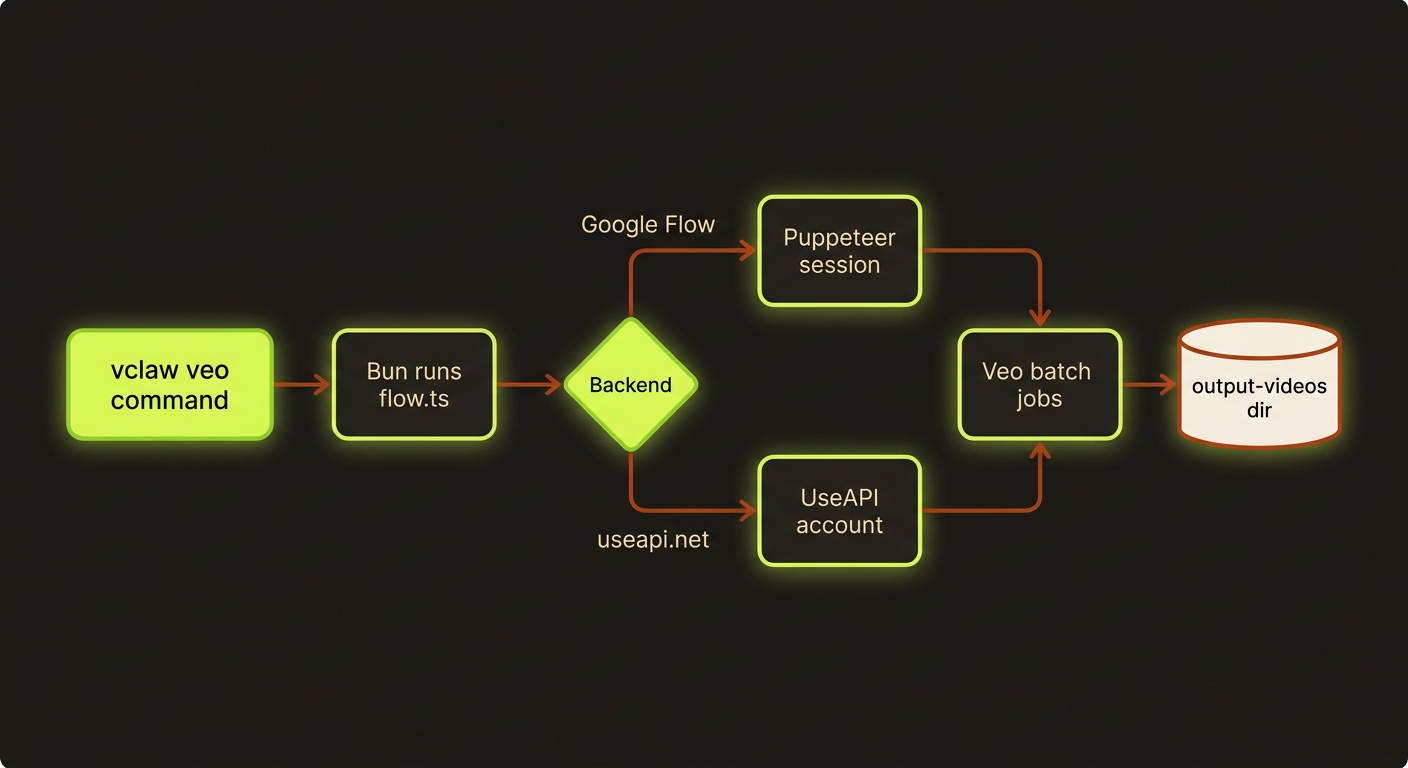
Diagram source (live Mermaid)
Artifacts & outputs
- Generated videos land in the Veo CLI output directory (
vclaw-cli/output-videos/by default, overridable withVCLAW_VEO_OUTPUT_DIR). - The native transport writes per-job state to
<output-videos>/.vclaw-jobs/<externalJobId>.json(route, output dir, timestamps, output file list) so polling can resolve completed clips. - GIFs, upscaled images, and upscaled videos write to the path you pass (
--output-file) or the useapi-returned media. - When the Veo route is used inside a project pipeline, the resulting clips and the
execution-reportflow into the standardprojects/<slug>/artifacts/layout. See Execution.
Tips & gotchas
Real human faces are rejected by content moderation (image-to-video)
Veo refuses to animate a photograph of a real person on this route. Measured 4 Sep 2026: four image-to-video scenes built from real photographs of a dental practice. The one keyframe with no person in it rendered on the first attempt; all three containing a person were refused, each with the byte-identical masked failure Generation failed: All operations failed.
Read the evidence rather than the message. isIpProhibitedFailure returned false, so this is the moderation class, not the intellectual-property one — which matters, because the two have opposite remedies. Clinical or anatomical imagery is not the variable: the refused set includes a receptionist holding a telephone with nothing anatomical in frame. Softening the motion wording (VCLAW_VEO_SAFE_MOTION=1) cannot clear a refusal about the input image.
It is bracketed, not inferred. Every refusal in that first run came after the single success, which "a face is present" and "something changed account-side mid-session" would fit equally well. Settled 5 Sep 2026 on veo_3_1_i2v_lite_low_priority at 0 credits: 00:38 no person → PASS, 00:39 real face → REFUSE, 00:42 no person → PASS. The person-free scene passes on both sides of the refusal, so the account was healthy throughout and the refusal is pinned to the image. Run the bracket, not the pair — a pass/refuse pair alone cannot separate the two explanations.
No cheaper tier clears it. That bracket ran on the lite row; the original refusals were the quality row (veo_3_1_i2v_s_portrait). Two different Veo model rows refuse the same three keyframes and pass the fourth.
Refusals are not charged — the account balance was unchanged across all of them. A failed attempt costs time, not credits.
omni-flash is not the way round it either. buildPrompt emits image:<path> (First-Frame I2V) only when the task carries firstFrame, which comes from a firstFrame field on the storyboard scene — and no CLI flag writes it. Without it the transport takes the ingredients: branch: with --veo-model omni-flash set, the payload quotes as abra_r2v_8s, operation r2v, not abra_i2v_8s. Confirmed against the price quote, not just the code.
R2V — whether reached this way or through vclaw video flow-register-characters — synthesises a scene from an identity reference rather than animating the photograph you supplied. Where the photograph itself is the deliverable (documentary, client-owned footage, a real named person), that is a fabrication decision, not a technical one, and belongs to whoever owns the material.
If the ad needs a real, named person on screen and you have their photograph, do not reach for an AI i2v route on Veo. A deterministic camera move on the still delivers the shot with zero refusal risk and zero identity drift, and that is what shipped.
A note on tiers that cuts the other way: on the one scene that did render — a static room, no people — the free lite tier produced a better take than the 100-credit quality tier: a clean one-way push where quality pushed in and then pulled back out. Both 1080x1920, 24fps, 8s, no letterbox. A static-room shot is not a case for the expensive tier.
Asset paths must be ABSOLUTE on this route
native-veo.ts passes the reference to flow.ts inside the prompt text as image:<path>, and runs it with cwd set to the vclaw-cli root — not the project directory. A project-relative path in the asset manifest therefore cannot resolve, and the run dies immediately with:
Generation failed: Image file not found: references/scene0-keyframe.pngIt fails before submission, so it costs nothing — but the message names the file, not the cause, and the path looks perfectly correct in the manifest. Relative paths work on seedance-direct only because that route uploads the bytes instead of handing over a path, so a manifest that renders fine there is silently unusable here.
Fix: bind with absolute paths — vclaw video assets --project <slug> --asset "image:/abs/path/scene0-keyframe.png:0". The spec parser takes them verbatim, and gen-image already emits absolute paths in its own registerHint.
A partial run leaves execute-status blind
The transport renders scenes sequentially in one call and throws on the first scene that produces no output — before writeJobState. So when scene 1 fails, scene 0's clip has already been collected to outputs/scene-0.mp4, but outputs/.vclaw-jobs/ is empty, execute-status lists nothing, and no actualCost/priceRows were recorded for the clip that did land and was charged.
The clip is real and usable (assemble --from-clips reads outputs/ directly). Just do not treat the artifacts as the spend record after a partial run — the account balance delta is. Read it with veo useapi:health, before and after.
The same throw aborts every later scene, so re-run the survivors with --scene <i> rather than a bare produce, which would re-render (and re-charge) the scenes that already landed.
Bun is required
The bridge runs bun run flow.ts, so install Bun first: curl -fsSL https://bun.sh/install | bash. Point VCLAW_VEO_CLI_ROOT at your vclaw-cli directory if it isn't a sibling of the workspace, and override the binary with VCLAW_VEO_BUN_BIN if needed.
Stale Google Flow cookies cause timeouts
If a command times out or fails with a "session refresh failed" message, your Google Flow cookies have expired. Refresh them in the Veo CLI's cookie.json (setup guide: useapi.net setup-google-flow) and retry. The default per-command timeout is 180s (VCLAW_VEO_COMMAND_TIMEOUT_MS).
Keep the colon form
veo verbs use colon separators (useapi:accounts list, not useapi accounts list) to match the underlying Bun CLI. The legacy bun run vclaw-cli/flow.ts <verb> form still works in v3.0 but is deprecated — prefer vclaw veo *.
Driving it from an agent
These are thin passthrough commands: a non-zero exit means the underlying flow.ts call failed (commonly a session-refresh / cookie error, surfaced verbatim in stderr). Agents should treat any "session refresh failed" string as a cookie-refresh signal and not retry blindly. Run vclaw veo useapi:health as a cheap pre-flight before submitting paid work, and discover the canonical command list with vclaw schema --json. For full project runs on this route, see Providers and Execution.