
Multi-shot prompts

Turn one idea into a tight, timecoded multi-shot cinematic prompt — a sequence of camera-cut shots that fit a fixed clip length, with the camera language already varied for you and provider-tuned for Seedance, Veo, or Runway. It scaffolds, validates, fixes, and (with an image + Gemini) fully writes the prompt for you.
What it does
- Plans a shot grid. Splits a target duration (default 15 seconds) into 3–7 shots, each with a timecode, shot size, lens, angle, and camera move — and it never repeats a camera parameter in two shots in a row.
- Provider presets. Pick
cinematic-15s,seedance-10s,veo-8s,runway-10s,music-video-15sorsocial-hook-8s. Each preset bakes in the right clip length, shot count, per-shot duration, and character budget for that video model. You can also just pass--provider seedanceand it picks the matching preset. - Validates a prompt. Checks an existing prompt against the rules (starts at 00:00, shots are contiguous and total the right length, no repeated camera params, under the character budget, has the Location/Style/Audio block). Exits
0if clean,1if not. - Auto-fixes. Conservative deterministic repairs — normalizes whitespace, adds a missing metadata block — without creatively rewriting your shots.
- Writes the whole prompt for you. With
--autoplus a reference image, Gemini authors the full timecoded prompt, then it validates the result and can retry on failure. - Renders in three formats. Default JSON, a single flowing Seedance paragraph, or a structured per-shot layout — optionally bilingual (English / 中文 block wrappers).
- Adds hooks and dialogue. Prepend a named opening hook (e.g.
beat-drop,match-cut-in) and append spoken dialogue lines. - Genre styling. Swap the default Christopher-Nolan look for
music-video,action,anime,noir,influencer, orpixar.
How to use it
Commands below use the in-repo form. Installed users can type vclaw video multi-shot ... instead of node dist/cli/vclaw.js video multi-shot ....
node dist/cli/vclaw.js video multi-shot --presetsLists every preset contract as JSON (duration, shot-count window, character budget, style + audio lines).
node dist/cli/vclaw.js video multi-shot --plan --shots 5 --seed 42Scaffolds a reproducible 5-shot grid as JSON: timecodes plus suggested shot size, lens, angle, and move per shot.
node dist/cli/vclaw.js video multi-shot --plan --provider seedance --format seedance-paragraph --category cinematicRenders the plan as one flowing Seedance-native paragraph (Style and Mood / Dynamic / Static / Camera / Audio) instead of JSON.
node dist/cli/vclaw.js video multi-shot --plan --format per-shot --hook beat-drop --dialogue "Rider: We move at dawn. || Scout: Already gone."Renders a SHOT N — NAME block layout, prepends an opening-hook directive, and appends two-speaker dialogue to the opening.
node dist/cli/vclaw.js video multi-shot --plan --format seedance-paragraph --lang en+zh --genre music-videoMusic-video styling, wrapped in two labeled fenced blocks (EN and 中文) for bilingual delivery.
node dist/cli/vclaw.js video multi-shot --validate --file my-prompt.txt --explain-issuesValidates a prompt file and prints per-issue repair guidance. Exits 0 if valid, 1 on any error. You can also pipe via stdin: cat my-prompt.txt | node dist/cli/vclaw.js video multi-shot --validate.
node dist/cli/vclaw.js video multi-shot --fix --file my-prompt.txt --location "Tokyo alley" --time "night"Applies conservative fixes and returns a before/after report ({ original, fixed, appliedFixes[] }).
node dist/cli/vclaw.js video multi-shot --auto \
  --image ./ref.png \
  --location "Tokyo back alley" --time "night" \
  --retry-invalid 2 \
  --project my-project
Gemini authors the full prompt from the reference image, validates it (retrying up to 2 extra times), and persists it as the project's multi-shot-prompt artifact.
node dist/cli/vclaw.js video multi-shot --plan --from-storyboard \
  --project my-project --scene 0 --route seedance-direct
Hydrates the plan from a project's storyboard scene 0, shaped for the seedance-direct route; output records the scene, characters, action, location, and time used. This prints to stdout only; pass --auto --image <path> if you want the hydrated plan written to the multi-shot-prompt artifact.
How it flows
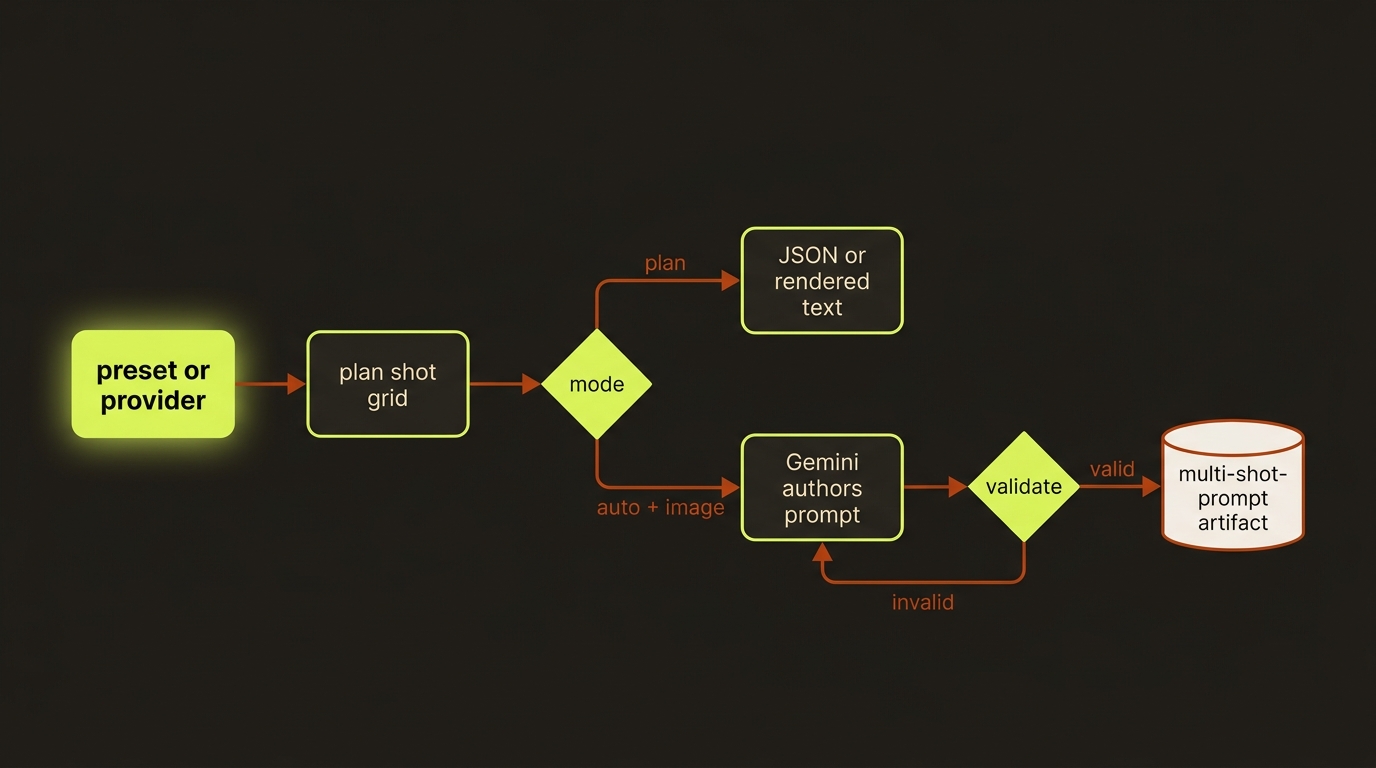
Diagram source (live Mermaid)
Artifacts & outputs
When --project <slug> is supplied, --auto persists the result as a multi-shot-prompt artifact at projects/<slug>/artifacts/multi-shot-prompt.json. --plan (including --plan --from-storyboard) only prints JSON to stdout — it does not write an artifact.
The --auto artifact carries { preset, location, timeOfDay, shots, promptText, charCount, valid, issues, attempts, generatedAt } (plus source when hydrated from a storyboard). The parsed shots[] makes it usable by downstream review and execution. Project status and readiness summarize the latest artifact (preset, validity, shot count, issue count, generation time).
Tips & gotchas
Reproducible plans
Pass --seed <n> to --plan for byte-identical output across runs — handy for tests and for agents that want a stable plan to diff.
A saved artifact is not a passing prompt
When --project is set, the artifact is written to disk even when validation fails (valid: false), and the process exits with code 1. Always check the valid field before rendering from it — persistence does not imply the prompt passed.
Format-only flags
--format, --lang, --category, --hook, and --dialogue only take effect with --plan on a non-default format (seedance-paragraph or per-shot). On --format default the output is unchanged. A --dialogue value with no colon, or an unknown --hook / --category / preset name, fails fast.
Don't fight the camera variation
The planner deliberately never repeats a shot size, lens, angle, or move in consecutive shots — that's the single rule that makes the cut feel like real coverage rather than a static clip. Validation enforces the same rule on hand-written prompts.
Offline --auto
--auto normally calls Gemini (needs the GEMINI_API_KEYS key pool). For offline or test runs, point VCLAW_MULTISHOT_AUTO_STUB at a file whose contents are returned verbatim, or use --dry-run to print the resolved request and validation contract with no model call.
Driving it from an agent
An AI agent (e.g. Claude Code) runs vclaw video multi-shot --auto --image ... --project <slug> and treats the exit code as a gate: 0 means the prompt validated, 1 means errors. With --retry-invalid <n> the previous issue codes are fed back into the next authoring attempt, so the agent can let the tool self-repair before falling back to its own correction. For deterministic, model-free planning the agent should use --plan --seed <n>; for validating a prompt it generated itself, pipe it to --validate and branch on the exit code.
Related
- providers — the routes (Seedance, Veo, Runway) these presets target
- storyboard-grid — lock panel order and camera language before authoring shots
- characters — keep identity locked across the shots you generate
- assemble — stitch the rendered clips into a master
- Deep reference: the Multi-shot prompt section of
docs/CLI_REFERENCE.md, andvclaw video prompt-lib-show --name multi-shot-frameworkfor the full framework and anti-patterns.