
Use it with Claude Code (the easy way)
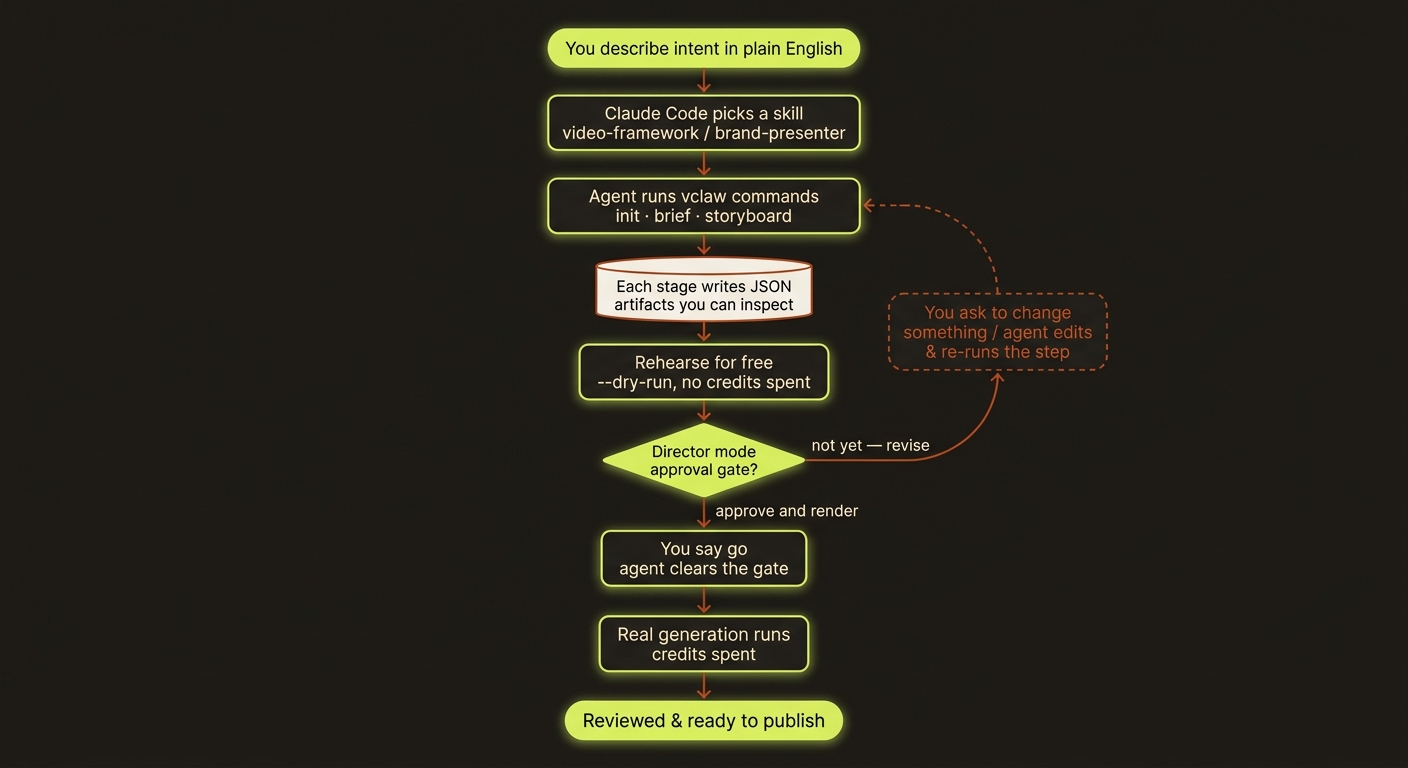
Diagram source (live Mermaid)
The simplest way to use videoclaw is to not type commands at all — just talk to Claude Code in plain English and let it drive videoclaw for you.
What is Claude Code? It's Anthropic's agentic coding tool — an AI assistant that lives in your terminal (and VS Code / JetBrains), reads your project, and runs real commands for you. videoclaw was built to be driven by an agent like Claude Code: you describe what you want, and it runs the pipeline, pausing for your approval before anything costs money.
The mental model
You bring the ideas. Claude Code does the clicking. videoclaw does the work. You never have to memorize a single command — but every command is still there if you ever want it (see the cheat sheet).
Set it up once
Install videoclaw — follow Install & setup so the
vclawcommand works on your machine.Install Claude Code — see claude.com/claude-code.
Give Claude Code the videoclaw skills. videoclaw ships ready-made skills that teach Claude Code how to drive it. Copy them into your project's
.claude/skills/folder:bashmkdir -p .claude/skills cp -R mcp/skills-pack/* .claude/skills/That adds skills like videoclaw-create-video, videoclaw-check-status, and videoclaw-portfolio-review. Claude Code discovers them automatically — the next time you ask for a video, it knows what to do.
Want the full skill library, not just the starter pack?
The repo's skills/ folder has the complete set, organized around two canonical entry points: video-framework (any video) and brand-presenter (narrated presenter / host-led videos). Point Claude Code at those and it routes to the right specialist for you. See the Reference for the full map.
Then just… ask
Open Claude Code in your project and say what you want in normal language. For example:
"Make me a 15-second vertical product tease for my coffee brand. Keep the host character consistent across the shots, and do a free dry-run first."
Claude Code will:
- Pick the right skill (e.g.
video-frameworkorbrand-presenter). - Set up the project for you —
init,brief,storyboard— and build the continuity story bible so your character stays consistent. - Rehearse for free with
--dry-runso you can see the whole plan before a single credit is spent. - Show you what it found and ask before doing anything expensive.
More things you can just say:
| You say… | Claude Code does… |
|---|---|
| "Make a 30s explainer from these 5 slides, with narration." | Routes to brand-presenter, builds the storyboard + narration plan. |
| "What's the status of the coffee project?" | Runs status / next-actions and summarizes the single safest next step. |
| "Show me the storyboard so I can approve it." | Opens the Review UI or prints the storyboard for you. |
| "Change scene 2 to a close-up on the logo, then continue." | Edits the storyboard and re-runs the affected step. |
| "This is good — render it for real." | Clears the approval gate and runs the real generation. |
The approval pause (your "stop and check" button)
If you use director mode (recommended for anything you'll publish), videoclaw stops before spending money and waits for a human. With Claude Code you don't set any environment variable yourself — you just talk:
"The storyboard looks good — approve it and render."
Claude Code recognizes the approval gate (videoclaw signals it explicitly) and clears it for you. If you'd rather change something first, just say so and it loops back. Nothing real is generated until you say go.
You're always in control
Director-mode storyboard approval and the durable queue’s quote/authorisation contract provide explicit checkpoints. Plain storyboard-mode production can submit directly, so the agent must honour your agreed spending scope. Every step is written to a file you (or Claude Code) can re-read. If you're ever unsure, ask Claude Code "what did that just do and what will the next step cost?"
Reviewing and finishing — still just talking
- "Is this ready to publish?" → Claude Code checks the review report (a project is only ready when it passes review) and tells you what's missing.
- "Make a square version and a thumbnail." → it runs the polish commands for you.
- "Give me a dashboard of all my video projects." → it runs the portfolio tools and summarizes what's blocked, what needs review, and what's done.
Using a different agent host?
Claude Code is the smoothest path, but it is not the only one. videoclaw is built as a neutral target for agent hosts — it doesn't care which assistant is driving it, as long as that assistant can run a command line or speak MCP. So the exact same workflow works from:
- Claude Desktop — Anthropic's desktop app, via an MCP connection (
vclaw mcp serveexposes read-only project state as MCP tools). - OpenAI Codex — the same skill templates in
mcp/skills-pack/were written to work for Codex too; drop them into your Codex skills/agents directory. - Any other agent or orchestration layer — a custom agent, a workflow runner, or your own script. If it can run
vclawand read JSON, it can drive videoclaw.
The trick that makes this possible: videoclaw exposes its entire contract in one call — vclaw schema --json returns every command, flag, artifact schema, and exit code — so any agent can learn the surface without guessing. The deep details live on the How videoclaw works (for agents) page.
Prefer to drive it yourself?
Everything above is the same videoclaw underneath — your agent is just typing the commands for you. If you'd rather run them by hand, the Make your first video walkthrough and the command cheat sheet show the exact commands.
videoclaw is designed to be driven by an agent host. Claude Code (Anthropic's agentic coding tool) is the smoothest path, but it works equally with Claude Desktop, OpenAI Codex, or any agent that can run a CLI or speak MCP — it is a neutral target, not tied to any one assistant.
Shared production standard
Ask the agent to use the shared filmmaking workflow for new productions: author an explicit film plan, inspect compiled prompts and references, and record full playback against the final export. For substantial authorised work, the external agent maintains phases, evidence and a progress page, continuing within your agreed scope. VideoClaw remains the target CLI; it does not contain an agent supervisor.