
Filmmaking prompts & cinematography

Turn a plain project into a director-grade shoot: filmmaking-prompts writes the exact character sheets, storyboard grid, and per-scene Seedance/Veo/Runway prompt packets a video model needs — with quantified camera, lighting, color-grade, and audio language baked in, and an anti-plastic "photographed not generated" realism register that keeps AI faces from looking like AI faces.
What it does
- Builds the whole prompt layer in one deterministic command. From your project's brief and characters it emits character reference-sheet prompts, a multi-panel cinematic storyboard grid prompt, a stable
@image1/@image2reference map, and per-scene provider prompt packets — no model is called and no credits are spent unless you ask. - Speaks real cinematography, not vibes. At
--detail richevery shot carries quantified language: lens in mm, lighting as Kelvin + key-angle + contrast ratio, color grade as hue°/sat% (plus lift/gamma/gain for looks like bleach-bypass), camera-move velocity in ft/s, and a dB audio hierarchy. - Kills the plastic AI look. The keystone realism block surgically removes skin specular highlights, adds subsurface scatter at ears and nostrils, renders hair strand-by-strand, lifts shadows and rolls off highlights, lights the air with volumetric haze, and lays down film grain — so faces read as biology, not rendered plastic.
- Photoreal by default, dial down by exception. Zero flags gives you the full treatment (rich detail + realism + behaviour-prose register). You reduce it per call or pin a project-wide look with
cinema-profile. - Genre, lighting, grade, and backdrop are swappable. Pick
noir,music-video,anime,action,night-firelighting,bleach-bypassgrade, or amid-grayseamless plate — the wording changes everywhere it should. - Survives real-person content filters.
--no-facesrenders the grid in a silhouette / no-frontal-face register so it can be passed as a provider reference image without tripping the "real person" moderation gate.
How to use it
All commands use node dist/cli/vclaw.js video .... If you installed the package, you can type vclaw ... instead — they are identical.
node dist/cli/vclaw.js video filmmaking-prompts --project my-film --writeWrites the full packet (photoreal default: rich detail, realism on, prose register) to projects/my-film/artifacts/filmmaking-prompts.json.
node dist/cli/vclaw.js video filmmaking-prompts --project my-film --phase storyboard --no-facesReturns only the storyboard / camera-language slice (video packets gated to []) in a no-face register — the "lock the grid" step before any character imagery.
node dist/cli/vclaw.js video filmmaking-prompts --project my-film \
  --detail rich --lighting night-fire --grade bleach-bypass --wet --haze heavy
Emits quantified shots lit by flickering 2000K firelight, graded with lifted milky blacks, with a moisture-matte clause and heavy volumetric air.
node dist/cli/vclaw.js video filmmaking-prompts --project my-film --sheet 6-panel --background mid-grayUses the compact 3×2 mid-gray character sheet — the locked default backdrop for character work, which lowers subject-to-background contrast for cleaner edges.
node dist/cli/vclaw.js video filmmaking-prompts --project my-film \
  --storyboard-grid projects/my-film/assets/storyboard-grid.png
Re-attaches a real generated 9-panel grid image and feeds it into the prompt packets, flipping the grid slot to ready.
node dist/cli/vclaw.js video cinema-profile --project my-film --detail standard --register numeric --no-realismPersists a leaner look onto project.json so every later run inherits it.
node dist/cli/vclaw.js video cinema-profile --project promo --capture phonePins a project to the amateur smartphone / UGC capture register instead of cinema.
How it flows
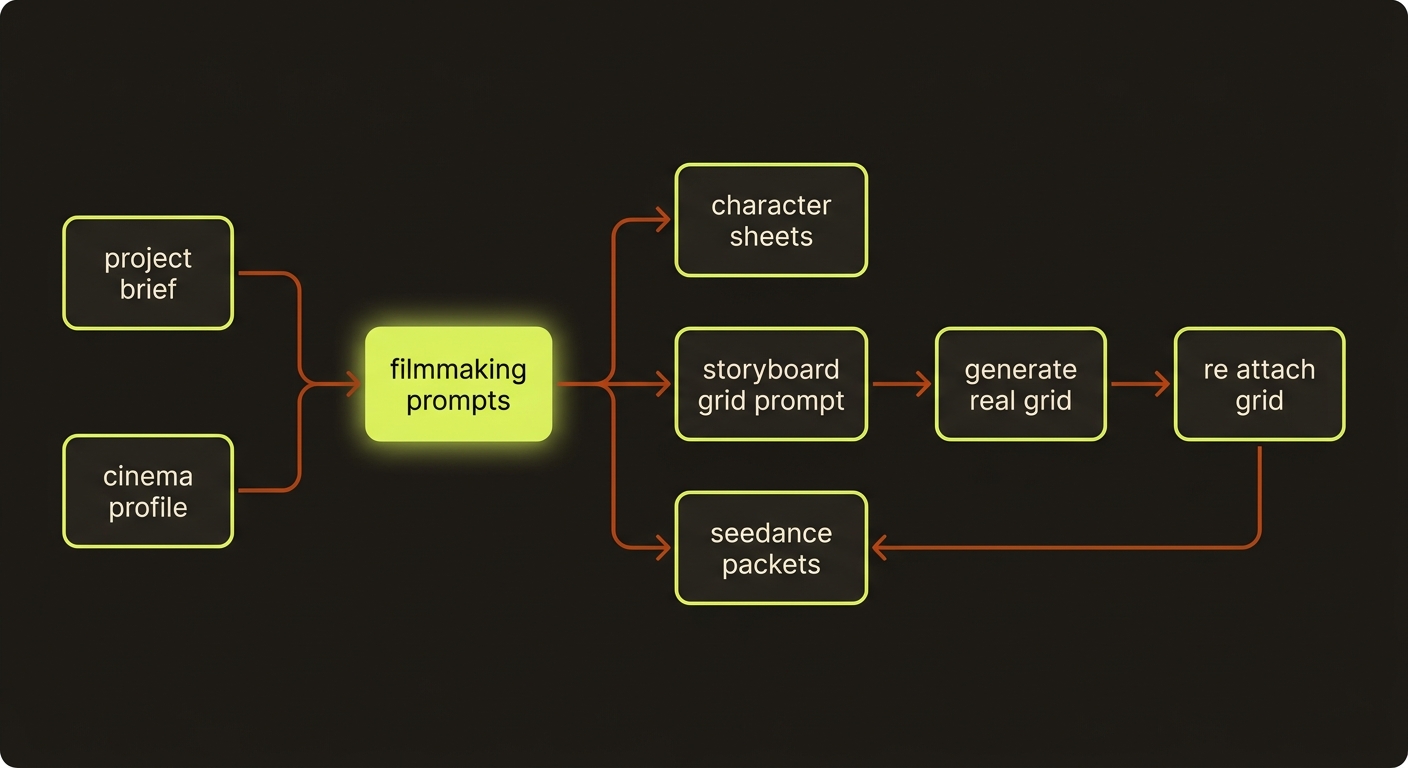
Diagram source (live Mermaid)
Artifacts & outputs
projects/<slug>/artifacts/filmmaking-prompts.json(written with--write, snapshotted inartifacts/history/). Contains:characterSheetPrompts[]— 8-view (or 6-panel) reference-sheet prompts.storyboardGridPrompt— the multi-panel cinematic grid prompt with per-panel timecodes and a CAM / MOVE / MOOD strip, plusrows/colsfor the renderer.referenceMap[]— stable@image1,@image2, … reference slots.seedancePackets[]— per-scene provider prompt packets (10-block master-prompt format by default).issues[]— authoring warnings (missing character descriptions, pending grid image, defaultNO MUSICpolicy).
project.jsoncinemaProfile— set bycinema-profile; the project-wide look every later run inherits.
Tips & gotchas
Lock the grid, then fill it
Run --phase storyboard first to lock panel order and camera language, generate the real 3×3 grid with an image model, then re-attach it with --storyboard-grid before generating the cinematic packets.
Grids become 9-panel split-screen unless guarded
A storyboard grid passed as a provider reference_image gets reproduced as a moving 9-panel split-screen unless the prompt forces single-full-frame output. The generated packets embed that guard — don't strip it.
Real faces trip the moderation gate
Photoreal faces as reference_images are rejected by xskill/ARK Seedance as "real person." Use --no-faces to render the grid in a silhouette register, and describe characters by visual descriptor, never by proper name.
Precedence is predictable
A look resolves as: CLI flag > project.cinemaProfile > genre default > the photoreal hard default. The influencer/ugc genres default to the phone capture register.
Negative direction doesn't work
Don't write "no slow motion." These models ignore negation — use positive tempo phrasing (the --genre music-video path emits beat-synced positive direction).
Driving it from an agent
An AI agent (such as Claude Code) invokes this with node dist/cli/vclaw.js video filmmaking-prompts --project <slug> --write and reads the resulting filmmaking-prompts.json to drive generation. The command is pure and deterministic — it reads project artifacts and spends no credits, so it is safe to run repeatedly. Unknown --category ids fail fast (non-zero exit); character descriptions over 60 words warn and over 100 words are flagged as an error in issues[]. Validate the artifact without rendering via video prompt-lint --project <slug> (or --file).
Related
- characters — reference sheets and identity anchors
- storyboard grid — the deterministic shot-spec sheet
- multi-shot prompts — provider-tuned multi-shot packets and genres
- providers — Seedance / Veo / Runway routes the packets target
- assemble — stitch the rendered clips into a master
- Deep reference: CLI reference — Filmmaking prompt packets
Shared film plans
New agent-led productions should use the shared filmmaking workflow. Author explicit plans with storyboard --film-plan <json-path>; create still produces legacy storyboards. The shared runtime validates planned scenes and prompt freshness, including local attached-reference changes. Rebuild stale prompt packets before execution. Product-category prompt compilation and cinema-deliver reject explicit film plans; use the documented cinematic planning and normal review/publish route.