
Doctor & Health

A pre-flight mechanic for your video projects: one command reads every artifact, checks it against the JSON schemas, and tells you exactly what is broken, stale, or waiting on a human approval — before you spend a single credit.
What it does
- Validates each completed stage's artifacts (brief, storyboard, story-bible, asset-manifest, review-report, publish-report, execution-plan, execution-report, analyze-output, clone-plan) against their canonical JSON schemas and flags malformed JSON.
- Flags missing artifact pointers and artifact files a checkpoint claims to have produced but that no longer exist on disk.
- Catches approval gaps: a director-mode storyboard awaiting approval where
storyboard.mdis missing, or where the review file is stale relative to the latest storyboard changes. - Surfaces review readiness: a
review-reportwith aretry/failverdict, or apassverdict wheremetrics.publishReadyis nottrue, blocks publish and tells you the next action. - Checks character continuity: reference-sheet role collisions, unassigned roles, and (director-mode) scenes with character bindings but no Identity Sheet bound when approval is pending.
- Checks scene candidates: missing selections, stale selections whose output file vanished, pending rerolls, and stale upstream chains.
doctor-portfoliorolls every project into one health dashboard with healthy/unhealthy/warning counts and per-category rollups.
How to use it
You can run these as node dist/cli/vclaw.js video ... or, once the CLI is on your PATH, simply as vclaw video ....
node dist/cli/vclaw.js video doctor-project --project my-adRuns every health check on the my-ad project and prints a JSON report of issues with error/warning severities.
node dist/cli/vclaw.js video doctor-project --project my-ad --mode directorSame checks, but evaluates the director-mode storyboard approval gate and the missing-Identity-Sheet rule.
node dist/cli/vclaw.js video doctor-portfolioScans every project in the workspace and prints a portfolio-wide health summary plus a per-project entry list.
node dist/cli/vclaw.js video doctor-portfolio --mode directorPortfolio sweep that applies director-mode approval and identity checks to each project.
How it flows
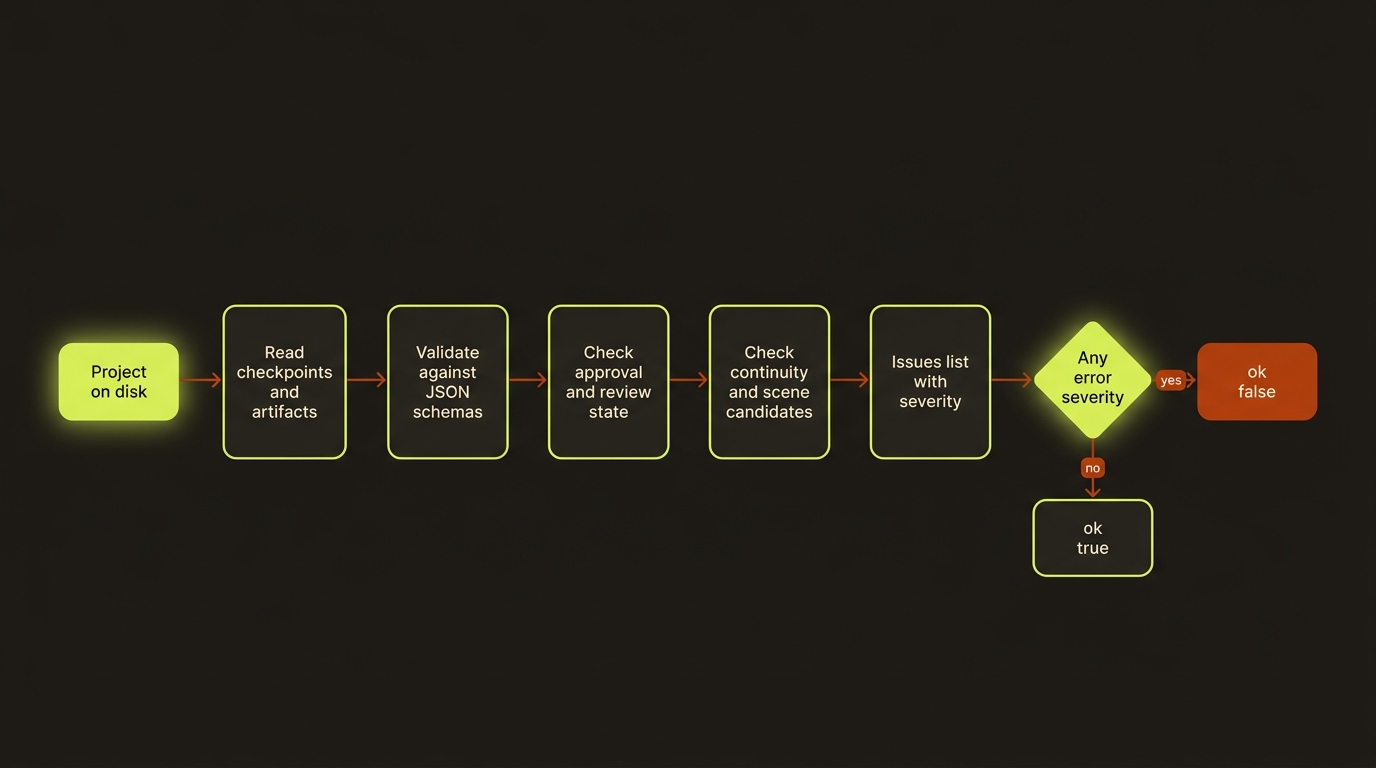
Diagram source (live Mermaid)
Artifacts & outputs
Doctor is read-only — it never writes project artifacts. It reads and validates the canonical files under projects/<slug>/artifacts/ (and the checkpoints under projects/<slug>/checkpoints/), then prints its report as JSON on stdout.
doctor-projectemits aVideoProjectDoctorReport:{ slug, root, ok, issues[] }, where each issue is{ severity, message }.doctor-portfolioemits aVideoPortfolioDoctorReport:generatedAt,totalProjects,healthyProjects,unhealthyProjects,warningProjects, legacy-import rollups,referenceSheetsandsceneCandidatessummaries, and anentries[]array (one health entry per project).
Tips & gotchas
TIP
ok is true only when there are zero error-severity issues. Warnings (e.g. an artifact path resolving outside the artifacts directory, or a pending reroll) do not flip ok to false — they are advisory.
WARNING
A stale or missing storyboard review is an error, not a warning, in director mode. This is the same review-state ladder (missing | current | stale) that blocks execute/execute-status at runtime — fix the review before you try to produce.
TIP
Scene-candidate and reference-sheet checks are feature-gated on the presence of their artifacts. Legacy projects with no scene-candidates.json or reference sheets simply skip those blocks — a clean report there means "not applicable", not "passed".
Driving it from an agent
Parse the JSON: treat any issue with severity: "error" (or ok: false) as a hard gate — stop and resolve before producing. For a fleet, read doctor-portfolio's unhealthyProjects count and the per-project entries[] to decide which projects need attention. Warnings are safe to log and continue past.
See also Readiness, Status, and Review & approval.