
One-Shot Creation Front Door

Type one sentence describing the video you want, and vclaw initializes a project, writes the brief, builds a storyboard, scaffolds assets, runs continuity and content checks, estimates cost, and — if you ask it to — produces the video. One command takes you from a plain-English idea to a planned (or fully produced) project on disk.
What it does
- Turns intent into a project. You pass a quoted sentence (the "intent") and it runs the front of the whole pipeline for you: init → brief → storyboard → seed assets, all in one call.
- Writes canonical artifacts. It creates the machine-readable
briefandstoryboardJSON, plus a deterministic story bible (continuity reference) and a scaffolded asset manifest — no provider calls, no credits spent for the planning part. - Knows your characters. It records Go Bananas character bindings, can import exact-name matches from the library, and can auto-create missing characters from a JSON seed file.
- Carries your settings through. Aspect ratio, quality, resolution, audio, and output count flow into the brief and every downstream surface.
- Gates the expensive part. In
directormode it generates a human-readablestoryboard.md, runs a preflight, estimates cost, and stops before spending credits — so a person (or an approval command) signs off first. - Can go all the way. Add
--executeand it hands off to the real production path;iterateandrun-pipelineare the same front door pre-wired to execute.
How to use it
Commands below use node dist/cli/vclaw.js video .... If you installed the CLI globally, you can type vclaw video ... instead — they are identical.
node dist/cli/vclaw.js video create "a neon cyberpunk courier racing through rain-soaked Tokyo at night"Plans a project from your intent: initializes it, writes the brief + storyboard + story bible, scaffolds assets, and prints a JSON summary with every artifact path. No video is produced yet. Note that create defaults to director mode, so even this bare example runs the storyboard-approval gate — it writes storyboard.md, runs the preflight, and lands the project in awaiting-approval. To get a non-gated plan, pass --production-mode storyboard explicitly.
node dist/cli/vclaw.js video create "a calm product demo of a smart water bottle" \
  --project water-demo --production-mode director --title "Hydrate Pro" \
  --scenes 4 --aspect-ratio 9:16 --resolution 1080p --quality quality
Same, but names the project, runs in director mode (adds the storyboard-approval gate), and pins format/quality. It stops awaiting your approval and prints the exact review, approve, and verify-env commands to run next.
node dist/cli/vclaw.js video create "a 15s UGC ad for a coffee brand" \
  --project coffee-ad --gb-character "Mia:97" --import-library-characters \
  --apply-content-fixes --execute
Binds a Go Bananas character, imports exact-name library matches, auto-fixes content-policy issues in the storyboard, then hands off to the real production path because --execute is present.
node dist/cli/vclaw.js video auto "a moody trailer for a detective game" --project noircreate already defaults to director, so auto is essentially an explicit alias of the director-default path — it just guards that director default from being overridden, rather than adding a gate plain create lacks. The real opt-out is create --production-mode storyboard.
node dist/cli/vclaw.js video iterate "regenerate scene 2 with harsher rim lighting" --project noir
node dist/cli/vclaw.js video run-pipeline "a 30s teaser for a sneaker drop" --project kicks
iterate and run-pipeline are create pre-set to director mode and --execute. They plan and then produce in one shot. iterate is the re-run shorthand; run-pipeline is the full straight-through build.
node dist/cli/vclaw.js video produce --project noir --mode director --approveThe approval half of the gate: the same produce, with --approve granting the storyboard approval for this run so production can proceed. Add --dry-run to rehearse without submitting. (video approve is the earlier spelling; it still runs, with a deprecation line on stderr.)
node dist/cli/vclaw.js video create "..." --project demo --dry-run --executeWalks the full pipeline including the execute hand-off, but in dry-run mode — nothing is submitted to a provider.
How it flows
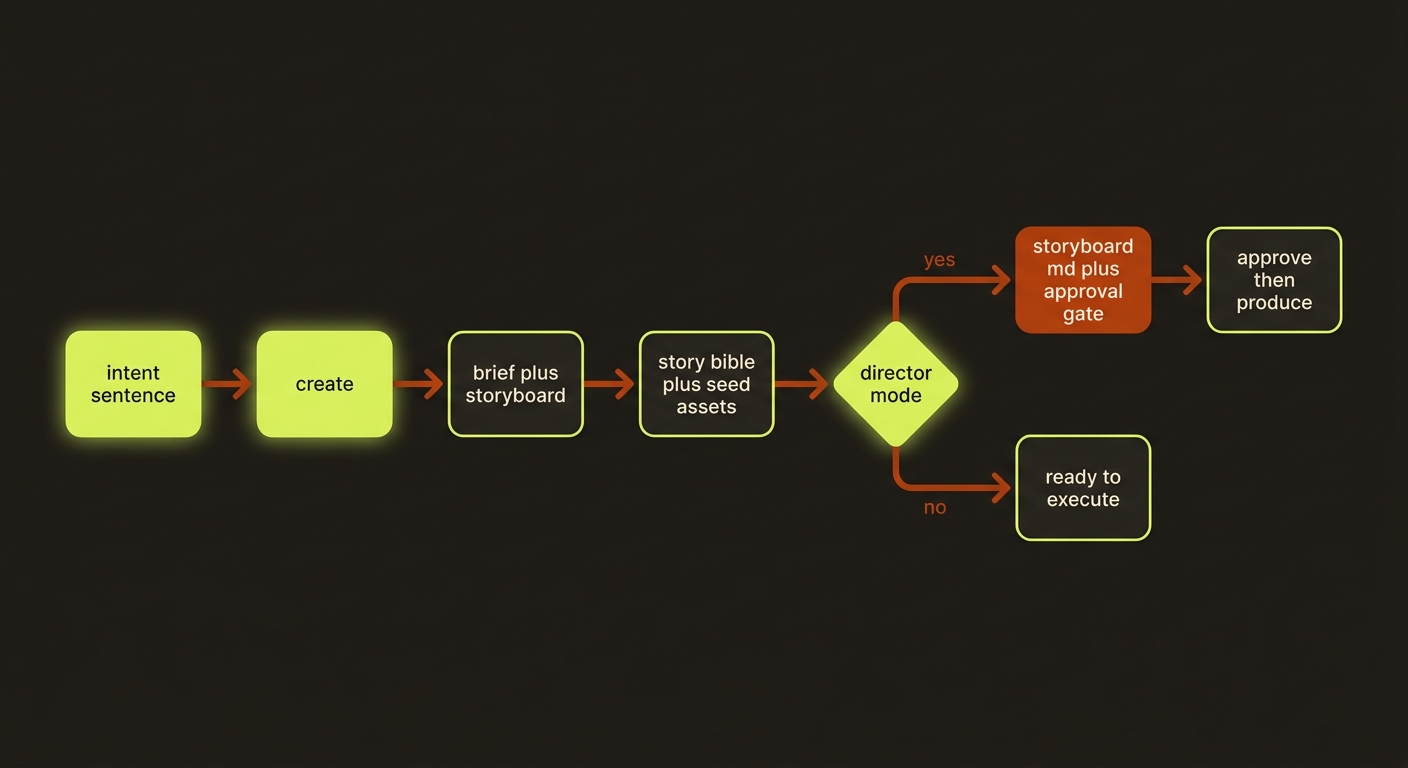
Diagram source (live Mermaid)
Artifacts & outputs
Everything lands under projects/<slug>/. create writes (or scaffolds):
artifacts/brief.json— the canonical brief, including your execution-profile overrides.artifacts/storyboard.json— the canonical storyboard scenes.artifacts/story-bible.json— the deterministic continuity bible (cast, settings, props, per-scene timeline). Schemaschemas/video/artifacts/story-bible.schema.json.artifacts/asset-manifest.json— seed assets scaffolded from the storyboard for execution planning.storyboard.md— human-readable review file (director mode only).checkpoints/andevents/events.jsonl— stage checkpoints and the append-only timeline.
The command prints a single JSON object to stdout with slug, briefPath, storyboardPath, storyBiblePath, seedAssetManifestPath, plus review, preflight, costEstimate, handoff, and (when --execute) execution.
Tips & gotchas
Plan first, spend later
Without --execute, create is pure planning — it never calls a provider, runs FFmpeg, or spends credits. The cost estimate and storyboard are free, so you can iterate on the idea before committing.
One command, every mode
auto, iterate, and run-pipeline are thin wrappers over create with smart defaults. Since create already defaults to director, auto just guards that director default (it doesn't add a gate plain create lacks); iterate and run-pipeline add --execute on top of the director default. Reach for create --production-mode storyboard when you want the non-gated path, or plain create for full manual control.
Director mode blocks before submission
In director mode the project lands in an awaiting-approval state and will not produce video until you approve. Run the video produce … --approve command the blocked report prints (or set VIDEOCLAW_APPROVE_STORYBOARD=1 before the execute step). A failed preflight marks the storyboard checkpoint failed and tells you what to fix.
Slugs are validated
--project values must be real slugs (isProjectSlug). A flag-looking value will be rejected rather than silently accepted, so quote your intent and keep the slug clean.
Driving it from an agent
An AI agent (such as Claude Code) calls this exactly like a human would — it shells out to node dist/cli/vclaw.js video create "<intent>" --project <slug> ... and parses the JSON printed to stdout to discover every artifact path. The process exits non-zero on errors (missing intent, bad slug, failed preflight), so an agent can branch on exit code: plan with create (no --execute), inspect preflight.pass and costEstimate, then either run the video produce --project <slug> --mode director --approve command handed back in handoff.approvalCommand, or re-run with --execute to produce. For a fully unattended build, run-pipeline does plan-and-produce in a single invocation.
Related
- providers — which video backends the execute hand-off can target.
- characters — Go Bananas bindings, library import, and auto-create.
- story-bible — the continuity artifact
createemits. - assemble — stitching the produced clips into a master.
- studio — the higher-level, plan-only planning front door.
- Deep reference: CLI reference.
Shared film plans
New agent-led productions should use the shared filmmaking workflow. Author explicit plans with storyboard --film-plan <json-path>; create still produces legacy storyboards. The shared runtime validates planned scenes and prompt freshness, including local attached-reference changes. Rebuild stale prompt packets before execution. Product-category prompt compilation and cinema-deliver reject explicit film plans; use the documented cinematic planning and normal review/publish route.