
Obsidian workspace
Run an entire multi-project video portfolio from a normal Obsidian sidebar instead of terminal scrollback — vclaw writes a vault of 14 dashboard notes plus one note per project, all regenerated from canonical repo state with a single command.
What it does
- Turns the CLI into a control plane you can browse. Active queue, blockers, owners, dependencies, health, timeline, and the review-state ladder become navigable markdown notes.
- Writes 14 dashboard notes —
Dashboard,Active,Needs Review,Blocked,Complete,Metrics,Health,Next Actions,Dependencies,Timeline,Trends,History,Changes,Owner Workload. - Writes one note per project under
Projects/<slug>.mdwith queryable frontmatter (state, mode, score, owner, priority, due risk,storyboard_review_state,ops_status, execution profile, artifact links) and a body covering stage status, checkpoints, characters, character bindings, and prompt guidance. - Optionally writes per-scene notes (
Projects/<slug>/Scenes/<i>.md) when a scene-candidates artifact exists — one note per scene with prompt, characters, reference sheets, candidate takes, and selection state. - Is a view, never the source of truth. The repo on disk (
projects/<slug>/,artifacts/,checkpoints/,events/) is canonical; the vault is a regenerable rendering you can delete and rebuild any time. - Honest health. Dashboards are backed by the same
doctor-portfolio,metrics, and scorecard machinery that drives reporting — missing approvals, stale reviews, and blocked work are counted, not guessed.
How to use it
node dist/cli/vclaw.js video sync-obsidian --root . --output-dir ./ops/obsidianRegenerates every dashboard note plus a project note for every project under --root. Idempotent — run it twice, get the same vault. This is the common case after a meaningful CLI change.
node dist/cli/vclaw.js video export-obsidian --project my-project --output-dir ./ops/obsidian/ProjectsWrites one project note (and its scene notes) for my-project only — useful for incremental updates between full syncs.
node dist/cli/vclaw.js video sync-obsidian --root . --output-dir ./ops/obsidian --mode directorFilters the vault to a single production mode, so you can keep separate storyboard and director vaults at scale.
All of the above also work via the published binary, e.g. vclaw video sync-obsidian --output-dir ./ops/obsidian.
How it flows
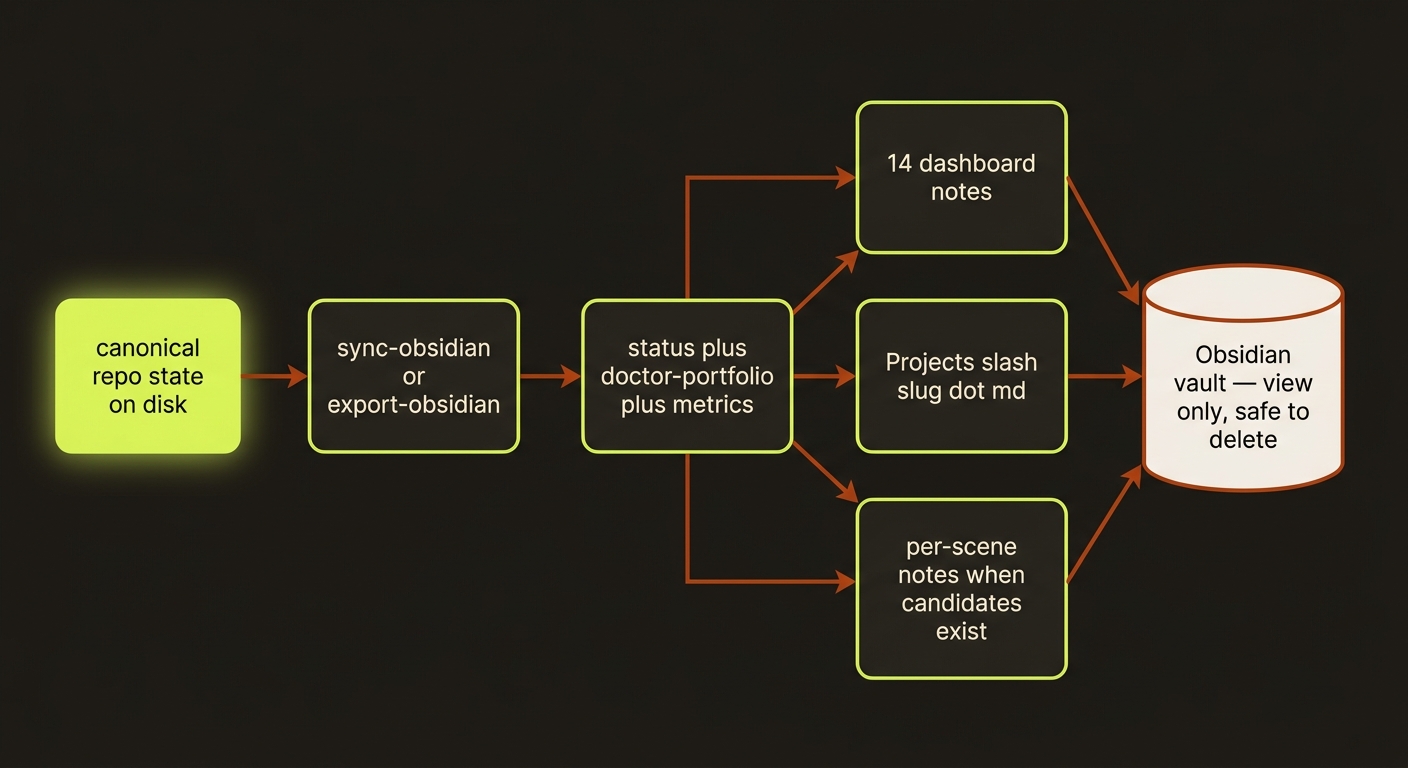
Diagram source (live Mermaid)
Artifacts & outputs
sync-obsidian / export-obsidian are readers, not artifact writers — they emit markdown into your chosen --output-dir, not into the canonical projects/<slug>/artifacts/ tree:
Dashboard.md,Active.md,Needs Review.md,Blocked.md,Complete.md,Metrics.md,Health.md,Next Actions.md,Dependencies.md,Timeline.md,Trends.md,History.md,Changes.md,Owner Workload.md— the 14 dashboard notes at the vault root.Projects/<slug>.md— one frontmatter-bearing note per project.Projects/<slug>/Scenes/<i>.md— per-scene notes, only whenprojects/<slug>/artifacts/scene-candidates.jsonexists.
The notes are derived from the canonical JSON they link to: projects/<slug>/artifacts/ (brief, storyboard, scene-candidates, scene-selection, reference-sheets, review-report, ...), projects/<slug>/checkpoints/, and projects/<slug>/events/events.jsonl.
Tips & gotchas
Treat the vault as a build artifact
Never hand-edit notes and expect changes to flow back — the CLI is the only writer. To change owners, priorities, blockers, or approval state, use set-meta / approve, then re-sync. Pin Dashboard.md as Obsidian's default note. Combine project frontmatter with the Dataview plugin for ad-hoc queries (e.g. "all director-mode projects with stale reviews owned by X").
If a note disagrees with the CLI, the CLI is right
The vault can go stale the moment you advance work. Re-run sync-obsidian after any meaningful CLI change. If the CLI itself disagrees with what shipped, the artifact JSON under projects/<slug>/artifacts/ is authoritative — let doctor find the drift. Historical state already lives in events/events.jsonl and artifacts/history/, so you don't need to version the vault to keep history.
Driving it from an agent
Both commands are deterministic, side-effect-light reads: run sync-obsidian after each pipeline step, then parse Next Actions.md / Needs Review.md (or the project-note frontmatter) to decide what to do next — storyboard_review_state: stale plus an awaiting-approval ops_status is the signal that a director-mode run is gated on human sign-off. Non-zero exit means the sync failed; the vault is then untrusted until the next clean run.
See also: Operations loop · Status & reporting · Scene candidates · Reference sheets