
Agent Surface

One command (vclaw schema --json) hands any AI agent the entire control surface — every command, flag, artifact shape, exit code, and error code — in a single JSON read. A second command (vclaw mcp serve) lets MCP-aware hosts query live project state. This is how a bot discovers and drives the whole video toolkit without guessing.
What it does
- Dumps the full contract in one call.
vclaw schema --jsonreturns the complete command tree (145 subcommands), the flags for each, every artifact JSON Schema bundled in the binary, the exit-code map, and the list of stable error codes. An agent parses it once and then drivesvclawwithout further introspection — no scraping--help, no guessing flag names. - Includes prompt-craft metadata. The dump also carries the multi-shot presets and the prompt-quality issue explanations, so an agent that builds prompts knows the named presets and what each lint warning means.
- Exposes live state over MCP.
vclaw mcp serveboots a stdio Model Context Protocol server with five read-only tools:list_projects,get_project_status,get_artifacts,get_event_log, andlist_provider_routes. Hosts like Claude Code, Codex, or Cursor list these automatically. - Keeps writes on the CLI. MCP is query-only by design. Actions (init, brief, execute, assemble) always go through the deterministic CLI so every change is explicit and written to disk — never a hidden side-effect of a chat tool.
- Speaks exit codes, not prose. Every command returns a meaningful exit code (
0success,1user error,2system error,3gate) and emits machine-readable JSON on stdout, so an agent branches on a number instead of parsing English.
How to use it
Commands below use node dist/cli/vclaw.js .... If you installed the CLI globally, type vclaw ... instead — they are identical.
node dist/cli/vclaw.js schema --jsonPrints the entire v3 contract as one JSON object: version, exitCodes, errorCodes, commands[] (name, usage, flags), artifactSchemas (every bundled JSON Schema), and multiShot (presets + issue explanations). This is the first call an agent should make.
node dist/cli/vclaw.js schema --json | jq '.commands[].name'Lists just the command names — a quick way to confirm a subcommand exists before invoking it.
node dist/cli/vclaw.js schema --json | jq '.exitCodes, .errorCodes'Extracts the exit-code map (SUCCESS:0, USER_ERROR:1, SYSTEM_ERROR:2, GATE:3) and the full set of stable error-code strings an agent should branch on.
node dist/cli/vclaw.js mcp serveStarts the read-only MCP server over stdio. It runs until stdin closes; an MCP host launches this as a subprocess and lists the five introspection tools. serve is the only verb — any other prints a user error.
How it flows
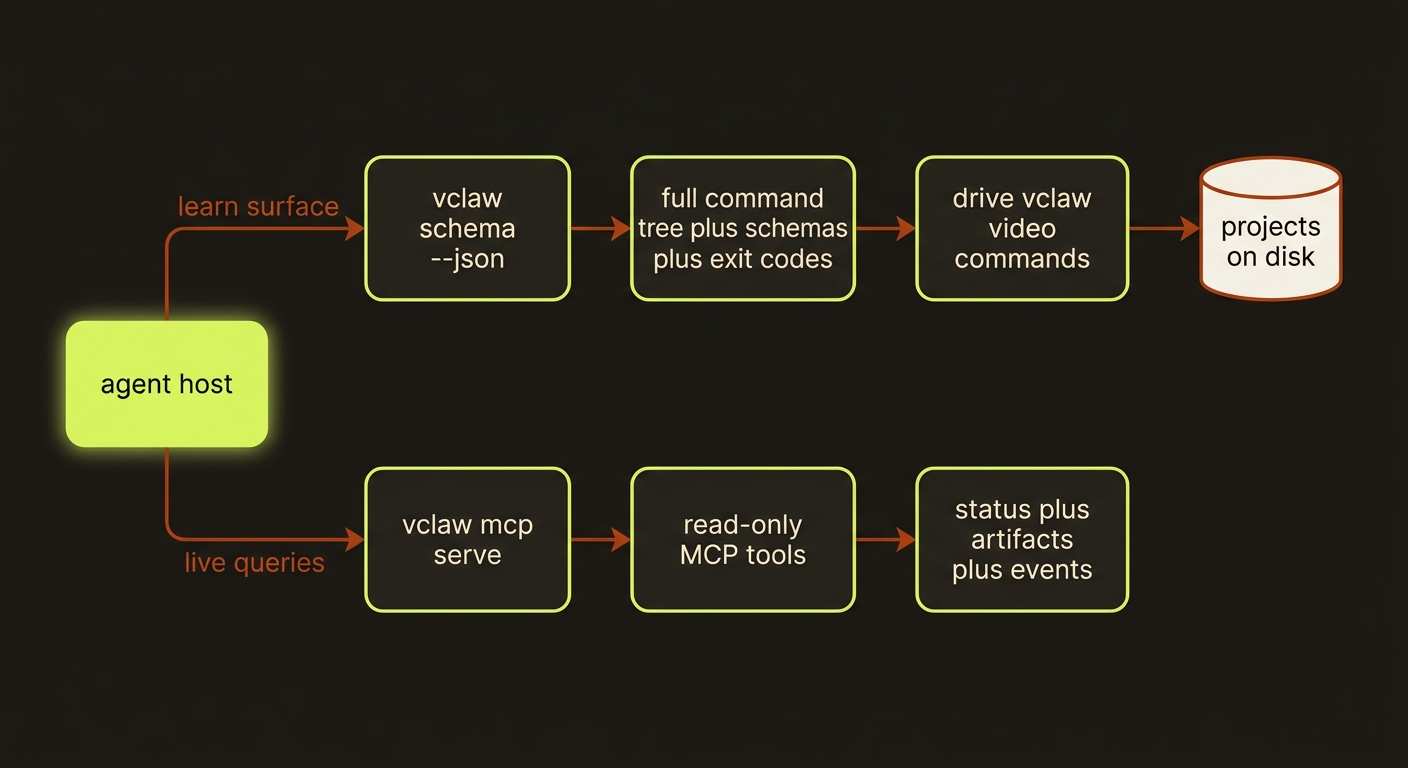
Diagram source (live Mermaid)
Artifacts & outputs
The agent surface is introspection, so it writes nothing — both commands are pure reads:
vclaw schema --jsonemits aSchemaDumpobject to stdout (version,generatedAt,exitCodes,errorCodes,commands,artifactSchemas,multiShot). It reflects the bundled schemas underschemas/video/— it does not touch anyprojects/<slug>/folder.vclaw mcp serve's tools read a project's existing artifacts underprojects/<slug>/artifacts/and itsevents/events.jsonl, returning them as JSON — but the server never writes.
Tips & gotchas
Parse the schema once, then stop introspecting
The whole point is that schema --json is exhaustive. An agent that re-runs --help per command is wasting tokens — the single dump already has every flag and artifact shape.
MCP is for state, the CLI is for actions
Use mcp serve to answer "where is this project / what's its status / what artifacts exist." Use the CLI for anything that changes state. They are two halves of the same surface, deliberately split.
mcp serve runs read-only and forever
The server has no write tools and blocks until its stdin closes — it is meant to be spawned and managed by an MCP host, not run interactively in a terminal you expect to return.
Don't build intent into the CLI
videoclaw deliberately ships no natural-language front door or model calls for "deciding what the user wants" — research showed agents driving raw CLIs beat MCP-wrapped ones 10-32x on token cost. The host does intent; vclaw is the deterministic target.
Driving it from an agent
This page is the agent contract. An agent's first move is vclaw schema --json to load the surface; thereafter it shells out to vclaw video ... and branches on the exit code — 0 continue, 1 fix flags, 2 retry/investigate, 3 clear a gate (a spend gate, or a queue/adapter refusal) first. A direct produce/execute reports its own gates differently: the run returns status: "blocked" on exit 0 with the exact next command in blockers[0] — storyboard approval (produce … --approve), a stale review (storyboard-review), preflight and readiness alike — so branch on status before the exit code. On any non-zero exit, stdout is {"code":"...","message":"...","details":{...}}; read code, don't re-run blindly. For live-state polling, an MCP host launches vclaw mcp serve and calls get_project_status / get_artifacts instead of shelling out.
Related
- How videoclaw works — for agents — the full orientation page for an AI driver, including invariants and the canonical flow.
- one-shot-create — the
video createfront door an agent drives after reading the schema. - providers — the routes surfaced by
list_provider_routes. - director-mode — the approval gate that returns a
blockedreport (exit0, next command inblockers[0]). - Deep reference: CLI reference.