
Projects & the stage lifecycle

A videoclaw project is a single folder on disk that is the source of truth for one video — its brief, storyboard, characters, every render decision, and an append-only history of what happened. There is no database and no hidden server state: the folder is the truth, and the CLI is a thin tool over it.
What it does
- Creates one self-contained project folder under
projects/<slug>/that holds everything about a video — you can zip it, commit it to git, copy it to another machine, and it still works. - Tracks a strict stage machine: every project walks the same path — brief → storyboard → assets → review → publish — and the folder always knows which stage is next.
- Records an approval checkpoint per stage (who approved, the verdict, retry count) so a video can never silently skip a gate.
- Keeps an append-only event timeline (
events/events.jsonl) — every meaningful action is logged as one line, so you can replay exactly what happened. - Snapshots every artifact on overwrite into
artifacts/history/, so regenerating a storyboard never loses the old one. - Reads back a full status report in machine-readable JSON: next stage, completed/pending stages, checkpoints, character bindings, review state, and more — one command tells you everything.
Because all of this is plain JSON files in a predictable layout, both a human and an AI agent can inspect and drive a project without guessing.
How to use it
Commands below use the repo-local form node dist/cli/vclaw.js video .... If you installed the package globally, type vclaw video ... instead — they are identical.
node dist/cli/vclaw.js video init 2026-06-01-disco-monsterCreates projects/2026-06-01-disco-monster/ with all stage folders, a project.json manifest, and the first checkpoint. Prints the resolved workspace paths, mode, and pipeline name as JSON.
node dist/cli/vclaw.js video init 2026-06-01-disco-monster --mode directorSame, but in director mode, which adds a storyboard-approval gate before any provider is called. Omitting --mode defaults to storyboard.
node dist/cli/vclaw.js video init my-project --root /path/to/workspaceCreates the project under a chosen workspace root instead of the current directory.
node dist/cli/vclaw.js video status --project 2026-06-01-disco-monsterPrints the full status report: nextStage, completedStages, pendingStages, per-stage checkpoints, artifactFiles, character bindings, and storyboardReviewState. This is the one command to ask "where is this project and what's next?"
Slug rules (enforced at init time)
A slug must be lowercase [a-z0-9-], 3–64 chars, start and end with a letter or digit, contain no --, and must not be a reserved directory name (artifacts, checkpoints, events, state, characters, history, outputs, assets, obsidian, notes, tmp). Anything that looks like a flag (starts with -) is rejected so video init --project foo can never be mistaken for a slug. Recommended template: <yyyy-mm-dd>-<noun>-<noun>.
How it flows
- 1initscaffolds projects/<slug>/ + project.json manifest + first checkpointfree
- 2briefwrites brief.json
- 3storyboardwrites storyboard.json (and the storyboard.md approval file)
- 4assetswrites asset-manifest.json
- 5reviewapproval checkpoint; director mode blocks before provider submissiongate
- 6publishwrites publish-report.json
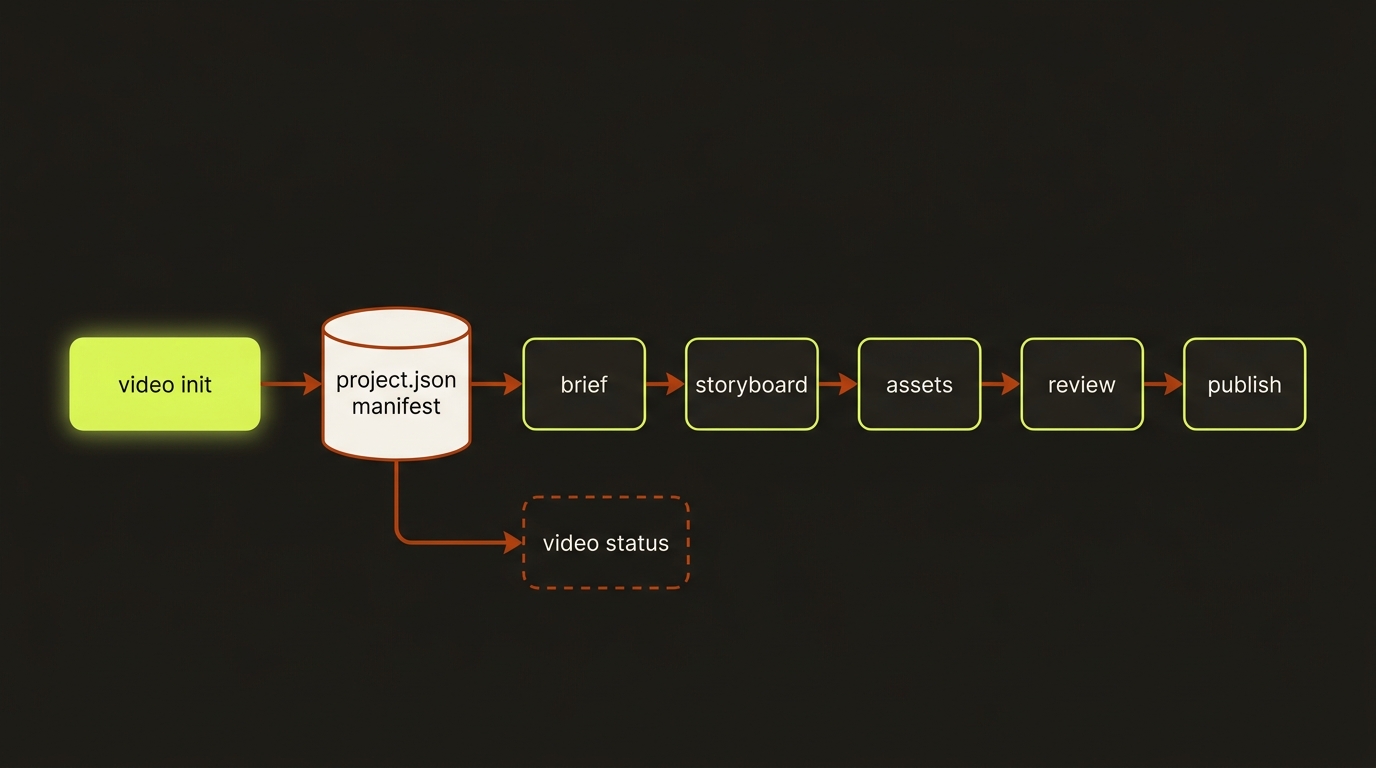
Diagram source (live Mermaid)
Each arrow between stages is guarded by a checkpoint. video status reads the manifest and checkpoints at any time to report the current position.
Artifacts & outputs
video init scaffolds these inside projects/<slug>/ (empty until later stages fill them):
project.json— the manifest. Shape:{ slug, productionMode, createdAt, updatedAt, pipeline, currentStage, lastCompletedStage, lastCheckpointStatus }. The full pipeline definition is embedded inline; on init,currentStageis"brief",lastCompletedStageisnull, andlastCheckpointStatusis"pending".artifacts/— canonical machine-readable JSON outputs (brief.json,storyboard.json,story-bible.json,asset-manifest.json,execution-plan.json,review-report.json,publish-report.json, …). Every file here has a schema underschemas/video/artifacts/.artifacts/history/— append-only snapshots of each artifact when it is overwritten.checkpoints/— one file per stage (brief.json,storyboard.json,assets.json,review.json,publish.json) tracking approval state.characters/characters.json— the canonical identity store for this project's cast.events/events.jsonl— append-only timeline; init writes aproject.initializedline.state/— derived state cache.
Later, derived media lands in outputs/ and assets/ (both gitignored at the workspace level), but video init itself does not write a per-project .gitignore.
Tips & gotchas
The folder is the source of truth
Anything you want to keep — brief, storyboard, characters, decisions — lives as a JSON file in the project. To back up or share a project, just copy the folder. To inspect it, read the JSON. Nothing important is hidden in a database.
Stages are ordered — you cannot skip the gate
The canonical order is brief → storyboard → assets → review → publish. In director mode, produce/execute exports storyboard.md and blocks before any provider submission until the run carries --approve (or VIDEOCLAW_APPROVE_STORYBOARD=1 is set). A stale director review also blocks runtime execution even if approval is set — keep the review fresh after re-writing a storyboard.
Reserved names are not just style — they break the layout
The disallowed slug substrings double as per-project directory names. Using one as a slug would collide with the folder structure, so init rejects them outright.
Driving it from an agent
An AI agent (such as Claude Code) initializes and inspects projects with the exact same commands — they emit JSON to stdout, which is trivial to parse:
node dist/cli/vclaw.js video init 2026-06-01-disco-monster --mode director
node dist/cli/vclaw.js video status --project 2026-06-01-disco-monster
The agent reads nextStage from the status JSON to decide the next action, and watches checkpoint status fields to know whether a gate has been approved. In director mode, the agent must re-run produce with --approve (after a human or review pass) before the execute step will proceed past the storyboard gate — otherwise the run halts at the gate by design.
Related
- brief & storyboard — the first two stages that fill the project
- characters — the identity store under
characters/ - story bible — the deterministic continuity artifact
- review & approval — the checkpoint and approval ladder
- assemble — stitching final media into
outputs/ - Deep reference: Project Layout