
Providers & Routing

videoclaw speaks to seven production routes through one CLI — Google Veo, Seedance (free through the Higgsfield engine that ships with videoclaw, and paid through both the official ModelArk API and reAPI), Runway, Dreamina and Magnific — and it never silently swaps one for another behind your back. You pick a route, it checks that route's keys and tools, and it tells you exactly what is ready before a single credit is spent.
What it does
- Gives you seven production routes (one of them,
dreamina-useapi, registered but not pursued since 2026-09-09), each with its own strengths:veo-useapi— Google Veo through UseAPI (unlocks portrait image-to-video, Omni Flash video-to-video, and native voice narration). Its native local transport drives thevclaw-cliBun/Flow workspace on your machine.seedance-direct— ByteDance Seedance 2.0 via xskill.ai (artistic, stylized, product shots; up to 9 reference images).runway-useapi— Runway through UseAPI (multi-shot, lip-sync, extend, edit; free "explore" mode for overnight drafts).dreamina-useapi— Dreamina (CapCut/ByteDance Seed) Seedance 2.0 through useapi.net (keyframe image-to-video, 1080p on CA accounts).dreamina-useapistays registered but is not pursued: Dreamina was dropped on 2026-09-09 as too expensive to keep supporting, so it is uncertified by decision. Useseedance-directfor Seedance 2.0.magnific-rest— the Magnific/Freepik REST catalog (proxied image-to-video across MiniMax Live / PixVerse / Runway / Kling / LTX, plus the image and video upscale models).reapi-seedance— Seedance 2.5 with the content filter off, served by reAPI (through the treg catalog or your own reAPI key): a real photograph as the subject and a voice clip as the speech reference in one render. Paid per second; opt-in only.minimax-useapi— MiniMax Hailuo 3.0 on your hailuoai.video plan, through useapi.net: 768p or 2K, 4–15 seconds, native sound, up to 9 reference images (a real face is accepted in an image reference). Billed in the plan's monthly credits; opt-in only.
- Knows each route's exact capabilities — which operations (text-to-video, image-to-video, frames-to-video, extend, edit, add-audio) work in landscape vs portrait, and how many reference images are allowed.
- Resolves the transport in a strict order with no silent fallback: a custom adapter binary you set, then a built-in command shim, then the native in-process transport — and if none is usable, it throws instead of guessing.
- Verifies your environment before you run: checks API keys, local tools (
ffmpeg,bun,python3, …), your build freshness, and your Gemini key pool, then prints a machine-readable health report. - Marks each route
available,degraded, orunavailableso you (or an agent working for you) can choose a route that will actually work. - Names the way a route will actually render, as
activeTransport:custom-adapterwhen aVCLAW_<ROUTE>_ADAPTERoverride is set,in-tree-enginefor the free Higgsfield engine that ships with videoclaw, and otherwise the route's built-in transport. This matters most onseedance-direct, which has two: the paid API thatSUTUI_API_KEYbuys, and Seedance 2.0 rendered free through your own Higgsfield account once that engine is set up. Availability alone cannot tell them apart;activeTransportcan, so check it before you assume a render will be billed (or free). "Set up" means a readiness file:bootstrap/import_cookies.pywrites<session>/.vclaw-engine-ready.jsonat the end of a successful, signed-in import, and the free engine is chosen only when that file reads"loggedIn": true. Only the import writes it, because only the import proves you are signed in — before that file existed, the check accepted the directories merely being there, so an emptymkdir(or an unfinished setup) reported a working free engine on a machine with nothing configured. - Tells you what to type next, as
setupHint: one line naming the fix when a route has issues, andnullwhen it has none. Onseedance-directit names the setup step that has not been done and the paid alternative; onveo-useapiit gives the Google Flow sidecar recipe with the directory videoclaw actually resolved; otherwise it lists the variables to set. When a route works but is no longer free, there are no issues and so no hint: one of the route's notes carries that news instead.
How to use it
All commands below use the repo form node dist/cli/vclaw.js video .... If you installed videoclaw globally, you can type the shorter vclaw video ... instead.
node dist/cli/vclaw.js video providersPrints the full provider status report as JSON: every route, its maturity, required env vars, runtime dependencies, and availability. This is your "what can I run right now?" command.
node dist/cli/vclaw.js video providers --workspace-root ./my-workspaceSame report, but checks .env / .env.local and tools relative to the given workspace folder.
node dist/cli/vclaw.js video verify-envRuns a deeper pre-flight: API keys (and where each came from — process env, .env.local, or .env), local dependencies, build age, Gemini key-pool size, plus the provider report. Emits blockingIssues, warnings, and a top-level ok: true|false.
Two things to know before you read that report on an installed package. First, the build check resolves dist/cli/vclaw.js against the application root — the directory the running CLI actually lives in — so a correct npm install -g no longer reports a phantom Build output missing. Second, you only need the credentials for the route you intend to use. A missing provider key is a warning naming the route it gates, never a blocker; ok goes false only for missing build output, an unsupported Node version, or a missing ffmpeg / ffprobe. A healthy install with one route configured therefore reports ok: true alongside several key warnings, and that is the expected shape.
verify-env has always resolved its workspace the way every project command does: --workspace-root, then --root, then VCLAW_WORKSPACE. providers read --workspace-root alone and otherwise fell back to the current directory, which is how the two came to describe different workspaces; from this release it follows the same chain.
node dist/cli/vclaw.js video verify-env --root ./my-workspaceThe pre-flight scoped to a specific workspace (the --workspace-root flag is also accepted).
How it flows
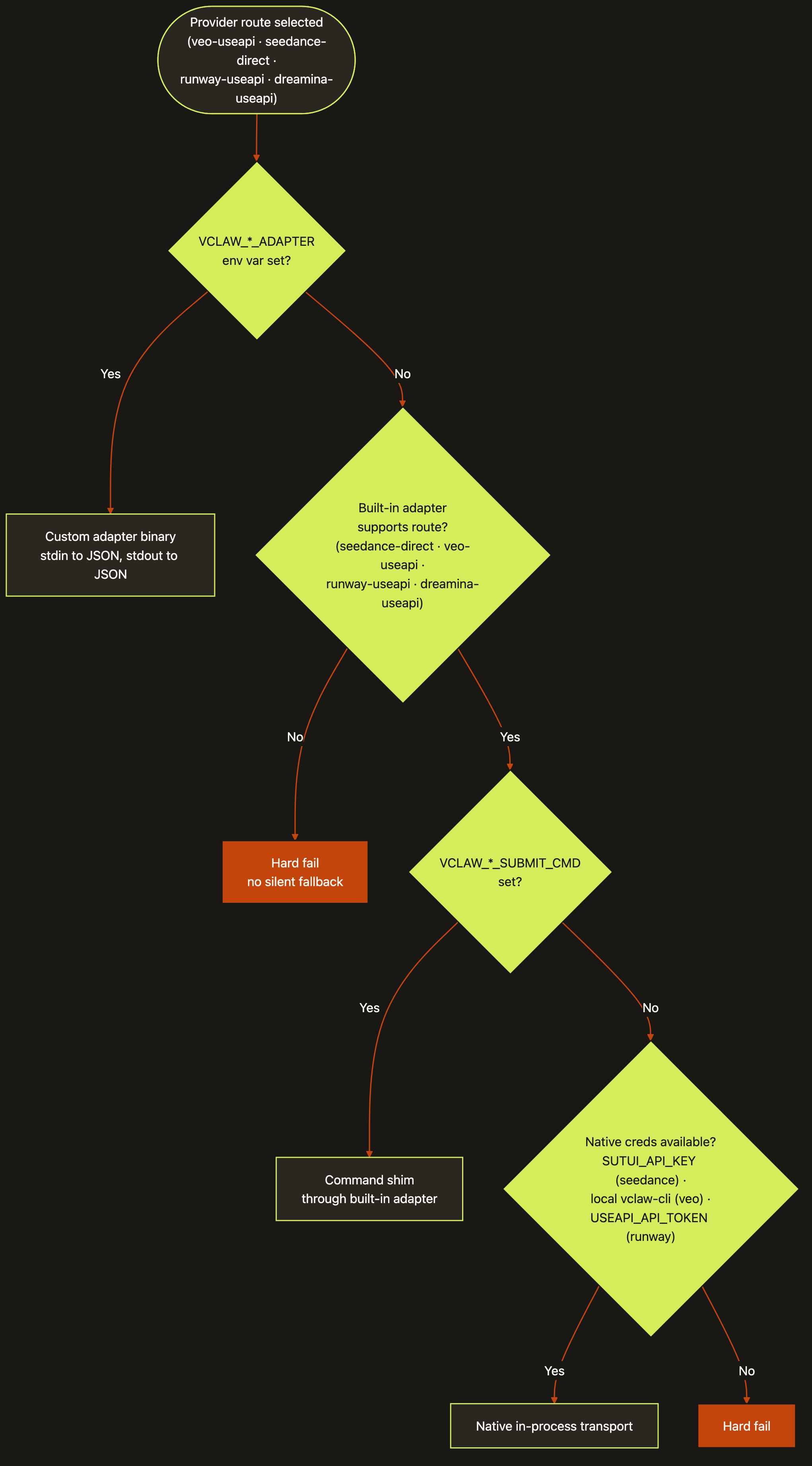
Diagram source (live Mermaid)
The transport resolution at execution time runs in this order, and stops at the first match:
- Custom adapter — if
VCLAW_<ROUTE>_ADAPTERis set, that command is the adapter (JSON in on stdin, JSON out on stdout). - Built-in command shim — the bundled
dist/cli/provider-adapter.jsinvoked with--route <id>, driven by per-route..._SUBMIT_CMD/..._POLL_CMD/..._CANCEL_CMDshims. - Native in-process transport —
native-veo.ts,native-seedance.ts,native-runway.ts, ornative-dreamina.ts(no subprocess hop).
If none is usable, execution throws — e.g. Live execution for <route> requires VCLAW_<ROUTE>_ADAPTER to point at an adapter command. There is no silent fallback to a different route.
Artifacts & outputs
providers and verify-env are read-only inspectors — they print JSON to stdout and do not write project artifacts. Downstream execution (the route you choose here) is what writes projects/<slug>/artifacts/execution-report.json and the generated clips. See execute for that stage.
Credentials per route
| capability | veo-useapi | seedance-direct | runway-useapi | dreamina-useapi | magnific-rest | seedance-modelark | reapi-seedance | minimax-useapi |
|---|---|---|---|---|---|---|---|---|
| text-to-video | ✓ | ✓ | ✓ | ✓ | – | ✓ | ✓ | ✓ |
| image-to-video | ✓ | ✓ | ✓ | ✓ | ✓ | ✓ | ✓ | ✓ |
| video-to-video / edit | ✓ | – | ✓ | – | – | – | – | – |
| native voice narration | ✓ | – | – | – | – | – | from a voice clip | native sound |
| portrait (9:16) | ✓ | ✓ | ✓ | ✓ | — | ✓ | ✓ | ✓ |
| reference images | — | up to 9 | — | — | 1 start frame | up to 30 | up to 30 (real faces OK) | up to 9 (real faces OK) |
| free rendering | --veo-model free | free Higgsfield engine | explore (no account) | – | – | – | – | plan credits |
| 1080p | ✓ | ✓ | ✓ | CA accounts | ✓ | ✓ | ✓ | 2K |
| credential | USEAPI_API_TOKEN | SUTUI_API_KEY | USEAPI_API_TOKEN | USEAPI_API_TOKEN | MAGNIFIC_API_KEY | ARK_API_KEY | TREG_TOKEN or REAPI_API_KEY | USEAPI_API_TOKEN + VCLAW_MINIMAX_ACCOUNT |
| Route | Required env vars | Native transport |
|---|---|---|
veo-useapi | USEAPI_API_TOKEN, USEAPI_ACCOUNT_EMAIL | built-in adapter (native local transport: native-veo.ts drives the vclaw-cli Bun/Flow workspace via bun) |
seedance-direct | SUTUI_API_KEY | native-seedance.ts |
runway-useapi | USEAPI_API_TOKEN, USEAPI_ACCOUNT_EMAIL | native-runway.ts (pure Node fetch+fs) |
dreamina-useapi | USEAPI_API_TOKEN, VCLAW_DREAMINA_ACCOUNT (e.g. CA:ai@example.com) | native-dreamina.ts (pure Node fetch+fs) |
magnific-rest | MAGNIFIC_API_KEY | native-magnific.ts (pure Node fetch+fs) |
seedance-modelark | ARK_API_KEY | native-modelark.ts (pure Node fetch+fs) |
reapi-seedance | VCLAW_REAPI_SEEDANCE_VIA + TREG_TOKEN or REAPI_API_KEY | native-reapi.ts (pure Node fetch+fs; hosts references at submit) |
minimax-useapi | USEAPI_API_TOKEN, VCLAW_MINIMAX_ACCOUNT | native-minimax.ts (pure Node fetch+fs; uploads references to the named account) |
Useful overrides: VCLAW_RUNWAY_MODE=credits (paid faster path; default is free queued explore), VCLAW_RUNWAY_MODEL, VCLAW_DREAMINA_MODEL (default seedance-2.0), VCLAW_DREAMINA_REGION (default CA), and the VCLAW_VEO_* knobs (VCLAW_VEO_CLI_ROOT, VCLAW_VEO_BUN_BIN, VCLAW_VEO_OUTPUT_DIR).
Tips & gotchas
Run verify-env first, every session
verify-env reads keys from your shell, then .env.local, then .env, and tells you the source of each. If a key is "missing", that route shows up unavailable before you waste a submission.
Real human faces get rejected
Both runway-useapi and dreamina-useapi (Seedance moderation) reject photoreal human faces as references. Describe characters by visual descriptor, not proper names, or feed an illustrated / stylized start frame. For identity-locked photoreal characters, use the Asset Library route — see characters.
Free routes are slow on purpose
runway-useapi defaults to explore mode: free, queued, one render at a time. It can sit in queue for hours and is meant for overnight backfill drafts. Set VCLAW_RUNWAY_MODE=credits for the paid, faster lane.
Dreamina 1080p is region-gated
Seedance 2.0 at 1080p is CA-region only. 720p works on both US and CA accounts. Set the account region via VCLAW_DREAMINA_REGION.
Capability lives in the registry
Each route declares exactly which operation × aspect-ratio it supports. For example, Veo image-to-video portrait regresses on the direct Flow path, so the registry routes portrait I2V to veo-useapi instead. The providers JSON exposes all of this.
Driving it from an agent
An AI agent (e.g. Claude Code) should run node dist/cli/vclaw.js video verify-env and parse the JSON before any generation. Gate on the top-level ok field and on each route's availability:
ok: falseor non-emptyblockingIssues→ stop and fix env/build first.- A target route showing
availability: "unavailable"→ do not submit to it; pick anotheravailableroute or supply its missing credentials.
Both commands print JSON to stdout and exit 0 (they are inspectors). The hard stop is at execution time: an unconfigured route throws rather than falling back, so the agent always knows precisely which credential or adapter is missing.
Related
- execute — submit a project to the route you chose here.
- characters — Asset Library identity-locking for Seedance.
- batch — overnight free-mode queue across these routes.
- assemble — stitch the generated clips into a master.
- Deep reference:
docs/PROVIDER_PLATFORM.md— descriptor schema, routing policy, and how to add a new route.