
Execution Runtime

This is the engine room: it checks a project is truly ready, picks the right provider, rehearses the whole run for free, then submits the real job, polls it to completion, and can cancel a live job mid-flight — every step machine-readable.
What it does
readinessverifies a project can run: required artifacts present, character identity consistent, director-mode Identity Sheets bound, scene candidates selected, and input images the right aspect ratio and resolution. It returns hardblockersand softerwarnings.plan(aliasexecution-plan) reads readiness, infers the operation kind (text-to-video,image-to-video, oredit), and recommends a provider route (Seedance / Veo) that supports it and is available — with arationaleexplaining each pick or skip.produce(aliasexecute) builds the real provider payload and submits it. With--dry-runit rehearses everything for free — validates, picks the route, builds the adapter payload, and simulates the run without spending a credit or calling a provider.produce --scene <n>restricts the run to specific scene indices (and turns on candidate mode, so each take is tracked as a candidate you can later pick a winner from).execute-statuspolls the live provider job once, downloads finished outputs into the project, and advances the project toreviewwhen done.execute-cancelasks the provider to stop an in-flight job. When the provider confirms, the run is marked blocked; when the route has no cancel (most do not), it answersunsupportedand changes nothing, because the job is still running andexecute-statuswill still collect it.execute-abandonstops waiting on Runway or Dreamina jobs the provider has left in flight, including per-scene jobs still pending. It is not a cancel: the provider jobs keep running and keep billing, their clips are never collected, and it cannot be undone. It shows the plan first;--confirm-abandonapplies it.
How to use it
All examples use the built CLI. The installed binary is simply vclaw ....
node dist/cli/vclaw.js video readiness --project my-projectReports whether the project can run, listing every blocker and warning as JSON.
node dist/cli/vclaw.js video plan --project my-projectPicks the recommended provider route and operation kind, with a per-route rationale (alias: execution-plan).
node dist/cli/vclaw.js video produce --project my-project --dry-runRehearses the entire run for free — no provider call, no credits — and reports the taskCount it would submit.
node dist/cli/vclaw.js video produce --project my-projectSubmits the real job to the provider adapter and records the returned externalJobId (alias: execute).
node dist/cli/vclaw.js video produce --project my-project --scene 0 --scene 2Re-runs only scenes 0 and 2 as fresh candidates, leaving the rest untouched.
node dist/cli/vclaw.js video execute-status --project my-projectPolls the live job once, ingests any finished clips into the project, and updates the checkpoint.
node dist/cli/vclaw.js video execute-cancel --project my-projectCancels the in-flight provider job (if the route supports it) and marks the run blocked.
TIP
For director mode, the real produce carries the approval: node dist/cli/vclaw.js video produce --project my-project --mode director --approve (VIDEOCLAW_APPROVE_STORYBOARD=1 in the environment is the unattended equivalent).
How it flows
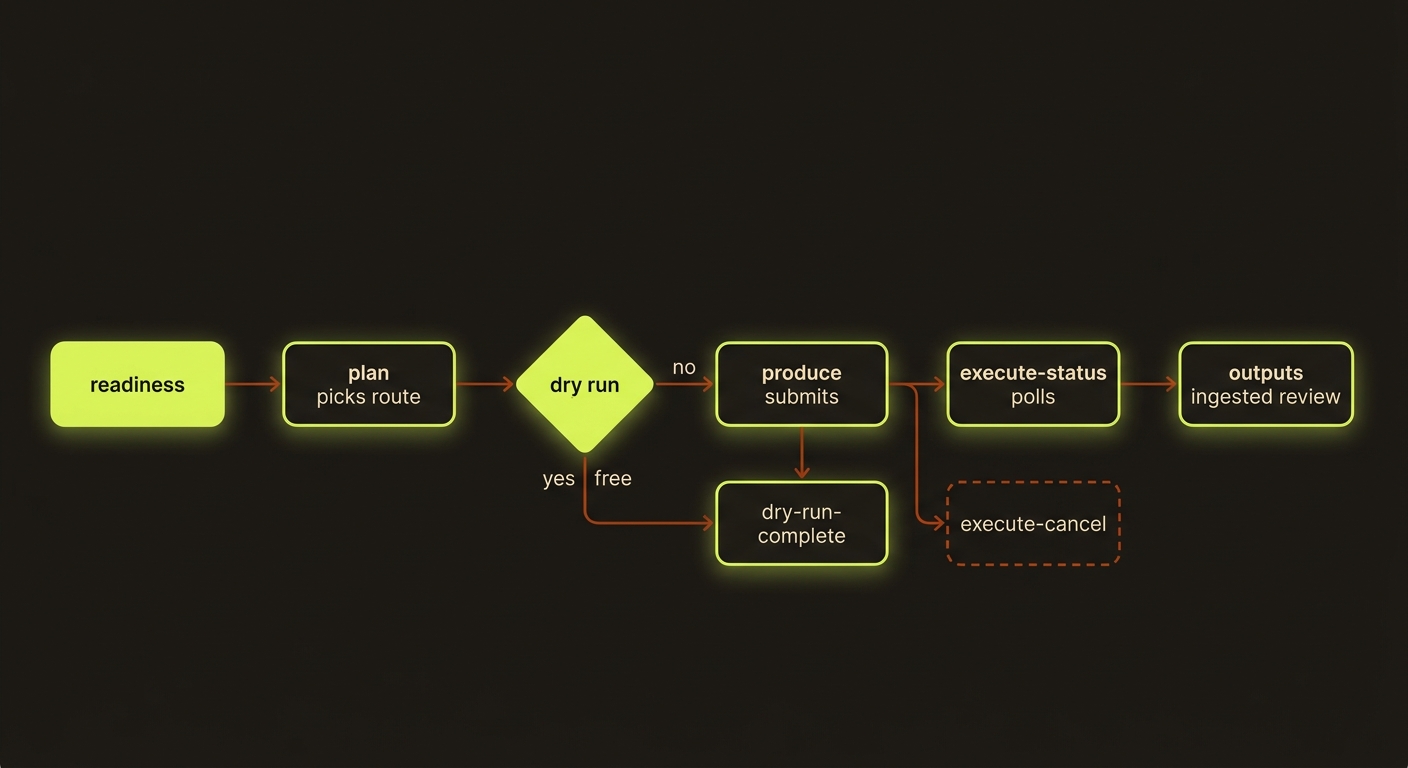
Diagram source (live Mermaid)
Artifacts & outputs
Everything lands under projects/<slug>/artifacts/ (plus checkpoints, events, and outputs):
execution-report.json— the single source of truth for a run:status(dry-run-complete,live-submitted, orblocked),routeId,operationKind,taskCount, thesubmission(withexternalJobId), and apollblock updated byexecute-status.asset-manifest.json— finished clips are merged in here asexecute-statusingests outputs; downloaded media lands inprojects/<slug>/outputs/.scene-candidates.json/ scene selection — in candidate mode (when--sceneis used or the file already exists), each take is appended as a tracked candidate awaiting a winner.storyboard.md— in director mode, an approval review file written when the gate blocks submission.- Per-run telemetry is appended via
generation.telemetry.recorded, and every step writes toevents/events.jsonl.
Tips & gotchas
Rehearse first, always
produce --dry-run walks the full pipeline — readiness, route selection, payload build, simulation — and never spends credits. Use it to confirm taskCount and the chosen route before the real run.
Director mode is gated
In director mode, produce blocks before any provider call unless the run carries --approve (or VIDEOCLAW_APPROVE_STORYBOARD=1 is set), and a stale storyboard review blocks both produce and execute-status even when approval is set — refresh it with vclaw video storyboard-review first.
Status and cancel need a live job
execute-status and execute-cancel require a prior execute-report carrying a routeId and a live externalJobId. Run a real (non-dry-run) produce first, or they report missing-live-adapter-job-id. Not every route supports cancellation — an unsupported route returns status: unsupported.
Do not poll a run that is still in flight
produce prints nothing at all until the provider returns — on a free Veo clip that is roughly 90 seconds to two minutes of silence, and it is normal, not a hang. It writes execution-report.json when the submission comes back, not when it starts.
That has a consequence worth knowing before you open a second terminal. execute-status reads whatever report is currently on disk, so calling it mid-flight reads the previous report — typically the dry run — and answers about that instead of the live job. Against a dry-run report it returns status: "failed" with Execution status unavailable: last execution report has no live adapter job id, which describes the stale file rather than your healthy running render. It also writes its poll block into execution-report.json while doing so.
Today the safe rhythm is: let produce return, then poll execute-status until report.poll.status reaches completed or failed. Judge a run in progress by the output directory (projects/<slug>/outputs/) or the route's own job-state files, not by a concurrent status call.
Driving it from an agent
Run readiness → plan → produce --dry-run and parse the JSON: ready: false with a blockers array means stop and fix; dry-run-complete means go live. After a real produce, loop execute-status until report.poll.status is completed (outputs ingested) or failed. Director-mode runs return a blocked report at the approval gate — re-run the produce … --approve command it prints to clear it.
Related: Readiness checks · Studio planning front door · Assemble & stitch · Scene candidates
Shared film plans
New agent-led productions should use the shared filmmaking workflow. Author explicit plans with storyboard --film-plan <json-path>; create still produces legacy storyboards. The shared runtime validates planned scenes and prompt freshness, including local attached-reference changes. Rebuild stale prompt packets before execution. Product-category prompt compilation and cinema-deliver reject explicit film plans; use the documented cinematic planning and normal review/publish route.