
Studio: the planning front door

Tell Studio what you want — "make a 30-second product ad" — and it hands you back the exact vclaw commands and the artifacts they will produce. It never calls a provider, never runs FFmpeg, and never spends a credit. It is the safest way to look before you leap.
What it does
- Turns a plain-English goal into a concrete, copy-paste production plan with real commands.
- Is plan-only (Phase 1): even without
--dry-run, it does not call providers, run FFmpeg, or spend credits — it just adds a "plan-only" warning. - Covers 9 goals, each with a short alias:
create-video,copy-reference,presenter-video(presenter),music-video,ugc-campaign(ugc),existing-project,review-regenerate,publish-deliver, andbrand-campaign(brand,website). - Tells you exactly what is missing (e.g. "provide project and intent") instead of failing silently.
- Surfaces a risk level per recipe and an execution policy —
dry-run-first,plan-first, orapproval-gated— so you know which steps need a human sign-off. - Reads existing-project readiness and next-actions to enrich the plan with what to do next.
- Emits a clean
StudioPlanJSON on stdout for an agent to parse; progress and warnings stay off stdout.
How to use it
Studio is a top-level command — node dist/cli/vclaw.js studio (installed, the binary is just vclaw studio). It is not a video subcommand: vclaw video studio errors with "Unknown subcommand: video studio".
node dist/cli/vclaw.js studio --dry-run --goal create-video --project demo --intent "Create a 30 second product ad"Plans an original video: drafts a brief + storyboard, then a readiness check — printed as commands, not run.
node dist/cli/vclaw.js studio --dry-run --goal presenter-video --project demo --input deck.pdf --client "Acme"Plans a presenter episode (Bunty, Nex, Davendra, or generic) from a deck, plus a review portal.
node dist/cli/vclaw.js studio --dry-run --goal music-video --project dhuaan --duration 60Plans a cinematic / music-video sequence: filmmaking prompts, multi-shot, readiness, an execute dry-run, and a review surface. Marked high risk and approval-gated.
node dist/cli/vclaw.js studio --dry-run --goal brand-campaign --project demo --input https://acme.comPlans an on-brand campaign chained from a website: brand-extract → brief --from-brand-dna → storyboard → readiness.
node dist/cli/vclaw.js studio --dry-run --goal existing-project --project demoInspects a live project and recommends the next action from status, readiness, and next-actions.
node dist/cli/vclaw.js studio --dry-run --goal presenter-video --project demo --input deck.pdf --write-sessionSame plan, but persists the handoff to projects/<slug>/artifacts/studio-session.json.
How it flows
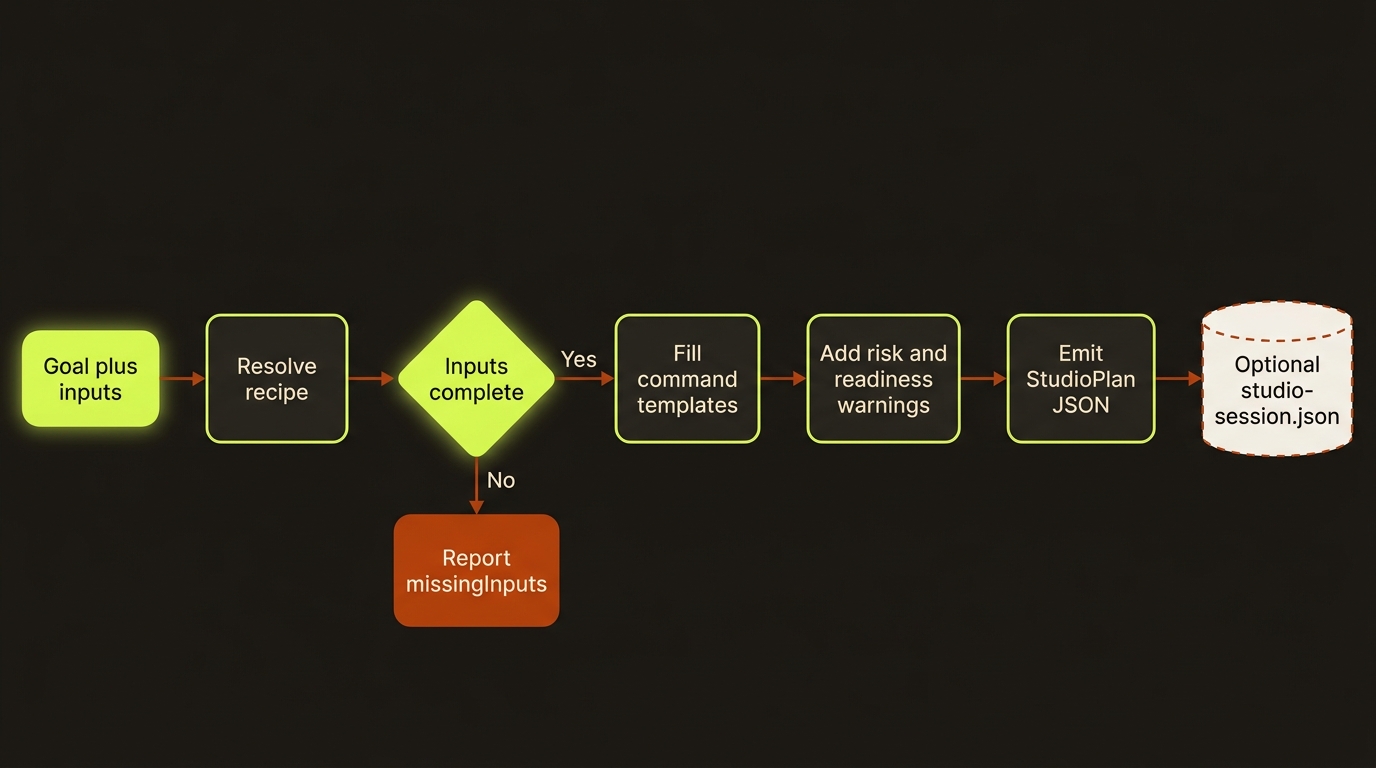
Diagram source (live Mermaid)
Artifacts & outputs
StudioPlanJSON — printed to stdout (schemaVersion: 1):goal,title,summary,missingInputs,warnings,steps[](each withcommand,reason,produces,requiresApproval), andnextAction. Nothing is written to disk by default.studio-session.json— written only with--write-session, atprojects/<slug>/artifacts/studio-session.json. It wraps the plan withcreatedAtfor an auditable handoff.
The commands the plan lists are the things that actually write artifacts later — for example brief.json, storyboard.json, readiness.json, brand-dna.json, execution-report.json — all under projects/<slug>/artifacts/. Studio only names them; it does not create them.
Tips & gotchas
Always start here
For any non-trivial job, run Studio first. It is read-only, costs nothing, and turns a vague idea into the precise command sequence — so you commit credits only when the plan looks right.
Plan-only, even without --dry-run
Phase 1 Studio never executes. Drop --dry-run and it still only plans, adding a warning that execution is intentionally not enabled. To actually run a step, copy its command and run it yourself.
Missing inputs zero out the steps
If a required input is absent, steps[] comes back empty and missingInputs tells you what to supply (e.g. brand-campaign needs both --project and --input). If the project does not exist yet, Studio warns you to run vclaw video init <slug> first.
Driving it from an agent
Pipe stdout and parse the StudioPlan JSON: iterate steps[], run each command, and treat any step with "requiresApproval": true (the approval-gated recipes) as a human gate. A non-empty missingInputs means stop and gather inputs before executing — steps[] will be empty until you do.
Related: One-shot create · Brand DNA · Readiness & execution · Multi-shot prompts · Filmmaking prompts · Preview portal