
Reference sheets

Reference sheets are how videoclaw stops your AI video from drifting. Instead of dumping a folder of images at a provider and hoping for the best, you give each image one job — face, palette, location, motion — tag it with a role, and bind it to the exact scenes it controls. A validator then refuses to let two images fight over the same job in the same scene, and the runtime refuses to render a character scene that has no face anchor. That is real continuity, enforced before you spend a single credit.
What it does
- Five typed sheets, one job each. Every sheet is one of five types, and each image inside it carries exactly one role from a closed list. No "image that does three things."
- Per-scene bindings. A sheet is bound to explicit scene numbers (0, 1, 2…), not "all scenes." The opening palette can own scenes 0–2 while the climax palette owns scenes 3–4.
- Collision protection. If two sheets try to supply the same role to the same scene (two palettes fighting over scene 1), validation flags it before render.
- Identity gate. In director mode, a scene that has characters in it but no Identity Sheet bound to it is blocked from execution. No silent "different-looking lead each scene."
- Product anchoring too. The outfit-material vocabulary is extended with
product-hero,product-variant,product-in-use, andpackaging, so product ads lock their hero shot the same way character ads lock their lead. - Go Bananas hookup. Bind a GB character, product, scene, style-preset, or reference-group directly into a sheet entry instead of a file path.
- It flows everywhere. Counts and collisions surface in
status,report, the Obsidian vault, the doctor health checks, and the human-readablestoryboard.mdapproval file.
The five sheet types
| Sheet type | Allowed roles (one per image) |
|---|---|
| identity | identity · wardrobe · silhouette · age-reference |
| outfit-material | outfit · material · accessory · texture · product-hero · product-variant · product-in-use · packaging |
| environment | location · set-dressing · weather · time-of-day |
| motion-camera | motion-rhythm · camera-behavior · blocking · shot-framing |
| palette-mood | palette · composition · mood · lighting-reference |
Any role outside a type's list is rejected at add-time with role-vocabulary-violation.
How to use it
All commands below use the form node dist/cli/vclaw.js video .... If you installed videoclaw globally, you can type vclaw video ... instead — they are the same thing.
node dist/cli/vclaw.js video reference-sheet-add \
  --project demo \
  --type identity \
  --name "Lead identity" \
  --character-name "Mochi" \
  --ref refs/mochi-identity.png:identity:"primary face anchor" \
  --binding 0 --binding 1
Creates an Identity Sheet, adds one image tagged as the identity role, and binds it to scenes 0 and 1. Prints { sheet, summary } JSON.
node dist/cli/vclaw.js video reference-sheet-list --project demo --type identityLists every sheet (optionally filtered to one type). Returns { sheets, summary }.
node dist/cli/vclaw.js video reference-sheet-show --project demo --id sheet-001Returns one sheet by id as { sheet }. Exits non-zero if the id is unknown.
node dist/cli/vclaw.js video reference-sheet-bind --project demo --id sheet-001 --scene 0 --scene 2Adds scene indices to an existing sheet. Bindings are a set, so repeating an index is a no-op.
node dist/cli/vclaw.js video reference-sheet-validate --project demoRuns the full structural + collision check. Returns { ok, errors, collisions, summary }; exits non-zero when not ok.
Bind a Go Bananas product reference instead of a file path:
node dist/cli/vclaw.js video reference-sheet-add \
  --project demo \
  --type outfit-material \
  --name "Hero product" \
  --gb-ref product:42:product-hero \
  --binding 0
Anchors the canonical product shot using a GB product id rather than a raw image. The --gb-ref form is <kind>:<id>:<role>[:<note>]; kinds are character, product, scene, style-preset, reference-group.
How it flows
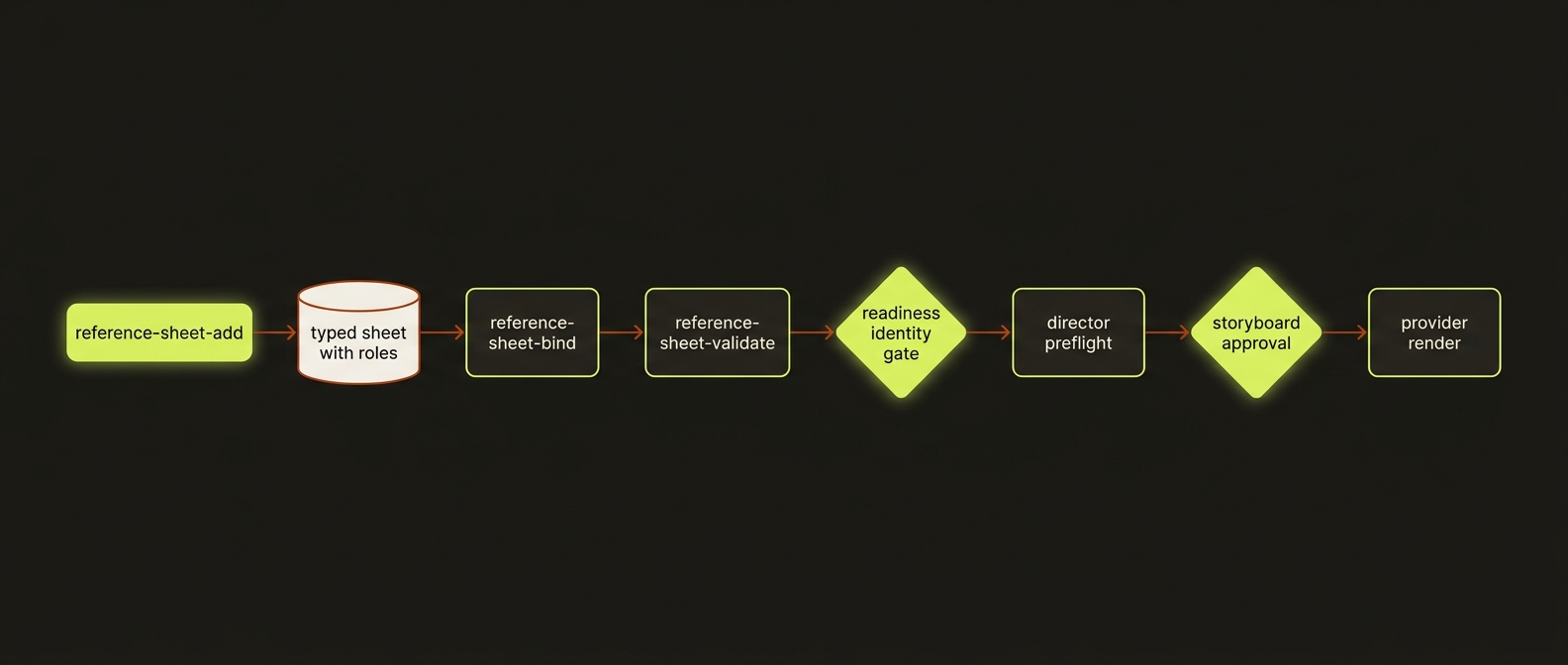
Diagram source (live Mermaid)
Artifacts & outputs
Every sheet lives in one canonical JSON file. You never hand-edit it — the five commands write it for you.
projects/<slug>/references/reference-sheets.json— the full artifact: an array of typed sheets, each with itsreferences(path orgbRef+ role + optional note) and itsbindings.sceneIndices.
The same summary block (count, byType, boundSceneCount, unboundSheetIds) is echoed into status, project-index, report, CSV export, and Obsidian, so every surface agrees on the counts without re-reading the file.
Tips & gotchas
One reference, one job
The whole subsystem exists to enforce the first rule of the Seedance director handbook: every reference should do exactly one thing. If an image is both "the face" and "the palette," split it into two sheets.
Identity gate is a hard block
In director mode, readiness --mode director raises reference-sheet-missing-identity per-scene when a scene has characters but no Identity Sheet bound to it. This blocks execute / execute-status before any provider submission. Add an Identity Sheet (ideally with --character-name) and bind it to that scene.
Fixing a collision means un-binding
reference-sheet-bind only adds scene indices — there is no remove flag. To clear a role-collision reported by validate, either re-create the offending sheet with the bindings you actually want, or remove the unwanted index from the on-disk artifact, then re-run reference-sheet-validate until it returns ok: true.
Catch problems for free
The director preflight runs reference-sheet checks (unassigned-role, role-vocabulary-violation, role-collision, reference-sheet-orphan-gb-ref) before the approval gate, so failures show up in storyboard.md and doctor-project without spending any provider budget. Readiness also emits non-blocking warnings like reference-sheet-weak-identity and reference-sheet-thin-identity-coverage for single-anchor character work.
Driving it from an agent
An AI agent (Claude Code) drives this exactly like a human: shell out to node dist/cli/vclaw.js video reference-sheet-add ..., parse the JSON on stdout, and gate on exit codes — 0 means ok, non-zero means a validation error the agent must fix before proceeding. The intended agent loop is: add sheets → reference-sheet-validate until ok: true and collisions is empty → run readiness --mode director and clear any reference-sheet-missing-identity → only then attempt execute. The identity gate and preflight are the safety rails that stop an over-eager agent from rendering drifted footage.
Related
- characters — character profiles whose names the Identity Sheet matches against.
- providers — the routes (Seedance, Veo, Runway) that consume the bound references.
- story bible — the broader continuity contract reference sheets plug into.
- assemble — stitching the rendered, identity-locked clips into a master.
- Deep reference:
docs/REFERENCE_SHEETS.md.