
Generation telemetry & cost

Every render leaves a machine-readable receipt: what route ran, how many shots it sent, what the provider charged, how long it took, and how many clips came back. Over time those receipts teach vclaw what your videos actually cost — so the price quote stops being a guess and becomes your own history.
What it does
- Records a
generation.telemetry.recordedevent after every submit and every poll — routeId, operation, status, dry-run flag, task count, and the scene indices touched. - Captures the run's config: aspect ratio, resolution, audio on/off, output count, average clip duration, prompt word count, and reference image/video/audio counts.
- Extracts provider-reported numbers when the provider exposes them:
cost.usd,cost.creditsCharged, andgenerationTimeSec— pulled out of the raw provider response automatically. - Records
outputsIngestedafter a poll so you can see how many clips each job actually returned. - Logs
issueson blocked, failed, or warning runs — your failure ledger, not just your success ledger. - Feeds
cost-estimate: once real completedseedance-directruns exist, the estimate switches from static defaults to your own historical average per scene. - Dry-runs are recorded too, but are never used as cost samples — only live completed runs count.
How to use it
All examples use node dist/cli/vclaw.js ...; the installed binary is the same command as vclaw ....
node dist/cli/vclaw.js video cost-estimate --project my-spot --scenes 6 --clip-duration 10 --narration onPrints a JSON cost + wall-time estimate for the project (scene count and clip duration are inferred from the storyboard if you omit the flags).
node dist/cli/vclaw.js video cost-estimate --project my-spotSame estimate with everything inferred — scenes and durations from storyboard, narration from the brief's execution profile, new-character count from the cast.
node dist/cli/vclaw.js video metrics --root . --mode storyboardPrints portfolio-wide metrics (completion rate, average score, review states, ops status, platform/priority/due-risk breakdowns) across every project under the workspace.
node dist/cli/vclaw.js video execute --project my-spotLive submit — appends a telemetry event with the route, config, and any provider cost the response carries. Use Execution & runtime to drive the full run.
node dist/cli/vclaw.js video execute-status --project my-spotPolls the job — appends a second telemetry event with outputsIngested, final status, and any provider-reported credits or USD.
Telemetry is read back through the library helpers readProjectGenerationTelemetry, readPortfolioGenerationTelemetry, and findHistoricalSeedanceCostTelemetry for integration code.
How it flows
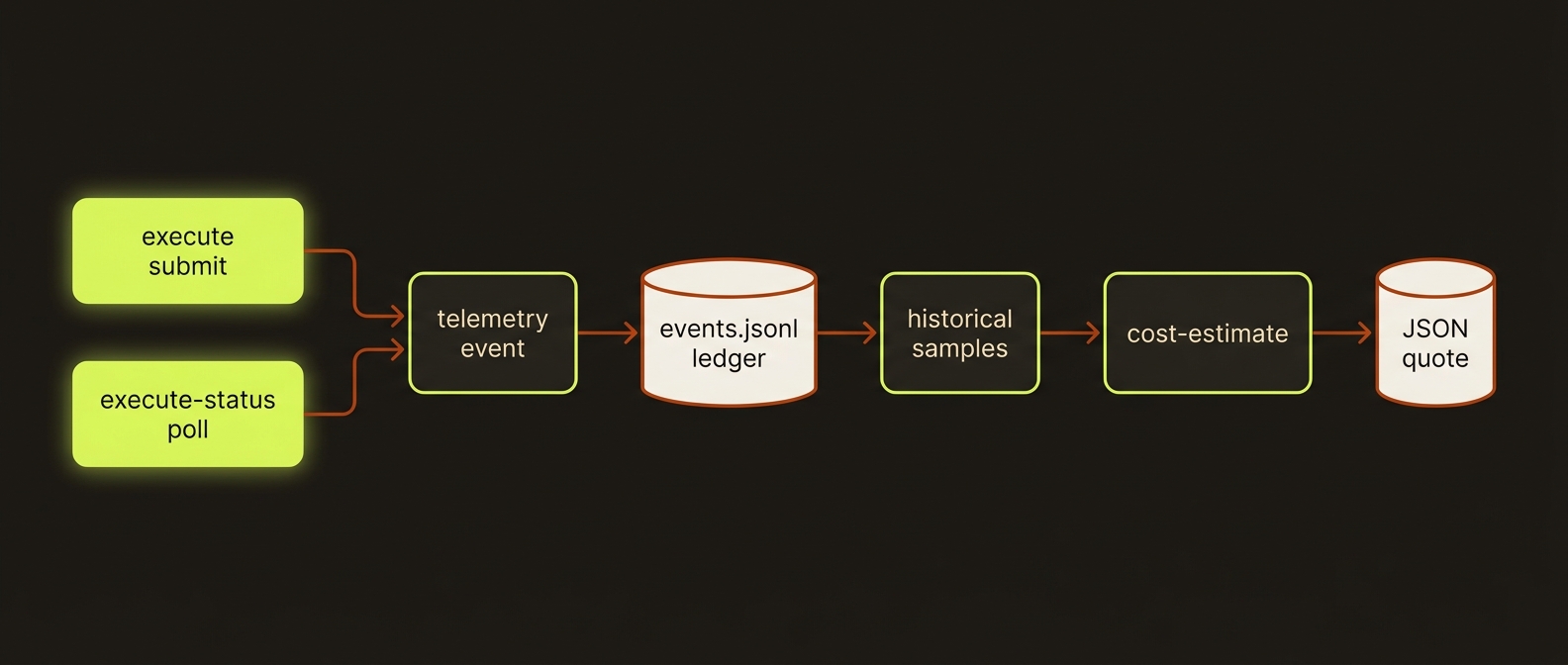
Diagram source (live Mermaid)
Artifacts & outputs
- Telemetry ledger — appended to
projects/<slug>/events/events.jsonlasgeneration.telemetry.recordedrecords (schemaVersion: 1). This is the longitudinal cost/timing/failure history; it does not replace the execution report. - Cost estimate — printed to stdout as JSON.
estimateSourceis eitherstatic-defaultorhistorical-telemetry; when historical, atelemetryblock reportssampleCount,matchedRouteId,averageSeedancePerSceneUsd, andlastRecordedAt. - Portfolio metrics —
vclaw video metricsprints the JSONVideoPortfolioMetricsobject to stdout (not persisted).
TIP
The static estimate scales by clip length (about $0.27 for ≤10s, $0.40 for ≤15s, $0.53 longer per Seedance scene) and adds small line items for Gemini, Go Bananas new characters, and ElevenLabs narration. Once you have real runs, your own average overrides the Seedance line — the more you ship, the more accurate the quote.
WARNING
Credits (creditsCharged) are recorded but never auto-converted to USD — there is no implicit credit-to-dollar rate. Only completed seedance-direct runs with a positive cost.usd and a positive taskCount feed the historical estimate (last 20 samples); other routes' costs are logged but not used for estimation.
Driving it from an agent
cost-estimate and metrics emit pure JSON on stdout and exit 0 on success — parse them directly. cost-estimate throws (non-zero exit) if it cannot determine a scene count, so either pass --scenes or create a storyboard first. Telemetry is written as a side effect of execute/execute-status, so no separate step is needed to record it.
Related: Execution & runtime · Storyboard · Projects lifecycle · Seedance assets