
Connect a video provider
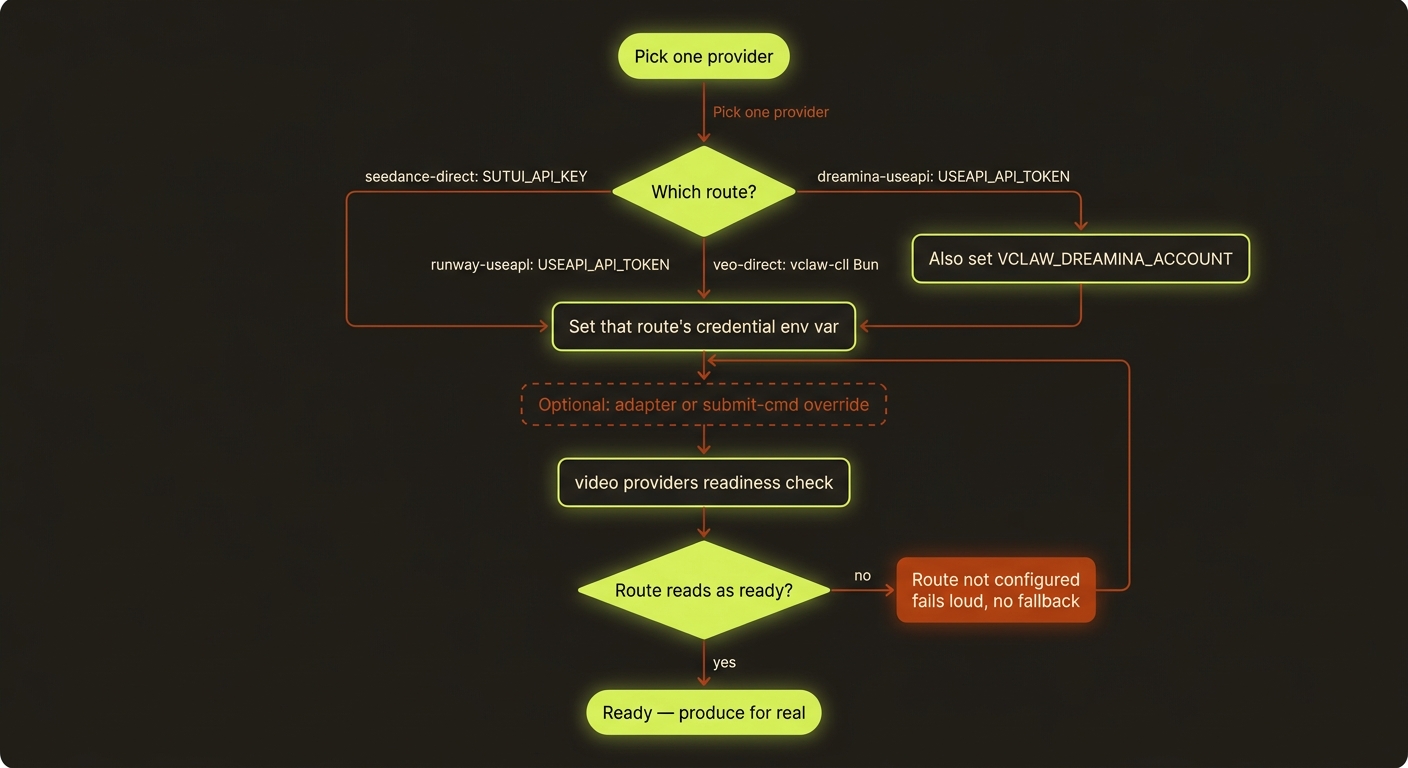
Diagram source (live Mermaid)
So far you can plan a whole video for free. To make a real clip — actual moving pictures, not a rehearsal — videoclaw has to hand your request to an AI video engine. That engine is called a provider. This page shows you how to wire up one provider and confirm it's ready.
The good news: you only need one provider to make your first real video. Pick one, set one or two secret keys, run a check, and you're live.
Try the dry run first
You can author a brief and storyboard without provider credentials. Plain produce --dry-run does not submit paid generation, but missing route configuration or artifacts can still return a readiness blocker. When readiness passes, it prepares the provider payload. The report itself is a summary — status, routeId, taskCount — and the resolved submit payload is written beside it to artifacts/run-contract.json, whose path comes back as contractPath. Read that file, not the summary, before you drop --dry-run. See first video and how it works.
The commands below use the source-checkout form
node dist/cli/vclaw.js video .... If you installed the published package, just typevclaw video ...instead.
The seven routes
videoclaw can drive seven different routes. Each one has a route name — a short id you'll see in the readiness check and in your project's plan. A "route" just means "the exact path your request travels to reach that engine."
| Route | veo-useapi | seedance-direct | runway-useapi | dreamina-useapi | magnific-rest | seedance-modelark | reapi-seedance | minimax-useapi |
|---|---|---|---|---|---|---|---|---|
| Engine | Google Veo | ByteDance Seedance | Runway | Seedance 2.0 / Dreamina | Magnific / Freepik | Seedance 2.5 / BytePlus ModelArk | Seedance 2.5 (Less Restriction) / reAPI | MiniMax Hailuo 3.0 / hailuoai.video |
| Credential | USEAPI_API_TOKEN | SUTUI_API_KEY | USEAPI_API_TOKEN | USEAPI_API_TOKEN | MAGNIFIC_API_KEY | ARK_API_KEY | TREG_TOKEN or REAPI_API_KEY (VCLAW_REAPI_SEEDANCE_VIA picks) | USEAPI_API_TOKEN + VCLAW_MINIMAX_ACCOUNT |
| Free option | --veo-model free | bundled Higgsfield engine | explore mode (no account) | – | – | – | – | plan credits |
| Photoreal faces OK | ✓ | – | – | – | ✓ | unverified | ✓ | in image references |
| Provider | What it is | Route name(s) |
|---|---|---|
| Google Veo (Flow) | Google's video model, driven through your Google Flow account — has a 0-credit model | veo-useapi |
| Seedance 2.0 | ByteDance's Seedance model, great for keeping a character consistent | seedance-direct |
| Runway | Runway's model, driven through your Runway account | runway-useapi |
| Seedance 2.0 via Dreamina | Seedance 2.0 through a Dreamina (CapCut–ByteDance) account — registered but not pursued since 2026-09-09 (too expensive to keep supporting); use seedance-direct | dreamina-useapi |
| Magnific | The Magnific/Freepik catalog — animates a still, and runs their upscale models | magnific-rest |
| Seedance 2.5 via reAPI | ByteDance Seedance 2.5 with the content filter off, served by reAPI through the treg catalog or your own reAPI key — takes a real photograph AND a voice clip in one render. Paid per second; opt-in only | reapi-seedance |
| Seedance 2.5 via BytePlus ModelArk | ByteDance's own official Seedance 2.5 / 2.0 API, on your BytePlus account — up to 30 image references, 30-second clips, and a chain that can extend the previous clip. Paid per second of output (~USD 0.93 for 4 s at 720p) | seedance-modelark |
| Hailuo 3.0 via your hailuoai.video plan | MiniMax's Hailuo 3.0 — 768p or 2K, 4–15 seconds, native stereo sound, up to 9 reference images. Billed in your plan's monthly credits (7 a second at 768p, 12 at 2K); opt-in only | minimax-useapi |
New here? Start with the free Veo model
veo-useapi has a 0-credit model. Point your project at it once and every render on that project is free:
node dist/cli/vclaw.js video set-execution-profile --project demo --veo-model freeThat selects veo-3.1-lite-low-priority, which bills 0 credits on an Ultra-tier account and errors clearly on account classes that do not carry it. Check your balance before and after with vclaw veo useapi:health if you want the proof. More on the free routes below.
Native transports vs. adapter overrides
There are two ways a route can talk to its provider. You almost always want the first one.
- Native transport (the default, built in). videoclaw already knows how to talk to each provider directly. You don't install anything extra — you just give it the right credential (a secret key or token), and it works. This is the recommended path.
- Adapter override (advanced). If you have your own script or a special setup, you can point a route at it with an environment variable (a setting you put in your shell), e.g.
VCLAW_SEEDANCE_DIRECT_ADAPTER. videoclaw sends your script the request as JSON and reads the result back. Skip this unless you have a specific reason. (An "environment variable" is just a named value your terminal remembers — you set it withexport NAME=value.)
What each route needs
Each native route needs its own credential. Set the one for the provider you chose — you don't need the others.
| Route | Credential(s) to set | Notes |
|---|---|---|
seedance-direct | The bundled Higgsfield engine, or VCLAW_SEEDANCE_DIRECT_NATIVE=1 + SUTUI_API_KEY | Two transports, and you pick. Free: the Higgsfield browser engine that ships with videoclaw, which needs no key at all and takes over once you have set it up; see the engine README. Paid: xskill.ai, which is what the key buys — optional VCLAW_SEEDANCE_BASE_URL (defaults to https://api.xskill.ai) — and which runs only when VCLAW_SEEDANCE_DIRECT_NATIVE=1 selects it. With neither in place the route refuses to render instead of billing a transport you did not choose. |
runway-useapi | USEAPI_API_TOKEN, USEAPI_ACCOUNT_EMAIL | A useapi.net token. This project has had no Runway account since 2026-08-10; the route stays registered but do not plan work on it. |
dreamina-useapi | USEAPI_API_TOKEN, VCLAW_DREAMINA_ACCOUNT | Registered but not pursued since 2026-09-09. Reuses the same useapi.net token as Runway — no new key. Account looks like CA:you@example.com. |
veo-useapi | USEAPI_API_TOKEN, USEAPI_ACCOUNT_EMAIL | Google Veo, driven through your Google Flow account. Its native local transport drives the vclaw-cli Bun/Flow workspace on your machine (Bun runtime); tune with VCLAW_VEO_CLI_ROOT / VCLAW_VEO_BUN_BIN if needed. |
magnific-rest | MAGNIFIC_API_KEY | The Magnific/Freepik catalog (MiniMax Live / PixVerse / Runway / Kling / LTX, plus the image and video upscale models). Paid — there is no free option. |
seedance-modelark | ARK_API_KEY (optionally VCLAW_MODELARK_MODEL, VCLAW_MODELARK_BASE_URL, VCLAW_MODELARK_CHAIN_MODE) | The official Seedance 2.5 API on BytePlus ModelArk. Paid per second of output — there is no free tier. |
reapi-seedance | VCLAW_REAPI_SEEDANCE_VIA=treg + TREG_TOKEN, or VCLAW_REAPI_SEEDANCE_VIA=direct + REAPI_API_KEY + GO_BANANAS_API_KEY | Seedance 2.5 with the content filter off: a real photograph as the subject and a voice clip as the speech reference, with native speech, sound effects and music. Paid per second of output (about $0.12/s at 480p, $0.27/s at 720p, $0.46/s at 1080p); a reference video is billed on top. Never chosen for you. |
minimax-useapi | USEAPI_API_TOKEN, VCLAW_MINIMAX_ACCOUNT (optionally VCLAW_MINIMAX_MODEL, VCLAW_MINIMAX_RESOLUTION) | Hailuo 3.0 on a hailuoai.video plan you have added to useapi.net — the same useapi.net token as Runway and Dreamina; the account id is the one useapi lists. Credits are taken when the job is submitted. A real face is accepted in an image reference (not in a video reference). Never chosen for you. |
Here's how you set a credential in your terminal (do this once per session, or add it to your shell profile so it sticks):
export SUTUI_API_KEY="your-seedance-key-here"Sets the Seedance key for seedance-direct. Nothing prints — that's normal. Replace the placeholder with your real key. Use the matching variable name from the table for whichever provider you picked.
Setting up Runway / Dreamina (they share one token)
export USEAPI_API_TOKEN="your-useapi-token-here"Sets the useapi.net token. This one token powers both runway-useapi and dreamina-useapi — you do not need a separate Dreamina key. For Dreamina, also set the account:
export VCLAW_DREAMINA_ACCOUNT="CA:you@example.com"Tells Dreamina which pre-registered account to bill. The account itself is set up on useapi.net's side beforehand; this just points videoclaw at it. Optional: VCLAW_DREAMINA_REGION (defaults to CA) and VCLAW_DREAMINA_MODEL (defaults to seedance-2.0).
Real human faces get rejected
Seedance, Dreamina, and Runway content filters reject photoreal human faces. Describe people by what they look like ("a tall woman in a red jacket"), not by name, and use stylized or illustrated characters where you can. See characters for how videoclaw keeps a character consistent without tripping the filter.
Check if a route is ready
Before you try to render, ask videoclaw which routes are wired up and which are still missing a credential.
node dist/cli/vclaw.js video providersPrints a readiness report for every route. In a terminal it's pretty-printed; in a script it's JSON — each route shows up under routes[] with its routeId. Look for the route you set up and confirm it reads as ready.
node dist/cli/vclaw.js video providers | jq '.routes[].routeId'Lists just the route ids, one per line. Handy if you only want to see the names. (jq is a small tool for reading JSON; install it with brew install jq if you don't have it.)
Routes fail loud — they never silently switch
This is the most important promise on this page, so read it twice.
If the route you asked for isn't configured, videoclaw stops and tells you, with a clear error. It will never quietly send your video to a different provider to "make it work." That protects you from surprise bills, mismatched output, and a render you didn't ask for.
One route, one path
If produce fails with a "route not configured" style message, the fix is always the same: set the credential for that route (from the table above) and run video providers again to confirm. videoclaw will not pick a fallback engine for you — that's a feature, not a bug.
So the safe rhythm is:
- Plan for free with
--dry-run(first video). - Set the credential for one route.
- Confirm with
video providers. - Run
producefor real.
The free routes
Two routes can render without spending anything.
Veo, via the 0-credit model. The fastest path to a real clip. Set it once per project and every render on that project is free:
node dist/cli/vclaw.js video set-execution-profile --project demo --veo-model freeSelects veo-3.1-lite-low-priority. It is gated at the provider to Ultra-tier accounts and fails with a clear error elsewhere. The clip arrives at 1080p even if you asked for 720p — Google Flow upscales the free model at no cost.
Seedance, via the engine that ships with videoclaw. Setting up the bundled Higgsfield engine makes seedance-direct free and removes the need for SUTUI_API_KEY entirely. It drives a Higgsfield browser session that renders one video at a time, so never run two at once. Setup is in the engine README. Afterwards video providers reports the route with activeTransport: in-tree-engine, which is how you confirm the free transport is the one that will run.
Runway explore mode is not currently free for this project. The mode exists and is free, but the account has been suspended since 2026-08-10. The route stays registered so old projects still resolve; a new render on it will not go through.
New batch queue work compiles into durable Cinema tasks without submitting:
vclaw video batch-submit --manifest batch.json --project overnightUse the returned receipt and the installed cinema-work-quote, cinema-authorize and cinema-work contracts to execute. --route may override the manifest route. Account availability and paid-generation requirements must be checked for the chosen route.
batch-monitor --out <old-run> --once remains for historical runs containing batch-queue.json; it is not the execution step for new durable tasks. See the batch queue guide.
You're ready
Once video providers shows your chosen route as ready, your produce runs will make real clips. When the clips are in, the next step is to look at them, approve the result, and ship it.
Next: Review & publish. Related: how it works · modes · assemble · troubleshooting · cheat sheet.