
Characters
Give your video a recurring cast that actually looks the same in every shot. The character subsystem stores named, identity-anchored profiles for each person in your story, so the same face shows up scene after scene instead of a new stranger every clip.
What it does
- Keeps a per-project cast list on disk: every character has a name, an optional Go Bananas identity id, a description, reference images, and notes.
- Auto-generates brand-new characters from a one-line description — it makes a portrait, registers it as a reusable Go Bananas character, and files it into your project in one step.
- Imports characters that already exist in your Go Bananas library by matching them to the people described in your story idea.
- Audits consistency: scans your storyboard, finds every character the scenes reference, and tells you which ones have no profile or no reference image yet — the gap that causes a face to drift between shots.
- Feeds those profiles into the rest of the pipeline (storyboard, story bible, prompt packets) so identity stays locked across scenes and regenerations.
How to use it
All commands below use node dist/cli/vclaw.js video .... If you installed videoclaw globally you can type vclaw video ... instead. (Both noun-verb vclaw video character add and hyphenated vclaw video character-add forms work.)
node dist/cli/vclaw.js video character-add --project my-film --name "Mara" \
  --description "weathered desert scout, cropped silver hair, dust-grey coat" \
  --ref characters/mara-front.png --note "always squinting"
Adds or updates a character profile in characters/characters.json. Re-running with the same name merges fields instead of duplicating.
node dist/cli/vclaw.js video character-auto-create --project my-film --input cast.jsonReads a JSON array of { name, description, style? } entries, generates a portrait for each new one via Go Bananas, registers it as a reusable character, and imports it into the project. Add --dry-run to preview without spending credits or creating anything. Requires GO_BANANAS_API_KEY.
node dist/cli/vclaw.js video character-import-library --project my-film \
  --intent "a grizzled scout and a young engineer cross the dunes"
Finds exact-name matches in your existing Go Bananas library for the people implied by the story intent and binds them into the project. Requires GO_BANANAS_API_KEY.
node dist/cli/vclaw.js video character-list --project my-film
node dist/cli/vclaw.js video character-show --project my-film --name "Mara"
List every stored profile, or show one by name or id. Output is JSON.
node dist/cli/vclaw.js video character-consistency --project my-filmAudits the storyboard against the cast list. Returns JSON with ok, referencedCharacters, missingProfiles, and missingReferenceAssets so you (or an agent) can fix gaps before generating.
A cast.json for auto-create looks like:
[
  { "name": "Mara", "description": "weathered desert scout, silver hair", "style": "photorealistic cinematic portrait" },
  { "name": "Tev", "description": "young engineer, oil-streaked jumpsuit" }
]
How it flows
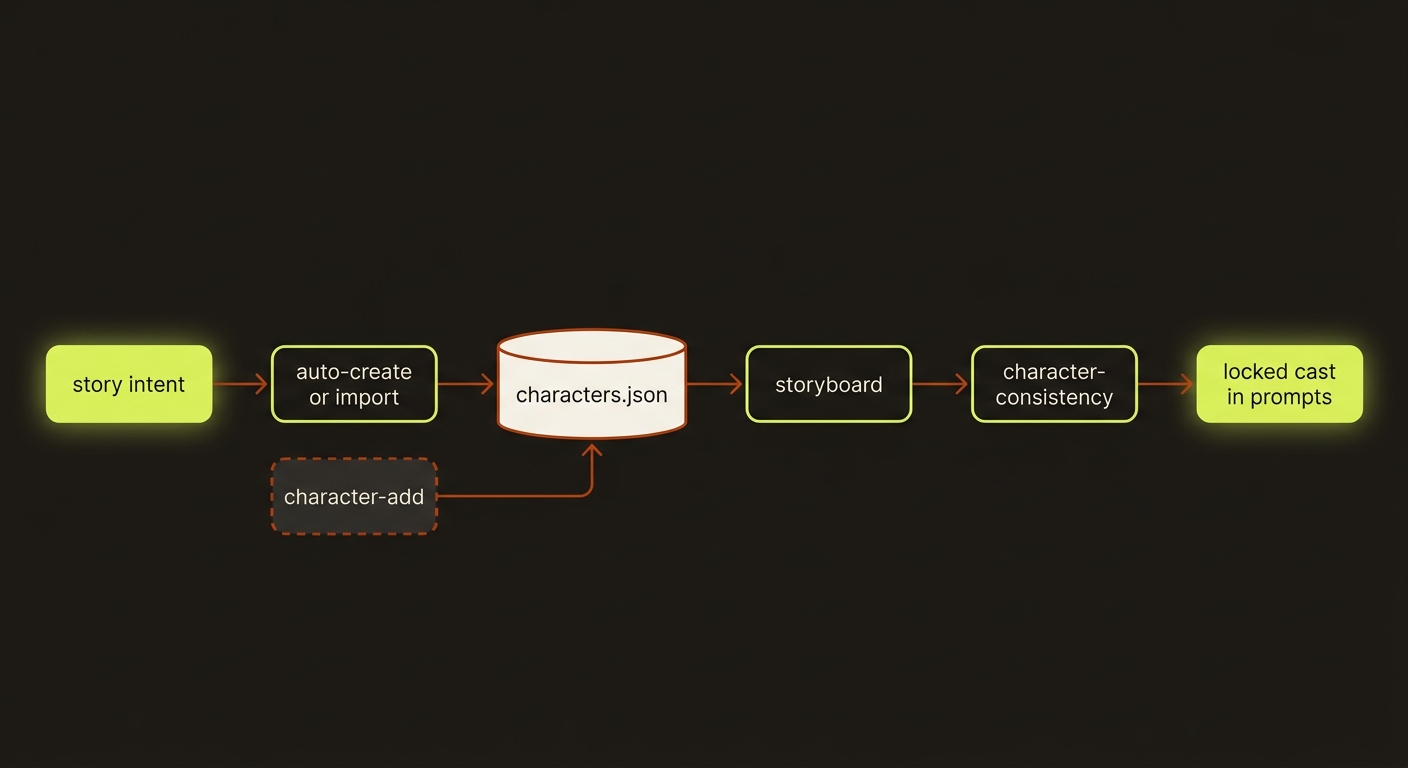
Diagram source (live Mermaid)
Artifacts & outputs
projects/<slug>/characters/characters.json— the canonical cast store:{ characters: [{ id, name, goBananasId?, description?, referenceAssets[], notes?, createdAt, updatedAt }] }.idis the slugified name. Auto-created and imported characters land here with agobananas://character/<id>reference asset.character-listandcharacter-showprint this store as JSON to stdout.character-consistencyprints a report object (it does not write an artifact file):{ slug, ok, referencedCharacters, missingProfiles, missingReferenceAssets, issues }.- An
character.auto-createdevent is appended to the project timeline (events/events.jsonl) after auto-create.
Tips & gotchas
Describe by visual descriptor, not proper name
In the prompts that reach the video provider, refer to characters by what they look like ("weathered desert scout, silver hair") — not by name. Proper names do not survive across generations, so a descriptor is what keeps the face consistent. Put the name in the profile, the description in the prompt.
Real photoreal faces get rejected
Several provider content filters reject real human faces passed as reference images. Lock identity through managed references (Go Bananas characters or the Seedance Asset Library) and stylized visual descriptors instead of raw photo URLs. See providers and seedance assets.
Consistency depends on naming
character-consistency matches scene characters to profiles by name (case-insensitive). If your storyboard scene names a character "Mara" but no profile named "Mara" exists, it shows up under missingProfiles. Keep storyboard character names and profile names aligned.
Reference images matter most
A profile with no referenceAssets is flagged under missingReferenceAssets — it exists but has nothing to lock the face to. Always attach at least one reference image (via --ref, auto-create, or import).
Driving it from an agent
An AI agent (such as Claude Code) runs these as plain shell commands and reads the JSON from stdout. Typical loop: call character-consistency, check ok and the missingProfiles / missingReferenceAssets arrays, then fill gaps with character-add or character-auto-create --dry-run before any expensive generation. Every command prints JSON; a missing required flag (e.g. --project) throws and exits non-zero, so failures are easy to detect. character-consistency returns ok: true (with empty arrays) when there is no storyboard yet or no characters are referenced — treat that as "nothing to check", not "all good".
Related
- story bible — pulls character profiles into the deterministic continuity bible.
- reference sheets — multi-view identity sheets for a character.
- seedance assets — Asset Library avatars for Seedance identity locking.
- providers — per-route content-filter rules.
- Deep reference: CLI_REFERENCE.md.