
Storyboard grid

A deterministic 3x3 shot-spec sheet — a clean PNG that locks the order, framing, and mood of every panel in your video before a single credit is spent. It is the blueprint your AI image model fills in, and the stable anchor your video provider points at.
What it does
Think of it as the architect's floor plan, not the finished house.
- Renders a 3x3 grid (or whatever panel count your prompt has) of labelled boxes — one box per shot/beat.
- Each box shows the beat description plus three director annotations: CAM (the shot size/angle), MOVE (the camera move), and MOOD (the emotional tone).
- It is drawn from text as crisp SVG, then converted to PNG — so it is byte-for-byte the same every run. No AI, no randomness, no spend.
- It is NOT a cinematic picture with characters in it. It is the layout and intent contract — the agreed shot list, in picture form.
- Running it flips the grid's reference slot in
filmmaking-prompts.jsontoready, clearing the "grid pending" warning so the project can move on to provider execution.
Why it matters: this is the "lock the grid" step. Once the panel order and camera language are agreed, you hand the same layout to an image model to paint the real cinematic 3x3, then point your video provider at it for consistent shots. No more arguing about shot order halfway through a paid render.
How to use it
The grid reads from the filmmaking-prompts artifact, so generate that first. Commands use node dist/cli/vclaw.js video ...; if you installed the CLI globally you can type vclaw video ... instead.
node dist/cli/vclaw.js video filmmaking-prompts --project my-video --writeBuilds the prompt packets (including storyboardGridPrompt with its panels) and writes artifacts/filmmaking-prompts.json. Required before the grid will render.
node dist/cli/vclaw.js video storyboard-grid --project my-videoRenders the shot-spec sheet to projects/my-video/assets/storyboard-grid.png, flips the grid slot to ready, and snapshots the updated artifact. This is the main command.
node dist/cli/vclaw.js video storyboard-grid --project my-video --dry-runReports where the PNG would be written and the panel count, but writes nothing. Use it to validate the artifact has panels before committing.
node dist/cli/vclaw.js video storyboard-grid --project my-video \
  --output assets/board-v2.png --width 2560 --height 1440
Renders to a custom path and resolution. Default is 1920x1080; dimensions must be positive integers.
Then generate the real cinematic grid from storyboardGridPrompt.promptText with an image model (always use a multi-panel-capable model for composites), and re-attach it:
node dist/cli/vclaw.js video filmmaking-prompts --project my-video \
  --storyboard-grid assets/cinematic-grid.png --write
Marks the storyboard-grid slot ready with the cinematic image and feeds it into the Seedance/Veo/Runway prompt packets.
How it flows
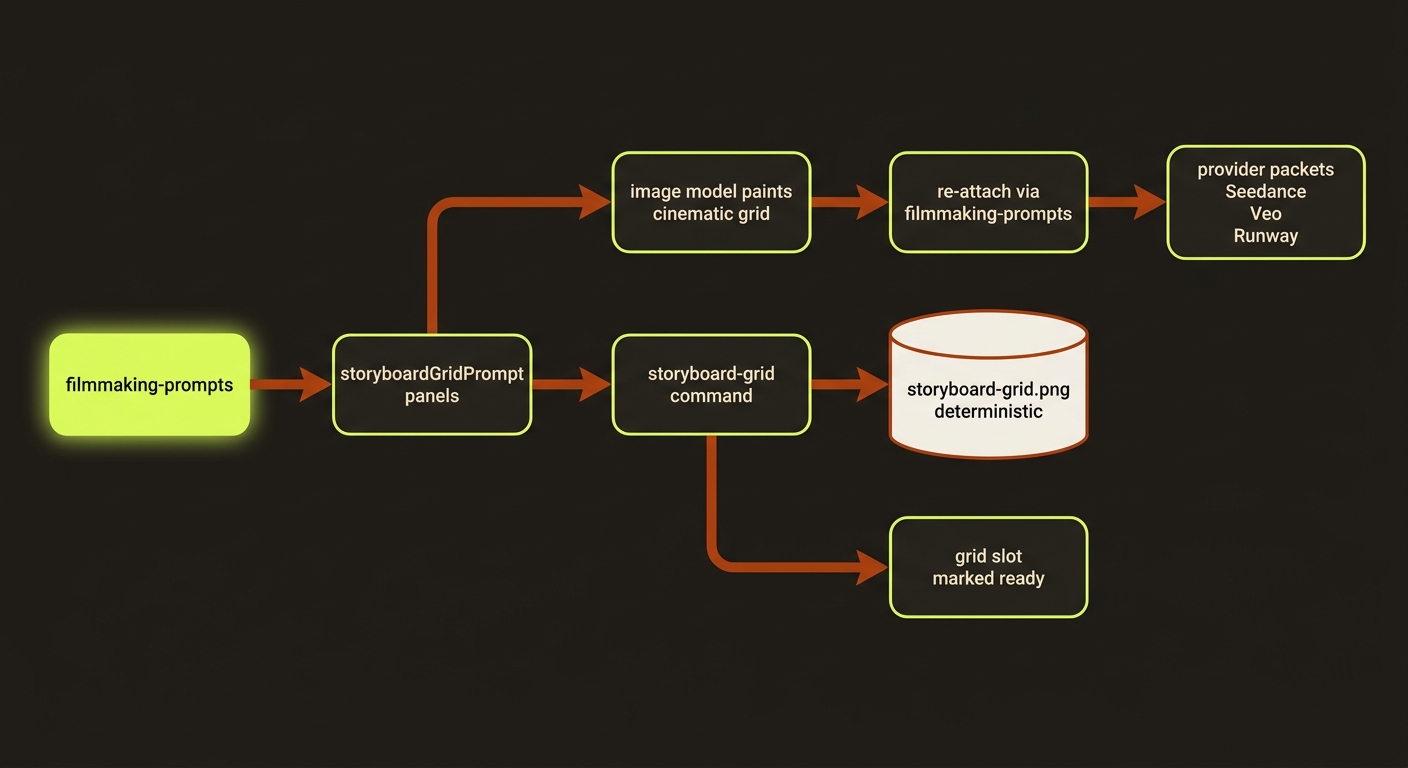
Diagram source (live Mermaid)
Artifacts & outputs
projects/<slug>/assets/storyboard-grid.png— the rendered deterministic shot-spec sheet (or your--outputpath).projects/<slug>/artifacts/filmmaking-prompts.json— updated in place: the storyboard-grid reference slot path is set and its status becomesready, thestoryboard-grid-pendingand matchingreference-slot-pendingissues are removed, and the slot is registered (e.g.@image3) so provider packets can reference it. A snapshot is appended toartifacts/history/.
Tips & gotchas
Two-step workflow
Step 1: storyboard-grid to lock panel order + camera language as a reviewable board. Step 2: generate the real cinematic 3x3 from storyboardGridPrompt.promptText and re-attach with filmmaking-prompts --storyboard-grid <path>. The deterministic PNG is the contract; the cinematic grid is the asset.
It is not a character image
The output is annotation panels (CAM/MOVE/MOOD), not faces or scenery. Do not send the deterministic sheet to a video provider expecting a finished frame — generate the cinematic grid for that.
Run filmmaking-prompts first
If artifacts/filmmaking-prompts.json is missing, or it has no storyboardGridPrompt panels, the command errors with asset_not_found and tells you to run filmmaking-prompts --write first. Bad --width/--height (non-positive or non-integer) errors with invalid_video_format.
Grid leaks as split-screen
A grid passed to a provider as a reference_image gets reproduced as a moving 9-panel split-screen unless the prompt forces single-full-frame output — the generated packets embed that guard, and the grid-guard check fails the packet if it is missing. For real-person content filters, render the grid prompt face-free with filmmaking-prompts --no-faces.
Driving it from an agent
An AI agent runs node dist/cli/vclaw.js video storyboard-grid --project <slug> after filmmaking-prompts --write. The result JSON returns outputPath, artifactReferencePath, panelCount, and dryRun. A non-zero exit means the prerequisite artifact or panels are missing (asset_not_found) or the dimensions are invalid (invalid_video_format) — the agent should run filmmaking-prompts --write and retry. Use --dry-run first to confirm panelCount > 0 without writing.
Related
- filmmaking prompts — generates the
storyboardGridPromptand packets this depends on. - providers — where the cinematic grid gets sent for execution.
- characters — identity-locked casts that the grid panels stage.
- assemble — stitching the rendered clips into a master.
- Deep reference: the storyboard-grid section of
docs/CLI_REFERENCE.md.