
Prompt-Quality Preflight & Lint

A spell-checker for AI video prompts. Before you spend a single credit, videoclaw reads your prompts and catches the exact mistakes that make AI video models produce garbage — so the first render is the good one.
What it does
- Two layers of automatic prompt review.
video prompt-lintvalidates the finished provider prompts (thefilmmaking-promptsartifact), andvideo director-preflightchecks every storyboard scene's wording before a director-mode run. - Catches the seven classic "handbook" anti-patterns that wreck Seedance/Veo output, scene by scene:
- Adjective soup — too many comma-stacked modifiers in one clause (default threshold: more than 4).
- Multiple actions — several actions crammed into one shot (the model averages them into mush).
- Multiple camera moves — more than one camera-move family in a single prompt (e.g.
push-in and orbit). - Style-word overload — stacked filler like
cinematic, epic, atmospheric(default: more than 3). - Literary emotion — invisible inner states (
feels profound sadness) instead of visible behavior. - Overlong — a single-shot prompt past the word budget (default: more than 120 words).
- Negative direction — negated motion/tempo like
no slow motion/avoid blur; these models ignore negation, so rephrase positively. Sanctioned only for on-screen-text, specular-kill, and anti-plastic clauses.
- Lints the finished Seedance "packets" for structural correctness: the canonical 10-block order, a 280–600 word-per-packet window, the three required identity blocks (
SUBJECT LOCK,CAPTURE REALISM,CAMERA CAPTURE), and the single-full-frame grid guard. - Scrubs for leaks. Catches a cast member's real name or a brand token that slipped through (both cause identity drift and trademark problems), plus numeric-register tokens like
5200Kor40°left in a prose-style prompt. - Dialogue timing check. Flags scripts whose spoken dialogue (estimated ~2.5 words/sec) can't fit naturally inside the clip duration.
- Warnings by default, a hard gate when you want it. Nothing blocks until you opt in — perfect for "advise me" during iteration and "block the release" in CI.
- Pure and free. No providers, no FFmpeg, no credits, no network — it only reads JSON and reports.
How to use it
All commands use node dist/cli/vclaw.js video .... If you installed videoclaw globally, the same commands work as vclaw video ....
node dist/cli/vclaw.js video prompt-lint --project rani-rooftopLints projects/rani-rooftop/artifacts/filmmaking-prompts.json and prints JSON. Exits non-zero if any error-severity issue is found.
node dist/cli/vclaw.js video prompt-lint --file out/filmmaking-prompts.json \
  --cast "Rani:a compact woman in a navy tactical vest" --brand "Nike"
Lints an arbitrary artifact file and turns on the proper-name and brand leak checks. --cast and --brand are repeatable.
node dist/cli/vclaw.js video prompt-lint --project rani-rooftop --register numericSuppresses the prose-register Kelvin/degree check when those numerals are intentional (default is prose).
node dist/cli/vclaw.js video director-preflight --project rani-rooftopRuns the seven storyboard anti-pattern checks plus dialogue-fit. Issues appear as warnings in the preflight JSON.
DIRECTOR_STRICT_PROMPT_QUALITY=1 node dist/cli/vclaw.js video director-preflight --project rani-rooftopPromotes every prompt-quality warning to a blocking error — pass flips to false and execute/produce is blocked before any provider submission. (Use DIRECTOR_STRICT_DIALOGUE_FIT=1 to do the same for the dialogue-timing check.)
How it flows
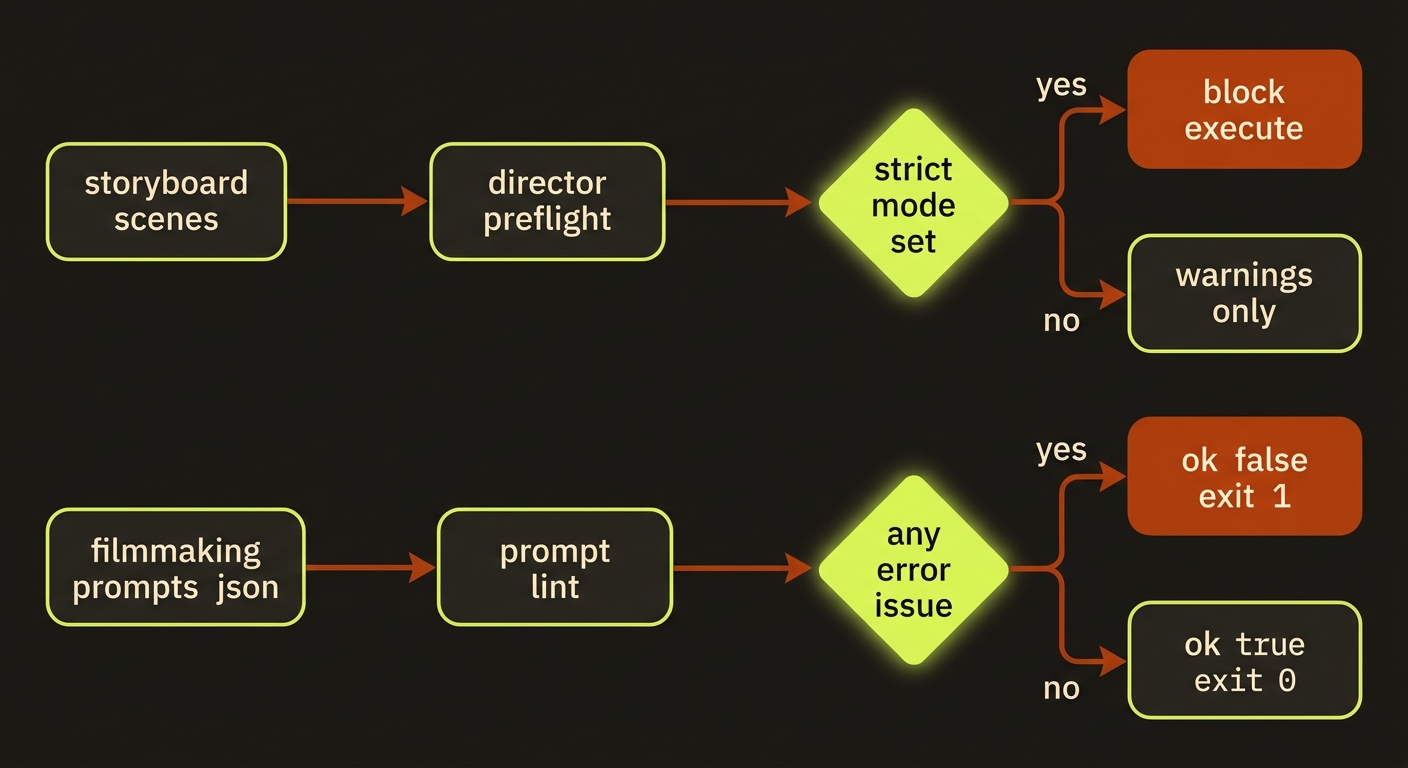
Diagram source (live Mermaid)
Artifacts & outputs
prompt-lint reads the filmmaking-prompts artifact at projects/<slug>/artifacts/filmmaking-prompts.json (produced by vclaw video filmmaking-prompts --write) or any file passed with --file. It writes no artifact — it streams machine-readable JSON to stdout:
{ "packets": [ { "sceneIndex": 0, "issues": [] } ], "ok": true }ok is true only when no packet raised an error-severity issue. The seven anti-pattern and dialogue checks surface inside the existing director-preflight JSON payload (warnings / errors buckets), not in a separate file — so status, storyboard.md approval review, and CI all see them automatically.
Tips & gotchas
Lint the multi-shot format too
The same module powers vclaw video multi-shot --validate, which enforces structural rules (timecodes, shot count, per-shot duration, required metadata) for multi-shot cinematic prompts. Those issues are always error-severity — they're format requirements, not stylistic advice.
Camera move is checked separately from shot size
wide shot, slow push-in is valid (one movement family). push-in and orbit raises prompt-quality-multiple-camera-moves. Shot-size terms like wide shot or close-up never count as a movement conflict.
Grid guard is load-bearing
If a storyboard-grid reference is attached but the single-full-frame guard text is missing, prompt-lint raises an error — without it, the 3×3 grid leaks into the video as a moving 9-panel split-screen. This is a real production failure mode, not a theoretical one.
Names and brands cause drift
Proper names don't survive across AI generations, and brand tokens trip content filters. Pass --cast and --brand so a leaked name or logo is caught before submission, not after a wasted render. The proper-name and brand checks only run when you supply those flags.
Thresholds are conservative on purpose
Defaults: adjective soup > 4, style words > 3, overlong > 120 words, multiple actions/camera moves > 1. They're deliberately short and forgiving so warnings mean something.
Driving it from an agent
An AI agent (such as Claude Code) runs node dist/cli/vclaw.js video prompt-lint --project <slug> and parses the JSON: branch on the top-level ok boolean, or just check the exit code — the process exits 1 when ok is false, so it gates a pipeline with no parsing at all. For the storyboard-scene checks, the agent runs director-preflight and reads result.warnings / result.errors; setting DIRECTOR_STRICT_PROMPT_QUALITY=1 makes any handbook violation a hard pass: false that blocks execute/produce, turning advisory linting into an enforced release gate.
Related
- filmmaking-prompts — produces the artifact
prompt-lintvalidates - multi-shot — the
--validatestructural checks share this module - director-preflight — where the seven anti-pattern checks run
- characters — cast descriptors feed the proper-name scrub
- providers — why brand/name/grid leaks matter per route
- Deep reference:
docs/PROMPT_QUALITY.md