
Assembly — the final MP4

One command turns an approved project's slides and storyboard into a finished, narrated, music-scored MP4 — voiceover, Ken-Burns motion, music bed, stitch, and an automatic ffprobe quality check, all in one pass.
What it does
- Runs the whole back half of production in order: slides → title card → TTS narration → slide animation → background music → stitch → QA → media QC.
- Speaks each scene's narration with ElevenLabs, then cuts every slide segment to match the speech that plays under it (no fixed guesses — real
durationMsper scene). - Animates each slide with a Ken-Burns pan/zoom, AV-locked to the narration, at a uniform 1280×720 @ 24fps H.264/AAC so segments concatenate cleanly.
- Mixes an optional background-music bed (Kie.ai/Suno) under the narration with ducking and fade-out.
- Auto-QCs the finished media: after stitch it ffprobes every clip and the master MP4 to confirm audio streams, codecs, sample rate, and that the master duration matches the sum of the clips.
--dry-runplans the entire pipeline for free — every FFmpeg command and provider call is listed, nothing runs, no keys needed.- Emits one machine-readable
assemble-report.jsonwith the output path, a per-asset manifest, warnings, and the full QC report.
How to use it
# Plan the whole pipeline without running anything (no keys, no ffmpeg, free)
node dist/cli/vclaw.js video assemble --project my-project --dry-run
Lists every stage, FFmpeg command, and provider call that would run, and writes a dry-run report — the safe first step.
# Real render: needs ffmpeg + ffprobe on PATH and API keys
export ELEVENLABS_API_KEY=sk_...
export KIE_API_KEY=...
node dist/cli/vclaw.js video assemble --project my-project
Speaks the narration, animates and stitches the slides, mixes music, then ffprobes the result — producing the final MP4 and the QC report.
# Point at a custom workspace root and a presenter brand profile
node dist/cli/vclaw.js video assemble --project my-project --root ./workspace --brand-profile ./brand-profile.json
--root sets the workspace directory; --brand-profile supplies presenter parameters and optional assemble knobs (title card, music bed).
The same command is available as vclaw video assemble ... once the CLI is installed on your PATH.
How it flows
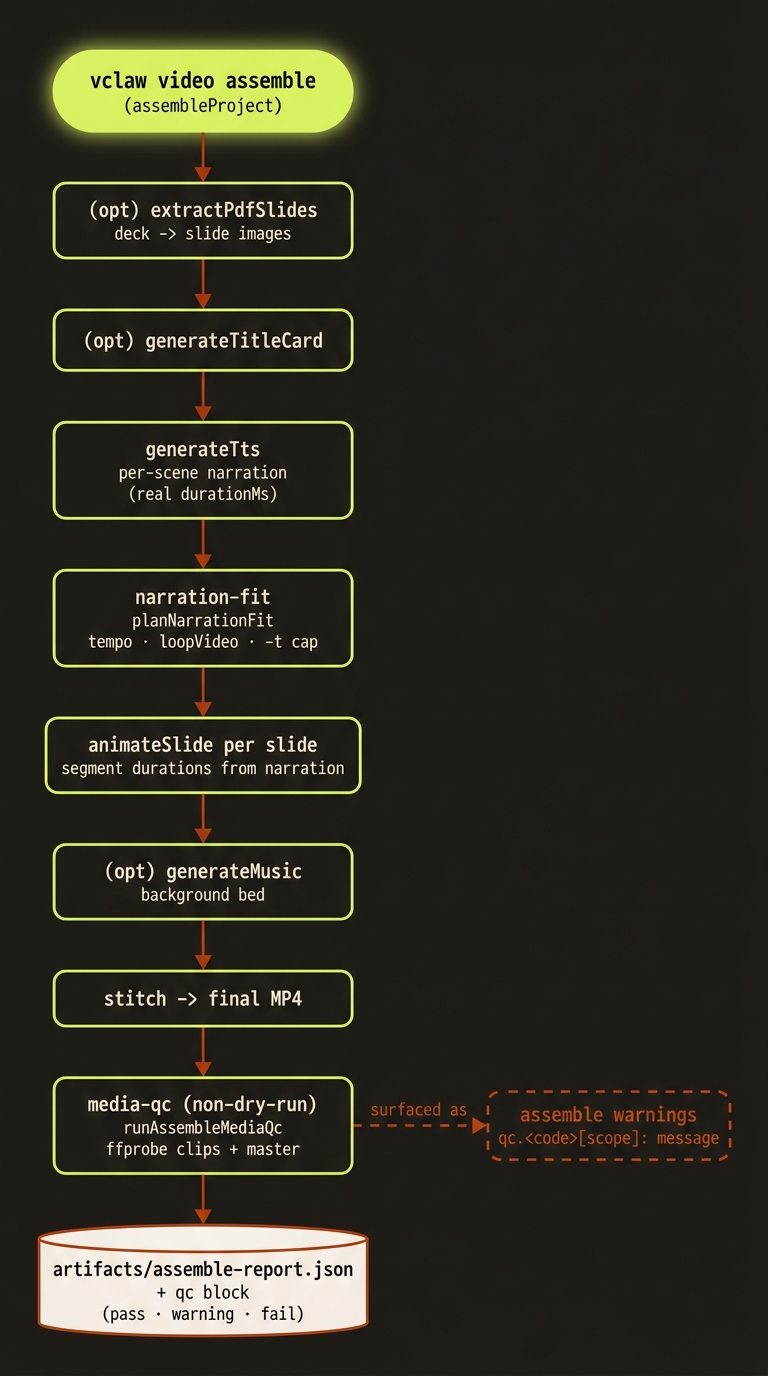
Diagram source (live Mermaid)
Artifacts & outputs
Written to projects/<slug>/artifacts/:
assemble-report.json— the canonical report (schemaschemas/video/artifacts/assemble-report.schema.json):status—complete|partial|dry-run|failedoutputPath— the final MP4manifest[]— one entry per generated asset (kindofnarration|music|title-card|slide-animation|final-video, pluspath,durationMs,sizeBytes,generator)warnings[]— advisory QA findings; Media QC issues are folded in asqc.<code>[<scope>]: <message>linesqc— the full Media QC report ({ status, clips[], master?, issues[] }), present on real renders onlyevents[]— ordered log of what ran, or what would run in dry-run
The final MP4 itself lands at the report's outputPath. Media QC stamps each clip and the master with pass | warning | fail, with codes like missing-audio, nonstandard-audio-codec, nonstandard-video-codec, and duration-drift (master duration drifting from the clip-sum beyond the 500ms default tolerance).
Tips & gotchas
Start with --dry-run
--dry-run needs no keys and no ffmpeg — it plans every step and is exactly what the smoke:assemble CI check exercises. Always plan before you spend credits.
Narration drives timing
The TTS stage runs before animation on purpose so each scene's real narration durationMs drives that slide segment's length — every Ken-Burns segment is cut to match the speech it plays under rather than a fixed guess. (There is a separate pure planner module, planNarrationFit in narration-fit.ts, that can speed up narration via atempo or loop the visual bed, but it is not invoked by the assemble command.)
Real renders need ffmpeg + keys
A non-dry-run render requires ffmpeg and ffprobe on PATH (override with VCLAW_FFMPEG_BIN / VCLAW_FFPROBE_BIN), ELEVENLABS_API_KEY for narration, and KIE_API_KEY only if the brand profile enables a music bed. Missing dependencies fail the render rather than silently skipping.
QC warns, it doesn't block
Media QC and the advisory QA checks surface warnings into the report — they flag problems but do not halt assembly. Read the qc block and warnings[] before publishing.
Driving it from an agent
Pipe the command and parse stdout JSON: status of complete means success, partial/failed means investigate. Gate publishing on qc.status === 'pass' and an empty (or warning-only) warnings[]; treat any severity: "error" QC issue (probe-failed, missing-audio) as a hard stop.
Related: Storyboard · Director mode · Project lifecycle · Providers