
Features

videoclaw (vclaw) is a full AI-video assembly line in one CLI: a plain-English idea becomes a reviewed, published MP4 — using Google Veo, Seedance (free in-tree, plus the official ModelArk API and reAPI), Runway and Magnific — with a human (or AI agent) approving the storyboard before anything expensive runs. Every stage leaves a readable JSON file behind, so nothing is hidden and you can stop, inspect, or replay any step.
This page maps everything it can do. Each item below is a one-line pitch plus a link to its own deep-dive page.
What it does
- Turns a one-line idea into a finished video without leaving the terminal — or driven entirely by an AI agent like Claude Code.
- Talks to seven provider routes (Google Veo, Seedance (free in-tree, plus the official ModelArk API and reAPI), Runway and Magnific; Dreamina registered but not pursued) through one consistent command set, and never silently swaps providers if one fails.
- Keeps characters, sets, and props consistent across every scene — the #1 thing that breaks in multi-scene AI video — via characters, reference sheets, scene candidates, the story bible, and Seedance Asset Library avatars.
- Stops to ask before spending money — director mode blocks the real render until a human approves the storyboard.
- Finishes the video — stitches clips, narration, music, subtitles, title cards, and emits vertical / square / looping platform variants, with an automatic media quality check.
- Manages a whole portfolio — dashboards for what's blocked, stale, needs review, or ready to ship, plus an Obsidian workspace of your own.
- Is built for agents — JSON on every non-TTY call, stable exit codes, and one-call discovery via
vclaw schema --json.
How to use it
Commands below use the source-checkout form node dist/cli/vclaw.js video .... If you installed the published package, just type vclaw video ... instead.
node dist/cli/vclaw.js video providersShows which AI providers are wired up and ready.
node dist/cli/vclaw.js video create "a 15-second ad for my coffee brand" --project coffeeRuns the front of the assembly line in one shot: init, brief, storyboard, and a story bible — no credits spent.
node dist/cli/vclaw.js video produce --project coffee --dry-runRehearses the whole render for free, planning the exact provider request without spending a credit.
node dist/cli/vclaw.js video status --project coffeePrints the project's current stage, review state, and next safe action as JSON.
node dist/cli/vclaw.js schema --jsonReturns the entire command contract — commands, flags, exit codes, error codes, and artifact schemas — in one call (the agent first-contact entry point).
How it flows
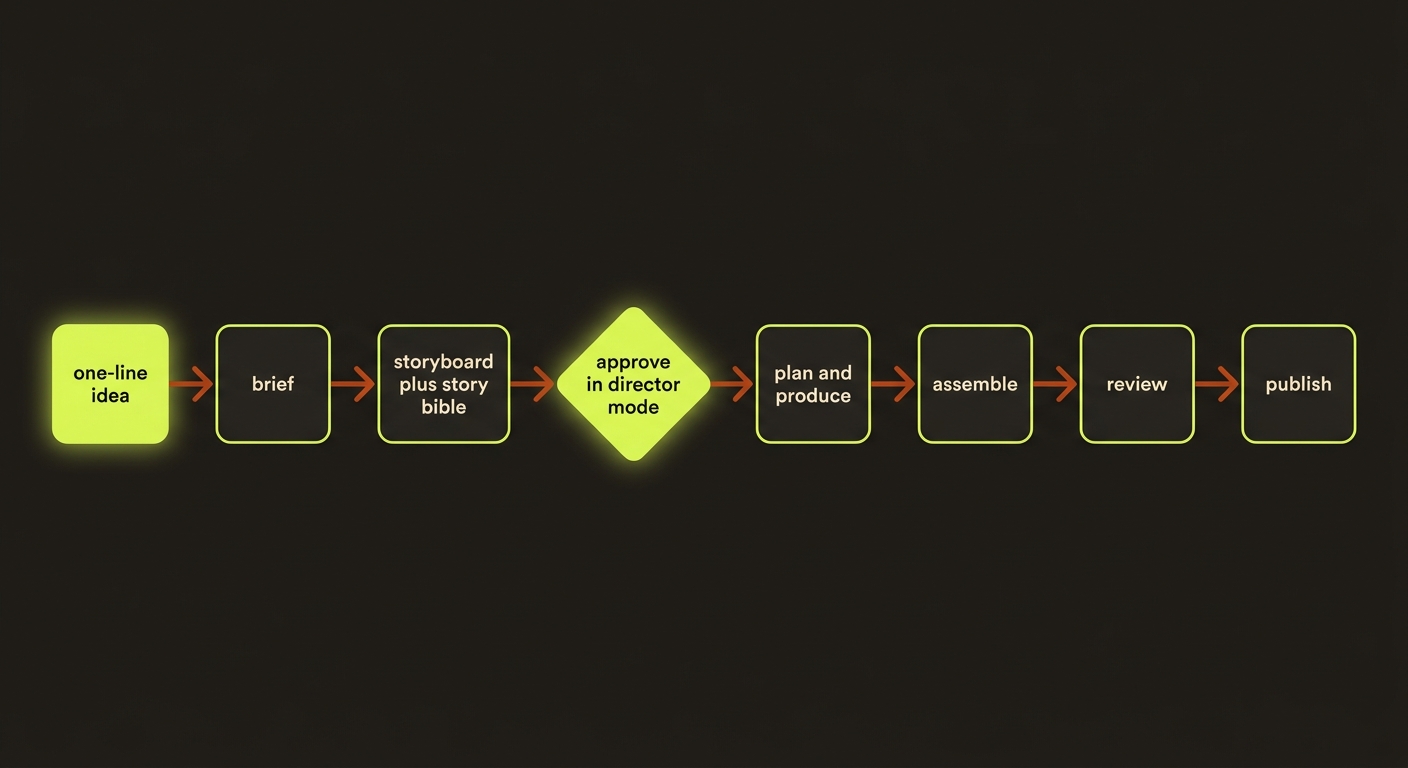
Diagram source (live Mermaid)
The feature map
 Create
- Projects & lifecycle — the
init → brief → storyboard → assets → review → publishladder; every stage writes a file you can replay. - One-shot create —
video createturns a single intent into init, brief, storyboard, and bible in one command. - Brief — turns your one-line idea into a short, structured written brief.
- Brand DNA — captures a brand's look, voice, and palette so every output stays on-brand.
- Storyboard — breaks the brief into scenes with character bindings.
- Storyboard grid — a deterministic 3×3 shot-spec sheet that locks panel order and camera language.
- Story bible — an auto-written, deterministic continuity reference (cast, settings, props, scene timeline) so scenes stay consistent.
 Direct & refine
- Director mode — adds the "stop and approve" gate plus preflight hazard checks before any spend.
- Prompt quality — six Seedance-handbook anti-pattern checks that catch bad prompts before they cost you.
- Multi-shot prompts — timecoded, non-repeating multi-shot cinematic prompts, validated against preset rules.
- Filmmaking prompts — first-class provider-tuned prompt packets with photoreal-by-default cinematography knobs.
 Consistency
- Characters — project character profiles with Go Bananas identity anchors and consistency enforcement.
- Reference sheets — role-tagged, per-scene-bound references (identity, outfit, environment, motion, palette).
- Scene candidates — append-only takes plus a mutable selection ledger, partial reruns, and chain-from-prev.
- Seedance assets — register Asset Library avatars so Seedance locks identity past its real-person filter.
 Generate
- Providers — seven routes across Google Veo, Seedance, Runway, Dreamina and Magnific, with explicit, never-silent routing.
- Execution — submit, poll, ingest outputs, and cancel live jobs through the adapter layer.
- Batch queue — queue many jobs to run unattended overnight, resumable and idempotent.
 Finish
- Assemble — stitches clips, narration, and music into one MP4, then ffprobe-checks the result.
- Review UI — a browser station to approve or regenerate storyboard stills, no code needed.
- Preview portal — standardized HTML pages for your own review, for your client, and for the final showcase and delivery.
- Publish — marks a project done and hands it off — only when the review report says
pass.
 Manage
- Templates & cloning — analyze a reference video into a reusable template, then clone it onto a new brand.
- Portfolio ops —
index,metrics,next-actions,workload,dependencies,report, and CSV export across all projects. - Doctor — per-project and portfolio health checks that name the single safest next step.
- Obsidian — a regenerable vault of dashboards and per-project notes you browse instead of the terminal.
- Telemetry & cost — per-run cost/timing telemetry feeding real
cost-estimatenumbers.
 Plan & agents
- Studio — a plain-English planning front door that prints the exact commands a goal would run, plan-only.
- Agent surface — JSON on non-TTY, stable exit codes, and
vclaw schema --jsonone-call discovery. - Veo CLI — the
vclaw veo *bridge into Google Flow + UseAPI (image upscale, video upscale, GIF, account health).
Artifacts & outputs
Every stage writes a canonical JSON artifact under projects/<slug>/artifacts/ (schemas under schemas/video/ are the source of truth): brief.json, storyboard.json, story-bible.json, asset-manifest.json, readiness.json, execution-plan.json, execution-report.json, scene-candidates.json, scene-selection.json, review-report.json, publish-report.json, and more. Artifacts are append-only via artifacts/history/, and every write emits an event to events/events.jsonl. The on-disk project folder is the source of truth — the commands are a tidy way to work on it.
Tips & gotchas
Rehearse for free
Use documented preview commands such as plain produce --dry-run. Not every command accepts that flag; durable queue compilation and authorisation are separate stages. Discover the installed flags with vclaw schema --json.
One call for agents
Call vclaw schema --json once on first contact, then drive the CLI from that dump. It returns the full command contract, exit-code taxonomy, error codes, and embedded artifact schemas.
Publish only on pass
A handoff is ready only when review-report.json has verdict: "pass" and metrics.publishReady: true. There is no guessing — and a stale director review blocks execute/execute-status even if approval is set.
Real faces trip provider filters
Seedance and Dreamina reject photoreal human faces at content moderation. Lock identity via Seedance Asset Library avatars or describe stylized characters by visual descriptor, not by proper name.
Driving it from an agent
An AI agent (e.g. Claude Code) drives videoclaw by calling vclaw schema --json once, then running vclaw video ... commands and reading the JSON each one prints to stdout. Exit codes tell the agent what to do next: 0 success, 1 bad input (fix and retry), 2 system error (retry later), 3 a spend gate or a queue/adapter refusal (clear it, then retry). A direct produce/execute reports its gates as status: "blocked" on exit 0 with the exact next command in blockers[0]; in director mode that is the produce … --approve run. See agent surface for the full contract, and the deep reference in docs/CLI_REFERENCE.md.