
Story bible
videoclaw treats the story bible as the single machine-readable continuity reference for a project — one artifact that names the cast, settings, props, and the full scene timeline, with per-scene continuity notes, so every downstream generation stage stays consistent across scenes and across regenerations.
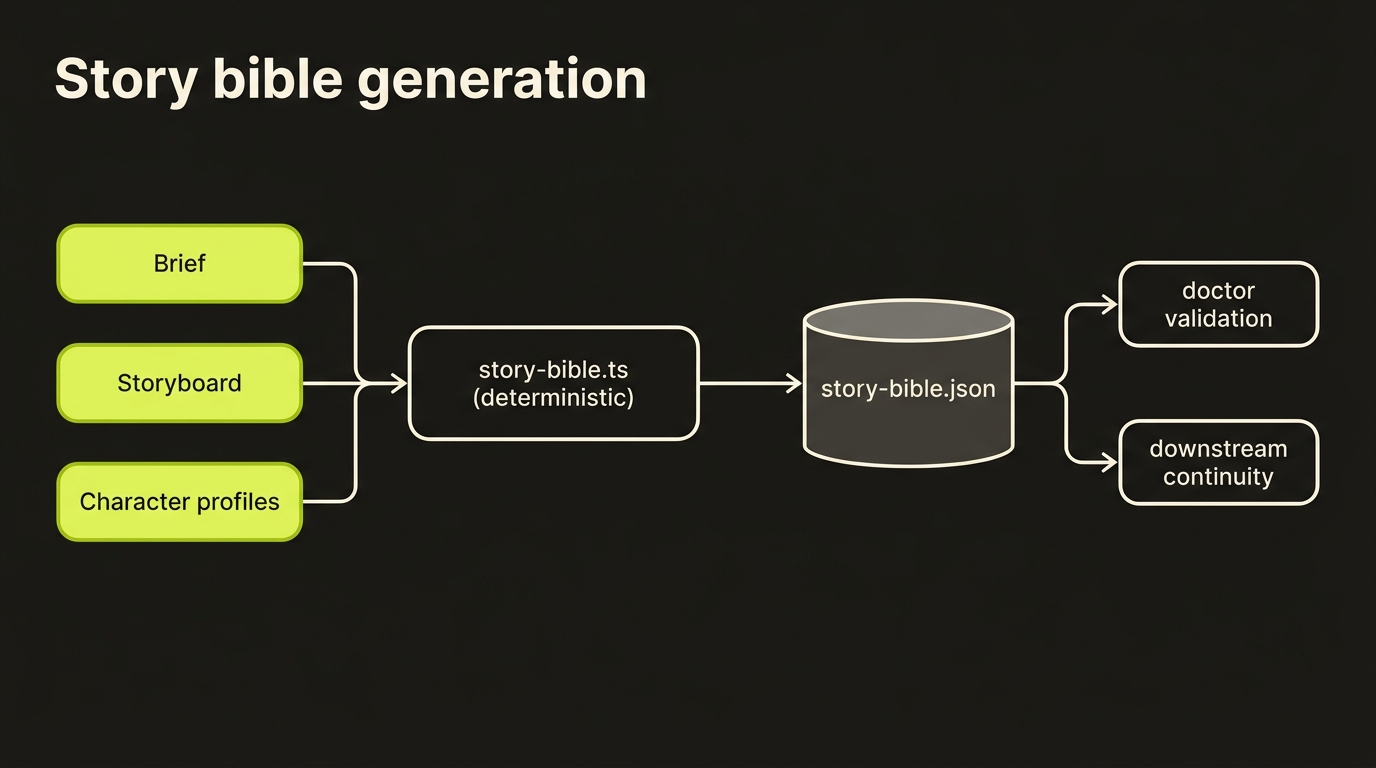
Lock continuity once, read it everywhere. The story bible is derived, not authored: it is rebuilt deterministically from the brief, the storyboard, and the character profiles whenever the storyboard changes. It spends no credits and calls no providers.
It lives next to the other canonical artifacts at projects/<slug>/artifacts/story-bible.json and is validated by the doctor layer like any other canonical artifact.
Why the story bible exists
Long-form and multi-scene video drift in predictable ways once a project has more than a couple of scenes:
- Cast drift — a character described one way in scene 0 is described differently in scene 5, so the provider renders a different person.
- Scattered continuity intent — "keep the same jacket / same kitchen / same lighting" lives only in the operator's head and is re-typed (or forgotten) per scene.
- No single timeline — "when does each scene start and end, and how long is the whole thing?" is recomputable but never written down.
- Regeneration amnesia — re-running the storyboard loses any continuity context that wasn't baked into each scene's prompt.
The story bible fixes this by collapsing brief + storyboard + character profiles into one deterministic continuity document that downstream stages and operators can both read. Because it is a pure derivation, it is always regenerated to match the current storyboard — there is no stale hand-maintained copy to keep in sync.
What it is — a deterministic derivation
buildStoryBibleArtifact (in src/video/story-bible.ts) is pure: given a brief, a storyboard, and the project's character profiles it returns a StoryBibleArtifact. writeStoryBibleForProject is the thin on-disk wrapper — it reads artifacts/brief.json, artifacts/storyboard.json, and characters/characters.json for the project, builds the artifact, and writes it via the artifact store. Both are re-exported from src/index.ts for library callers.
The derivation rules are entirely mechanical:
- Title / intent / production mode come straight from the brief.
- Style, genre, mood, music, aspect ratio are pulled from the brief's
metadata(each is optional — omitted when absent). - Cast is the union of character names referenced across storyboard scenes, names in brief metadata, and registered character profiles, sorted alphabetically. Each character's
description/voiceare filled from the matching profile (preferred) or brief metadata, andreferenceAssetscome from the profile. - Settings and props are read from brief
metadata.storyBible.settings/metadata.storyBible.props(and the top-levelmetadata.settings/metadata.propsfallbacks), keeping only entries with both anameand adescription. - Scenes are the storyboard scenes sorted by
sceneIndex. Each scene's duration comes from the storyboard (falling back to a default derived frommetadata.clipDurationSeconds, ortargetRuntimeSeconds / sceneCount).start/endseconds are accumulated in order to form a contiguous timeline.narrationis the scene's dialogue (or its description), andvisualPrompt/motionPrompt/diegeticAudioare lifted from the scene's prompt block when present. - Continuity notes are synthesized per scene: keep the present characters consistent with the bible, continue cleanly from the previous scene, and maintain the project visual style.
- Timeline is the rolled-up
totalDurationSecondsplus a compact{ sceneIndex, startSeconds, endSeconds }list.
Because every field is computed from the same three inputs, two runs over the same brief + storyboard produce a byte-identical artifact (modulo generatedAt).
When it is generated
The story bible is written automatically at storyboard-write time by every command that produces or rewrites a storyboard — operators never invoke it directly:
vclaw video createvclaw video storyboardvclaw video clone-executevclaw video storyboard-from-clonevclaw video storyboard-reviewvclaw video director-preflight --apply-content-fixes
When director-preflight --apply-content-fixes rewrites the storyboard, the story bible is regenerated afterwards so it reflects the post-fix storyboard rather than the pre-fix one.
The story bible is also regenerated mid-run by vclaw video execute / produce when it applies a director content auto-fix — gated on env DIRECTOR_AUTO_FIX_CONTENT=1 in director mode — mirroring the director-preflight --apply-content-fixes behaviour above.
Each of these commands, after writing the artifact, records it in three places:
- The storyboard checkpoint, under
artifacts['story-bible']. - The
artifact.storyboard.writtenevent payload, asstoryBiblePath. - The command's JSON output, surfaced as
storyBiblePath.
So an operator (or a downstream script) can find the bible either by its fixed path or by reading the storyBiblePath field off the command result.
Where it lands on disk
projects/<slug>/
  artifacts/
    brief.json            # input
    storyboard.json       # input
    story-bible.json      # <- derived continuity bible
  characters/
    characters.json       # input (character profiles, optional)
The artifact is written through the standard artifact store, so it also gets the usual append-only artifacts/history/ snapshot on each write.
Artifact shape
Canonical schema: schemas/video/artifacts/story-bible.schema.json (schemaVersion: 1). Full skeleton:
{
  "schemaVersion": 1,
  "projectSlug": "demo",
  "generatedAt": "2026-05-31T10:00:00.000Z",
  "title": "Demo",
  "intent": "A 15s product tease",
  "productionMode": "director",
  "style": "warm cinematic, shallow depth of field",
  "genre": "product",
  "mood": "upbeat",
  "music": "light electronic bed",
  "aspectRatio": "16:9",
  "defaultSceneDurationSeconds": 5,
  "characters": [
    {
      "name": "Nova",
      "description": "30s engineer, short dark hair, charcoal jacket",
      "voice": "warm, measured",
      "referenceAssets": ["characters/nova/sheet.png"]
    }
  ],
  "settings": [
    { "name": "Loft kitchen", "description": "sunlit open-plan kitchen, oak counters" }
  ],
  "props": [
    { "name": "Hero mug", "description": "matte black ceramic mug with brand logo" }
  ],
  "scenes": [
    {
      "sceneIndex": 0,
      "startSeconds": 0,
      "endSeconds": 5,
      "durationSeconds": 5,
      "description": "open on product on the counter",
      "narration": "Meet the mug that wakes you up.",
      "charactersPresent": ["Nova"],
      "visualPrompt": "close on matte black mug, morning light",
      "motionPrompt": "slow push-in",
      "diegeticAudio": "kettle hiss, distant street",
      "continuityNotes": [
        "Keep Nova visually consistent with the character bible.",
        "Maintain the project visual style: warm cinematic, shallow depth of field."
      ]
    }
  ],
  "timeline": {
    "totalDurationSeconds": 5,
    "scenes": [
      { "sceneIndex": 0, "startSeconds": 0, "endSeconds": 5 }
    ]
  }
}
Field notes:
- Required everywhere:
schemaVersion,projectSlug,generatedAt,title,intent,productionMode,characters,settings,props,scenes,timeline. productionModeisstoryboardordirector.- Optional top-level:
style,genre,mood,music,aspectRatio,defaultSceneDurationSeconds— each emitted only when derivable from the brief. characters[]requirename+referenceAssets(possibly empty);descriptionandvoiceare optional.settings[]/props[]are{ name, description }pairs — both fields required, so partially-specified entries are dropped during derivation.scenes[]requiresceneIndex,startSeconds,endSeconds,durationSeconds,description,narration,charactersPresent, andcontinuityNotes;visualPrompt,motionPrompt, anddiegeticAudioare optional.timelinecarriestotalDurationSecondsand a per-scene{ sceneIndex, startSeconds, endSeconds }list mirroringscenes[].
The schema is additionalProperties: false at every level, so the artifact is a tight contract — no stray fields survive validation.
How the doctor validates it
validateStoryBibleArtifact is registered in the doctor's artifact-validation switch, and story-bible is part of the canonical-artifacts list that doctor-project walks. The doctor performs two checks against projects/<slug>/artifacts/story-bible.json when it exists:
- Schema validation — each issue is surfaced as
story-bible: <message>. - Malformed-JSON guard — if the file exists but does not parse, the doctor raises
story-bible: malformed JSON artifact (...)rather than crashing.
A project that has never produced a storyboard simply has no story-bible.json, and the doctor treats that as a non-issue.
Smoke test
npm run smoke:story-bible-imageThis runs scripts/smoke-story-bible-image-only.mjs end to end on the image-only path: it creates a project, drives the storyboard so the continuity bible is generated, and exercises the content-fix propagation path so the regenerated bible reflects the post-fix storyboard. Like the other smokes it runs npm run build first.
How downstream stages benefit
The story bible is a read surface, not a runtime gate — it never blocks a stage. Its value is that everything past the storyboard has one consistent place to consult for continuity:
- Cast consistency — the
characters[]block gives every scene the same canonical name → description / voice / reference-asset mapping, so prompts describe the same person each time. - Set and prop continuity —
settings[]/props[]keep the same environment and objects described identically across scenes. - Timeline awareness — the rolled-up
timelineand per-scenestart/end/durationseconds give assemble, narration-fit, and review surfaces an authoritative scene-by-scene clock. - Per-scene continuity notes — the synthesized notes ("keep X consistent", "continue cleanly from scene N", "maintain the visual style") are ready to fold into generation prompts.
- Regeneration safety — because the bible is rebuilt every time the storyboard is written (including after director content-fixes), the continuity reference can never silently fall out of sync with the scenes it describes.
Where to read next
docs/CLI_REFERENCE.md— the storyboard-producing commands that emit the bible.docs/ARCHITECTURE.md— where the story bible sits in the layered flow.docs/REFERENCE_SHEETS.md— the input-layer character reference subsystem the bible'sreferenceAssetspoint at.docs/SCENE_CANDIDATES.md— the output-layer per-scene take registry, indexed by the samesceneIndex.src/video/story-bible.ts— the pure derivation plus the project writer.schemas/video/artifacts/story-bible.schema.json— the canonical artifact contract.