
Seedance Asset Library consistency

Lock a character's face once, then keep it identical across every Seedance shot — and clear the "real person" content filter that rejects raw photo references. This is the proven 1080p identity-lock recipe.
What it does
- You supply each character's name and a public http(s) image URL via
--character name:url; the command registers each as a managed Asset Library avatar on the xskill / NEX AI Seedance backend and mints anAsset://URI for each one. - Those
Asset://URIs are what the officialark/seedance-2.0model uses to keep a character's identity consistent — raw photoreal image URLs both trip the "real person" content filter and fail to lock identity, so naming a character or pasting a photo simply does not work. Managed assets do. - Groups your characters under a named Asset group so a whole cast registers together.
- Waits until each asset has synced to the international Ark profile (
sync_status: active) before returning — Ark rejects assets that are stillprocessing. - Writes the minted URIs to a project artifact that the execution layer reads automatically: at submit time, each scene's characters resolve to their
Asset://URI with zero extra wiring. - Degrades gracefully: a project with no asset artifact just runs with description-only references instead of failing.
How to use it
You can invoke the CLI as vclaw ...; the examples below use the built-in node dist/cli/vclaw.js ... form.
export SUTUI_API_KEY=sk-... # the Seedance Asset Library / xskill API keySets the API key the Asset Library client authenticates with.
node dist/cli/vclaw.js video seedance-register-assets --project my-film --character "Nina:https://.../nina.png" [--character "Tev:https://.../tev.png"] [--group my-film-cast]Registers each --character name:url image as an Asset Library avatar under a group, waits for international sync, and writes the asset artifact. --group defaults to <slug>-cast. Each image must be a public http(s) URL.
node dist/cli/vclaw.js video execute --project my-filmProduces on ark/seedance-2.0. The project must already be configured for the seedance-direct route (via its provider platform / execution profile); when on that route each scene's characters are auto-resolved to their Asset:// URIs from the artifact — no manual reference paths.
How it flows
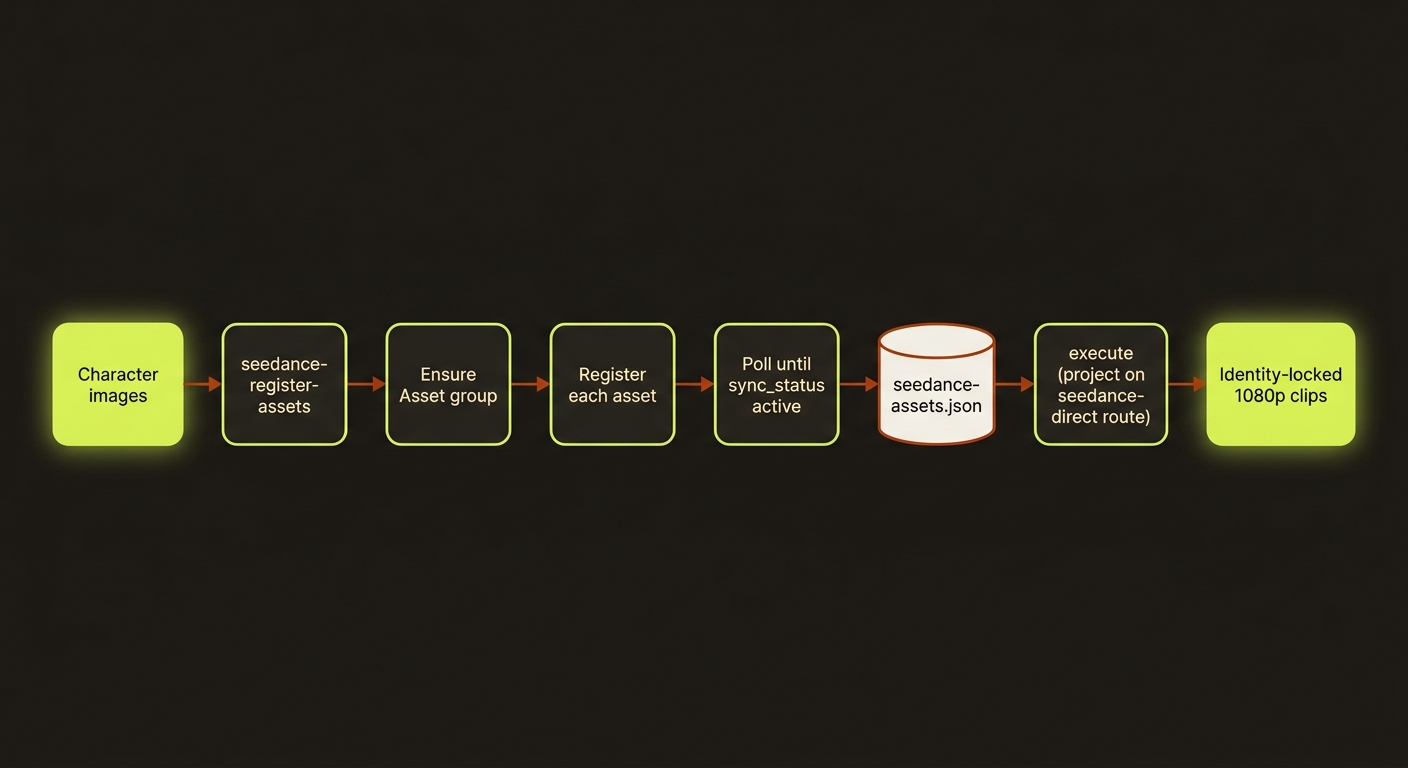
Diagram source (live Mermaid)
Artifacts & outputs
projects/<slug>/artifacts/seedance-assets.json— canonical artifact (schemaschemas/video/artifacts/seedance-assets.schema.json). Shape:
{
  "schemaVersion": 1,
  "projectSlug": "my-film",
  "groupName": "my-film-cast",
  "generatedAt": "2026-06-01T12:00:00.000Z",
  "assets": [
    { "name": "Nina", "assetId": "...", "assetUri": "Asset://...", "intlAssetUri": "asset://..." }
  ]
}
readSeedanceAssets() reads this back into a name → Asset:// URI map for the execution layer. A present-but-malformed file is not swallowed — corruption surfaces as a parse error.
Tips & gotchas
TIP
Describe characters by visual descriptor, not proper names, in your prompts — names do not survive across generations. The Asset:// reference is what carries identity; the prose just sets the scene.
WARNING
Registration blocks until every asset reaches sync_status: active (default up to ~45s per asset, 30 polls at 1.5s). If an asset never syncs, the command throws — re-run rather than submitting with a half-synced cast.
TIP
Each --character image must be a publicly reachable http(s) URL — the handler rejects anything not matching ^https?://. Host the image somewhere the Asset Library backend can fetch it before registering.
WARNING
Do not feed raw photoreal face URLs as reference_images on Ark Seedance — they trip the real-person content filter and do not lock identity. Always go through the Asset Library.
Driving it from an agent
seedance-register-assets exits non-zero (throwing) if SUTUI_API_KEY is missing or any asset fails to reach active sync — treat a clean exit as "cast is locked and the artifact is written," then run execute --project <slug> (with the project already on the seedance-direct route) and let auto-resolution wire the references.
See also: Reference sheets · Story bible · Multi-shot prompts