
CLI Reference
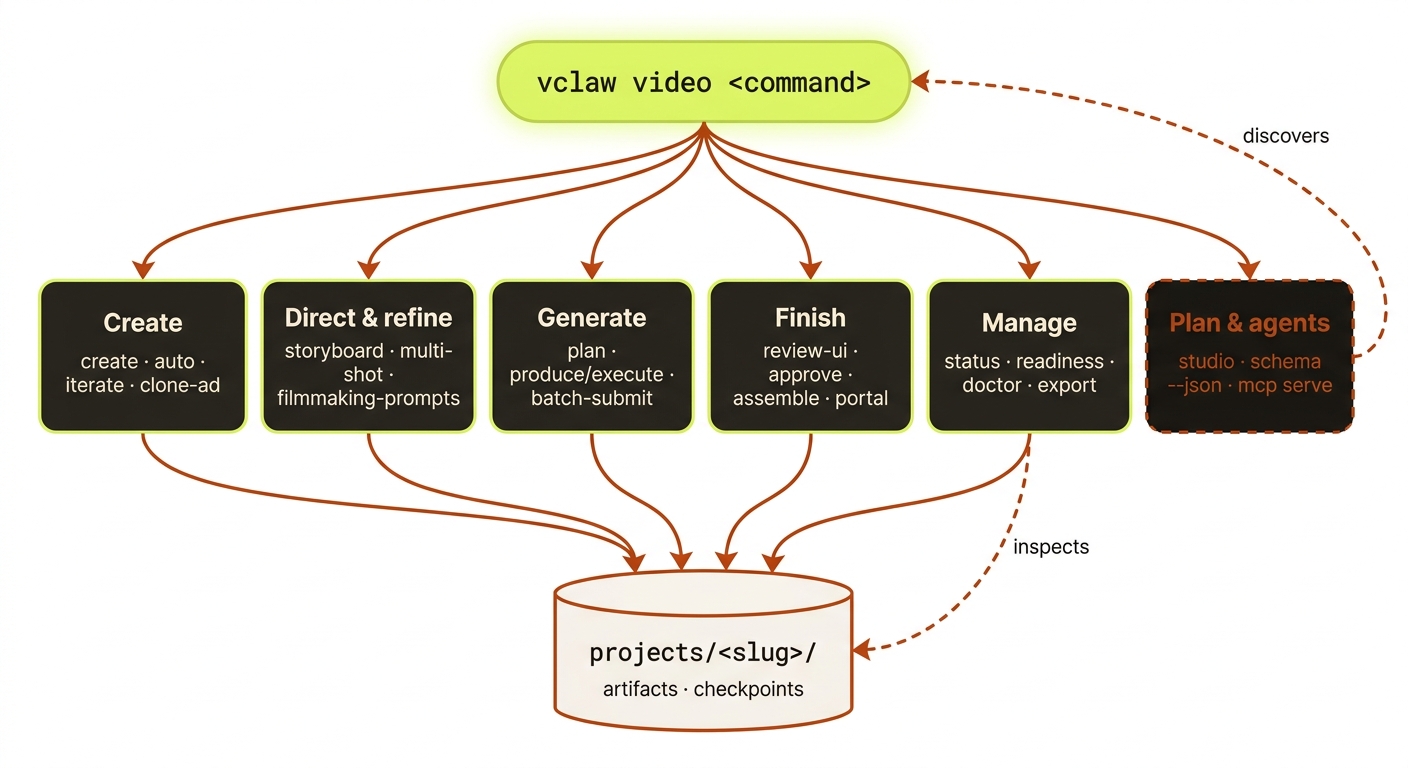
Diagram source (live Mermaid)
Agent-friendly surface (v3)
These four properties hold across every vclaw subcommand. They are the contract external agents (Claude Code / Codex / Antigravity / Cursor) can rely on.
1. JSON on non-TTY
When stdout is not a TTY (i.e., piped to another command or captured by an agent), every subcommand writes JSON to stdout. Human-readable formatting is reserved for interactive TTY use. Progress chatter (spinners, status updates) always goes to stderr.
# TTY (human): pretty-printed
vclaw video providers

# Non-TTY (agent / pipe): newline-terminated JSON
vclaw video providers | jq '.routes[].routeId'
2. Exit-code taxonomy
| Code | Name | Meaning |
|---|---|---|
| 0 | SUCCESS | Command completed without errors. |
| 1 | USER_ERROR | Bad input — invalid flag, missing argument, validation failure. Retrying with the same input will fail the same way. |
| 2 | SYSTEM_ERROR | Environmental failure — provider down, disk full, missing env var. Retry may succeed. |
| 3 | GATE | Gated by an approval / readiness check (e.g., director storyboard.md not approved yet). The command CAN succeed once the gate clears. |
Agents decide retry strategy from the exit code. Code 1 means "fix the input and retry"; code 2 means "investigate the system and try later"; code 3 means "do the gate-clearing work first, then retry."
3. Stable error codes
On a non-zero exit from a thrown error, stdout contains a JSON envelope with a stable string code field. Three verdict commands are the exception: keyframe-qc, show-preflight and execute-cancel exit 3 beside their NORMAL result (no envelope), so read the result's own status field there. The full catalog lives at schemas/video/errors.json and the TS source-of-truth is src/video/errors.ts ALL_ERROR_CODES.
{
  "code": "project_not_found",
  "message": "No workspace at projects/foo/",
  "details": { "slug": "foo" }
}
Codes are stable — once shipped, they never change name. New codes get added; old ones may get a deprecation note but the string stays working for old agents.
3b. Version
vclaw --version # or: vclaw -vPrints the bare version string and a newline, then exits 0 — the same value vclaw schema --json reports as version. This is the one command that does not follow the JSON-on-non-TTY rule above: the output is plain text either way, so a script can read it without a parser. It is the first command to run after an install, and the only one that needs neither a project nor any configuration.
4. Single-call discovery: vclaw schema --json
Returns the full v3 contract in one call:
version: the v3 release this dump comes fromcommands: array of{name, usage, flags, aliases?}exitCodes: the 0/1/2/3 taxonomyerrorCodes: the full ALL_ERROR_CODES listartifactSchemas: everyschemas/video/artifacts/*.schema.jsonembedded by name
Agents should call this once on first contact, then drive the CLI from the dump without further introspection. Cheaper than per-command --help parsing.
vclaw schema --json | jq '.commands | map(.name)'Noun-verb command conventions
v3 prefers noun-verb command shape (vclaw video character list) over hyphenated forms (vclaw video character-list). Both work for the 38 commands that have a noun-verb spelling registered in NOUN_VERB_ALIASES (src/cli/vclaw.ts): the character, reference-sheet, candidates, storyboard, review, execute, doctor, export/sync obsidian, verify, show, stock, publish families plus consistency audit, motion qc, keyframe qc, voice clone and export csv. Every other command has only its kebab form. The canonical name in vclaw schema --json is the kebab form.
Declared back-compat aliases (a second spelling that runs the same handler) are listed per command as aliases in the schema; execution-plan → plan and execute → produce are supported spellings, the rest are notice-only spellings on their way out (see Command lifecycle):
vclaw schema --json | jq '.commands[] | select(.aliases) | {name, aliases, deprecated, deprecatedAliases}'vclaw veo * subcommands keep the Bun CLI's colon-separated form (useapi:accounts list, not useapi accounts list). This matches the underlying bun run flow.ts surface. Aliasing the colon to a space would create confusion for users with existing scripts.
Studio Planner
vclaw studio is the human-friendly planning front door. It maps goals such as presenter video, UGC campaign, music video, copy-reference, review, and publish to deterministic CLI commands.
vclaw studio [--dry-run] [--goal <goal>] [--project <slug>] [--intent <text>] [--input <path-or-url>] [--client <name>] [--duration <seconds>] [--write-session] [--execute] [--confirm-spend] [--auto-approve-storyboard] [--from-step <id>]Supported goals:
create-videocopy-referencepresenter-videomusic-videougc-campaignexisting-projectreview-regeneratepublish-deliverbrand-campaigncharacter-video
Studio is plan-only by default: it returns a command plan and optional studio-session.json artifact, but runs nothing.
Add --execute to run the emitted plan — Studio shells out to the same vclaw video … commands (it does not re-implement orchestration). Three modes, chosen at run time:
--execute— dry: free steps + spend steps with--dry-run; a spend subcommand lacking--dry-runis refused (blocked-spend). Spends nothing. A step that clears the director gate in its own argv (produce --approve, or the deprecatedapprove) is refused (blocked-approval) in every mode short of--confirm-spend --auto-approve-storyboard.--execute --confirm-spend— real render, human-gated: promotes the dry spend steps to real (strips--dry-run); the render still needs the storyboard approved out-of-band (the runner stripsVIDEOCLAW_APPROVE_STORYBOARD).--execute --confirm-spend --auto-approve-storyboard— unattended render: also setsVIDEOCLAW_APPROVE_STORYBOARDso one command runs through the real render with no human checkpoint.
It fails fast (a blocked/failed step stops with no partial spend) and --from-step <id> resumes after an approval. The result is reported under an execution block (mode, per-step status, stopReason, a dry-mode hint). See docs/STUDIO.md.
Creator UI
A local, loopback-only product shell over the same Studio planner, plus a zero-key demo project builder for trying the review portals without any provider.
vclaw video creator-ui
vclaw video creator-ui [--root <path>] [--host 127.0.0.1] [--port <port>] [--dry-run]Launch the secure local Creator UI product shell. It binds loopback only, uses a one-time tokenized URL plus HttpOnly session cookie, and exposes closed typed APIs for canonical Studio planning, project inspection, Pexels stock search/import, and Studio execution bound to a plan digest. Mutations require same-origin proof; execution is dry by default and spend-gated when confirmed. There is no arbitrary command endpoint.
vclaw video creator-demo
vclaw video creator-demo --project <slug> [--intent <text>] [--platform generic|youtube-shorts|tiktok|instagram-reels] [--aspect-ratio 16:9|9:16|1:1] [--duration <seconds>] [--root <path>]Create a complete zero-key local demo: project, brief, three-scene storyboard, portrait placeholder media, asset manifest, readiness and cost artifacts, plus browser-ready review/preview/run portals. Makes no provider or network calls and does not render a final MP4.
Veo (Bun bridge)
The vclaw veo * subcommand family bridges to the Bun-based vclaw-cli/flow.ts for Google Flow access. Bun >=1.3.5 and the sidecar's own dependencies are required; the root npm install does not install them. In a source checkout, run bun install --cwd vclaw-cli --frozen-lockfile. For an installed package that cannot be modified, copy its bundled vclaw-cli/ to a writable directory, install there, and set VCLAW_VEO_CLI_ROOT to that directory. Project workspace selection is separate from the sidecar application directory. See the installation guide for the complete optional-runtime setup.
Standard verbs
| Command | Purpose |
|---|---|
vclaw veo status [batchId] | Show batch status. |
vclaw veo list | List all batches. |
vclaw veo history [--limit <n>] | Recent job history. |
vclaw veo resume [batchId] | Resume a paused batch. |
vclaw veo reset | Reset failed jobs to pending. |
vclaw veo cancel | Cancel current batch. |
UseAPI verbs
| Command | Purpose |
|---|---|
vclaw veo useapi:accounts list|add | Manage useapi.net accounts. |
vclaw veo useapi:captcha list | --provider <name> --key <key> | CAPTCHA providers. |
vclaw veo useapi:health | Account health + history. |
vclaw veo useapi:image --image-prompt "..." | Generate images. |
vclaw veo useapi:image:upscale --media-id <id> --resolution 2k|4k | Upscale images. |
vclaw veo useapi:gif --media-id <id> --output-file <path> | Video → GIF (free). |
vclaw veo useapi:upscale --media-id <id> --resolution 720p|1080p|4k | Upscale videos. 720p/1080p are FREE on a paid plan; 720p promotes a clip generated at --video-resolution 360p, and a 360p clip can also go straight to 1080p. |
See vclaw schema --json | jq '.commands[] | select(.name | startswith("veo "))' for the canonical list.
The legacy standalone form bun run vclaw-cli/flow.ts <verb> still works in v3.0 but is being deprecated. Use vclaw veo * going forward.
Project lifecycle
vclaw video init <slug> [--root <path>] [--mode storyboard|director]
vclaw video create "<intent>" [--project <slug>] [--root <path>] [--production-mode storyboard|director] [--title <title>] [--scenes <count>] [--style <preset>] [--color-grading <preset>] [--platform <name>] [--gb-character <Name:ID> ...] [--import-library-characters] [--auto-create-characters <json-path>] [--api-url <url>] [--aspect-ratio 16:9|9:16|1:1] [--quality fast|quality] [--resolution 720p|1080p] [--audio on|off] [--outputs 1-4] [--apply-content-fixes] [--execute] [--dry-run]
vclaw video auto "<intent>" [...same flags as create]
vclaw video iterate "<intent>" [...same flags as create]
vclaw video run-pipeline "<intent>" [...same flags as create]
vclaw video brief --project <slug> --title <title> --intent <intent> [--root <path>] [--mode storyboard|director] [--platform <name>] [--aspect-ratio 16:9|9:16|1:1] [--quality fast|quality] [--resolution 720p|1080p] [--audio on|off] [--outputs 1-4]
vclaw video storyboard-template-list
vclaw video storyboard-template-show --name <template-id>
vclaw video storyboard --project <slug> (--scene <text> [--scene <text> ...] | --template <template-id> [--environment <text>] [--character-a <name>] [--character-b <name>]) [--duration <seconds>] [--scene-character <sceneIndex:name> ...] [--film-plan <json-path>] [--root <path>]
vclaw video assets --project <slug> (--asset <kind:path[:sceneIndex][:backend]> [--asset ...] | --text-only) [--root <path>]
vclaw video review-ui --project <slug> [--root <path>] [--host <host>] [--allow-remote] [--port <port>] [--ui-path <path>] [--dry-run]
vclaw video review-autopilot --project <slug> [--root <path>] [--template <template-id>] [--character <name>] [--run-id <id>]
vclaw video storyboard-grid --project <slug> [--root <path>] [--output <path>] [--width <px>] [--height <px>] [--dry-run]
vclaw video portal --project <slug> [--root <path>] [--client <name>] [--run <id>] [--surface edit|review|client-review|preview|compare|run|index]
vclaw video portal-index [--root <path>] [--client <name>] [--output <path>]
vclaw video publish-preview --project <slug> --client <name> --bucket <bucket> [--root <path>] [--run <id>] [--surface edit|review|client-review|preview|compare|run|index] [--public-base-url <url>] [--wrangler-bin <path>] [--dry-run]
vclaw video publish-portal-index --bucket <bucket> [--root <path>] [--client <name>] [--public-base-url <url>] [--wrangler-bin <path>] [--dry-run]
vclaw video review --project <slug> [--verdict pass|retry|fail] [--film-edit <json-path>] [--film-review <json-path>] [--finding <text> ...] [--root <path>]
vclaw video publish --project <slug> --status ready|published|blocked [--final-output <path>] [--note <text> ...] [--root <path>]
--duration <seconds> sets durationSeconds on every --scene (whole seconds, > 0); a --template scene keeps its own. It is the one place the standard path states how long a clip is: without it most routes assume 8 s, and seedance-modelark, which bills per second, refuses the scene rather than pick a length.
video assets — the manifest gate
readiness treats asset-manifest as a required artifact, so plan and produce stay blocked (Missing required artifacts: asset-manifest) until this stage has run — including for a pure text-to-video project that references no files at all. --text-only is the declaration for that case: it writes { projectSlug, assets: [], textOnly: true } and clears the blocker without inventing an entry. It is mutually exclusive with --asset.
The manifest also feeds operation-kind inference: with no manifest on disk, plan classifies a project with no images as image-to-video. Declaring the manifest, empty or not, lets it settle on text-to-video.
Each --asset spec is kind:path[:sceneIndex][:backend]. The allowed kinds are exactly image, video, audio, subtitle, and other; anything else fails with invalid_flag_value rather than being coerced to other. A local path that does not exist is an error too, so a typo can no longer satisfy the readiness gate with a file that was never there. Paths carrying a URI scheme (https://, Asset://, gobananas://, …) are exempt from that existence check and keep their internal colons; the optional trailing :sceneIndex binds the asset to one storyboard scene.
A local path is stored absolute: a path typed relative to the directory you ran the command from is resolved there and then, so the render, the upload and the run contract's byte measurement all open the same file no matter where a later command runs. A refusal names the resolved path it looked for.
For production image-to-video handoff, prefer review-ui or review-autopilot. The simple review --verdict pass path is for projects that already have equivalent review evidence outside the browser station. Publishing remains blocked unless the saved review-report.json has verdict: "pass" and metrics.publishReady: true.
Preview review and delivery portal
The preview portal is the standardized static HTML layer for generated video projects. It replaces one-off preview.html/review.html variants with repeatable surfaces:
Staging: the portal discovers assets under the project directory —
projects/<slug>/final/{videos,images,audio}(and top-levelvideos/,images/,characters/, …). It does not scan afinal/at the workspace root, so finals staged there produce an empty preview. Put the finished cut, stills, and soundtrack underprojects/<slug>/final/before building the surface.
Portal rendering reads template or previewTemplate from project.json and uses the built-in registry for music-video, story-film, documentary, product-ad, sports-recap, and generic-video labels/section ordering. It also reads project-scoped image entries from artifacts/asset-manifest.json and renders them as generation inputs; Seedance-backed images appear under Seedance Input Frames for music-video projects so reviewers can inspect the exact start/upscaled frame being sent to Seedance 2.
| Command | Output |
|---|---|
vclaw video portal --project <slug> | Writes review.html, preview.html, and the live run.html dashboard in the project directory. |
vclaw video portal --project <slug> --surface run | Writes only run.html — the live run dashboard (per-generation status badges + diff-vs-contract alarm + playable in-progress clips + event log, auto-refreshing). |
vclaw video portal --project <slug> --surface compare | Writes compare.html for version/run comparison. |
vclaw video portal-index | Writes projects/index.html across all projects. |
vclaw video portal-index --client <name> | Writes projects/clients/<client>/index.html for that client only. |
vclaw video publish-preview --dry-run ... | Prints the Cloudflare R2 upload plan without side effects. |
vclaw video publish-preview ... | Uploads referenced files with wrangler r2 object put and records a publish audit event. |
vclaw video publish-portal-index --client <name> ... | Uploads a client index to clients/<client>/index.html with links into each uploaded run folder. |
Live run dashboard (--surface run)
run.html is a first-class portal surface and the live operations view for a render: it renders one card per generation (storyboard scene) showing a STATUS badge (done / rendering / pending / failed), the provider job id and any provider error, the input keyframe, a playable in-progress clip (outputs/scene-N.mp4) once it lands, the exact submit prompt + contract, and a RED diff-vs-contract alarm when the payload that was actually submitted has diverged from the current contract (the class of bug where an @tag silently hijacks the references). It also surfaces a spend estimate chip, an event log (events/events.jsonl), per-card copy-command buttons (re-roll / approve), and a Show › Episode header from show-bible.json when present. The page auto-refreshes via a <meta http-equiv="refresh"> so an open tab repaints against fresh on-disk state.
The diff alarm is backed by artifacts/run-contract.json (schema schemas/video/artifacts/run-contract.schema.json), the frozen snapshot of the exact resolved submit payload per scene that produce/execute persists at submit time. Besides the prompt and the resolved reference paths, a scene freezes the packet's slot plan (submittedReferenceSlots: slot, role, label, path, in order) and the provider settings it was sent with: submittedResolution, submittedPromptPacketVariant, submittedEndKeyframePath, submittedVoicePreset, submittedReferenceVideoMediaId, submittedFirstFrame, submittedCharacterRefs. The dashboard re-derives the slot plan, duration, resolution and variant from the current filmmaking-prompts.json, so any of those moving after submit paints the alarm with diverged: resolution (or durationSeconds, promptPacketVariant, referenceSlots) and the reason "submitted provider settings diverged from the contract"; the rest are resolved inside the execution runtime and are recorded as provenance only. A contract written before these fields existed carries none of them and never alarms on them. A scene also freezes submittedReferenceHashes: the sha256 of every local file it submits (references and the end keyframe; an Asset:// URI or a hosted URL is recorded as remote-unverified, an absent file as missing). Everything else in the contract identifies a reference by its PATH, so a keyframe replaced with different pixels at the same path used to read as unchanged; the dashboard now re-measures those paths and paints diverged: referenceBytes — including for a project with no filmmaking-prompts.json at all, where there is no prompt to diff. The baseline is the last submit: every run rewrites the contract, so a file swapped between a dry-run review and the live submit is frozen with its new bytes. What this catches is a file changed after the submit the dashboard is showing. run.html is regenerated automatically on every produce/execute and on every execute-status poll, so you never re-runs the portal command by hand; it is also part of the default vclaw video portal surface set (review + preview + run). Set VCLAW_NO_RUN_SURFACE=1 to skip the automatic regeneration.
Example local generation:
vclaw video portal \
  --project 2026-05-27_dhuaan-music-video \
  --root /path/to/video-workspace \
  --client "Acme Studios" \
  --run run-002
Example publish dry-run:
vclaw video publish-preview \
  --project 2026-05-27_dhuaan-music-video \
  --root /path/to/video-workspace \
  --client "Acme Studios" \
  --run run-002 \
  --surface preview \
  --bucket videoclaw-reviews \
  --public-base-url https://reviews.example.com \
  --dry-run
The publish plan includes the HTML file plus local src/href references, content types, R2 keys, SHA-256 hashes, and public URLs when a base URL is provided. Running without --dry-run requires wrangler to be installed and authenticated. --wrangler-bin can point to a specific Wrangler executable when running from automation.
Project surfaces publish under clients/<client>/<project>/runs/<run>/<surface>.html. Published client indexes link to those run folders, so a client with six generations can open clients/<client>/index.html and choose among all six project/run previews.
vclaw video create is the clean-room front door for the legacy “one command to start a project” mental model. In its current form it:
- initializes the project when needed
- writes canonical
briefandstoryboardartifacts - scaffolds storyboard-seed assets for execution planning
- records Go Bananas character bindings as project character profiles
- can import exact-name Go Bananas matches from the story intent when
--import-library-charactersis present - can auto-create missing Go Bananas characters from a JSON seed file via
--auto-create-characters <json-path> - carries execution-profile overrides (
aspect-ratio,quality,resolution,audio,outputs) into the canonical brief and status surfaces - generates
storyboard.mdautomatically fordirectormode - optionally hands off to the existing
executepath when--executeis present
For director mode, this means the first-run path now supports the same storyboard-first approval pattern as the older workflow surface, while still writing canonical clean-room artifacts underneath.
vclaw video auto, vclaw video iterate, and vclaw video run-pipeline are thin creator-mode drivers over video create (same flag surface) with opinionated defaults:
vclaw video auto "<intent>" [...]— defaults--production-mode directorwhen neither--modenor--production-modeis passed; otherwise identical tocreate.vclaw video iterate "<intent>" [...]— defaultsdirectormode AND force-appends--execute, so it re-generates and immediately runs the project in one shot.vclaw video run-pipeline "<intent>" [...]— the full create→execute pipeline driver: defaultsdirectormode and--execute;--dry-runis supported to plan the run without submitting.
Story bible (continuity reference)
Every storyboard-producing command now also emits a deterministic continuity bible — projects/<slug>/artifacts/story-bible.json (schema schemas/video/artifacts/story-bible.schema.json, schemaVersion: 1). It is derived from the canonical brief + storyboard + character profiles (characters/characters.json); it spends no credits and calls no providers. The commands that write it are video create, video storyboard, video clone-execute, video storyboard-from-clone, video storyboard-review, and video director-preflight --apply-content-fixes (the bible is regenerated after director content-fixes are applied, so it always reflects the corrected storyboard).
The artifact gives downstream generation one machine-readable reference so scenes and regenerations stay consistent — cast (characters[] with referenceAssets), settings[], props[], a per-scene timeline (scenes[] with startSeconds/endSeconds/durationSeconds, charactersPresent, visualPrompt/motionPrompt/diegeticAudio, and continuityNotes[]), and a rolled-up timeline.
It is recorded in the storyboard checkpoint under artifacts['story-bible'], carried on the artifact.storyboard.written event payload as storyBiblePath, and surfaced as storyBiblePath in the command's JSON output. doctor-project validates it (added to the canonical-artifacts list, plus a malformed-JSON check on artifacts/story-bible.json).
End-to-end smoke (create → storyboard continuity + content-fix propagation, image-only path):
npm run smoke:story-bible-imageAnalysis and templates
vclaw video analyze --project <slug> --source <path-or-url> [--title <title>] [--beat <text> ...] [--keep <text> ...] [--change <text> ...] [--var <text> ...] [--auto] [--processing static|agentic] [--gemini-model <id>]
vclaw video analyze-template --project <slug> --source <path-or-url> [options] [--auto]   # (deprecated since 3.0.0-alpha.13; use analyze)
vclaw video prompt-lib-list
vclaw video prompt-lib-show --name <reference-name> [--root <path>]
vclaw video template-create --project <slug> --name <template-name> [--root <path>]   # (deprecated since 3.0.0-alpha.13; use template-save)
vclaw video template-save --project <slug> --name <template-name> [--root <path>]
vclaw video template-list [--root <path>]
vclaw video template-show --name <template-name> [--root <path>]
vclaw video template-validate --name <template-name> [--root <path>]
vclaw video clone-ad --template <template-name> --project <slug> --intent <text> [--root <path>] [--mode storyboard|director] [--platform <name>] [--aspect-ratio 16:9|9:16|1:1] [--quality fast|quality] [--resolution 720p|1080p] [--audio on|off] [--outputs 1-4] [--dry-run]   # (deprecated since 3.0.0-alpha.13; use clone-execute)
vclaw video clone-plan --template <template-name> --project <slug> --intent <text> [--root <path>]
vclaw video clone-init --template <template-name> --project <slug> --intent <text> [--root <path>] [--mode storyboard|director] [--platform <name>] [--aspect-ratio 16:9|9:16|1:1] [--quality fast|quality] [--resolution 720p|1080p] [--audio on|off] [--outputs 1-4]
vclaw video storyboard-from-clone --project <slug> [--root <path>] [--mode storyboard|director]
vclaw video clone-execute --template <template-name> --project <slug> --intent <text> [--root <path>] [--mode storyboard|director] [--platform <name>] [--aspect-ratio 16:9|9:16|1:1] [--quality fast|quality] [--resolution 720p|1080p] [--audio on|off] [--outputs 1-4] [--dry-run]
When --auto is present on analyze / analyze-template, the clean-room repo uses the Gemini HTTP path to fill the analyze artifact automatically. It reads keys from GEMINI_API_KEYS, GOOGLE_API_KEYS, or GOOGLE_API_KEY, and you can override the endpoint with VCLAW_GEMINI_API_ENDPOINT. When --source is a readable local video file, --auto now samples ~6 JPEG frames spread evenly across the whole clip (a frame every duration / 6 seconds via ffmpeg's fps filter — the clip duration is probed when not supplied; overridable with VCLAW_FFMPEG_BIN) and sends them to Gemini so the analysis is grounded in the actual footage start-to-end, not just the opening ~20s. URL sources, directory paths, and any frame extraction that fails stay metadata-only and fall back to text-only analysis (clips whose duration cannot be determined fall back to ffmpeg's head-clustered thumbnail sampling).
--auto --processing agentic (or VCLAW_GEMINI_VIDEO_PROCESSING=agentic; the flag wins) switches to Gemini's agentic video understanding: the whole video goes to the Interactions API (POST /v1beta/interactions) by reference and the model fetches transcript, frame windows and audio on demand instead of receiving six sampled frames. A local file is uploaded through the Gemini Files API first (2 GiB cap enforced before any byte moves; per Google's Files API docs the file is visible only to the key that uploaded it and expires server-side after 48 h — analyze does not delete it); a public YouTube URL is passed straight through (watch, shorts, live, embed, youtu.be); any other URL is refused with invalid_flag_value before any spend — download it first. The model defaults to gemini-3.8-flash (--gemini-model <id> or VCLAW_GEMINI_AGENTIC_MODEL; only gemini-3.8-flash, 3.7-flash, 3.6-flash and 3.5-flash-lite are agentic-capable — extend the allowlist with VCLAW_GEMINI_AGENTIC_MODELS=a,b; the static path keeps gemini-3.5-flash). The artifact gains analysis: { processing, model } and a usage block (inputTokens, outputTokens, thoughtTokens, totalTokens, …) so the two modes can be compared on spend; a static run writes neither key. The Interactions and Files endpoints share one base override, VCLAW_GEMINI_API_BASE (VCLAW_GEMINI_API_ENDPOINT stays a generateContent URL for the static path). Live contract: docs/audits/2026-09-16-gemini-agentic-contract.md.
Analyze artifacts can now carry optional clone-planning fields:
styleLayersbeatCompressiontechnicalNotesdialogueNotes
Saved templates preserve those fields and clone plans copy them forward with a workflowChecklist so you can keep the reusable mechanism while replacing brand, product, audience, proof, and offer details.
Publish packaging
Local-only packaging for a reviewed export: explicit metadata (nothing invented, synthetic-media disclosure required) and a versioned upload package with checksums. Neither command uploads anything.
vclaw video publish-metadata
vclaw video publish-metadata --project <slug> --title <text> --visibility private|unlisted|public --synthetic-media yes|no [--description <text>] [--tag <tag> ...] [--captions <path>] [--thumbnail <path>] [--root <path>]Write explicit local publish metadata for reviewed export packages. This has no external side effects and never invents title, visibility, or synthetic-media disclosure.
vclaw video publish-package
vclaw video publish-package --project <slug> --platform youtube-shorts|tiktok|instagram-reels [--final-output <path>] [--metadata <path>] [--captions <path>] [--thumbnail <path>] [--root <path>]Build a versioned local upload package for a publish-ready reviewed project. Writes final.mp4, metadata.json, optional captions/thumbnail, manifest.json, and SHA256SUMS without uploading.
Project management
vclaw video set-meta --project <slug> [--root <path>] [--owner <name>] [--priority low|medium|high|critical] [--due YYYY-MM-DD] [--tag <value> ...] [--blocked-by <slug> ...] [--blocked-reason <text>]
vclaw video set-execution-profile --project <slug> [--root <path>] [--aspect-ratio 16:9|9:16|1:1] [--quality fast|quality] [--resolution 720p|1080p] [--audio on|off] [--outputs 1-4] [--veo-model fast|quality|lite|free|omni-flash] [--veo-resolution 360p|720p|none]
vclaw video character-add --project <slug> --name <name> [--gb-id <id>] [--description <text>] [--costume <text>] [--ref <path> ...] [--note <text> ...] [--root <path>]
vclaw video character-auto-create --project <slug> --input <json-path> [--root <path>] [--api-url <url>] [--no-sheet] [--sheet-preset <id>] [--dry-run]
vclaw video environment-auto-create --project <slug> --input <json-path> [--root <path>] [--api-url <url>] [--dry-run]
vclaw video character-import-library --project <slug> --intent "<text>" [--root <path>] [--api-url <url>]
vclaw video character-list --project <slug> [--root <path>]
vclaw video character-show --project <slug> --name <name> [--root <path>]
vclaw video character-consistency --project <slug> [--root <path>]
vclaw video consistency-audit --project <slug> [--root <path>] [--json]
vclaw video motion-qc --project <slug> [--root <path>] [--samples <2-24>]
vclaw video clip-qc --project <slug> [--samples <2-24>] [--root <path>]
vclaw video keyframe-qc --project <slug> [--root <path>] [--json]
vclaw video find-library --intent "<text>" [--api-url <url>]
vclaw video library find --intent "<text>" [--api-url <url>]   # (deprecated since 3.0.0-alpha.13; use find-library)
vclaw video library clean [--ids <csv>] [--name-regex <pattern>] [--bloated] [--max-prompt-chars <n>] [--dry-run] [--yes]
vclaw video library clean --patch <id> --base-prompt <text> [--dry-run]
vclaw video status --project <slug> [--root <path>] [--mode storyboard|director]
vclaw video readiness --project <slug> [--root <path>] [--mode storyboard|director]
vclaw video plan --project <slug> [--root <path>] [--mode storyboard|director]
vclaw video execution-plan --project <slug> [--root <path>] [--mode storyboard|director]
vclaw video produce --project <slug> [--root <path>] [--mode storyboard|director] [--scene <n> ...] [--dry-run] [--approve] [--require-contract <hash>] [--continuity-feedback] [--auto-chain [--chain-fallback] [--enqueue]]
vclaw video execute --project <slug> [--root <path>] [--mode storyboard|director] [--scene <n> ...] [--dry-run] [--approve] [--require-contract <hash>] [--continuity-feedback] [--auto-chain [--chain-fallback] [--enqueue]]
vclaw video execute-status --project <slug> [--root <path>] [--mode storyboard|director]
vclaw video execute-cancel --project <slug> [--root <path>] [--mode storyboard|director]
vclaw video execute-abandon --project <slug> [--job <externalJobId> ...] [--confirm-abandon] [--root <path>] [--mode storyboard|director]
vclaw video execute-bind --project <slug> --task <taskId> [--job <externalJobId>] [--scene <i>] [--confirm-bind] [--root <path>] [--mode storyboard|director]
vclaw video pool --project <slug> [--root <path>] [--mode storyboard|director] [--max-concurrent <N>] [--scenes <csv>] [--enqueue | --dry-run]
vclaw video render-scenes --project <slug> [--root <path>] [--mode storyboard|director] [--method <route>] [--fallback-chain] [--continue-from <i>] [--scenes <csv>] [--dry-run] [--confirm-spend]
vclaw video assemble --project <slug> [--root <path>] [--brand-profile <path>] [--from-clips] [--allow-missing-scenes] [--music-volume <0..1>] [--on-twos] [--sharpen] [--film-grain [0..100]] [--dry-run]
vclaw video soundtrack --project <slug> (--prompt "<text>" [--duration <seconds>] [--backends suno,lyria,lyria3,flowmusic,mureka] [--lyrics "<[Verse]…>"] [--instrumental] [--dry-run] [--confirm-spend] | --select <backendId>) [--root <path>]
vclaw video narrate --project <slug> (--text "<script>" | --text-file <path>) [--voice <name>] [--backend gemini-tts|elevenlabs-tts|nari-tts] [--video-duration-ms <ms>] [--dry-run] [--confirm-spend] [--root <path>]
vclaw video dialogue --project <slug> --turns "Name: line || Name2: line2" [--voice <name>] [--backend gemini-tts|elevenlabs-tts|nari-tts] [--dry-run] [--confirm-spend] [--root <path>]
vclaw video sfx --project <slug> --prompt "<text>" [--duration <seconds>] [--prompt-influence <0..1>] [--backend elevenlabs-sfx] [--dry-run] [--confirm-spend] [--root <path>]
vclaw video gen-image --project <slug> --prompt "<text>" --kind prop|screen|overlay [--backend gobananas|openai|flow] [--scene <i>] [--out <path>] [--aspect <ratio>] [--model <id>] [--character-id <n>] [--style-preset-id <n>] [--ref <path|mediaGenerationId>]... [--character <name|ref>]... [--count <1-4>] [--seed <n>] [--no-directive] [--dry-run] [--root <path>]
vclaw video overlay --input <video> --output <path> (--graphic <png> | --alert "<text>" | --lower-third "<text>") [--position <pos>] [--start <s>] [--end <s>] [--fade-in <s>] [--fade-out <s>] [--opacity <0..1>] [--pulse-hz <n>] [--font-size <n>] [--color <c>] [--dry-run]
vclaw video review-ui --project <slug> [--root <path>] [--host <host>] [--allow-remote] [--port <port>] [--ui-path <path>] [--dry-run]
vclaw video review-autopilot --project <slug> [--root <path>] [--template <template-id>] [--character <name>] [--run-id <id>]
vclaw video artifact-history --project <slug> --artifact <name> [--root <path>]
vclaw video doctor-project --project <slug> [--root <path>] [--mode storyboard|director]
vclaw video verify-env [--root <path>] [--workspace-root <path>]
vclaw video verify-env is the environment readiness doctor. It prints a JSON environment report (provider keys, runtimes) from buildVideoEnvironmentReport; it is read-only, needs no project, and resolves its workspace root the way every project command does: --workspace-root, then --root, then VCLAW_WORKSPACE, then VIDEOCLAW_WORKSPACE, then ~/videoclaw. video providers read --workspace-root alone in earlier releases and otherwise fell back to the current directory; from this release it follows the same chain.
Primary lifecycle names are now plan and produce. execution-plan and execute remain supported as compatibility aliases over the same handlers.
--require-contract <hash> submits only the run you reviewed. A dry run also prints contractApprovalHash: one hash over the route, the transport that would submit, the whole execution profile (the Flow generation tier included, since it halves or doubles the credits) and every scene's frozen contract (prompt, resolved references, slot plan, provider settings and the bytes of each reference file; no timestamps or job ids). Pass it back on the live run and produce rebuilds the payload, hashes it the same way and compares BEFORE it takes a queue slot or calls the provider:
vclaw video produce --project <slug> --dry-run            # review artifacts/run-contract.json
vclaw video produce --project <slug> --require-contract <contractApprovalHash>
A mismatch fails with execution_blocked_by_readiness (details.code: "run-contract-not-approved"): no queue slot is taken, no candidate is recorded, the provider is not called, and the reviewed report and contract stay as they were. While the reviewed dry run is still the contract on disk the refusal names changedScenes, addedScenes, droppedScenes and settingsChanged; if another run has overwritten it the refusal says the difference cannot be itemised. Use the same --scene selection on both commands, since the hash covers exactly the scenes in the run. The flag is opt-in (plain produce behaves as before) and with --dry-run it checks a payload against a hash without submitting. It is refused, never ignored, where it could not hold: with --auto-chain (which submits nothing), with --continuity-feedback (its cues are generated afresh on every run, so the reviewed and submitted prompts could never match), and on every other command (render-scenes, pool, …), none of which checks a contract. It holds the payload produce builds.
What the gate does not hold:
- Our own transports can still rewrite a prompt after the gate. The Flow moderation retry softens it, and the paid Seedance and Dreamina transports re-submit a sanitised copy after a content violation. Mark the packet
"promptPolicy": "exact"(see "Submitting an approved prompt as written") and none of them touches it; the render fails as written instead. - A remote reference. "The bytes of each reference file" means local files. An
Asset://orhttps://reference is frozen asremote-unverifiedwith no hash, so the same address serving different pixels passes. - Other environment settings. The hash does cover which transport would submit (on
seedance-directthe free engine and the paid API share one route and one payload; a run reviewed on one and submitted on the other is refused) and Dreamina'sVCLAW_DREAMINA_MODEL/VCLAW_DREAMINA_RESOLUTION. Any other variable a transport reads at submit time is outside it. - A chained scene on
seedance-direct. Building the payload hosts the chain seed's last frame and submits the hosted URL, so the reviewed and the live run may carry different URLs and the gate refuses. Use the gate on unchained scenes there. - In director mode the storyboard approval is recorded before the gate runs, so a refusal there is not free of writes; it still submits nothing.
- Whether anyone actually read
run-contract.json.
produce --dry-run writes the run contract. The report printed on stdout is a summary — status: "dry-run-complete", routeId, operationKind, taskCount, blockers — and the resolved submit payload is written beside it to projects/<slug>/artifacts/run-contract.json, whose path is reported as contractPath. Read that file, not the summary, before dropping --dry-run. Plain produce is live by default and has no separate --confirm-spend gate — removing --dry-run is what authorises the submission. A typed --confirm-spend or --execute on plain produce is refused (execution_blocked_by_readiness, naming the flag) rather than accepted and ignored, so nobody believes a gate exists that does not; the spend-gated path is produce --auto-chain followed by cinema-work --confirm-spend per task. --approve clears the director storyboard gate for this one run (it implies --mode director when no mode is typed, and is refused with --mode storyboard or --auto-chain, where there is no gate to clear). Every direct front door — produce/execute, render-scenes, clone-execute, create/auto/iterate/ run-pipeline --execute — reaches the provider through the same executeProject call (ADR 0008, amendment of 2026-09-10).
character-add --costume "<text>" (opt-in, default off) records a locked wardrobe/costume on the character profile (e.g. --costume "crimson-red dhoti, rudraksha bead necklace, top-knot"). When set, buildExecutionPayload appends a deterministic Keep <Name> in <costume> exactly. clause to every scene that lists that character — structurally pinning the costume so a recurring character cannot drift wardrobe/colour between scenes (the wardrobe analog of the visual-descriptor identity lock). Omit it and the prompt is byte-identical to before. Separately, vclaw video readiness now emits a non-fatal unregistered-scene-character warning when a scene's cast lists a character that has no registered profile, so "described in prose only" figures (which can carry no locked identity/costume) are surfaced before render.
Stock footage
Licensed stock search through Pexels, and an import that turns one chosen rendition into a project asset with an immutable receipt and asset-manifest provenance.
vclaw video stock-search
vclaw video stock-search --query <text> [--provider pexels] [--page <n>] [--per-page <n>]Search licensed stock videos through the Pexels API. Search is transient and does not write project artifacts; PEXELS_API_KEY is read from the environment and never returned.
vclaw video stock-import
vclaw video stock-import --project <slug> --selection <stock-result.json> --rendition <id> [--scene <index>] [--root <path>]Download one selected stock rendition into a project asset, write an immutable stock-import receipt, and register provenance in asset-manifest.
Standing per-scene render rules (default on)
buildExecutionPayload bakes a canonical standing render rules block into every scene's animation/motion prompt, for all routes, so the rules no longer have to be hand-written per project. The block (STANDING_RENDER_RULES in execution-runtime.ts) encodes two production-learned guards from the Savitri film:
- Motion — natural, physically-correct motion only; no fidgeting, twitching, jitter, or morphing of faces/bodies; no fiddling with cloth; nothing new appears/fades in/materializes; no duplicates or extra figures; full frame, no border.
- Audio — only diegetic ambient sound appropriate to the scene; NO speech, dialogue, voices, singing, or music (lips may mime only). Voices and music are overlaid in post, so the rendered clip must be ambient-only.
It is applied to the finalized prompt — after @Name/Flow-marker resolution and after the costume clause — and is idempotent (it never double-appends; a prompt that already carries the block is returned byte-identical). It is on by default. Opt out two ways (either disables it; manifest is the primary control):
- Per project — set
"standingRenderRules": falsein the project'sproject.jsonmanifest. - Per invocation — set the env kill-switch
VCLAW_DISABLE_STANDING_RULES=1.
When disabled, the per-scene prompt is byte-identical to the legacy output.
Scripted spoken dialogue (free Seedance route) — the Last Call recipe. The free Higgsfield Seedance engine's native audio invents dialogue on speech-suggesting beats and drifts to random languages, while the standing rules above ban speech outright (that's why unscripted runs come out miming). To get a scene to speak its actual lines: (1) put the quoted ENGLISH line in the scene text itself with an explicit language cue — asks in English: 'Where to?' — plus a language guard (All spoken dialogue is in clear ENGLISH only — never any other language.); (2) disable the standing block for that run (VCLAW_DISABLE_STANDING_RULES=1) so the no-speech rule doesn't fight the script; (3) carry the motion clauses inline in the scene text since the standing block is off (natural physically-correct motion; no morphing; nothing new appears; no extra figures; single full frame). QC the result by transcription, not by ear: whisper <clip> --model base — real lines transcribe as recognisable words/homophones ("Where to?" → "We're two"), while ambience misdetects as short foreign-language garbage fragments (those are fine).
vclaw video consistency-audit --project <slug> runs the automated character-consistency vision audit over the project's rendered scenes — the engine-side catch for identity/costume drift, so a render is no longer presented as done on the strength of a human eyeballing it. For each storyboard scene that has a rendered output (outputs/scene-<i>.mp4 or a bound keyframe image) it extracts ONE representative mid-frame and asks a Gemini-Vision client whether each registered scene character still matches its locked reference face/hair AND costume/colours, listing any differences. It also runs a deterministic dark-border check on the frame and flags suspected extra figures.
It additionally runs a multi-frame mid-clip inspection for the two recurring Veo image-to-video failure modes that only show up at full playback and slip past a single mid-frame check: (1) an appearing element — a new object/garment that materializes mid-clip and was NOT in the scene's keyframe (a floating garland, a flame, a scarf/veil pulled over the head, new cloth/petals), and (2) an anatomy/duplication error — a person rendered with a third hand / extra arm / extra limb, or a duplicated character. For each VIDEO scene that has a bound keyframe (its i2v START IMAGE, resolved from the asset-manifest as the image asset whose sceneIndex matches), it samples K frames evenly across the clip (default K=5, interior fractions (i+1)/(K+1) → ≈0.17…0.83) and asks an injectable frame-inspection client to compare each sampled frame against the keyframe. The default client reuses the same Gemini infra via a two-image call (classifyTwoImagesWithGemini over the same key pool + VCLAW_GEMINI_API_ENDPOINT transport — no new auth path). Results are deduped across the sampled frames and each is tagged with the approx frame fraction (e.g. t≈0.67: floating garland). A scene with no bound keyframe simply skips mid-clip inspection (framesSampled:0).
The structured report (artifacts/consistency-audit.json) is { projectSlug, ok, generatedAt, scenes:[{ sceneIndex, frameChecked, characters:[{ name, match, issues[] }], borderDetected, extraFigureSuspected, appearingElements[], anatomyIssues[], framesSampled }], findings[] }; ok is false when any checked character mismatches OR any checked frame has a border OR any scene has appearing-elements / anatomy issues. The vision and frame-inspection clients are injectable (tests inject fakes; the defaults reuse the existing Gemini key pool + VCLAW_GEMINI_API_ENDPOINT transport — no new auth path), and the command requires a Gemini vision key (GEMINI_API_KEYS / GOOGLE_API_KEY) — it fails fast (env_var_missing) when none is set. The same audit runs advisory and non-fatal at the end of a real (non-dry-run) produce/execute run only when a vision key is configured and rendered outputs exist, appending its findings to the execution report as warnings (it never hard-fails the run and never runs on dry-runs / keyless environments — keyless or output-less runs stay byte-identical).
vclaw video clip-qc --project <slug> [--samples <2-24>] counts the people in frame across every rendered scene clip — the check that catches invented, duplicated, and edge-entering cast. It exists because consistency-audit samples one mid-frame (identity/costume) and motion-qc samples nine for morph/vanish artefacts: neither counts people, so a figure walking into frame at t≈4s is invisible to both, and to the single-frame grabs you do by hand. Eight clips of a 37-shot film shipped that way.
Two findings, both advisory (warning severity):
headcount-variance— the count is not the same in every sampled frame; someone entered or left mid-clip. Structurally invisible to any single-frame check.headcount-exceeds-cast— the maximum count exceeds the people the scene names (itscharactersfield union the@tagsresolving to a registered character); the model invented or duplicated cast. Catches steady-state duplication that variance alone misses.
It also writes a filmstrip contact sheet per clip to projects/<slug>/qc/scene-<i>-filmstrip.jpg — every sampled second tiled side by side. That lane needs no vision key and runs regardless, because the contact sheet is what a human actually reads and is what exposed the original defect; without GEMINI_API_KEYS / GOOGLE_API_KEY the command degrades to filmstrips-only rather than failing. Emits artifacts/clip-qc.json. The findings triage rather than gate: vision headcounts are approximate — a live 37-clip run produced one verified false positive (a lone woman in a colonnade counted as 2–3) — so the command points you at the few filmstrips worth opening instead of failing a build. A ±1 spread is treated as boundary noise (a subject half-out of frame in the first or last sample); the real defect signature was a spread of 4. Prevention side: vclaw video prompt-lint --storyboard catches the prompt phrasing that causes this before spend.
vclaw video motion-qc --project <slug> [--samples <2-24>] runs the dense-frame motion-artifact vision QC over the project's rendered clips — the defect classes a still-frame + whisper QC pass is blind to (production feedback from The Counsel brand film): breath-vapour condensation puffs at a speaker's mouth, film grain rendering as drifting fog over dark regions, objects or faces morphing between moments, and solid props vanishing mid-clip. It is deliberately distinct from consistency-audit: that audit's inspection prompt excludes mist/fog/smoke/vapour (to avoid false positives on ambient motion) — exactly why vapour and grain-fog slip through it — and it never compares adjacent samples, which is what morph/vanish detection needs.
Per rendered VIDEO scene it samples K dense frames (default K=9, interior fractions; --samples overrides, clamped 2–24) and runs two lanes: a per-frame lane (single image → statically-visible vapour / grain-fog) and an adjacent-pair lane (frame i vs frame i+1 → morphing / vanished / temporal vapour wisps, with the scene's bound keyframe as the pair anchor before the first sample so a defect at the clip start is still caught). The pair lane is scene-intent-aware: when the storyboard scene has a description, it is passed as intent context so a transformation the scene explicitly calls for (an object materializing / forging / assembling / folding / sealing) is not reported as morphing — only changes the intent does not call for count (production evidence: a helmet forged from circuit traces and a shield folding shut were both false-flagged by the intent-blind check). Parsers also drop template-echo fragments (the vision model parroting the reply format line back), which previously surfaced as junk findings. The temporal vapour class exists because ground truth proved some breath vapour is invisible in every single frame and only reads as a difference BETWEEN frames; pair-lane vapour findings merge into the same breathVapour bucket with a pair-window tag. Findings are deduped and tagged (t≈0.40: … / t≈0.20→0.40: …). Prompts are conservative (report only high-confidence defects); transport failures degrade to advisory so a flaky vision call never falsely flags a clean clip. Image-only and unrendered scenes are skipped (clipChecked:false) and never flip ok.
The structured report (artifacts/motion-artifact-qc.json) is { projectSlug, ok, generatedAt, scenes:[{ sceneIndex, clipChecked, framesSampled, breathVapour[], grainFog[], morphing[], vanishedElements[] }], findings[] }; ok is false when any scene has any finding. Both clients are injectable (the defaults reuse the existing Gemini key pool + VCLAW_GEMINI_API_ENDPOINT transport — no new auth path), and the command requires a Gemini vision key (GEMINI_API_KEYS / GOOGLE_API_KEY) — it fails fast (env_var_missing) when none is set.
vclaw video keyframe-qc --project <slug> is the fail-fast PRE-render keyframe readiness gate — deterministic and offline (pure Node fs, PNG IHDR header parse; no vision model, no ImageMagick, no spend). Given the storyboard's scene count it verifies every scene has references/scene<i>-keyframe.png, that each file is a readable PNG, and that every keyframe matches the dominant (most common) WxH. A missing/unparseable storyboard, a missing or unreadable keyframe, or a dimension mismatch is a severity-error finding → status: 'fail' and exit 3 (GATE), so an && chain (or a driver) halts BEFORE produce spends on drifted keyframes; a uniform set whose dominant size is not 1280x720 only adds a severity-advisory finding and still passes. The report (artifacts/keyframe-qc.json, schema schemas/video/artifacts/keyframe-qc.schema.json) is { schemaVersion, projectSlug, generatedAt, sceneCount, keyframeCount, dominantDimensions, findings:[{ code, severity, sceneIndex?, path?, detail }], status } with codes storyboard-missing | keyframe-missing | keyframe-unreadable | keyframe-dimension-mismatch | keyframe-nonstandard-size. It productizes the mechanical half of the Garden Days keyframe-drift lesson (~30 films shipped with wrong-crown / mixed-dimension / missing keyframes because nothing machine-checked them); the visual half (is the crown correct?) stays with consistency-audit.
--continuity-feedback (opt-in, default off) turns on the PHASE-3 continuity loop. It only affects scenes that already carry a chain-from-prev seed (set via the scene-selection chainFromPrev flag in candidate mode). For each such scene it (1) enriches task.prompt with a concise Continuity: <cues> clause and (2) re-pastes the project's full cast/setting/prop descriptor block from the story-bible artifact verbatim (StoryCraft anti-drift). When the prior scene's seed is an on-disk image and a Gemini key (GEMINI_API_KEYS / GOOGLE_API_KEY) is configured, the cues are extracted by a single Gemini gemini-3.5-flash call on that image; otherwise (video seed, no key, or any Gemini failure) it falls back to the deterministic story-bible descriptors. The re-paste is idempotent. Omitting the flag is byte-identical to today — no Gemini call and no prompt mutation.
--auto-chain (opt-in, default off) compiles sequential continuity into the shared durable Cinema queue without contacting a provider. The first pending scene is awaiting-quote; every later pending scene depends on its predecessor and stays blocked. Each immutable payload preserves the base native execution task and an ordered chainBinding policy (previous scene, optional anchor, then image-only) with exactly one explicit activeSourcePolicyIndex. Quotation resolves only that active rung: a chain rung requires a reviewed selected completed candidate, places its video first while retaining identity refs, and hash-binds those bytes. Missing review never scans ahead or silently becomes image-only. A completed candidate remains pending until the normal review/select gate is passed; only then can the next task be quoted. All tasks share a LaneQueue lane with limit 1, and already selected scenes are skipped on a resumable recompile. --scene a b c restricts and orders the subset.
The command is already provider-free, so --dry-run and --confirm-spend are rejected; --enqueue remains an alias. The former immediate --auto-chain --execute runner is physically removed and returns the stable execution_blocked_by_readiness retirement error before project or provider access. --enqueue without --auto-chain is rejected.
--chain-fallback (opt-in) permits an explicit self-healing transition instead of fail-fast. A chained scene can produce no usable candidate when the provider rejects its video reference — e.g. Seedance's face filter (fail_code 4011 RejectFace) rejects a specific upstream clip as an input reference even though other clips pass. Only an authoritative non-retryable provider failure advances one rung: chain-from-prev → chain-from-anchor (the first scene) → image-only. The failed task and provider receipt remain dead-letter and immutable. VideoClaw creates a new task at the next rung, cancels only untouched blocked descendants, recreates that tail against the replacement dependency, and returns an immutable compatibility receipt. The transition itself makes zero provider/generation calls and carries no prior spend authorization; the replacement requires a fresh exact quote and approval. Image-only therefore occurs only after recorded failures exhaust the video rungs, never because a reviewer or file was missing. Default off preserves fail-fast behavior.
vclaw video pool is the parallel, independent, no-chain scene driver and defaults to the durable queue. Its former immediate --execute loop is retired. Unlike --auto-chain (each scene seeded from the previous scene's output), pool treats scenes as independent units, so it suits a storyboard whose scenes do NOT need continuity from one another. It runs scenes in parallel with --max-concurrent scenes in flight (default 2), auto-refilling a slot as each completes (a fixed pool of worker loops over a shared cursor — cap-enforced, failure-isolated). Concurrent renders are lost-update-safe: each scene's scene-candidates.json/scene-selection.json read-modify-write runs under a shared per-project artifact lock (withSceneArtifactsLock — re-read the current on-disk state → apply this scene's delta → write), so two scenes never clobber each other's candidate/selection (no "pending on resume → re-render → double-spend"), while their slow provider submit/poll overlaps OUTSIDE the lock. --scenes <csv> (e.g. 3,4,5) restricts the set; omit it to render every storyboard scene. --enqueue compiles every pending scene's exact native execution task and profile into the shared durable Cinema queue, maps --max-concurrent to one capacity-limited LaneQueue lane, persists an immutable compatibility receipt, and performs zero provider calls. The project/readiness and identity gates still run; provider availability is deliberately deferred to discovery/quotation, and the paid tasks remain awaiting-quote. It cannot be combined with --dry-run or --confirm-spend. A scene that already has a selected candidate is never enqueued (clear it with reroll-scene --void to re-render). Without --dry-run, pool IS the enqueue — --enqueue is the explicit spelling — and the output is { mode: "pool", enqueued, pendingScenes, providerCalls: 0, spendAuthorized: false, receipt }; --dry-run prints the plan (the scene set + the cap) and writes nothing. Draining each queued task — quote, authorize, submit, reconcile — is cinema-work's job, which is where the spend gate now lives.
Draining a queued Flow task (veo-useapi) — the shipped quote adapter
cinema-work needs a --quote-adapter <executable> that answers an exact provider quote. For veo-useapi, vclaw ships one: dist/cli/flow-quote-adapter.js. It reads Google's own per-model price table for the account (GET /v1/google-flow/accounts/{email}, needs USEAPI_API_TOKEN + USEAPI_ACCOUNT_EMAIL), prices the task's exact model/operation/duration/aspect row (src/video/flow-account.ts — a row the account does not list is refused, never guessed), and quotes in credits. The 0-credit veo-3.1-lite-low-priority model (--veo-model free) therefore quotes at 0 and authorizes at --maximum-spend 0 with no special case. The veo-useapi transport records the same lookup as actualCost at completion (before rendering — a combination it cannot price refuses with nothing spent), which the paid worker requires.
QA=dist/cli/flow-quote-adapter.js
# 1. quote — one provider read, nothing authorized (task stays awaiting-quote)
vclaw video cinema-work-quote --project <slug> --task <taskId> --quote-adapter $QA
#    → { quote: { quoteId, contentHash, totalCost: { currency: "credits", amount } } }
# 2. authorize at exactly the quoted amount (0 for the free model)
vclaw video cinema-authorize --project <slug> --quote <quoteId> --quote-hash <contentHash> \
  --authorization-id <id> --approver <who> --approved-at <iso> --expires-at <iso> \
  --maximum-spend <amount> --evidence <path>
# 3. submit — re-quotes with the same adapter (must match byte-for-byte), then renders
vclaw video cinema-work --project <slug> --task <taskId> --quote <quoteId> --quote-hash <contentHash> \
  --authorization <id> --quote-adapter $QA --confirm-spend
# 4. reconcile — completion bridges the clip to scene-candidates with actualCost
vclaw video cinema-work --project <slug> --task <taskId>
Draining a queued reAPI task (reapi-seedance) — the shipped quote adapter
For reapi-seedance on the treg credential path, vclaw ships dist/cli/reapi-quote-adapter.js. It reads treg's LIVE per-second table for the catalog row (GET /catalog/endpoints/reapi.video-gen.seedance-2-5.unrestricted) and the team balance (GET /auth/me → GET /orgs/{org_id}/balance, needs TREG_TOKEN), measures every reference VIDEO with ffprobe (reAPI bills that footage on top of the output: max(ceil(ref s) + duration, ceil(5·duration/3)); images and audio are free), settles in whole credits (ceil(rate × seconds × 1000), 1 credit = $0.001) and quotes in USD — the currency the transport's actualCost is stated in, from the task's own usage.credits. A 480p 4 s probe therefore quotes at $0.475 and authorizes at --maximum-spend 0.475. Refused, never guessed: a fractional duration, a resolution the table does not price, a remote video reference (its length cannot be measured), a balance below the quote, and the direct credential path (reAPI publishes no machine-readable rate card for a direct key, and quoting one bill with another's numbers is exactly what ADR 0001 forbids — the direct path stays on render-scenes --confirm-spend). VCLAW_REAPI_SEEDANCE_RESOLUTION is honoured the way the transport honours it; VCLAW_REAPI_QUOTE_BALANCE_BAND_USD (default 5) and VCLAW_REAPI_QUOTE_TTL_HOURS (default 12) widen the envelope; VCLAW_REAPI_QUOTE_FIXTURE=<json> replaces the two reads for offline tests and says so on stderr.
export VCLAW_REAPI_SEEDANCE_VIA=treg TREG_TOKEN=<token> VCLAW_REAPI_SEEDANCE_RESOLUTION=480p
QA=dist/cli/reapi-quote-adapter.js
vclaw video cinema-work-quote --project <slug> --task <taskId> --quote-adapter $QA
#    → { quote: { totalCost: { currency: "USD", amount: 0.475 } } }
vclaw video cinema-authorize --project <slug> --quote <quoteId> --quote-hash <contentHash> \
  --authorization-id <id> --approver <who> --approved-at <iso> --expires-at <iso> \
  --maximum-spend 0.475 --evidence <path>
vclaw video cinema-work --project <slug> --task <taskId> --quote <quoteId> --quote-hash <contentHash> \
  --authorization <id> --quote-adapter $QA --confirm-spend
vclaw video cinema-work --project <slug> --task <taskId>     # reconcile: actualCost from usage.credits
vclaw video cinema-retire
vclaw video cinema-retire --project <slug> --task <queue-task-id> [--reason <text>] [--confirm-retire] [--root <path>]Retires a queued task that never reached a provider, together with every task that depends on it, directly or not (#731). Use it for a render you no longer want: quoted or authorized but never submitted, waiting for a lane, or claimed by a worker that died before it submitted. Such a render otherwise stays runnable and holds its mograph block. Its dependants can no longer run, so they are retired with it, a stitched film's assembly among them. A retired task is cancelled: it is never claimed again. A re-run of mograph-render gives that work a fresh attempt instead (a fresh render, post task or assembly); any other plan that maps onto a retired task is refused by name rather than quietly re-using it. The command refuses, retiring nothing and writing nothing (exit 3, execution_blocked_by_readiness, the tasks named in details.refused), when any task in that set has a provider execution, recorded spend or a live lease, or belongs to a scene chain, or depends directly on a generation task that can still run or already ran (retire that one instead): a job that may exist is reconciled with cinema-work, never retired, and its output is never stranded. Without --confirm-retire it only lists wouldRetire. Running it again on a retired task retires nothing. It never calls a provider.
Cinema planning, review and delivery verbs
The queue verbs above (cinema-status, cinema-work-quote, cinema-authorize, cinema-work, cinema-retire, cinema-discover, cinema-quote, cinema-execute, cinema-sync) move tasks; the verbs below build the provider-free planning package, record human gates and reviews, and deliver promoted shots. None of them generates media, calls a provider or authorizes spend. Flags are exact — copy the usage line.
vclaw video cinema-create
vclaw video cinema-create --project <slug> --logline <text> [--hero <name>] [--runtime MM:SS|seconds] [--genre <text>] [--tone <text>] [--audience <text>] [--format <text>] [--dialogue none|sparse|dialogue-led] [--budget exploration|controlled|premium] [--boundary <text> ...] [--root <path>]Compile and atomically persist the provider-free Cinema planning package: creative contract, story bible, visual/sound law, ten-condition hero recognition plan, geography, five-shot editorial coverage, rights registry and voice registry. The result is intentionally non-executable and records every unresolved gate; it never generates media, calls a provider or authorizes spend.
vclaw video cinema-migrate
vclaw video cinema-migrate --from-direct-ai-film <path> --project <slug> [--dry-run | --write] [--root <path>]Dry-run by default. Inventories and hashes a Direct AI Film project, translates its source shots/assets into native Cinema planning contracts, snapshots canonical text metadata only, and never copies bulk media or imports approvals. --write persists an immutable import receipt while keeping rights, voices, recognition, execution and spend blocked.
vclaw video cinema-history-import
vclaw video cinema-history-import --from-direct-ai-film <path> --project <slug> [--clip <id>] --write [--root <path>]After the matching metadata migration, reconcile one existing Direct AI Film clip as bounded historical Cinema lineage. Re-hashes source request/job/cost/media/QC evidence, independently probes and copies exactly the clip/contact-sheet/end-frame, appends an unpromoted attempt/outcome, and explicitly authorizes no new work or spend. Requires --write; never contacts a provider.
vclaw video cinema-approve
vclaw video cinema-approve --project <slug> --gate character-sheet|recognition|rights|voice --decision-id <id> --reviewer <id> --reason <text> [--artifact <sheet.json> --evidence <path> ... | --verdict <gate-verdict> --asset <id> --version <id> --condition <id> --evidence <path> ... | --verdict <gate-verdict> --asset <id> --owner <name> --scope <text> --evidence <path> ... | --verdict <gate-verdict> --character <id> --voice-id <id> --audition-evidence <path> ... --release-evidence <path> ...] [--decided-at <iso>] [--root <path>]Append one immutable authority decision against the exact current Cinema plan. Evidence paths are read and content-hashed before the decision is accepted. Character-sheet approval validates the single-face/headless-body contract and rehashes every referenced media file; recognition targets one planned condition; rights clearance requires owner/scope evidence; a speaking voice lock requires both audition and release evidence. No media generation and no spend.
vclaw video cinema-preflight
vclaw video cinema-preflight --project <slug> [--root <path>]Persist and return a content-addressed, provider-free readiness report. Character sheet, ten-condition recognition, rights and voice/release are compile gates; route discovery, exact quote and spend authorization remain separate external gates. Never submits media.
vclaw video cinema-compile
vclaw video cinema-compile --project <slug> [--root <path>]Compile immutable state-safe per-shot reference packs and five content-addressed shot manifests only after every evidence gate passes. Provider route remains null, submissionAuthorized remains false, and no provider is contacted. Exits with gate code cinema_evidence_required while evidence is unresolved.
vclaw video cinema-console
vclaw video cinema-console --project <slug> [--root <path>]Export a self-contained static HTML5 Cinema review console and canonical JSON sidecar from the real persisted project. Shows actual character-sheet media, full-clip filmstrips, all ten recognition conditions, rights/voice evidence, continuity/timed-audio bindings, blockers, detailed queue/lane/lease/retry state and zero-spend status. Read-only; never contacts a provider or authorizes generation.
vclaw video cinema-console-live
vclaw video cinema-console-live --project <slug> --reviewer <id> --role reviewer|editor|director|producer --authority-evidence <path> [--role <role> ...] [--root <path>] [--host <host>] [--allow-remote] [--port <port>] [--dry-run]Serve the real Cinema production console through an authenticated session. Live candidate review requires four evidence-bearing lanes and role-scoped authority; promotion requires director or producer authority. The server exposes no provider execution or spend-authorization action and records the launch authority evidence hash with every response.
vclaw video cinema-ingest
vclaw video cinema-ingest --project <slug> --task <queue-task-id> [--root <path>]Bridge one succeeded Cinema video task into the existing VideoClaw scene-candidate and selection stores. Re-hashes downloaded bytes, preserves queue/attempt/shot/provider/cost lineage in an immutable receipt, and leaves the completed candidate pending for review. Idempotent and provider-free; never generates media or authorizes spend.
vclaw video cinema-review
vclaw video cinema-review --project <slug> --task <queue-task-id> --review-id <id> --reviewer <id> --authority-evidence <path> --decision pass|reject|redesign --lane <lane>=pass|fail ... --reason <lane>=<text> ... --evidence <lane>=<path> ... [--story-purpose-verified] [--changed-variable <field>] [--reviewed-at <iso>] [--root <path>]Record one immutable human review of a completed Cinema candidate across exactly four independent lanes: technical, identity-continuity, performance and editorial. The reviewer requires separately byte-hashed authority evidence; every lane requires its own evidence and reason. Pass additionally requires explicit story-purpose verification. Reject/redesign updates the existing selection store but never mutates generation history. Provider-free.
vclaw video cinema-promote
vclaw video cinema-promote --project <slug> --review <id> --promotion-id <id> --reviewer <id> --editorial-slot <slot> --evidence <path> ... [--supersedes <promotion-id>] [--decided-at <iso>] [--root <path>]Promote only an all-lane passed, story-verified Cinema review into an append-only generation-ledger promotion and the existing VideoClaw scene selection. Requires separate byte-hashed authority evidence, preserves asset-manifest inputs, and requires an exact superseded promotion when replacing a select. Provider-free and idempotent.
vclaw video cinema-archive
vclaw video cinema-archive --project <slug> [--root <path>] [--archive-dir <path>]Create a byte-inventoried Cinema project archive with an immutable adjacent receipt. Rejects symbolic links and performs no provider call or generation.
vclaw video cinema-restore
vclaw video cinema-restore --archive <path> --destination-root <new-empty-path>Restore a receipt-bound Cinema archive only into a new or empty workspace root, then re-hash every file and revalidate canonical Cinema planning, queue and lineage.
vclaw video cinema-deliver
vclaw video cinema-deliver --project <slug> [--root <path>] [--ffmpeg-bin <path>]Materialize every active evidence-promoted Cinema shot into the existing VideoClaw edit layout, assemble locally, run media/final verification, and persist a content-addressed delivery manifest. No provider calls or generation.
The official Higgsfield CLI route (higgsfield-cli)
cinema-discover / cinema-quote / cinema-execute / cinema-sync drive the official higgsfield binary (--higgsfield-bin <path>, default higgsfield on PATH) through src/video/cinema-higgsfield-cli-adapter.ts. The adapter's verbs and response shapes are pinned to higgsfield 1.1.23 in HIGGSFIELD_CLI_CONTRACT and asserted by its test, because the first version of the route spawned five verbs the binary never had and its injectable-runner tests stayed green while the real route was dead (#417). What the binary actually offers, and how the route uses it:
| step | command | note |
|---|---|---|
| available? | higgsfield version | prints text (higgsfield 1.1.23 (…) built …); non-zero exit or an unrecognised line → available: false |
| authenticated? | account status --json | {credits, email, subscription_plan_type}; a non-zero exit is "installed, not logged in". The e-mail is hashed to acct-<12 hex> before it reaches any artifact |
| models / workflows | model list --video --json, workflow list --json | arrays of {job_type}; the snapshot lists the job_types (seedance_2_5, kling3_0, veo3_1, …) |
| per-model schema | model get <job_type> --json | params[] + CEL rules[], one call per video model; stored under capabilities.parameterSchema[job_type] so the flags are built from the model's own schema and a schema change upstream changes the snapshot hash |
| quote | generate cost <job_type> --prompt … --duration N --resolution … --aspect_ratio … --mode t2v|omni_reference [--generate_audio …] [--image-references <path>…] --json | {credits}. The CLI validates unknown params, enum values, types and the model's rules here (exit 4, diagnostic on stderr) — it IS the preflight. It uploads each --image-references path, so a quote reports providerMutations = reference uploads; it never generates |
| submit | generate create with byte-identical params | prints a bare array of job-id strings, ["<uuid>"]; that id is the durable providerJobId (an object with id/job_id/jobId is tolerated; no single id → the task is recorded as an unknown submission and never retried) |
| poll | generate get <id> --json | {id, status, result_url, …}; waiting → accepted, nsfw → failed (provider-moderated, retryable — moderation is per draw), missing → exit 3 Error: Job not found (authoritative) |
| actual cost | account transactions --size 50 --json | a job carries no cost; the ONE spend row for the job's model within ±10 s of its created_at is the actual cost (measured ~100 ms apart). A debit is a negative credits value (-12.5) and the magnitude is recorded; a 0 row is the app's unlimited-plan render. Two candidates or none → actualCost: null and cinema-sync blocks with provider-actual-cost-unavailable rather than guessing |
cinema-quote needs --model <job_type> whenever discovery lists more than one (the binary lists ~31); --workflow is optional — a generate create <job_type> is a model job, and the CLI's workflows (reframe, draw_to_video, …) are a separate generate workflow family this route does not drive. Adapter-side facts that are not provider-discovered: operations is image-to-video (mode omni_reference, ≥1 image reference) and text-to-video (mode t2v, none); maximumConcurrentJobs is null (the account's slot count is not exposed). A fractional shot duration is rounded up to the integer the CLI takes (the clip must cover the shot; assemble trims), and to the smallest enumerated duration that covers it when the model enumerates them — a shot no allowed duration covers is refused. Every reference file is re-hashed against the immutable pack before cost and again before create.
Every cinema-quote also enqueues its jobs onto the durable queue. Re-quoting an unchanged shot set — routine, since a quote lives ten minutes — lands on the tasks already awaiting-quote (or authorized under an earlier quote but never submitted) rather than appending duplicates, so the queue task ids stay stable across quotes; a plan that changes a task's lane or dependencies is refused against the existing task rather than silently duplicated. A shot whose task is already submitted or finished is left out of the next quote and listed under skippedShots, so a film that outlives one quote is re-quoted for what is still open. cinema-authorize then replaces an earlier authorization on such a task only when that earlier one has provably expired; a still-live authorization keeps its task.
Reference kinds. A reference pack entry may carry mediaKind: image | video | audio (absent = image, so every earlier pack means what it meant), with the roles motion_donor (a muted clip whose movement the shot copies) and voice_track (the vocal the mouth follows). The projection seals each kind beside its hash, counts images against maximumReferenceImages and video/audio against the route's own maximumReferenceVideos / maximumReferenceAudio (the widest per-model caps discovery read from the CEL rules: a model that declares video_references / audio_references is bounded by its at most N reference media items rule; one that does not takes none), and the adapter emits --image-references ×n, then --video-references ×n, then --audio-references ×n in pack order within each kind — byte-identical for cost and create, and byte-identical to the old argv for an image-only pack. image-to-video still needs at least one image: a pack carrying only a donor or a voice track is refused at cinema-quote, because an identity-less render is a video_edit / video_extension job this route does not express. Every reference of every kind is uploaded by cost as well as create. No compiler emits a video or audio entry yet (cinema-project-compiler writes identity + body images); the capability exists for hand-authored packs and for the queue that will need it. The currency is credits throughout. CLI jobs are billed — the unlimited plan's 0-credit renders are the higgsfield.ai app's (the Higgsfield browser-session engine's) jobs; a CLI seedance_2_5 5 s / 480p job cost 12.5 credits on an ultra account (2026-09-05), exactly what cost quoted for it. CLI jobs run on the API pool, so they neither wait for nor block the app's single unlimited render slot.
A chain rung (--auto-chain) quotes only once its predecessor's candidate is selected (select-candidate --scene <i> --candidate-id <id>). Two knobs on the adapter, both deliberately wide: VCLAW_FLOW_QUOTE_BALANCE_BAND (default 1000 credits — the balance envelope is the queue's only tolerance at submit, and other sessions spend from the same account) and VCLAW_FLOW_QUOTE_TTL_HOURS (default 12 — the queue re-validates the quote on the reconcile call too, so it must outlive the whole render). VCLAW_FLOW_ACCOUNT_FIXTURE=<json> reads a recorded table instead of the live one (offline tests; the adapter says so on stderr). Live-verified 2026-09-02: a 3-scene free chain drained at 0 credits, a --veo-model lite scene at exactly −5.
Known gap: on
veo-useapia chain rung's video seed is not carried into the render — the Veo transport encodes only image references, so the rung renders as text-to-video of its own prompt (and is priced as such). Flow's continuation primitive isPOST /videos/extend, which the sidecar exposes (useapi:extend) but the main repo does not wire yet.
vclaw video render-scenes is the fallback-ladder driver — and the one scene driver that still renders directly, where --auto-chain (sequential + chained) and pool (parallel + independent) now compile the durable queue that cinema-work drains. It renders pending scenes sequentially in ascending order and, per scene, walks a fallback route ladder: it submits the scene on the primary route; if the provider rejects it (a blocked report — e.g. a Seedance RejectFace / moderation rejection, or the route is unavailable), it escalates to the next route in the ladder, and so on. The first route that produces a usable candidate wins and the ladder stops for that scene; if every route fails, the scene is recorded failed (with the last error) and the run continues to the next scene — one bad scene never aborts the run. A rung that leaves the scene unresolved never escalates, because the next route would pay for the scene a second time: a Flow submit whose answer was lost (the job may still be running and billing), a Flow clip that was made but did not download, a Flow job that completed (and is billed) but whose clip could not be fetched, a paid create on seedance-direct (paid API), runway-useapi, dreamina-useapi or magnific-rest whose answer was lost (a network error, a timeout, a 5xx or an unreadable answer after the request was sent; a 4xx, or useapi's 596, is the vendor refusing and still escalates, and so does a request that never left), a Flow clip that completed with no download link and no media id, a Flow run the time limit stopped before it reported a job (the create request may have been in flight; an account on Google's "labs" backend now stops here too, instead of reading its account advisory as a session failure), a Flow create that useapi answered with an error or without a job id (the sidecar tags it After the create request was sent:; a job may exist), or a job any route accepted that this run then failed to record (the artifact lock timed out, or the candidates or selection file could not be read or written; the error names the job and any clip already in outputs/, and says whether the scene candidate itself was recorded). The scene is recorded failed with unresolved: true and the reason; look the job up before re-running, because a re-run submits it again on that route (#710). A scene whose earlier job is still in flight as a recorded candidate also stops the ladder, but is recorded inFlight: true instead: a re-run keeps polling and adopts it. A Flow failure the sidecar tags Before any Flow job was created: (a dropped reference upload, credential check or health check) is a blip, not a lost answer: the transport retries it, and the ladder escalates it like any other failure. This productizes the hand-written voice-render.mjs / chain.mjs loops you write to render a scene at a time and, on a provider rejection, escalate to a fallback method, resumable across crashes.
--method <route> sets the primary route (one of veo-useapi, runway-useapi, dreamina-useapi, seedance-direct, magnific-rest, seedance-modelark, reapi-seedance — the last two bill per second: ModelArk needs ARK_API_KEY, reAPI needs VCLAW_REAPI_SEEDANCE_VIA + its key); omit it to use the project's first preferred route (its routePreference[0], else the mode default). --fallback-chain (opt-in) appends the rest of the project's routePreference (then the mode defaults) after the primary as the fallback rungs, de-duplicated — so a rejection escalates down your declared preference order. Without --fallback-chain the ladder is just the primary route — i.e. a plain sequential render with no fallback. The per-attempt route is applied via a routeOverride threaded into the same executeProject → buildExecutionPlan engine the other drivers use (the availability / operation-support gate still applies, so an unsupported override surfaces as a failed attempt and escalates).
It is resumable: --continue-from <i> records every scene with index < i as skipped and never runs it, and any scene that already has a selected candidate is likewise skipped. --scenes <csv> (e.g. 3,4,5) restricts the set; omit it to consider every storyboard scene. Output is a JSON report: routeLadder (the escalation order that was used) and results[] (each { sceneIndex, status: done|failed|skipped, routeUsed?, attempts, error?, unresolved?, inFlight? }, ordered by sceneIndex; attempts counts the rungs actually tried, unresolved marks a scene whose job may still be running or whose clip exists: the ladder stopped on it, and a re-run submits it again; inFlight marks a scene whose earlier job is still pending as a recorded candidate: the ladder stopped on it, and a re-run adopts it). It is a spend path: --dry-run prints the plan (the scene set, the route ladder, continueFrom) without rendering, and without --dry-run it refuses unless --confirm-spend is passed (spend_confirmation_required, exit 3).
Re-rendering a scene after you changed its prompt — and forcing a retake of a COMPLETED scene (voiding a take). These are the same operation, and the first is the more common way to arrive here: you rewrote a scene's prompt, deleted its clip, re-ran render-scenes, and got skipped, attempts=0 with no provider call. The resume gate reads the scene-selection artifact, never the filesystem, so deleting a file cannot force a re-render.
render-scenes resurrects finished work from four stores, so deleting the clip alone (or clearing just one store) silently re-adopts the old take instead of re-rendering. The one-command way:
vclaw video reroll-scene --project <slug> --scene <i> --void--void clears all four stores atomically (inside the scene-artifacts lock), in the safe order: the downloaded outputs/scene-<i>.mp4; the provider job-state (outputs/.vclaw-jobs/<jobId>.json → *.voided, so a poll can't re-download the old render); the scene's artifacts/scene-candidates.json entry; and last the scene-selection.json selection. The output reports what was voided ({ clipRemoved, jobStatesVoided, candidatesRemoved }). The next render-scenes/produce run then genuinely re-submits.
Why the order matters (and why plain reroll-scene is NOT enough for render-scenes): without --void, reroll-scene only writes rerollRequested + clears the selection — the produce/auto-chain retake protocol. render-scenes' adopt-in-flight guard then grabs the old completed candidate ("not failed, not selected") from the candidate store and re-writes the selection in a 0-second "done"; clearing candidates but leaving the selection set makes isAlreadyDone skip the scene instead. A failed candidate never blocks — the runner falls through to a fresh submit, so failed scenes can simply be re-run without --void.
Chain-seed hosting (seedance-direct). runway/dreamina-useapi upload local references themselves, but seedance-direct rejects local file paths — a reference must be a hosted HTTP(S) URL or an Asset:// URI. So on that route the chain seed (the prior scene's downloaded .mp4) is automatically converted to a hosted last-frame image: ffmpeg extracts the final frame, it is uploaded to Go Bananas (returning a public R2 URL), and that image becomes the scene's keyframe reference (reference_images). This is the proven seedance image-to-video keyframe path; it needs GO_BANANAS_API_KEY and ffmpeg on PATH. A seed that is already a hosted URL / Asset:// URI passes through untouched, and the transform never runs off the seedance route.
The rap lane's paid door uses the same binary without Cinema.skills/rap-avatar-mv/scripts/paid_take.py --plan build/plan.json --window w05 (--cost-only | --confirm-spend) buys ONE window of a rap plan on the API pool: the driver's own payload (prompt with the engine's <<<image_N>>> / <<<video_1>>> / <<<audio_1>>> citations, the identity stills as --image-references, the motion donor as --video-references, the voice slice extracted to the AUDIO channel as --audio-references), gated by the route's approval_gate (the approved submit contract), the donor's sha (the payload hash never covered motionReferencePath), generate cost ≤ --max-credits, then generate create with byte-identical params, generate get polling, the route's judge_landed verdict, and the actual debit read from account transactions. A pack sets PAID_WINDOWS="w05,w11" to run it inside render-all for the windows the free route did not land; it is refused together with UNATTENDED=1.
@Name asset tagging (in scene prompts)
Write @Youri (or @tokyo-alley) in any scene prompt. At payload assembly the tag is replaced with that character's visual descriptor (never the proper name — names don't survive across generations) and the character's saved reference is auto-wired into that scene, counted against the ≤9 image / ≤3 video / ≤3 audio budget. The reference is the character's Asset:// URI on seedance-direct (and only that — a raw referenceAssets portrait is not wired on seedance, since a local/photoreal portrait both fails submit and trips the real-person filter; the descriptor text still substitutes, so register the character with seedance-register-assets to lock identity); on every other route it falls back to the first referenceAssets image. An unresolved tag (no matching character/asset) is left as the bare word with a stderr warning — it never blocks a render. The @imageN positional binding is reserved (left verbatim). Prompts with no @ tokens are byte-identical to before. @location tags resolve once environment-assets.json exists — generate it with vclaw video environment-auto-create.
vclaw video character-auto-create
For new cinematic projects, use --reference-profile cinematic-face-first and follow the staged reference workflow. It reviews face and outfit separately, then creates a pending working sheet. The same profile on filmmaking-prompts enables three-panel sheets and final request validation. The legacy behaviour described below remains the default.
vclaw video character-auto-create --project <slug> --input <json-path> [--api-url <url>] [--dry-run] — creates each cast member as a reusable Go Bananas library character, not a one-off image. The --input JSON is an array of { name, description, style? }; for each it generates a front-facing mid-gray-background portrait via the Go Bananas /images backend, then POSTs /characters to register a real library character (returns its characterId, visible in the Go Bananas account and reusable across projects), and imports it into the project (goBananasId + a gobananas://character/<id> reference asset). This is the command to use when a character must persist in the library — unlike vclaw video gen-image, which produces a one-off diegetic still (prop/screen/ overlay) under assets/props/ and creates no library character.
By default each created character also gets its Cinematic Character Reference Sheet: after registering the library character, the command generates a 7-panel identity sheet (Go Bananas style preset 55, locked to the new characterId, rendered with openai-gpt-image-2), saves it under projects/<slug>/references/sheets/<name>-identity.png, registers it as a type: identity reference sheet (the sheet image + the gbRef character as the two identity-role references), and adds it to the character's referenceAssets. The new character therefore satisfies the director identity gate and locks identity downstream with no extra step. --no-sheet opts out; --sheet-preset <id> overrides preset 55; create --auto-create-characters inherits the behavior. --dry-run skips all network calls. Needs GO_BANANAS_API_KEY.
vclaw video environment-auto-create
vclaw video environment-auto-create --project <slug> --input <json-path> [--api-url <url>] [--dry-run] — the location half of the Asset-First Principle, mirroring character-auto-create. The --input JSON is an array of { name, description, style? }; for each it generates a seamless empty environment plate (no people) via the Go Bananas /images backend and writes artifacts/environment-assets.json ({ name, description, plateUrl, plateRef } per location). readEnvironmentAssets then feeds those into @location tag resolution — @tokyo-alley in a prompt becomes the plate's descriptor and wires its reference. --dry-run skips all network calls. Needs GO_BANANAS_API_KEY.
Cartoon-show workflow: voice-clone + show-bible
These two commands bring the "cartoon show" production system (build a reusable world of characters + locations + voices, recombine across episodes) natively into vclaw. They sit on top of the existing character / environment / multi-shot machinery and add the two pieces it lacked: a cloned voice asset and a show asset-library index.
vclaw video voice-clone
vclaw video voice-clone --project <slug> --name <name> --audio <sample> [--character <name>] [--description <text>] [--slice-seconds <n>] [--width <px>] [--height <px>] [--execute | --dry-run] builds the "blank video with audio" voice reference — the production-learned voice-cloning trick. Supplying a target voice to Seedance 2 / Veo as a raw MP3/WAV reference does NOT lock the voice (it drifts to a generic accent); supplying the same audio as the track of a black-frame video does. This command renders that black-frame MP4 from your --audio sample (via ffmpeg, locally — no provider spend) and persists it as a reusable voice clone in artifacts/voice-clones.json.
--character <name>binds the clone to a character so any scene featuring that character locks the cloned voice — on theseedance-directroute the blank video is auto-injected into the Seedancereference_videosset at execution time (the voice-lock reference), with no@-tag required. You can also reference a voice explicitly with an@<voice-name>tag:readVoiceClonesfeedsbuildAssetTagLookup'svoicesByName, exactly like environment plates feed@locationresolution.--slice-seconds <n>chops the recording into N-second clips (the workflow's drift fix — slice per dialogue line if the voice wavers).Hosting (
--execute): the built clip is uploaded to Go Bananas (POST /api/media/upload) and its durable public URL is stored ashostedUrlin the artifact. Theseedance-directr2v voice-lock injects that URL (the remote API can't read a local path). Hosting is graceful: if the GB endpoint/key is unavailable the clip stays a local path and a warning is emitted (it never fails the clone). RequiresGO_BANANAS_API_KEY.Duration cap: the Seedance/Dreamina r2v reference video must be ≤ 15.2 s (
dreamina-seedance-2-0rejects longer refs with an opaque HTTP 500). An un-sliced clip over the cap is flagged with a warning at clone time — re-run with--slice-seconds 15(or a shorter sample) before using it onseedance-direct.Routes that consume the voice clip (always the black-frame video — a raw MP3 does not lock the voice as reliably, which is the whole point of the trick):
seedance-direct— the voice rides intoreference_videos.runway-useapi— Seedance 2 via the UseAPI gateway →videoAssetId/videoAssetId2onPOST /runwayml/videos/create. Needs--audio on(the brief'sgenerateAudio, orVCLAW_RUNWAY_AUDIO=1) so Seedance generates speech in the cloned voice.dreamina-useapi— Seedance 2 via Dreamina Omni Reference →omni_N_videoRefonPOST /dreamina/videos. The omni video ref is expected to drive the voice on its own (Dreamina's contract has no audio param) — but this is unverified live; if a render comes back mute, setVCLAW_DREAMINA_AUDIO=1to forceaudio:true. This is the paid hi-res route (1080p talking cartoons).
All three run the talking-cartoon flow natively through
vclaw video produce— no side-script. Default off → byte-identical legacy when no voice clone is bound.Default-safe: without
--execute(or with--dry-run) it PLANS only — prints the exact ffmpeg command(s) + would-be artifact and renders/writes nothing.--executerenders the clip(s) and writes the artifact."Use your own voice": record yourself, pass the recording as
--audio, and tag that voice clone after your character's lines.
vclaw video show-bible
vclaw video show-bible --project <slug> [--title <t>] [--premise <p>] [--style <s>] [--add-episode "id|title|logline"]... [--from-json <path>] [--show] [--root <path>] derives or persists the cartoon-SHOW asset-library index (artifacts/show-bible.json) — the repeatable production system that ties the project's characters + locations + voice clones into one reusable world and tracks the episode list. By default it DERIVES the bible from the project's existing artifacts (characters, environment-assets.json, voice-clones.json), automatically binding each character's voice clone onto its cast entry, and writes it. --show prints without writing; --from-json validates + persists an a hand-authored bible; --add-episode (repeatable) merges episodes by id. It is deterministic (no provider calls) and distinct from story-bible (per-project narrative continuity) and director-blueprint (visual direction) — the show bible is the multi-episode asset library that lets one creator make many consistent episodes of one world.
vclaw video show-preflight
vclaw video show-preflight --project <slug> [--root <path>] [--mode storyboard|director] is the fail-fast gate that ENFORCES the cartoon-show method per route, so you just prompt and the tool refuses to render with a piece missing. Given the project's show-bible + storyboard, it resolves the provider route the SAME way execute does and confirms every cast/speaking subject in every scene has the references that route actually needs:
- Seedance family (
seedance-direct/runway-useapi/dreamina-useapi/reapi-seedance) — identity rides on REFERENCES + a specific descriptor. Each scene cast member must have a resolvable character sheet (onseedance-directit must additionally be a registered Asset-Library avatar — a raw portrait trips the real-person filter and drifts, the proven "Davendra-as-the-man" case); the scene's location must resolve to a plate; each speaking character (a cast member bound to a voice in the bible) must have a resolvable voice clip; and the prompt must use a full visual descriptor, never a bare generic noun (the man,the cat, …). - Flow (
veo-useapi) — identity rides on a registered Flow Character. The bible cannot fabricate one (registration is out-of-band viaflow-register-characters→flow-characters.json), so the only check here is that every scene cast member resolves to a Flow Character; sheets, plates, and the descriptor check are skipped.
It is read-only (persists nothing): it prints a machine-readable JSON blocker report and exits 3 (gate) when any piece is missing, so an && chain or the studio runner halts before a render; a fully-provisioned project exits 0.
The same checks gate produce/execute: once a project has a show-bible, execute runs show-preflight before building the provider payload and returns a blocked execution report (no submit) if anything is missing — and buildExecutionPayload auto-attaches the route-correct references per scene (Seedance: cast sheets + matched location plate as image refs + each speaking character's bound voice as a video ref; Flow: cast → Flow Characters; the bible is a low-priority back-fill that never overrides per-project artifacts). A project with no show-bible.json is inert — the gate reports ready / exit 0 and the payload is byte-identical to today (the method is opt-in by adopting a show-bible). Override the gate with SKIP_SHOW_PREFLIGHT=1 (mirrors SKIP_DIRECTOR_PREFLIGHT).
vclaw video review-ui starts the local human-in-the-loop review station. It serves the bundled Review UI asset by default, exposes project inventory at /api/review-inventory, and lets you save the current decision ledger to projects/<slug>/artifacts/review-ui-ledger.json. Saving also derives reference-board.json, director-seedance-plan.json, storyboard-stills-plan.json, scene-selection.json, gobananas-character-brief.json, post-plan.json, and review-report.json so the next agent has concrete production artifacts rather than a loose UI note. Publish handoff is canonical only when that saved review-report.json has verdict: "pass" and metrics.publishReady: true; stale checkpoints or legacy pass reports without that metric remain review work. Use it when a project needs storyboard, reference, character, motion-plan, or final assembly choices before the next agent step. Use --ui-path <path> only when testing a local replacement UI.
The station binds to 127.0.0.1 by default and prints a one-time launch URL. Opening that URL exchanges its random token for an HttpOnly, SameSite=Strict session cookie and immediately redirects to a clean URL; every page, inventory, mutation, local asset, and media-proxy request requires that session plus a trusted Host/Origin. Mutations accept application/json only. A non-loopback --host is refused unless --allow-remote is explicit, and wildcard binds (0.0.0.0 or ::) are always refused. Treat the launch URL as a credential.
Remote images and videos are never proxied from a caller-supplied URL. The UI uses opaque IDs derived from URLs already present in the selected project's inventory. The proxy resolves DNS and every redirect hop, rejects credentials and private/special-use IPv4 or IPv6 destinations, accepts only image/video responses, and enforces a 15-second timeout, three redirects, and a streaming 64 MiB response cap. Local file serving is limited to the selected projects/<slug>/ tree and shipped docs/assets/ or skills/*/assets/ files.
The review station is explicitly aligned to docs/REFERENCE_VIDEO_SEEDANCE_MOTION_DESIGN_WORKFLOW.md. Its director defaults record the expected professional workflow in the saved ledger: script/voiceover first, role-tagged references, still-frame lock, upscaled Seedance inputs, start/end frame chaining, control plus short-variant motion prompts, bridge poses for hard actions, continuity-frame extraction, and post retiming.
vclaw video review --verdict pass remains the simple artifact-stage approval command for projects that were already reviewed outside the browser station. It writes review-report.json with metrics.publishReady: true, so use it only when you have equivalent evidence. For director image handoffs, prefer review-ui or review-autopilot; those paths derive publishReady from locked scene candidates, artifact-backed 4K stills, character-match checks, and final assembly approvals.
For the step-by-step workflow, see docs/REVIEW_UI_STORYBOARD_WORKFLOW.md.
vclaw video review-autopilot is the non-interactive counterpart for projects that already have storyboard still candidates. It selects and locks the best completed still per scene, creates artifact-backed upscaled handoff candidates from local still assets where possible, fills the final approval checks, and writes the same review-report.json readiness truth as the browser station. It does not submit video generation jobs.
Go Bananas library cleanup
vclaw video library clean is the clean-room port of the legacy character library hygiene tool. It supports:
- listing cleanup candidates by explicit IDs, name regex, or bloated prompt size
- dry-run review before deletion
- prompt patching for a single library character without deleting it
vclaw video find-library and vclaw video library find provide the exact-name intent lookup used by the migrated Director lane. They extract capitalized candidate names from the intent and call the Go Bananas exact=true search path so reuse stays conservative.
Reference sheets
Use reference-sheet-add --id <existing-id> --type <type> --name <name> --review-status pending|approved to record a visual review state. Pending sheets remain unavailable to prompt packets.
Cinema also supports offline cinema-image-plan, cinema-image-ingest and cinema-image-review commands for local image results with explicit provenance, roles and hash-bound review. See the workflow and input examples.
cinema-image-compile is the first step of the generation half. It generates nothing itself: cinema-image-ingest records an image something else produced, and compiling turns a planned job into an image-generate task on the same durable Cinema queue video tasks use, so it can then reach a provider through the identical quote → authorise → work → evidence ceremony. Compiling enqueues only — providerCalls: 0, no spend authorized — and re-verifies the plan hash, the project binding and every reference's bytes first, so a job whose reference changed since planning is refused rather than rendered against the wrong input.
What this renders today, plainly: prompt-only images on openai-images, and nothing else. That is the only Cinema image route with a transport, and its endpoint (/v1/images/generations) accepts no image input — so a job carrying reference images is refused rather than rendered against nothing. Reference-locked identity work still goes through cinema-image-ingest, which records an image produced out of band. gobananas-images and higgsfield-images are declared routes with no transport yet and are refused at compile.
Three refusals are deliberate and happen before anything is enqueued:
- a route that does not generate images (its
mediaKindslackimage); - a route with no transport yet, such as
higgsfield-images. It is a real image route on a credits account, but nothing can execute it — and without this refusal the worker would render it on OpenAI: the wrong account charged against an authorization naming another, and a provenance record that is simply false. - a subscription image route such as
gobananas-images. An exact quote is only taken for a credits account, and provider-free execution is limited torunway-useapiexplore mode, which is not a Cinema route at all — so a task compiled onto it could never run and would sit in the queue looking exactly like a stuck render. This removes nothing you have today:cinema-image-ingestis already the door for a subscription-generated image. (The check is a policy that is deliberately stricter than the runtime one, which reads the adapter's own self-reported account class rather than the route registry.)
One job renders on one route. Compiling the same job onto a second route while the first task is still live is refused: both would quote, authorise and render, both would be paid, and the second result could not even be recorded, because a job's result.json is immutable.
The full lane, all four steps, with the provider touched exactly twice — once to price, once to render:
# 1. Compile: enqueue the planned job. No provider, no spend.
vclaw video cinema-image-compile --project <slug> --job <id> --route openai-images [--root <path>]

# 2. See the EXACT object that will be submitted. Claims nothing, leases nothing.
vclaw video cinema-work --project <slug> --task <queue-task-id> --dry-run

# 3. Price it. One provider READ; nothing is authorized and nothing renders.
vclaw video cinema-image-quote --project <slug> --task <queue-task-id> --quote-adapter <executable>

# 4. Authorise (the ordinary verb — the image quote seals a normal quote), then render.
vclaw video cinema-authorize --project <slug> --quote <id> --quote-hash <sha256> ...
vclaw video cinema-work --project <slug> --task <queue-task-id> --confirm-spend
The render lands as pending-review in the same chain cinema-image-ingest feeds, so cinema-image-review is still the human gate before any prompt packet may use the image. A queue-produced record carries producedBy ({ routeId, taskId, providerJobId }) instead of lane: lane describes an out-of-band human workflow, and a render that went through the queue did not use one.
Two behaviours worth knowing before you spend:
- Rendering is two passes. The first
cinema-work --confirm-spendsubmits and returnssubmitted; the second records the result and its cost. The provider is called once across both, and once across any number of later re-runs — a finished task returns its existing record rather than paying again. - A failed submit parks the task in
reconcilingrather than returning it to the queue. The call may already have cost money, so nothing renders it again on its own.
vclaw video reference-sheet-add --project <slug> --type <identity|outfit-material|environment|motion-camera|palette-mood> --name <name> [--id <id>] [--description <text>] [--character-name <name>] [--ref <path>:<role>[:<note>] ...] [--gb-ref <kind>:<id>:<role>[:<note>] ...] [--binding <sceneIndex> ...] [--root <path>]
vclaw video reference-sheet-list --project <slug> [--type <sheet-type>] [--root <path>]
vclaw video reference-sheet-show --project <slug> --id <sheet-id> [--root <path>]
vclaw video reference-sheet-bind --project <slug> --id <sheet-id> --scene <sceneIndex> [--scene <sceneIndex> ...] [--root <path>]
vclaw video reference-sheet-validate --project <slug> [--root <path>]
Reference sheets are role-tagged, per-scene-bound references that the readiness, preflight, and ops surfaces treat as first-class state. Every sheet has one of five types, each with a closed role vocabulary:
identity—identity,wardrobe,silhouette,age-referenceoutfit-material—outfit,material,accessory,texture,product-hero,product-variant,product-in-use,packagingenvironment—location,set-dressing,weather,time-of-daymotion-camera—motion-rhythm,camera-behavior,blocking,shot-framingpalette-mood—palette,composition,mood,lighting-reference
--gb-ref accepts the five Go Bananas kinds: character, product, scene, style-preset, and reference-group. The product kind pairs with the extended product-* roles on outfit-material sheets.
Full guide: docs/REFERENCE_SHEETS.md.
Scene candidates and selection
vclaw video candidates-list --project <slug> [--scene <sceneIndex>] [--root <path>]
vclaw video candidates-show --project <slug> --candidate-id <id> [--root <path>]
vclaw video storyboard-still-add --project <slug> --scene <sceneIndex> --image-url <url> [--image-id <id>] [--prompt <text>] [--notes <text>] [--root <path>]
vclaw video select-candidate --project <slug> --scene <sceneIndex> --candidate-id <id> [--notes <text>] [--root <path>]
vclaw video select-candidate --project <slug> --auto-select [--ref <imagePath> ...] [--root <path>]
vclaw video select-candidate --project <slug> --adopt-sole [--scene <sceneIndex>] [--root <path>]
vclaw video reject-candidate --project <slug> --scene <sceneIndex> --candidate-id <id> [--notes <text>] [--root <path>]
vclaw video reroll-scene --project <slug> --scene <sceneIndex> [--void] [--chain-from-prev on|off] [--verdict keep|fix-in-post|edit|re-roll|rewrite] [--flaw <label>] [--changed <var>] [--seed same|new] [--evidence <text>] [--attempt-budget <n>] [--root <path>]
vclaw video chain-from --project <slug> --scene <sceneIndex> --from <sourceSceneIndex> [--root <path>]
vclaw video unchain --project <slug> --scene <sceneIndex> [--root <path>]
vclaw video candidates-migrate-from-assets --project <slug> [--dry-run] [--root <path>]   # (deprecated since 3.0.0-alpha.13, will be removed; one-shot backfill)
select-candidate --auto-select is an opt-in LLM-as-judge pass: it reads every scene's candidates, asks Gemini (via the existing GEMINI_API_KEYS pool) to pick the best candidate per scene — conditioned on each candidate's intended prompt, its first image output, and any --ref <imagePath> shared reference images — then applies the pick through the same selectCandidate path a human uses and re-derives the asset-manifest. It is defensive: any scene the judge can't parse or that names an unknown candidate id is left for human selection (reported in the JSON leftToHuman array and on stderr), never failing the batch. Without --auto-select the command's behavior is unchanged (single --scene/--candidate-id human pick).
select-candidate --adopt-sole is the judge-free mid-batch unwedge: when a resumable driver dies between a render completing and its selection (crash, stale browser at poll), the scene is left with candidates-but-no-selection and the scene-selection-missing gate blocks every later scene — and --auto-select needs Gemini keys the unwedge environment may lack. --adopt-sole selects only the unambiguous scenes — NO existing selection, EXACTLY ONE completed candidate, and no still-pending sibling — and reports everything else in skipped with a reason. --scene <i> narrows it to one scene.
Scene-scoped selection gate (fix 2026-07-19). Readiness blocks a run when a scene has a completed candidate but no selection (scene-selection-missing). That gate used to be whole-project, so ONE scene left unselected by a crashed poll blocked every later scene of a batch. A scene-scoped run — produce --scene <i>, render-scenes --scenes <csv>, and every per-scene driver rung — now gates only on the scenes it actually renders; unselected scenes outside the scope are reported as warnings instead (with a pointer to select-candidate --adopt-sole). A whole-project produce still gates on everything, unchanged. Chained scenes stay safe: a chain-from-prev source without a selected winner still fail-fasts at seed resolution with chain-from-prev-source-missing.
All three selection modes merge-preserve the asset manifest (fix 2026-07-19): selection re-derives the manifest's candidate-OUTPUT entries but always preserves your INPUT assets (image keyframes, audio/video references). Before the fix the CLI overwrote the whole manifest whenever any scene had a selection, silently dropping attached keyframes — every later render then submitted without references (text-to-video → identity drift). The driver's poll path already had this merge (preserveInputKeyframes); the CLI now shares it.
Scene candidates are the output-layer counterpart to reference sheets. The execute runtime writes every generated take into projects/<slug>/artifacts/scene-candidates.json (append-only) and records your selection, rejections, pending ids, reroll state, and chain-from-prev into projects/<slug>/artifacts/scene-selection.json (mutable).
Retake protocol (opt-in). reroll-scene accepts optional flags that record an auditable shot log and surface the iteration economy harvested from the MIT Emily2040/seedance-2.0 retake-protocol (@63b32dc). Passing any of --flaw <label> (what's wrong), --changed <var> (the one variable changed this take), --verdict keep|fix-in-post|edit|re-roll|rewrite, --seed same|new, or --evidence <text> appends a structured retake.logged event for the scene (the take number auto-increments from prior logged takes) and adds an advisory array to the JSON output. The advisory enforces the two hard rules — ≥2 takes sharing the same flaw is a rewrite, by rule (change the prompt, don't re-roll on luck) and an attempt-budget stop (default 5, override with --attempt-budget <n>, suppressed once a take is marked keep) — plus a one-variable nudge when --changed names more than one thing. Advisory only and default-off: with none of these flags, reroll-scene output and events are byte-identical to before.
storyboard-still-add records generated storyboard still images, such as Go Bananas still outputs, into the same scene-candidate artifact with kind: image. This lets the image/storyboard review loop reuse the existing candidate-selection commands before any video generation happens.
produce and execute also accept one or more --scene <sceneIndex> flags for partial reruns: only the listed scenes get a new generation round, every other scene stays on its currently-selected candidate.
chain-from is v1-limited to chain-from-prev, so --from must equal --scene - 1. Any other source returns chain-from-unsupported.
Full guide: docs/SCENE_CANDIDATES.md.
Director approval gate
For director mode, vclaw video produce and vclaw video execute now export projects/<slug>/storyboard.md and block before provider submission unless VIDEOCLAW_APPROVE_STORYBOARD=1 is present in the environment. This preserves the legacy two-step storyboard-review flow without requiring the long smoke path.
vclaw video produce --project <slug> --mode director --approve [--root <path>] [--dry-run] is the one-shot way to clear that gate and run execution: the same produce, with the approval carried by the flag instead of an exported env var. It is the exact command the blocked report, storyboard.md and create's handoff print. --dry-run plans the run without submitting.
vclaw video approve --project <slug> [--root <path>] [--mode director] [--dry-run]
is the earlier spelling: it forwards to produce --approve (adding --mode director when no mode is typed), prints one deprecation line on stderr, and is otherwise identical.
When a live job is already in flight, vclaw video execute-cancel attempts to cancel it through the configured adapter surface and records the cancellation into the project execution report and event timeline.
At the moment, the only built-in cancel path is the native seedance-direct transport, reached whenever the built-in adapter runs for that route (the VCLAW_SEEDANCE_DIRECT_NATIVE pin gates submit, not poll or cancel, so a job that was paid for can always be stopped). It cancels only the scenes still in flight; a scene that already finished keeps its clip and its state. Every other route, and the free Seedance engine, returns an explicit unsupported result rather than pretending the job was cancelled.
An unsupported result changes nothing on disk. The provider was never told to stop, so the job is still running and still billable: the execution report stays live-submitted with its job id, no checkpoint, manifest state or execution.cancelled event is written, and vclaw video execute-status keeps collecting the render when it finishes. Do not resubmit on the strength of an unsupported answer; that starts a second job beside the first.
The exit code follows the answer: 0 only when the provider confirmed the cancel, 3 whenever nothing was cancelled — an unsupported route, or no live job to cancel — and 1 when the project does not exist. So vclaw video execute-cancel ... && echo stopped no longer prints "stopped" over a job that is still running. This exit 3 carries the normal result on stdout, not an error envelope (as keyframe-qc and show-preflight do); the test is cancellation.status !== "cancelled". And unlike most gates it may never clear: runway-useapi, dreamina-useapi, reapi-seedance and Flow have no provider-side cancel at all, so do not retry an unsupported answer. To stop waiting for such a job, use execute-abandon.
execute-abandon stops waiting; it does not cancel. runway-useapi, dreamina-useapi and reapi-seedance have no provider-side cancel, and their status poll ends only when the provider reports a result, so a job the provider has left in flight would be polled forever. execute-abandon ends the wait:
vclaw video execute-abandon --project <slug>                     # shows what it would abandon
vclaw video execute-abandon --project <slug> --confirm-abandon   # does it
The abandon itself makes no provider call. The provider jobs keep running and keep billing, their clips are never collected, and it cannot be undone: nothing re-polls an abandoned scene, so a clip the provider finishes five minutes later stays with the provider. Every message says so, and none uses the word cancelled.
Which jobs: by default the last report's job and every per-scene job whose candidate is still pending. A produce --scene N is its own provider job and a later submit overwrites the single execution report, so the wedged job is usually one only the candidate list still remembers. --job <externalJobId> (repeatable) names jobs instead; a job it cannot abandon refuses the whole request. The default sweep is not held up by one job whose saved state cannot be read (corrupt, or a file the transport refuses): that job is left as it was and named with the reason under abandonment.notAbandoned, and the others are abandoned. It abandons whole jobs, never some scenes of one (a --scene is refused): the poll reports failed as soon as one scene has, so a sibling scene that finished later would be downloaded and never ingested. Within a job only scenes still in flight change; a finished scene keeps its clip and an earlier failure keeps its own reason. On reapi-seedance it is also the only exit for a scene whose create answer was lost (submit-unknown): reAPI publishes no endpoint that lists tasks, so nothing can look that task up, the poll keeps the job pending and says the task may be billing, and abandoning it is how the waiting ends.
What it writes: the transport's job state, each matching pending candidate (failed, so the review page stops showing "rendering"), an execution.abandoned event, and the render-queue slots those candidates held. When the report's own job is among them it then runs the ordinary status poll, which sets the report's poll block and the checkpoint; the report's top-level status stays live-submitted, as it does after any failed poll. Freeing the render-queue slot frees OUR queue only: the provider still counts the running job against the account, so the next submission there may be refused or queued by the provider until it ends.
It refuses every other transport with the reason: Flow's poll completes from local state, the native Seedance transport has a real cancel, and a custom adapter, a command shim and the free Seedance engine own their own job state. The transport is judged from the current environment, so run it with the same adapter settings the job was submitted under.
That review file now includes a character-binding table for referenced scene characters, including any stored Go Bananas ids and reference assets.
execute-bind names the task a lost create started. When a create's answer is lost, the scene is recorded as submit-unknown and the next execute-status looks the task up in ModelArk's own list by model and creation window. It binds only when exactly one unowned task is there; when several are, when the list could not reach back past the window, or when no intent time is on file, it says so and binds nothing — because guessing would collect the wrong clip and pay for it. execute-bind is your answer to that: read the task id off the ModelArk console and name it.
vclaw video execute-bind --project <slug> --task <taskId>                  # shows what it would bind
vclaw video execute-bind --project <slug> --task <taskId> --confirm-bind   # does it
It makes no submission and never re-submits: ModelArk is asked once about the task, and it is bound only if it exists, names this job's model (an answer that names no model is refused — an unchecked bind is what collects the wrong clip), and is not already owned by a job in the same output directory (binding it twice would collect one clip twice). It is also refused when the scene's output path already holds a file this job did not download — every job in an output directory renders to the same scene-N.mp4, and the clip would replace another run's: move or delete that file first. The automatic resolver stops at the same wall and says so instead of binding. The scene then polls, downloads and bills as an ordinary submitted one; the bill is priced at the resolution ModelArk says the task ran at, which the bind records over the resolution the lost create intended — but only a resolution this version prices, since taking an unpriced spelling would turn a bill it can state into "cost unknown"; either way the answer says which it used. Whether the task had a video input is not in ModelArk's answer, so the intent's value still prices that half. seedance-modelark only — a bind is honest only where the vendor lets the task be read back before anything is written, and every other route is refused with its own reason.
Which job and scene: the one job being waited for on a route that can bind, unless --job <externalJobId> names one; the job's single lost create, unless --scene <i> names one. A scene that already has a task, or has ended, is refused rather than overwritten. The task's creation time is REPORTED against the lost create's window (createdInsideWindow, plus an issue when it falls outside) and not enforced: naming a task the window would not have found is the whole point, so the check is information, not a gate.
What it writes: the scene's task id and submitted status in the job state, an execution.task.bound event, and then the ordinary status poll, so one command ends with the task's real state. Nothing else changes — a candidate still pending keeps reading as "rendering", which is now true.
Assemble stage
vclaw video assemble --project <slug> runs the post-execution assembly pipeline in order: (optional) PDF slide extraction, (optional) branded title card, per-slide animation, per-scene TTS narration, (optional) background-music bed, and the final FFmpeg stitch — then advisory QA (dialogue/narration/image filter) whose findings land in the report warnings. It writes a typed assemble-report.json artifact (schema: schemas/video/artifacts/assemble-report.schema.json).
Finishing look — --on-twos, --sharpen, --film-grain
Three whole-cut treatments applied in the per-segment prep pass. All default off; omitting them leaves the emitted FFmpeg args byte-identical.
--on-twosholds every second frame so motion steps at 12fps while the container stays 24fps — the cadence of animation shot "on twos". AI video is smooth at 24fps in a way drawn animation never is, and that smoothness is most of what reads as machine-made. Implemented asfps=12,fps=24, not a barefps=12: stepping down and back up preserves the 24fps timebase that the-c copyconcat demuxer depends on, since every normalized segment must share parameters. (Verified against real ffmpeg: exactly half of adjacent frame pairs become identical, at an unchanged frame count and rate.)--sharpenapplies a mild luma-only unsharp, restoring bite lost to the x264 re-encode. Luma-only because chroma sharpening amplifies compression blocking in the flat colour areas illustrated styles are made of.--film-grain [0..100]overlays a temporal grain field (default 8;0emits no filter). Together with--sharpenthis is the binding pass that pulls separately-generated clips into one cohesive-looking piece.
Chain order is fixed and load-bearing: grade → on-twos → sharpen → grain. Sharpen precedes grain so the grain is not itself sharpened into speckle, and grain follows the fps step so it keeps shimmering at 24fps while the drawing holds at 12 — grain belongs to the film stock, not to the artwork.
vclaw video assemble --project my-film --from-clips --on-twos --sharpen --film-grain 8--dry-run plans the entire pipeline (every FFmpeg command + provider call, recorded into the manifest and events) WITHOUT executing anything or needing ffmpeg or any API key — this is the agent-safe planning surface. --brand-profile <path> supplies the presenter knobs (voice, intro/outro segments, optional deck/music/ title-card config). Real (non-dry-run) assembly spawns FFmpeg and calls the TTS and music providers; verifying the rendered MP4 looks/sounds correct is a human integration checkpoint.
--from-clips switches the body-segment source from animated slides to the per-scene rendered clips vclaw video execute wrote to outputs/scene-<i>.mp4, concatenating a finished clip-based production into one MP4. Each clip's native audio (incl. omni-flash voice) is kept (no TTS narration generation); the project's narrate narration and/or selected soundtrack (soundtrack --select) auto-attach at the stitch — narration as a voice layer, the soundtrack sidechain-ducked under it (neither present → byte-identical legacy; brand.music takes precedence over the selected soundtrack, with a warning). On a REAL run, a storyboard scene with NO rendered clip on disk is a hard gate (assemble_missing_scene_clips, exit 3) — an 88-second "12-scene" master was once staged because assemble only warned. Pass --allow-missing-scenes to stitch a deliberately partial master; dry runs always plan-and-warn. Dialogue/SFX auto-layers are not applied. Title card, intro/outro, and per-scene color grade still apply. Clip enumeration is driven by the outputs/ directory, not the storyboard scene count — every present scene-<N>.mp4 is stitched in ascending index order, joined to the storyboard scene of the same index for its metadata where one exists (clips beyond the current storyboard are still stitched, with a warning). See docs/ASSEMBLE.md.
Scenes marked silent in the storyboard (a visual action block with no spoken lines, e.g. a mograph motion-graphics clip) are excluded from the assemble dialogue/narration word-count QA, which would otherwise mis-read the action text as over-limit lip-sync speech.
Rewriting the storyboard (vclaw video storyboard) never touched the asset-manifest — asset bindings key on a bare sceneIndex, so a changed scene count silently orphaned or shifted prior bindings. The handler now emits an assetWarnings list flagging at-risk bindings; --reset-assets clears the scene-bound bindings for a clean re-bind.
Slide-animation styles
vclaw video diagnose [--symptom <text>] [--retry-pattern] is a read-only, stateless troubleshooter for Seedance output-quality failures. Given a symptom (generic, morphing, jittery, blocked, off-prompt, …) it returns the likely root cause, the first repair, and the vclaw tool that fixes it — routing you to the right remedy (prompt-lint slop anti-slop, multi-shot --vfx, prompt-lint reference-transfer, the retake protocol, the Seedance content filter, …). Without --symptom it prints the whole tree; --symptom <text> filters by keyword; --retry-pattern also emits the conservative retry template (Preserve … One visible action … Camera … Constraints …). Output is JSON { query, matches: [{ symptom, cause, repair, tool? }], retryPattern? }. Continuation/sequence failures live in the continuation-handoff failure-atlas, not here. Harvested from the MIT Emily2040/seedance-2.0 seedance-troubleshoot Diagnostic Tree.
vclaw video animation-styles [--style <id>] lists the slide-animation styles from the shared registry (src/video/assemble/animation-styles.json), or prints one style's full Veo motion prompt with --style <id>. Read-only and free.
The styles drive the animated-slide path: each slide becomes a subtle F2V motion loop (camera static, ~80–90% of the frame still) instead of a static hold. There are 11 — broadcast (default), tabloid, minimal, comic, indian-tv, neon-esports, cinematic-film, gold-luxe, retro-vhs, stadium-live, chalkboard. The registry is the single source of truth: this CLI/TS layer and the Python generator (skills/video-replicator/scripts/bunty_animate_slides.py, --style <id>, ~10 Veo credits/slide → stitch_bunty.py --animated) both read the same JSON, so adding a style is a one-file change. Motion prompts are kept clear of content-filter HIGH_RISK_VOCAB (a test enforces this).
Spend gate (paid audio commands).
soundtrack(generate path),narrate,dialogue, andsfxcall paid providers. Invoked directly without--dry-run, they refuse with thespend_confirmation_requiredgate unless you pass--confirm-spendto authorize the spend;--dry-runalways previews offline (no keys/network). Orchestratedstudio --executeruns are gated separately by the fail-closed FREE allow-list.
Soundtrack A/B (vclaw video soundtrack)
vclaw video soundtrack --project <slug> --prompt "<text>" generates one soundtrack candidate per available music backend (the audio-platform registry — suno via KIE_API_KEY, lyria via Vertex creds, lyria3 via a Gemini key, flowmusic and mureka via USEAPI_API_TOKEN) and writes each to projects/<slug>/artifacts/audio/soundtrack-<backendId>.mp3, alongside a typed soundtrack.json artifact (schema: schemas/video/artifacts/soundtrack.schema.json) listing every candidate. This lets you A/B-compare tracks in the preview portal before committing one.
Default backend:
flowmusic. It runs on the sharedUSEAPI_API_TOKEN(free for us), so prefer--backends flowmusicfor a music bed.lyria3needs the Generative Language API enabled on the Gemini key's GCP project (it 403s otherwise) andlyrianeeds Vertex creds — reach for those only when specifically wanted.
--duration <seconds>— desired track length (forwarded to each backend).--backends suno,lyria,lyria3,flowmusic,mureka— restrict to a comma-separated subset (unavailable ones are skipped; an unknown id errors). Default = every available backend.--lyrics "<[Verse]…>"— supply your own lyrics ([Verse]/[Chorus]-tagged) for a vocal song. FlowMusic and Mureka (instrumental-only backends ignore it).--instrumental— force an instrumental render. FlowMusic and Mureka.--dry-run— plan + write the artifact without calling any provider or needing keys (the candidate audio files are not downloaded).--select <backendId>— mark the human-chosen candidate: setssoundtrack.json.selectedAND writes that candidate's path into the project manifestsoundtrackfield, which the preview portal reads to render the headline<audio>player. (Does not regenerate.)
If only one backend is configured it still works (single candidate). When the preview portal finds soundtrack.json with >1 candidate it renders one labelled <audio> player per backend (the selected one flagged as the headline); single-soundtrack projects without soundtrack.json keep the legacy behaviour.
FlowMusic (Lyria 3 Pro vocal songs). The flowmusic backend generates full vocal songs (and instrumentals) via Google Lyria 3 Pro on useapi.net and supports vocal songs. It reuses the same USEAPI_API_TOKEN as the dreamina-useapi / runway-useapi video routes (no new token), and requires a FlowMusic (flowmusic.app) account registered on that useapi.net subscription. It submits async, polls to completion, and downloads the first of the A/B clip pair as .mp3. Pair it with --lyrics for a scripted vocal or --instrumental for a bed. Env: USEAPI_API_TOKEN (required); optional VCLAW_FLOWMUSIC_ACCOUNT (pin the flowmusic.app account email — omitted → useapi auto-selects), VCLAW_FLOWMUSIC_GHOSTWRITER (standard|pro, lyrics-writer used when the model writes the lyrics).
Mureka music and speech
The mureka music backend supports prompt-led songs, custom lyrics and instrumentals. mureka-tts supports narration and per-character dialogue. Both use the workspace's USEAPI_API_TOKEN and require a Mureka account linked to useapi.net. See Mureka setup for account connection, voice lookup, examples and recovery. video soundtrack, narrate and dialogue load --root/.env.local, with shell variables taking precedence.
Use vclaw video mureka --root <workspace> to check linked accounts, --voices to list speech voice IDs, or --job <jobid> to inspect a generation. These checks do not generate audio. Add --account <id> to select the account for voice lookup; otherwise VCLAW_MUREKA_ACCOUNT is used.
Mureka's --duration is a preview estimate only: its generation API does not accept a fixed duration. Live results use the delivered duration. The first song becomes the soundtrack candidate; both song IDs and download URLs are saved in <audio-path>.mureka.json. This receipt is also written as soon as the provider returns a job ID. Generation is submitted once, with bounded polling.
Narration / TTS (vclaw video narrate)
Nari Labs is available as --backend nari-tts with NARI_API_KEY. It returns WAV and defaults to voice diana and model qwen3-tts:free. See Nari setup, limits and verification.
vclaw video narrate --project <slug> --text "<script>" synthesizes a single narration clip via a TTS backend (the audio-platform registry) and writes it to projects/<slug>/artifacts/audio/narration.{wav,mp3}, alongside a typed narration.json artifact (schema: schemas/video/artifacts/narration.schema.json). Three backends are registered:
mureka-tts— Mureka speech through useapi.net, returning MP3. RequiresUSEAPI_API_TOKENand a numeric--voiceorVCLAW_MUREKA_VOICE_ID.gemini-tts(default) — Gemini APIgemini-2.5-flash-preview-tts, an API-key product (not Vertex) resolving a key from the Gemini key pool (GEMINI_API_KEYS/GOOGLE_API_KEYS/GOOGLE_API_KEY). Returns raw 24kHz mono PCM wrapped as WAV; duration computed from the PCM byte count. Requires the GeminigenerativelanguageAPI enabled on the key's project (else HTTP 403).elevenlabs-tts— ElevenLabseleven_multilingual_v2(--backend elevenlabs-tts). RequiresELEVENLABS_API_KEY;--voiceis an ElevenLabs voice_id (default "Rachel"). Returns mp3; duration estimated from text length. A Gemini-free alternative.
Without --backend, narration uses an automatic fallback chain: it tries the available backends in registry order (gemini-tts, then elevenlabs-tts) and falls back to the next when one fails at runtime — so a gemini-tts 403 (API not enabled) transparently lands on elevenlabs-tts when its key is set. narration.json records the winner as backendId and any failed-over backends in fallbackFrom. An explicit --backend is strict (no fallback — the error surfaces directly).
--text "<script>"/--text-file <path>— the narration script (one is required;--textwins if both are given).--voice <name>— prebuilt voice name (defaultKore).--backend gemini-tts— pin a specific backend (defaults to the first available; an unavailable named backend errorstts_failed).--video-duration-ms <ms>— when given, the artifact also embeds aplanNarrationFit()plan (tempo/loopVideo/targetDurationMs/warnings) so the assemble step can fit narration to the video bed (atempo speed-up within threshold, otherwise loop the visual bed).--dry-run— estimate duration from text length and write a placeholder WAV without any network call or key (availability is still gated on a key being present).
Per-character dialogue (vclaw video dialogue)
vclaw video dialogue --project <slug> --turns "Alice: Hello || Bob: Hi there" synthesizes one TTS clip per dialogue turn over the same audio-platform TTS registry (gemini-tts), writing each clip to projects/<slug>/artifacts/audio/dialogue-<i>-<name>.wav and persisting a typed dialogue.json artifact (schema: schemas/video/artifacts/dialogue.schema.json).
--turns "Name: line || Name2: line2"(required) — turns separated by||; each turn is split on the first:into{ name, line }. Empty pieces are skipped.--voice <name>— applied to every turn.--backend gemini-tts— pin a specific TTS backend (defaults to the first available; an unavailable named backend errorstts_failed).--dry-run— estimate duration per turn and write placeholder WAVs without any network call (availability is still gated on a Gemini key being present).
JSON output: { slug, action: "dialogue", dryRun, clips: [{ name, path, durationMs }], artifactPath }.
Sound effects / foley (vclaw video sfx)
vclaw video sfx --project <slug> --prompt "whoosh" generates one sound-effect clip from a text prompt via an SFX backend (currently elevenlabs-sfx, the ElevenLabs Sound Generation API — requires ELEVENLABS_API_KEY), writes it to projects/<slug>/artifacts/audio/sfx-<n>.mp3, and appends it to a typed sfx.json artifact (schema: schemas/video/artifacts/sfx.schema.json).
--prompt "<text>"(required) — the sound-effect description.--duration <seconds>— requested clip length (0.5–22s for ElevenLabs).--prompt-influence <0..1>— how strictly the backend follows the prompt.--backend elevenlabs-sfx— pin a specific SFX backend (defaults to the first available; an unavailable named backend errorsmusic_gen_failed).--dry-run— write a placeholder clip without any network call (availability is still gated onELEVENLABS_API_KEYbeing present).
JSON output: { slug, action: "sfx", dryRun, backendId, path, durationMs }.
Diegetic stills (vclaw video gen-image)
vclaw video gen-image --project <slug> --prompt "<text>" --kind <kind> generates a diegetic still — an in-world prop, an on-screen screen (UI / dashboard), or an overlay graphic (e.g. a "SYSTEM COMPROMISED" alert). Three backends, selected by --backend (default gobananas — omitting the flag is byte-identical to the pre-backend behavior):
gobananas(default) — the Go Bananas image API (the samePOST /imagesbackendcharacter-auto-createuses; resolvesGO_BANANAS_API_KEY/GO_BANANAS_API_URL, no OpenAI key).openai— the OpenAI Images API (gpt-image family,OPENAI_API_KEY). Override the endpoint withVCLAW_OPENAI_IMAGE_ENDPOINT(e.g. an Azure/proxy deployment) and the model withVCLAW_OPENAI_IMAGE_MODEL.flow— Google Flow via useapi.net (POST /google-flow/images; needsUSEAPI_API_TOKEN+USEAPI_ACCOUNT_EMAIL). See the Flow backend notes below.
The result is written under projects/<slug>/assets/props/ and can be composited onto footage with the assemble overlay builders. Pairs with the storyboard contract: generate the screen, overlay it.
--kind prop|screen|overlay(required) — weaves a per-kind render directive into the prompt:screen= flat UI capture (no bezel),overlay= centered on a solid background for keying,prop= isolated on neutral. Screens and overlays keep text (they are UIs/alerts); props suppress it.--scene <i>— tag the output filename (screen-scene001.png) and the registration hint.--out <path>— override the output path (defaultassets/props/<kind>[-scene<i>].png).--no-directive— send the prompt as written, without the per-kind prop/screen/overlay render directive: for a scene plate (a cutaway's starting frame) that is none of the three.--kindstill sets the default aspect.--aspect <ratio>— override the aspect (default16:9for screen,1:1otherwise).--model <id>— backend model id (Go Bananas defaultgemini-pro-image; forflowit must be one of the Flow models below).--character-id <n>/--style-preset-id <n>(gobananas only, rejected on other backends) —--character-idlocks the still to a managed Go Bananas character for identity consistency;--style-preset-idrenders via a style preset (e.g. the multi-view reference sheet). When either is set the per-kind directive is omitted (your prompt is authoritative), while--kindstill sets the default aspect ratio and negative prompt. (For a character's full identity + reference sheet, prefervclaw video character-auto-create, which renders and registers the sheet automatically.)--dry-run— print the composed request + output path without spending (no key needed).
The non-dry output includes a registerHint — the vclaw video assets command to attach the generated still to a scene so it flows into the preview portal.
Flow backend (--backend flow)
The Flow backend renders through Google Flow's image models with reference and saved-character slots:
| Model | Reference budget | Auto-selected when |
|---|---|---|
nano-banana-2-lite | ≤10 reference images | 0 references (the API's own default; fastest text-to-image) |
nano-banana-2 | ≤10 reference images | 1–3 references (character consistency) |
nano-banana-pro | ≤10 reference images | 4+ references (max references, upscale-able) |
Two legacy ids are still accepted on --model and mapped to the canonical one: nano-banana → nano-banana-2, and imagen-4 → nano-banana-2-lite. Google removed Imagen from Flow in July 2026 — useapi kept imagen-4 only as a deprecated alias, so a call that asked for Imagen was already being rendered by Nano Banana 2 Lite. Naming the real model changes no pixels; it makes the artifact honest. The old 3-reference ceiling went with Imagen: every current model takes 10.
The submit auto-solves the reCAPTCHA via captchaRetry — see VCLAW_FLOW_CAPTCHA_RETRY below.
--model pins one explicitly; otherwise it is auto-selected from the TOTAL reference-image count. Character refs count toward the same per-model budget (each contributes its saved image count — the -imgs:N- segment of the ref — default 1), so e.g. imagen-4 with 2 --ref + 2 single-image --character values fails fast with a budget error before any upload.
Flow-only flags (rejected with invalid_flag_value on other backends — never silently ignored):
--ref <path|mediaGenerationId>(repeatable, ≤10) —reference_1..Nslots in order. Values are classified by shape: anything shaped like an already-uploaded media ref (user:...prefix) is passed through verbatim; everything else is treated as a local image path, must exist (a typo'd path fails fast withinvalid_flag_valuebefore any upload — it is never silently shipped as a bogus id), and is uploaded first (POST /google-flow/assets, PNG/JPEG) with itsmediaGenerationIdsubstituted.--aspect <ratio>— one of16:9,4:3,1:1,3:4,9:16,auto(plus the legacy aliaseslandscape/portrait); anything else is rejected withinvalid_flag_value. Defaults to16:9for--kind screen,1:1otherwise.autoderives the aspect from the references and therefore requires a nano-banana model AND at least one reference image (--ref/--character) —imagen-4or a reference-less request rejects it.--character <name|ref>(repeatable, ≤7) —character_1..Nslots in order. A name resolves case-insensitively via the project'sflow-characters.json(vclaw video flow-register-characters); a value that is neither registered nor shaped like a Flow character ref (user:...-character:...) fails fast.--count <1-4>— images per generation (default 1; the API default of 4 would 4x the spend). Extra images are written next to--outwith-2/-3/-4suffixes before the extension.--seed <n>— non-negative integer for reproducible results.
Inline @-markers: the prompt may anchor a slot to a position in the text with @reference_1..10 / @character_1..7 (case-insensitive, opt-in). Every marker must have a matching slot or the API would 400, so the CLI validates markers before any upload or spend — including under --dry-run. (@referenceImage_N / @referenceAudio_N are video-endpoint markers and are rejected in image prompts.)
reCAPTCHA auto-solve (VCLAW_FLOW_CAPTCHA_RETRY): every in-repo Flow submit (gen-image --backend flow, flow-r2v, flow-register-voices, the Flow video upscale, and the motion-overlay V2V edit) sends captchaRetry so useapi auto-solves the Google reCAPTCHA — cycling its configured providers / the free CapSolver credits granted with the first account (300 since 2026-06-29, was 100) — instead of failing with 403 PUBLIC_ERROR_UNUSUAL_ACTIVITY. The count defaults to 5; set VCLAW_FLOW_CAPTCHA_RETRY (1–10) to change it, or 0 to opt out. (It tracks useapi's own server-side default, which is what a body that sends no captcha field gets. Ours sat at 3 for a while after they raised theirs, which meant we were explicitly asking for fewer attempts than sending nothing would have got.)
Google Flow environment variables
| Variable | Default | Effect |
|---|---|---|
VCLAW_FLOW_CAPTCHA_RETRY | 5 | reCAPTCHA auto-solve attempts (1–10); 0 opts out. |
VCLAW_FLOW_RESOLUTION | unset | Generation tier 360p|720p (omni-flash only). Unset = field not sent. Fallback for out-of-band runs; prefer --veo-resolution, which shows up in the reviewed plan. A value that is set but invalid throws — a silently dropped 360p renders at full price. |
VCLAW_FLOW_UPSCALE | on | The free 1080p Flow finish applied to every generated clip. 0|false|no|off disables it. |
VCLAW_FLOW_UPSCALE_RESOLUTION | 1080p | Finish target for the AUTOMATIC upscale: 720p or 1080p. Free tiers only — 4K is ignored here and falls back to 1080p, because a stale value in a shell profile would otherwise bill 50 credits on every clip of every later run. Ask for 4K explicitly with finish --flow-resolution 4K, which is gated by --confirm-spend. |
VCLAW_FLOW_UPSCALE and VCLAW_FLOW_UPSCALE_RESOLUTION are read by both Flow clients — the in-repo REST paths and the Bun vclaw-cli sidecar that produce/execute shells — so the upscale behaves the same whichever lane renders. The other two are in-repo only: the sidecar handles its own captcha, and takes the generation tier as the --video-resolution flag native-veo.ts forwards (from --veo-resolution, falling back to VCLAW_FLOW_RESOLUTION).
--dry-run prints the fully-composed POST /google-flow/images params plus plannedUploads (local --ref paths are listed and shown verbatim in reference_N; a real run uploads them first). Example:
vclaw video gen-image --project cyber --kind screen \
  --backend flow --model nano-banana-2 \
  --prompt "breach dashboard beside @character_1" \
  --ref ./assets/props/logo.png --character Bunty --count 2 --dry-run
The non-dry result includes paths (every written file), the generated mediaGenerationIds (reusable as --ref inputs downstream), and uploadedReferenceIds for any local refs that were uploaded.
Motion-graphics overlays (vclaw video overlay)
vclaw video overlay --input <video> --output <path> composites a motion-graphics overlay onto a video via FFmpeg. Exactly one mode is required:
--graphic <png>— overlay a PNG/alpha image, time-gated (--start/--end), alpha-faded (--fade-in/--fade-out), positioned (--position, 8 presets +full), and--opacity. This is the font-free path and pairs withgen-image: generate a "SYSTEM COMPROMISED" / dashboard screen, then overlay it (real-render validated).--alert "<text>"— burn a pulsing alert (--pulse-hz,--color,--font-size).--lower-third "<text>"— burn a boxed name/role caption.
The two text modes use the FFmpeg drawtext filter and require an ffmpeg built with libfreetype; on a drawtext-less build, render the text to a PNG (e.g. via gen-image) and use --graphic instead. --dry-run prints the planned ffmpeg command without running it. The command is file-scoped (no --project).
Flag value constraints (rejected with invalid_flag_value): --start/--end/ --fade-in/--fade-out are non-negative seconds, --opacity is a 0..1 alpha, and --pulse-hz/--font-size must be strictly positive. Empty numeric values are rejected (they would otherwise coerce to 0), and --color accepts only a colour name or #hex (optionally @opacity) so nothing can inject into the ffmpeg filter.
Style-locked motion graphics (vclaw video mograph-*)
vclaw video mograph-sheet  --project <slug> (--from-json <path> [--write] | --show | --master-prompt | --families) [--aspect <w:h>] [--force] [--root <path>]
vclaw video mograph-pack   --project <slug> [--init-from <srt|vtt|whisper-json> --video "<title>" [--sheet <id>] [--force] | --check | --stats [--cost-per-clip <usd>] | --assemble <blockId> | --list [--priority P1|P2|P3]] [--root <path>]
vclaw video mograph-render --project <slug> [--priority P1|P2|P3] [--block <id> ...] [--route runway-useapi|dreamina-useapi|seedance-direct|reapi-seedance|seedance-modelark|veo-useapi|prompt-only] [--enqueue | --plan-only] [--emit-batch <manifest-path>] [--write-sidecars <dir>] [--stitch] [--root <path>]
vclaw video mograph-logos  --project <slug> --brand <name> [--brand <name> ...] [--domain <domain>] [--source clearbit|simpleicons|favicon] [--color <tint>] [--size <px>] [--root <path>]
The mograph lane produces fleets of short motion-graphics clips that share one look: a motion sheet (artifacts/motion-sheet.json — master style board + ≤120-word style lock + audio-banned negative) locks the style ONCE, and a motion pack (artifacts/motion-pack.json — coverage map + action-only B### blocks tagged P1/P2/P3) carries the choreography. mograph-pack --check is the anti-drift gate (style words and hex codes are banned from actions; on-screen text must be quoted, ≤4 words, bound to a type role; SFX cues may never name music or narration). mograph-render lint-gates and assembles style lock + SHOT + AVOID per block, with transport-aware references: on the Omni family (veo-useapi) IMAGE refs are OMITTED and clips render prose-only from the style lock (an attached ref hijacks the on-screen text — validated across ~20 pilot renders; surfaced as refs-omitted-omni), while Seedance-family routes keep the sheet ref. By default it persists a canonical render → hash-verified local post-process DAG. --stitch adds a local assemble task after every post-process task; provider outputs, clips, sidecars and the master are all content-bound by receipts. Provider renders remain quote/authorization gated and execute only through cinema-work. A re-run that would put a second post-process task on a render already queued is refused (exit 3) before anything is written. That happens when a block's vo, sfx or priority, the sheet's audioIdentity or the pack's generatedAt changed. A re-run whose render for a block could never deliver is refused the same way, before anything is quoted: the block's clip or sidecar is already delivered, or another render's clip is on its way (submitted, or authorized, under a live authorization, and not yet run), and every render of a block delivers to the same mograph/clips/<block>.mp4. The refusal gives the commands, also in details.moveAside, that move the delivered clip, sidecar and any stitched master aside, for a re-render on purpose. cinema-work and cinema-work-quote apply the same rule to a mograph render already in the queue and run later by its task id: one whose block is delivered, or on its way from another render, is refused (exit 3) before anything is quoted, claimed or submitted. --write-sidecars refuses artifacts/mograph-sidecars, the directory the post-process tasks write. --plan-only is non-writing inspection. The former immediate --execute renderer is retired and refuses before provider access. --emit-batch only compiles a legacy-compatible manifest; batch-submit --project maps it back into the same canonical queue. Full artifact/command contract: docs/MOGRAPH.md; authoring workflow: skills/mograph/SKILL.md.
Motion-overlay reels (vclaw video motion-overlay)
vclaw video motion-overlay --input <video-path> (--project <slug> | --output-dir <path>)
  [--layout split|overlay|motion-only|avatar-host]   # default: split
  [--style apple-clean|editorial-dark|knowledge-tool] # default: apple-clean
  [--accent <hex>] [--delivery local|flow-web|flow-api]
  [--render v2v|local] [--kicker <text>] [--headlines] [--icons]
  [--emit-flow-pack] [--restitch <flow-outputs-dir>]
  [--lang <code>] [--max-take-seconds 10]
  [--transcript <path>] [--gb-character <Name:ID>]
  [--gb-character-image <path>] [--gb-voice <preset>]   # avatar-host
  [--host-engine omni-r2v|veo-i2v]                     # avatar-host, default omni-r2v
  [--host-retries <n>]                                 # avatar-host, default 3
  [--v2v-retries <n>]                                  # split/overlay V2V, default 10 (blocked draws are free)
  [--host-look <text>] [--no-host-chain]               # avatar-host consistency
  [--preview] [--root <path>] [--execute --confirm-spend]
Turns an existing talking-head video into a reel with motion-graphics overlays synced to the speech, driven by Google Flow's Omni Flash V2V (kinetic typography / icons / metaphors painted on the footage, original voice preserved).
Plan/dry by default — no provider spend. The pipeline is: ingest (ffmpeg probe + audio extract + frame-accurate take cuts + reference frames) → Gemini STT (or a bring-your-own --transcript <path> JSON) → sentence-boundary slice into ≤ --max-take-seconds (default 10s) takes → per-take overlay-prompt composition → writes a work folder (source/ takes/ frames/ prompts/), a README, and the motion-overlay-plan.json manifest (schemaVersion 1). --preview also renders the preview-portal review/review.html approval surface (aspect-aware cards).
--render local (recommended) is the free, reliable render path. Because the omni-flash V2V "add-overlay" edit is moderation-blocked for most input clips (FINISH_REASON_INPUT_VIDEO_EDIT, input-specific), --render local renders the finished reel natively — each segment becomes a broadcast lower-third (SVG → sharp PNG → ffmpeg overlay, no freetype) over the source, original audio kept. It costs nothing (no --confirm-spend gate), writes motion-overlay-local.mp4, and --kicker <text> sets the small brand label. --style picks the card look (apple-clean rounded frosted · editorial-dark squared UPPERCASE poster · knowledge-tool serif + lavender), and --headlines adds frame-filling anchor-word headlines with the accent * beat-marker synced to the spoken moment.
--render v2v (default) --execute renders via omni-flash V2V and is gated behind --confirm-spend (exit-3 spend_confirmation_required otherwise, so no provider is ever silently called). Per take it runs omni-flash V2V → restores the original take audio via ffmpeg -map 0:v -map 1:a -c:v copy -c:a aac → clip-stitches the audio-restored takes (in order) into motion-overlay-reel.mp4.
Layouts: split (graphics top, speaker bottom), overlay (graphics over the speaker with safe areas), motion-only (speaker removed, full-frame graphics narrated by their voice), and avatar-host (Layout D). The avatar-host layout replaces the speaker with an identity-locked character that speaks each line in Omni's own voice and requires --gb-character <Name:ID> (parsed on the final :, so Dr. Vox:97 works) plus, at --execute, --gb-character-image <path> (the R2V reference still) and optional --gb-voice <preset> (default Puck). Under --execute --confirm-spend it generates a per-take host clip with omni-flash R2V + native voice (Omni produces the speech + lip-synced video together — genuinely lip-synced; a safety reject is rare and per draw), stitches the clips into avatar-reel.mp4, then re-transcribes the avatar's own speech and renders local lower-thirds into motion-overlay-avatar.mp4 (the caption pass is best-effort).
The Flow safety filter rejects a benign R2V generation probabilistically, so across a multi-take reel a single rejected take would otherwise fail-fast the whole run. Two safeguards make it robust: each take is retried up to --host-retries (default 3) — only for what a redraw can change: a safety verdict or a clean no-clip exit redraws at once, a throttle burst waits out Flow's cooldown, a transport blip backs off; a bad flag or a dead session fails at once with the cause (classifyHostAttempt, sharing the veo-useapi transport's classifier) — and generation is resumable: a host clip that already exists on disk (host/take-NN.mp4 from a prior run, written atomically) is reused, never regenerated, so re-running after a mid-reel failure does not re-spend on the takes that already succeeded.
Character consistency — two engines (--host-engine). R2V treats the reference as a loose influence, so the talking avatar drifts (face/wardrobe/backdrop) across independently-generated takes — and no scriptable path locks identity and gives native voice at once (Flow @Character is web-UI only). So avatar-host offers a fork:
omni-r2v(default) — native voice + lip-sync, loose identity mitigated by--host-look <text>(pins a stable appearance + fixed setting on every take's prompt, killing backdrop/wardrobe jumps) and cross-take chaining (on by default,--no-host-chainto disable; seeds each take from the previous take's last frame).veo-i2v— every take starts from the same character still as the literal first frame (Veo 3.1 I2V), so frame 0 of every take is pixel-identical → tight identity, but silent (captioned from the planned script; add a VO/soundtrack separately). Landscape-only. Shares the retry + resume plumbing. A take stopped before it reports back (the 600 s limit, whichVCLAW_VEO_COMMAND_TIMEOUT_MSchanges, or a kill signal) after its Flow job was submitted is not drawn again: the error names the job, which may still be running and billing, so look it up (GET /google-flow/jobs/<id>) before re-running (completed takes are reused). To draw the take again after that, clear the batch the stopped run left with the command the error gives:vclaw veo cancel <N>for the batch the sidecar named, which only marks it cancelled locally (not the Flow job or its billing), or, when no batch was named,vclaw veo unwedge --confirm --stale-minutes 0, which clears every running batch in that database (#710).
Every side effect (Gemini STT, ffmpeg, omni-flash V2V, and the omni-flash R2V host generation) is behind an injectable interface, so the command is fully unit- and e2e-tested offline with no network and no spend. Full guide: docs/MOTION_OVERLAY.md.
The JSON returned by vclaw video status now also includes referenced characterBindings so project-facing status surfaces can show the same identity anchors without reparsing storyboard.md.
vclaw video readiness now also includes a warnings array. Current warnings include image-input aspect/size problems and non-blocking identity-sheet quality signals such as reference-sheet-thin-identity-coverage.
vclaw video status now also includes:
characterProfilescharacterHydrationSummary
so a later inspection can still show how the cast was assembled after the initial video create response is gone.
When a review file has been generated, status and the project index also carry the storyboardReviewPath so review tooling can link directly to the current artifact.
The same storyboardReviewPath now flows through:
vclaw video reportvclaw video export-csvvclaw video export-obsidianvclaw video sync-obsidiandashboard viewsvclaw video next-actionswhen approval is waiting on storyboard review
The Next Actions.md note generated by sync-obsidian now includes the same review link when a project is waiting on storyboard approval.
When present, next-actions also carries storyboardReviewGeneratedAt, and the generated note includes that freshness inline with the review link.
vclaw video doctor-project now also flags projects whose storyboard checkpoint is awaiting-approval but whose storyboard.md review artifact is missing.
vclaw video doctor-portfolio now also reports a portfolio-level missingStoryboardReviewProjects count for the same workflow invariant.
It now also reports staleStoryboardReviewProjects when approval is pending but the storyboard changed after the last generated review.
vclaw video storyboard-review now also appends a storyboard.review.generated event, so the review workflow shows up in timeline-style exports and history.
When stale review blocks execution, the runtime now emits a storyboard.review.stale.blocked event so timeline/history surfaces capture the enforcement step as well.
When review events exist, status and index now also expose storyboardReviewGeneratedAt alongside storyboardReviewPath.
The same surfaces now also expose storyboardReviewExists, so tooling can tell whether a review has ever been generated before trying to reason about freshness.
They now also expose a normalized storyboardReviewState field with one of:
missingcurrentstale
The same storyboardReviewState now flows through:
vclaw video reportvclaw video export-csvvclaw video export-obsidianvclaw video sync-obsidiandashboard viewsvclaw video next-actions
vclaw video report-diff now also exposes:
reviewStateChangedwhen the review-state ladder changes between snapshotsplatformChangedwhen the stored project platform changes between snapshotsexecutionProfileChangedwhen the normalized execution profile changes between snapshotslegacyImportChangedwhen captured legacy import diagnostics change between snapshots
Its top-line summary now also carries deltas for:
legacyImportedProjectsDeltalegacyQueueDriftProjectsDeltalegacyNestedOutputProjectsDelta
The same storyboardReviewExists now flows through:
vclaw video reportvclaw video export-csvvclaw video export-obsidianvclaw video sync-obsidiandashboard views
The same storyboardReviewGeneratedAt now flows through:
vclaw video reportvclaw video export-csvvclaw video export-obsidianvclaw video sync-obsidiandashboard views
When the storyboard changes after the latest review generation, status now marks the review stale and next-actions prioritizes refreshing the review artifact before approval.
The same stale-review signal now flows through:
vclaw video reportvclaw video export-csvvclaw video export-obsidianvclaw video sync-obsidiandashboard views
That same stale-review signal now gates director runtime operations as well:
vclaw video executevclaw video execute-status
The same referenced characterBindings now flow through:
vclaw video reportvclaw video export-csvvclaw video export-obsidianvclaw video indexvclaw video sync-obsidian
The same cast provenance now also flows through:
vclaw video statusvclaw video indexvclaw video reportvclaw video export-csv
The same review file now includes a focused director preflight result. Current preflight coverage includes:
- provider-risk content hazard detection
- stored Go Bananas id resolution and reference-image presence checks
- remote reference-asset probe failures
- pronoun drift warnings against known character descriptions
- repeated adjacent-scene warnings
- prompt-quality warnings/errors from
docs/PROMPT_QUALITY.md - dialogue duration fit warnings/errors (
DIALOGUE_DURATION_OVERFLOW) - reference-sheet validation and Go Bananas reference checks
Supported env controls for this flow:
DIRECTOR_AUTO_FIX_CONTENT=1auto-rewrites known provider-risk phrases before preflight re-checks the storyboardSKIP_DIRECTOR_PREFLIGHT=1bypasses the preflight step and goes straight to the storyboard approval gateDIRECTOR_STRICT_PROMPT_QUALITY=1promotes prompt-quality warnings to blocking errorsDIRECTOR_STRICT_DIALOGUE_FIT=1promotes dialogue duration warnings to blocking errors
Direct CLI surface:
vclaw video director-preflight --project <slug> [--root <path>] [--apply-content-fixes]
vclaw video preflight --project <slug> [--root <path>] [--apply-content-fixes]   # (deprecated since 3.0.0-alpha.13; use director-preflight)
vclaw video storyboard-review --project <slug> [--root <path>] [--mode storyboard|director] [--apply-content-fixes]
For director mode, storyboard-review now writes storyboard.md and, when preflight passes, marks the storyboard checkpoint awaiting-approval without starting execution.
When --apply-content-fixes is set, director-preflight/preflight and storyboard-review regenerate artifacts/story-bible.json after the fixes land so the continuity bible reflects the corrected storyboard (see Story bible).
Projects in awaiting-approval now surface as needs-review across the index, dashboard, and metrics layer instead of generic active.
Portfolio metrics now also expose staleStoryboardReviewProjects so stale approval reviews are visible in the summary layer.
They also expose unreviewedStoryboardProjects, which counts projects that have not generated a storyboard review yet.
They now also expose byReviewState with explicit missing, current, and stale counts.
Local media post-production (file-level utilities)
Free, local ffmpeg utilities over a project's final output (--project <slug>, resolved via final/ or the publish report) or any file (--file <path>). All emit machine-readable JSON.
| Command | Usage | What it does |
|---|---|---|
verify-final | vclaw video verify-final (--project <slug> | --file <path>) [--output-dir <path>] | Probe + sanity-check the final master (dims/duration/streams). |
qc | vclaw video qc --project <slug> [--root <path>] | ffprobe QC of the project's rendered clips under final/ + outputs/; reports pass/warning/fail (missing-audio, nonstandard codec, duration drift). Emits skipped when no clips exist. |
make-vertical | vclaw video make-vertical (--project <slug> | --file <path>) [--write-plan-template <json> | --reframe-plan <json>] [--captions <path>] [--caption-profile social-large|social-standard] [--strict | --quick-center-crop] [--output <path>] | 9:16 variant. --write-plan-template detects scene cuts and writes centre-anchor suggestions marked unverified; strict rendering remains blocked until every subject anchor is visually corrected and verified. Shot plans provide fixed/linear/contain crops, subject-anchor QC, portrait-native captions and automatic media QC. Blind centre crop is explicit compatibility mode. |
make-square | vclaw video make-square (--project <slug> | --file <path>) [--output <path>] | 1:1 square cut (1080×1080 scale-to-cover + center crop). |
make-loop | vclaw video make-loop (--project <slug> | --file <path>) [--output <path>] | Boomerang loop (forward + reversed concat). |
thumbnail | vclaw video thumbnail (--project <slug> | --file <path>) [--output <path>] [--text <title>] | Poster-frame thumbnail, optional title text. |
burn-subtitles | vclaw video burn-subtitles (--project <slug> | --file <path>) --subtitle <path> [--output <path>] | Burn a subtitle file into the video. |
remix-narrated | vclaw video remix-narrated --project <slug> [--output <path>] | Re-stitch the project's narrated scene clips into one master. |
Event-only reels from a long recording (match-highlights)
vclaw video match-highlights cuts a long fixed-camera sports recording down to only the events. By default those events are cricket deliveries (bowler's run-up to dead ball); --prompt-file swaps the built-in prompt for any other sport or event vocabulary.
It is a standalone-output command: it writes into --out and never touches a project, so there is no --project.
# Plan first — no upload, no provider call, no re-encode.
vclaw video match-highlights --source ~/videos/match.mkv --out ~/videos/highlights --dry-run

# Then the real run.
vclaw video match-highlights --source ~/videos/match.mkv --out ~/videos/highlights| Flag | Default | What it does |
|---|---|---|
--source <video> | required | The long recording to cut. Optional with --events-file, which can name its own. |
--out <dir> | required | Where the reels, the EDLs and match-highlights.json land. |
--events-file <path> | off | Take the events as given instead of listing them. Skips segmenting, the listing and every verification pass. |
--place | off | With --events-file: buy the timing for the --types events. See below. |
--lead <sec> | per type | One lead for every type, overriding the table below. |
--lead-four <sec> | 25 | Lead for four and six. |
--lead-wicket <sec> | 35 | Lead for wicket and unknown. |
--no-unknown | off | Leave unknown events out of the placement candidates. |
--replace-cache | off | Spend again when --out holds answers for a different candidate set. |
--segment-seconds <n> | 900 | Segment length, 60–1800. One Gemini call per segment. |
--types <a,b,c> | four,six,wicket | Event types kept in the highlights reel. |
--pre <sec> | 1.0 | Lead-in held before each event. |
--post <sec> | 1.5 | Tail held after each event. |
--prompt-file <path> | built-in cricket prompt | Replaces the prompt wholesale. |
--parallel <1-4> | 2 | Segments analysed at once. |
--gemini-model <id> | gemini-3.8-flash | Must be agentic-capable. |
--sport <id> | cricket | Picks the listing, gap and judge prompts, and the default --types. |
--timeout-seconds <n> | 2400 | Total cap per provider call, 60 to 7200. |
--no-gap-pass | off | Skip the completeness pass. |
--no-judge | off | Skip both judge stages; the highlights reel then trusts the listing labels. |
--dry-run | off | Print the plan and the exact request body; providerCalls: 0. |
How it works
- Segment with an ffmpeg stream copy (
-c copy -f segment), writing a CSV segment list. Cuts land on keyframes, so the real offsets come from that CSV — never fromindex × segment-seconds. - Upload each segment to the Gemini Files API under one pinned key, then run one synchronous agentic Interactions call per segment. Calls are synchronous because
background: truewith a Files APIurifails server-side, and they use a no-headers-timeout transport because Node's built-infetchaborts at about 300 s while a segment call can take 270 s. - Merge every answer onto the source timeline using the CSV offsets.
- Verify in three passes, described below.
- Cut two reels —
all-events.mp4and a--typeshighlights.mp4— padding each event, merging overlaps, dropping anything under three seconds, and re-encoding each window with-ssbefore-iso the cut is frame-accurate. Each reel gets an.edl.jsonand a.strip.jpgQC filmstrip.
Why the listing alone is not enough
Measured on the live run's first part, a 91-minute recording:
| Listing claim | Reality |
|---|---|
| 120 deliveries | 21 were duplicates |
| complete | 17 real legal balls missing, across 13 silences |
| 13 fours | only 9 were real |
| the fours it named | 5 more sat on balls it had skipped |
Timestamps were good to about a second. The outcome labels were not. So three passes sit on top of the listing before anything is cut.
Gap pass (completeness). Silences longer than the greater of 50 seconds and 2.2 times the median gap are cut into stretch reels, eight stretches per reel, and one call per reel lists whatever deliveries are inside them. Recovered rows are mapped back to the source timeline and merged in. A silence longer than 300 seconds is left alone: that is a failed segment, not a gap, and rescanning it would cost as much as the original call. Turn it off with --no-gap-pass.
Dedupe. Two events whose starts are within four seconds are one event. The survivor keeps the earlier start and the later end, joins the notes, and is promoted to an interesting label if the absorbed row had one.
Judge (precision). Every candidate is cut into one reel and one call rules on each window: did the ball actually reach the rope? A candidate is any event the listing labelled interesting, plus any window at least 14 seconds long, since a ball that reached the rope takes a while to come back. A second stage then re-examines the whole stretch around any candidate the judge rejected but the listing had called a boundary, because the real boundary is usually on the next ball, which the listing skipped. Turn both off with --no-judge.
Relabel. Every event takes its outcome from the judged verdicts. An event near a confirmed verdict takes that kind, an unconfirmed interesting label is demoted to runs, and a second-stage boundary that matches no listed event is added. This is what makes --types mean something.
A verdict confirms when the ball reached the rope or when its kind is one of the types being kept. That second clause matters: the judge is asked one question about the rope, so a wicket comes back with boundary false and kind set to wicket, and reading the boundary flag alone would drop real wickets out of a reel whose default types include them.
Judge reels are cut without merging overlapping windows, because the prompt says "window i is candidate i" and a merge would renumber everything after it. A verdict is mapped back through the window table, never by un-padding a timestamp: a window clamped at zero no longer carries its padding.
Cost, from the live run: roughly half a million tokens and 100 seconds per five-minute candidate reel.
Output
<out>/match-highlights.json (schema schemas/video/artifacts/match-highlights.schema.json) carries the per-segment ledger, every event on the source timeline, the reels, the summed token usage and providerCalls. It also records what the verification passes did: gapsScanned, recovered, deduped, every judge verdict in judged whether or not it survived into a reel, and passes, which reports calls, wall-clock seconds and token usage for the listing, gap, judge and second-judge passes separately.
Another sport
--sport selects a prompt set: the listing prompt, the gap prompt, the judge prompts and the default --types. Adding one is a data addition to the sport table in src/video/match-highlights-verify.ts, not a code change. Scoreboard reading is deliberately not part of this; it was broadcast-specific on the live run and is a separate concern. --prompt-file still overrides the listing prompt alone, which is the quicker route for a one-off.
Preflight and resumability
The command fails fast before anything is uploaded when the source is unreadable, ffmpeg or ffprobe is missing, no Gemini key is configured, the model is not agentic-capable, --segment-seconds is outside 60–1800, or --out is not writable. A --dry-run reports a missing key as a blocker rather than failing, so a plan can be reviewed on a machine with no credentials.
Two failures are told apart, because they want opposite treatment.
A tool-call overflow is retried once. "Model generated too many tool calls" means the agentic loop ran out of tool budget scanning a long clip, and the same question with an instruction to inspect fewer, larger windows succeeds. On the live five-part match this hit 3 of 28 listing segments, and each one silently dropped a whole 15-minute stretch that the gap pass could only partly recover. Both the listing calls and the pass reels retry once, the answer is cached under the original prompt, and the retry is recorded in the artifact notes. A second failure marks that segment failed and the run continues.
An output cap is terminal. A status: "incomplete" answer means the cap was hit, and thinking tokens count against it, so the same call fails the same way every time. It is never retried. Raise --gemini-model or change the prompt instead.
Uploads and completed answers are cached beside each segment, so a re-run after a partial failure re-uploads nothing and re-spends nothing. A cached upload is keyed by path, so it also records the size and modification time of the bytes it was made from: the pass reels reuse fixed names, and a re-run whose gap stretches changed rebuilds one of those paths with different content. Without the byte check the stale reference would be handed to a new window table and every recovered timestamp would be silently wrong.
A re-run reuses the existing cut, so --segment-seconds cannot be changed against a populated --out. Passing a different value is refused with a blocker naming the existing one, rather than being ignored while the artifact reports the new number.
An ffmpeg failure while cutting a reel is recorded as a note and the run continues to write match-highlights.json. By that point every listing call has been paid for, so losing the artifact would mean paying again to recover it. A segment that comes back incomplete (the output cap was hit; thinking tokens count against it) is recorded as a failed segment and is never retried, as described above.
Failures are not sticky across runs: no answer is cached for a failed segment, so a later re-run does re-attempt it. That is what you want for a transient error, but an incomplete will hit the same output cap and burn the call again, so change --prompt-file or --gemini-model before re-running one of those.
If --types matches no event, that reel is skipped with a note instead of failing the run. An explicit --types that names nothing is refused, because an empty keep-list would make the highlights reel a silent copy of all-events.mp4.
Productised from a live run on 2026-09-16: a 91-minute amateur club-cricket recording became 7 segments, 120 deliveries with timestamps accurate to about a second, and two reels.
The zero-cost sibling — reading the scoreboard instead
Everything above reads the PICTURE, which is what makes it work on any fixed-camera recording and what makes it cost money. When the broadcast carries a scoreboard overlay, there is a second route that costs nothing at all: the match-highlights-local skill (skills/match-highlights-local/) samples the score cell at 1 fps and reads it with template OCR, so every delivery, four, six and wicket falls out of about 150 pixels changing. No model, no key, no network, providerCalls: 0.
It is narrower on purpose. It needs an overlay it has glyph templates for (--build-templates makes a set for another broadcaster), it reads cricket scores rather than watching cricket, and its clip placement is limited by how far behind the scorer is — so the two are complements, not rivals. See skills/match-highlights-local/SKILL.md.
Placing events from the free skill
The two lanes are good at opposite halves of the job. The free skill finds every ball and its outcome for nothing, but it can only time a ball from the scorer's keystroke, which lands 3 to 25 seconds after the shot and occasionally much later — so its clips open on a batter standing still and end as the run-up starts. The paid lane times events well, because its judge passes ask the model where the ball actually is, but listing a whole match costs about $8.
--events-file --place is the hybrid. Take the free skill's event list as given, and spend a model call only on placing the handful of events that will reach a reel.
# 1. Free: find every ball and its outcome off the scoreboard overlay.
python3 skills/match-highlights-local/scripts/scoreboard_highlights.py \
  --source ~/videos/part1.mkv --out ~/videos/free/part1

# 2. Review the plan: the candidate windows and the exact request body, spending nothing.
vclaw video match-highlights \
  --events-file ~/videos/free/part1/match-highlights-local.json --place \
  --out ~/videos/placed/part1 --dry-run

# 3. Buy the timing.
vclaw video match-highlights \
  --events-file ~/videos/free/part1/match-highlights-local.json --place \
  --out ~/videos/placed/part1
--events-file accepts the free skill's match-highlights-local.json and this command's own artifact; both carry {source, events:[{s,e,t,n,…}]}, and the free skill additionally carries change, the scorer's keystroke. The file's source is used unless --source overrides it. Segmenting, the listing, the gap pass and both judges are all skipped, so --segment-seconds, --parallel, --prompt-file, --no-gap-pass and --no-judge do nothing in this mode; the artifact says so in a note. Without --place, nothing reaches a provider at all and no Gemini key is needed — it is a pure re-cut.
How placement works. Each --types event gets a candidate window of [anchor − 30s, anchor + 3s], where the anchor is the keystroke (change) if the file has one and the event's own end otherwise. Those windows are concatenated into one reel per 15 minutes of source, and one agentic call per reel is asked, for every window, where the bowler starts running in, where bat meets ball, and where the ball is dead. The event's window is rebuilt as [runUpStart − 3s, deadBall + 3s] and marked placement: "model". Verdicts are mapped back through the same window table the judge passes use, never by un-padding a timestamp — a window clamped at zero no longer carries its padding.
The keystroke lag was measured across 61 scored events of the reference match: median 10.5 s, 90th percentile 21.2 s, maximum 52.9 s, never negative. A 30-second lead covers 60 of the 61; a ball outside its window comes back unplaced on its original timing rather than mis-timed. The 3-second tail exists because the keystroke sometimes lands before the ball is dead, so a window ending at the keystroke would cut the ball off mid-flight.
When the model and a hand-verified reel disagree
On the reference part both disagreements were about which delivery it was, not about whether there was one, and they ran four and seven seconds from the hand-verified timing.
The seven-second case is worth knowing because it is not obviously the model's error. Its keystroke is at 3651.5 s and it placed the window at 3639.5 to 3650.5. Reading the source at one frame per second shows a bowler running in and a shot played inside that window, with the scoreboard turning from 63/0 to 67/0 at 3651.5 — a lag of about 8.5 seconds, squarely typical. The hand-verified reel puts the run-up at 3648.5, which would make the scorer three seconds behind, faster than all but the quickest entries measured. Neither reading is proven by that evidence, so a placed window that disagrees with a reference is a prompt to look at the frames, not a defect to fix.
The four-second case sits on the longest window in the reference reel, where the reference's own run-up is the least tightly pinned.
The lead is chosen by event type, because the scorer's lag depends on what happened. A wicket is a passage rather than a moment — the dismissal, the appeal, the celebration — and it is recorded last.
| type | lead | why |
|---|---|---|
four, six | 25 s | Part 1's fourteen fours, measured end to end: min 3.0 s, median 10.5 s, max 24.5 s (90th percentile across the match 17.4 s). Do not tighten to 20 s — the 90th percentile invites it, but that 24.5 s four would then be unplaced, and a flat 30 s missed none. |
wicket, unknown | 35 s | Median 16.5 s, 90th percentile 25.8 s, worst 29.4 s. |
| anything else | 30 s | The flat lead, for a vocabulary this table does not know. |
An unknown follows the wicket lead, not an average: it means the score cell would not decode, and a dismissal animation covering the score is the usual cause, so it is wicket-like exactly where the room matters. --lead overrides every type at once; --lead-four and --lead-wicket override one group each. Each event records the lead it was given, so a run is reproducible and an unplaced event says how much room it had.
Widening a lead is not free: a longer window holds more of the previous ball, which is the one failure the part-1 run did produce. Tighten or widen against measurements.
Measured on part 2, which has the wickets part 1 lacks: 21 candidates from 134 events, one call, 20 placed and 1 left unplaced. All four wickets were placed, which is what the 35-second lead was for, and no clip landed on the previous delivery.
Two surfaces, because they do not agree and the difference is instructive:
| surface | holds run-up | holds shot | both |
|---|---|---|---|
rendered clip (window + --pre/--post) | 19/21 | 19/21 | 19/21 |
raw placed window, as events[] records it | 19/21 | 17/21 | 17/21 |
The rendered clip is what you watch; the raw window is what anything consuming the artifact gets. Scoring only one of them hides problems in the other — the cutter's padding covers a window that closed too early, and a wide rendered clip can flatter a placement that was two seconds off.
Of the misses on the raw window, only some are timing:
- Two fours miss by between half a second and two and a half at a window edge. The three-second head margin recovered a third of them, which is what it is for: where a clip misses the shot it is usually because the model calls the run-up two to four seconds later than a human does.
- One four has a 52.9-second scorer lag, the worst in the match. No lead reaches it. The model returned
nonerather than guessing and the event stayedunplacedon its original window, which is the design working rather than failing. - One wicket is not in the events file as a wicket at all. The file carries an
unknown13 seconds after the hand-verified run-up — the dismissal animation covered the score cell — and--typesexcluded it, so it never became a candidate. That is fixed:unknownis now a candidate by default, whatever--typessays.
Which knobs are free to change, and which cost a call
A placement answer is cached in --out under the hash of the prompt it was asked under, and the prompt states every candidate window's times. So the question "can I change this and re-run for nothing?" has a precise answer, and it is worth knowing before you try.
| free after the fact | invalidates every cached answer |
|---|---|
| the head margin, the tail, the length cap — applied to the answer after it arrives | --lead, --lead-four, --lead-wicket |
--pre / --post, which only pad the rendered clip | --types, --no-unknown |
| the source, and the events file's own contents |
Changing anything in the right-hand column and re-running into the same --out would upload a fresh reel and pay for a fresh call. That is refused rather than done quietly:
<out>/passes holds a cached answer (place-0.mp4.result.json) for a DIFFERENT candidate
set, so re-running would upload a fresh reel and pay for a new call rather than reuse it.
Restore the previous values to reuse the answer, point --out at a new directory, or pass --replace-cache to spend again on purpose. A fresh --out is never affected. The guard exists because this exact case nearly cost a call during development: a changed lead looked like a free re-derivation and had already begun uploading.
An unreadable score cell is usually a wicket
An unknown event means the reader could not decode the score. The commonest reason is a dismissal animation covering it, so an unknown is usually a wicket — which is why it is a placement candidate by default even though it is not in --types, and why it takes the wicket lead.
It is also the one type where the model's kind overrides the events file's. Everywhere else the scoreboard delta is the reliable answer to what happened and the model only answers when. For an unknown there is no scoreboard reading to defer to; that is what the word means. So an unknown the model types as a four, six or wicket becomes that type and can reach a --types reel, while one it cannot place, or calls none, stays unknown and stays out. --no-unknown turns the whole behaviour off.
Nothing is ever dropped. An event the model returns nothing for, calls none, or answers with an unusable number keeps the window it arrived with and is marked placement: "unplaced". "Unusable" is checked, not assumed: a timestamp more than two seconds outside the window it belongs to is refused, which is what catches an answer given in source seconds rather than clip seconds — the prompt states both — and one borrowed from a neighbouring window. So is a result longer than 45 seconds, which no candidate window can legitimately produce. A failed call leaves its whole batch unplaced with a note. The artifact reports placed and unplaced, and passes.place carries that pass's calls, seconds and tokens; providerCalls counts the placement calls only.
The event's type still comes from the events file, not from the model: the scoreboard delta is the reliable answer to what happened, and the model is bought here to answer when. A disagreement is recorded as a note rather than acted on.
Measured on a 91-minute part with fourteen boundaries: one call, 138 seconds of model time, 1.64 million tokens of which 1.62 million were the agentic scan and 1.43 million were cached. All fourteen were placed, none left unplaced. Scored against the paid lane's own verified reel, thirteen of the fourteen rendered clips hold the run-up and thirteen hold the shot eight seconds later; twelve hold both, and each matched a distinct boundary. The window the artifact itself records now scores the same, which it did not at a two-second tail: the model reports dead-ball tightly, so the window closed on the ball and only eight of fourteen still held it eight seconds in. Three seconds fixes that. The rendered reel never showed the problem, because the cutter's own --post padding was quietly covering it — a reason to score the artifact's windows and not only the clips. The two that differ disagree with the paid lane by four and seven seconds about which delivery it was, not about whether there was one. The whole run took under eight minutes, most of it ffmpeg re-encoding the reels, not the model.
Archive, playbooks, and library lookups
| Command | Usage | What it does |
|---|---|---|
archive-project | vclaw video archive-project --project <slug> [--archive-dir <path>] [--cleanup] | Move a finished project out of the active workspace (optionally pruning state). |
playbook-list | vclaw video playbook-list | List the bundled playbooks. |
playbook-show | vclaw video playbook-show --name <playbook-name> | Print one playbook. |
list-library | vclaw video list-library [--name-regex <pattern>] | List Go Bananas library characters (see also find-library / library find). |
Live execution adapters
vclaw video produce submits a JSON payload to a route-specific adapter command via stdin. Configure one of:
VCLAW_VEO_USEAPI_ADAPTER
VCLAW_SEEDANCE_DIRECT_ADAPTER
VCLAW_RUNWAY_USEAPI_ADAPTER
VCLAW_DREAMINA_USEAPI_ADAPTER
The adapter should print JSON to stdout. If produce returns externalJobId, vclaw records that in the execution report and leaves the assets stage pending. execute-status then sends a poll request to the same adapter and, on completion, merges generated outputs into the canonical asset manifest and advances the project to review.
In candidate mode (per-scene submits, e.g. --auto-chain) each scene carries its own adapter job id on its candidate. If the most recent execute left a blocked, job-less execution report (a later scene failed to submit), execute-status still polls every pending candidate that has its own job id and promotes each independently — so one blocked scene never strands the rest of the chain's in-flight jobs. With no candidate artifact (legacy single-job runs) the blocked report is reported as-is, unchanged.
A produce that is still submitting is visible, not invisible. produce writes its execution report only after the provider answers, so for the whole submit window (~95 s on Flow, minutes on Seedance) the report on disk belongs to the previous run. Before submitting, produce writes a small run marker under projects/<slug>/state/execution-runs/ (one file per run, so parallel produce --scene runs coexist) and heartbeats it every minute. execute-status checks those markers first: while one is live (heartbeat within 10 minutes and the pid not gone) it returns poll.status: "pending" with rawResult.reason: "execution-in-flight", names the run (pid, start time, route, scene scope, elapsed seconds), and writes nothing — the report, checkpoint and manifest on disk are left exactly as they were. A marker whose writer is gone (a killed produce) is reaped on the next status check and recorded as an execution.run.abandoned event, after which the normal ladder continues. vclaw video status reports the same markers under executionRun, and Mission Control shows the project as rendering for the duration.
For built-in core-route adapters:
VCLAW_SEEDANCE_DIRECT_SUBMIT_CMD
VCLAW_SEEDANCE_DIRECT_POLL_CMD
VCLAW_VEO_USEAPI_SUBMIT_CMD
VCLAW_VEO_USEAPI_POLL_CMD
If VCLAW_SEEDANCE_DIRECT_ADAPTER or VCLAW_VEO_USEAPI_ADAPTER is unset, vclaw automatically falls back to the built-in adapter binary for that route.
Free Higgsfield Seedance — the free Higgsfield engine that ships with videoclaw, at
engines/seedance-direct/rendersseedance-directon Higgsfield's free unlimited Seedance for $0/clip. After a one-timeengines/seedance-direct/bootstrap.sh, it is the default for the route (no env var);VCLAW_SEEDANCE_DIRECT_ADAPTERoverrides with a specific command andVCLAW_SEEDANCE_DIRECT_NATIVE=1selects the paidark/seedance-2.0path. Without that flag an engine that is not set up does not fall through to the paid API: the route refuses withexecution_blocked_by_readinessandvclaw video providersreportsactiveTransport: blocked, so a stale browser session can never start billing on its own (ADR 0007, ADR 0001). Setup, contract, free-safety, and phase-1 limits:engines/seedance-direct/README.md, the adapter notes underdocs/adapters/in the repository, and ADR 0006. (Those two live in the repository only —docs/adr/anddocs/adapters/are not part of the published npm package, so the links are absolute.)
Every produce and execute-status path appends generation.telemetry.recorded events to projects/<slug>/events/events.jsonl. These records capture route, operation, task count, prompt/reference summary, external job id, provider cost fields, timing fields, issues, and output-ingest count when available.
For seedance-direct, if VCLAW_SEEDANCE_DIRECT_SUBMIT_CMD / VCLAW_SEEDANCE_DIRECT_POLL_CMD are also unset, the built-in adapter can talk directly to the Seedance API using:
SUTUI_API_KEY
VCLAW_SEEDANCE_BASE_URL   # optional, defaults to https://api.xskill.ai
For veo-useapi, if VCLAW_VEO_USEAPI_SUBMIT_CMD / VCLAW_VEO_USEAPI_POLL_CMD are unset, the built-in adapter can run the local vclaw-cli workspace using:
VCLAW_VEO_CLI_ROOT        # optional, defaults to <workspace>/vclaw-cli
VCLAW_VEO_BUN_BIN         # optional, defaults to bun
VCLAW_VEO_OUTPUT_DIR      # optional, defaults to <vclaw-cli>/output-videos
Omni-flash passthrough (veo-useapi)
The native transport forwards the following execution-profile / per-scene fields to flow.ts when present (absent → byte-identical legacy command):
executionProfile.veoModel(fast|quality|lite|free|omni-flash) →flow.ts -m(resolved to the useapi model string bymapModelToUseApi).omni-flashunlocks native audio and video-to-video;lite→veo-3.1-lite(cheaper Veo tier) andfree→veo-3.1-lite-low-priority(the relaxed / free Runway queue — Ultra-tier-gated at the provider, errors clearly otherwise); defaults toqualitywhen unset.Per-scene
voicePreset(one of the 30 Flow v1 voice presets) →--voice(FlowreferenceAudio_1). omni-flash-only — a voice preset on any otherveoModelfails the route-capability check (downgraded to a warning underVCLAW_ALLOW_UNSAFE_MODELS=1).Per-scene
durationSeconds→--duration, emitted only for the allowlisted values4 | 6 | 8 | 10(mirrors theflow.tsallowlist); other values are dropped rather than forwarded. Per-model limits are enforced by the sidecar — see the table below (10is omni-flash only; Veo R2V andveo-3.1-qualityare 8s only).Per-scene
referenceVideoMediaId→--ref-video(FlowreferenceVideo_1, video-to-video edit). omni-flash-only (same guard as voice). This is the dedicated V2V edit source — not the scene-chaining seed, which any model supports.executionProfile.flowResolution(360p|720p) →--video-resolution, set with--veo-resolutionon any command that takes--veo-model. omni-flash-only — Veo publishes no 360p variant, so the API rejects the pairing and the route-capability check refuses it before the submit. This is a distinct field from the shared--resolution(720p|1080p) every other route reads, which cannot express 360p.VCLAW_FLOW_RESOLUTIONis the env fallback for out-of-band runs, but prefer the flag: an env var never appears in the plan you review.360p is the iterate tier, not the deliver tier. It costs roughly half its 720p equivalent (a 4s clip: 4 credits vs 7; a V2V edit: 10 vs 20) and renders faster (~35s vs ~45s), which makes it the right place to settle wording. But an upscaled 360p clip is not the same picture as one generated at 720p — for a clip that matters, generate at 720p. Either way the clip finishes at 1080p, because both tiers upscale for free.
| Mode / model | duration | resolution | Aspect |
|---|---|---|---|
| Veo T2V / I2V / I2V-FL | 4 6 8 (4/6 need Ultra) | — | landscape portrait 1:1 4:3 3:4 |
| Veo R2V (character refs) | 8 only | — | as above |
veo-3.1-quality | 8 only | — | as above |
omni-flash T2V / R2V / I2V / I2V-FL | 4 6 8 10 | 360p 720p | landscape portrait only |
omni-flash V2V edit | not accepted (length = the input trim window) | 360p 720p | landscape portrait only |
- Image references are model-aware (encoded in the prompt, which is how
flow.tsreads them). On Veo models an image reference is the first-frameimage:<path>startImage (I2V). On omni-flash (which rejectsstartImageby default) the same references becomeingredients:<p1,p2,…>(referenceImage_*, R2V, up to 7). Mutually exclusive with V2V — whenreferenceVideoMediaIdis set, the R2Vingredients:prefix is suppressed. - omni-flash First-Frame (gated, build-ahead).
--scene-first-frame <sceneIndex>[,<sceneIndex>…]onstoryboardmarks scenes to deliver their single reference as a literal first frame (image:startImage / I2V) on omni-flash — locking the opening frame while keeping native voice — instead of the loose R2Vingredients:path. This is gated by theVCLAW_OMNI_FIRST_FRAMEenv flag and OFF by default: with the gate off the scene flag is ignored (a stderr advisory is logged) and behavior is byte-identical. The feature is build-ahead / UNVERIFIED-LIVE — useapi.net marks omni-flash frames mode "coming soon", so the in-process andvclaw-clivalidators only relax their omni-flashstartImageblocks when the gate is set. Inferred wire shape to confirm when useapi ships it:{ model:"omni-flash", startImage:<mediaId>, referenceAudio_1:<voice>, duration }. - Voice needs a reference.
referenceAudiois rejected by the provider on pure text-to-video, so voice on omni-flash requires either an image reference (R2V) orreferenceVideoMediaId(V2V); the route-capability check now fails fast otherwise. R2V + voice is the reliable narrated path (V2V + voice is heavily moderation-gated).
Authoring the fields:
--veo-model fast|quality|lite|free|omni-flashonset-execution-profile/brief/create/clone-*persistsveoModelinto the brief execution profile.--scene-voice <sceneIndex>:<preset>and--scene-ref-video <sceneIndex>:<mediaId>onstoryboardset the per-scenevoicePreset/referenceVideoMediaId(repeatable, same shape as--scene-character/--scene-color).--scene-first-frame <sceneIndex>[,<sceneIndex>…]onstoryboardsets the per-scenefirstFrameflag (repeatable; each value is one index or a comma-separated list). Honored only whenVCLAW_OMNI_FIRST_FRAMEis set at execution time (gated build-ahead, see above).
For dreamina-useapi (Dreamina / CapCut-ByteDance Seed, Seedance 2.0 via useapi.net — keyframe image-to-video plus text-to-video, 1080p on CA accounts), the built-in native transport (src/video/native-dreamina.ts) talks directly to the useapi.net Dreamina API. It reuses the same USEAPI_API_TOKEN as runway-useapi (no new token) and reads the account/region from env:
USEAPI_API_TOKEN          # required, shared with runway-useapi
VCLAW_DREAMINA_ACCOUNT    # required, e.g. "CA:ai@example.com" (already configured server-side)
VCLAW_DREAMINA_REGION     # optional, defaults to CA
VCLAW_DREAMINA_MODEL      # optional, defaults to seedance-2.0; one of:
                         #   seedance-2.0, seedance-2.0-fast, seedance-2.0-mini,
                         #   seedance-1.5-pro, seedance-1.0-pro, seedance-1.0-mini,
                         #   seedance-1.0-fast, sora2   (unknown value → seedance-2.0)
                         #   NB: seedance-2.0-fast/-mini and sora2 are 720p-only;
                         #   1080p (and 4k on seedance-2.0) are CA-region only.
VCLAW_DREAMINA_RESOLUTION # optional, 720p|1080p|4k. The shared execution profile
                         #   only expresses 720p/1080p, so 4k is opted into here.
                         #   Model-aware clamp: 4k only survives on seedance-2.0
                         #   (CA); other models clamp 4k→1080p, 720p-only models
                         #   →720p. Unset → uses the profile resolution.
VCLAW_DREAMINA_OMNI_RATIO # optional, "1" to force the project aspect ratio in Omni Reference mode
By default Omni Reference mode (multi-image / any video or audio reference) auto-detects the output aspect ratio from the references — but Dreamina defaults that to landscape (16:9) even when the references are portrait, so a 9:16 project comes out 16:9. Set VCLAW_DREAMINA_OMNI_RATIO=1 to pin the project's aspect ratio through Omni mode (the API accepts an explicit ratio alongside the omni_N_*Ref fields — live-confirmed). Default off → ratio is auto-detected as before (byte-identical). Only affects Omni mode; first_frame and text-to-video are unchanged.
The account must already be registered with useapi.net (POST /accounts with {email, password, region, maxJobs} is done out-of-band); the transport only needs the account id + token at submit time. Image-to-video uploads the first image reference via POST /dreamina/assets/<account> to obtain an assetRef, then passes it as firstFrameRef on POST /dreamina/videos; poll uses GET /dreamina/videos/<jobid> and downloads response.videoUrl. As with runway-useapi, you can override the whole route with VCLAW_DREAMINA_USEAPI_ADAPTER or the per-action shims VCLAW_DREAMINA_USEAPI_SUBMIT_CMD / _POLL_CMD / _CANCEL_CMD.
Seedance 2.0 rejects real human faces at content moderation — use illustrated or stylized characters, or a Runway-generated real-face start frame.
For seedance-modelark (the official Seedance 2.5 / 2.0 API on BytePlus ModelArk, paid per second of output, metered as output tokens), the built-in native transport (src/video/native-modelark.ts) talks directly to POST /contents/generations/tasks with a Bearer key. It never shares a credential with seedance-direct (SUTUI_API_KEY bills a different vendor):
ARK_API_KEY               # required; from the BytePlus ModelArk console. Keep it in
                         #   .env.local (gitignored) — never in a project file.
VCLAW_MODELARK_MODEL      # optional, defaults to dreamina-seedance-2-5-260628; one of:
                         #   dreamina-seedance-2-5-260628   4–30 s, 30 image / 10 video /
                         #                                  10 audio refs, 480p|720p|1080p,
                         #                                  audio-only references allowed
                         #   dreamina-seedance-2-0-260128   4–15 s, 9/3/3 refs, 480p|720p|1080p
                         #                                  (the cheapest 1080p: ≈ $0.37/s)
                         #   dreamina-seedance-2-0-fast-260128  4–15 s, 9/3/3 refs, 480p|720p
                         #   dreamina-seedance-2-0-mini-260615  4–15 s, 9/3/3 refs, 480p|720p
                         #   An unknown id is refused before any submit.
VCLAW_MODELARK_BASE_URL   # optional, defaults to https://ark.ap-southeast.bytepluses.com/api/v3
                         #   (the host decides which BytePlus account is billed)
VCLAW_MODELARK_CHAIN_MODE # optional, first-frame (default) | extend. How a chained
                         #   scene continues the previous one: first-frame sends
                         #   the previous clip's last frame as `first_frame`;
                         #   extend sends the previous clip itself as @Video 1
                         #   with omni_reference_task_type: extend (2.5 only; the
                         #   previous clip's seconds are billed as input too).
VCLAW_MINIMAX_ACCOUNT     # required for minimax-useapi: the hailuoai.video account id
                         #   registered on useapi.net (same USEAPI_API_TOKEN as runway/
                         #   dreamina). Always sent; part of the approval fingerprint.
VCLAW_MINIMAX_MODEL       # optional, Hailuo-3.0 (default, the only certified model;
                         #   768p/1440p, 4–15 s, 9/3/3 refs, native audio, 7 or 12
                         #   plan credits a second, taken at submit). Seedance through
                         #   MiniMax is refused (HTTP 422 on the Pro plan, 2026-10-03).
VCLAW_MINIMAX_RESOLUTION  # optional, 768 | 1440; default from the profile
                         #   (720p → 768, 1080p → 1440). Part of the approval fingerprint.
What the route enforces before it spends: every scene needs an integer durationSeconds inside the model's range (set by vclaw video storyboard --scene ... --duration <seconds>; a scene without one is refused, never defaulted); the resolution is the execution profile's (720p or 1080p) unless the scene's packet carries its own, in which case 480p, 720p and 1080p all reach the vendor and anything else — 4k included — is refused; the 2.0 fast/mini models do not sell 1080p and refuse it before submit; each scene's references are checked against the model's caps, and that preflight runs over the whole payload before the first submit, so a run with one over-budget scene submits nothing. Every reference video, local or remote, must also fit the vendor's shape limits: each side 300–6000 px, 407,696–8,295,044 pixels (the floor is 614×664: ModelArk's own 480p sizes such as 854×480 or 640×640 fit, a 640×480 or 720×480 SD clip does not), aspect 0.4–2.5 and 23.9–60 fps — the vendor's pages say 24–60, but 23.976 (the standard film cadence) was measured accepted on 2026-09-23, so footage at that rate is taken as it is; anything slower is refused and names the re-encode (ffmpeg -i in.mp4 -vf fps=24 -c:a copy out.mp4) — and it must be an .mp4 or .mov with H.264 or H.265 video and AAC or MP3 audio (PCM in .mov too, per the Seedance 2.5 tutorial; the API reference lists AAC/MP3 only) — a variable-frame-rate clip is judged by its average rate as well (more than 2% off its nominal rate and outside 23.9–60; timebase rounding is not VFR); the vendor's pages disagree on the resolution tier (480p/720p or up to 4k), so that is left to the vendor. A single image reference locks the first frame (first_frame, plus endKeyframePath as last_frame, ratio: adaptive); a character-role image, more than one image, or any video/audio reference switches the task to Omni mode (reference_image / reference_video / reference_audio, with @Image N markers added to the prompt when missing — a prompt marked exact that would need one is refused). Local images up to 4 MiB are inlined as data URIs; larger images, video and audio are hosted first. Asset:// URIs from the Seedance Asset Library are refused here: they belong to the xskill gateway.
Cost: the poll reads the task's usage tokens and prices them against the model/resolution list price (2.5: USD 10.70 per million output tokens at 480p/720p, 11.70 at 1080p, lower with a video input; one measured 4 s 720p text-to-video clip was 87,300 tokens ≈ USD 0.93), reported as actualCost when every completed scene could be priced. Every run that completes — a dry run or a live submission; a blocked or failed one writes nothing — freezes the exact create body per scene into artifacts/run-contract.json (submittedProviderWire) and the run page shows it; --require-contract binds VCLAW_MODELARK_MODEL and VCLAW_MODELARK_BASE_URL into the approval hash. A submit whose answer is lost is recorded as submit-unknown and resolved from the vendor's task list on the next execute-status, never re-submitted blindly; execute-abandon releases one that cannot be resolved. execute-cancel deletes only tasks still queued (a running task keeps billing until it finishes).
In extend mode a chained scene is sent as an explicit extension: ratio: adaptive (the clip keeps the previous clip's shape), the scene's duration, and Continue @Video 1: added to the prompt unless it already ties continue/extend to @Video 1 (an exact prompt that would need it is refused). A 2.0 model, an end keyframe, or a chained scene whose previous clip arrived as an image is refused before submit. Measured on the 2026-09-22 acceptance job (docs/audits/2026-09-22-live-acceptance.md): the extension began exactly at the previous clip's last frame and did not replay its tail, and the bill was exactly (input s + output s) × width × height × 24 / 1024 tokens at the video-input rate; the vendor's own wording ("usually only includes the tail footage of the original video") leaves room for another draw to repeat more. Extend mode is refused at 1080p: the Seedance 2.5 tutorial takes reference videos at 480p or 720p only (the API reference lists up to 4k; the stricter reading is kept until a 1080p extension is tested). --require-contract binds the mode (read from .env.local too), since it changes the bill. The durable queue (produce --auto-chain → cinema-work) follows the same rule — the previous clip's last frame, taken once per source take so the quote and the submit read the same bytes, unless the mode is extend — and a queued ModelArk task drains only with a quote adapter you supply. A task already submitted polls without the frame. On both paths a chained scene that also carries its own image sends the frame as @Image 1 in omni mode, a soft first-frame lock. Override the whole route with VCLAW_SEEDANCE_MODELARK_ADAPTER or the shims VCLAW_SEEDANCE_MODELARK_SUBMIT_CMD / _POLL_CMD / _CANCEL_CMD.
Execution profile normalization
plan now emits a normalized execution profile and the runtime uses it.
Supported fields:
aspectRatioqualityresolutiongenerateAudiooutputCount
You can override them through brief metadata:
{
  "executionProfile": {
    "aspectRatio": "9:16",
    "quality": "quality",
    "resolution": "1080p",
    "generateAudio": false,
    "outputCount": 2
  }
}
The same profile can now be set directly from the CLI through:
briefclone-initclone-executeset-execution-profile
Cost estimates
vclaw video cost-estimate [--project <slug>] [--root <path>] [--scenes <count>] [--clip-duration <seconds>] [--new-characters <count>] [--narration on|off]Direct flag estimates use the static model. Project estimates infer scene count, average duration, narration, and new-character count from project artifacts when possible. If completed seedance-direct telemetry with provider-reported USD is available under the same root, the estimate reports historical-telemetry in estimateSource and includes a telemetry summary. Otherwise it reports static-default.
Compatibility aliases
Every alias the schema advertises (vclaw schema --json | jq '.commands[] | select(.aliases)'); execution-plan and execute are supported spellings, the rest are notice-only spellings on their way out (see Command lifecycle):
execution-planremains an alias forplanexecuteremains an alias forproducepreflightremains an alias fordirector-preflightlibrary findremains an alias forlibrarytemplate-createremains an alias fortemplate-saveclone-adremains an alias forclone-executeanalyze-templateremains an alias foranalyze- deprecation notices are written to
stderrso JSONstdoutstays machine-readable — one line per invocation,vclaw: 'video X' is deprecated since <version>; use 'video Y', and the command still runs with its normal exit code (the schema marks the entry withdeprecatedordeprecatedAliases)
Multi-shot prompt
vclaw video multi-shot (--presets | --plan | --validate | --fix | --auto) [flags]Scaffolds, validates, and (via Gemini) authors compressed timecoded multi-shot cinematic prompts — structured shot sequences targeting a fixed duration (default 15 s) with enforced non-repeating camera parameters and a Location/Style/Audio metadata block.
Music videos (vclaw video music-video)
vclaw video music-video --config <music-video-config.json>
  [--work-dir <path>]      # default: the config's directory
  [--output <path>]        # default: <work-dir>/master.mp4
  [--execute] [--dry-run]  # plan/dry by default; --execute renders
  [--verify-lip-sync]      # measure each cut against its own bar (needs --execute)
  [--sync-min <0..1>]      # the wrong-words correlation floor (default 0.6)
  [--sync-offset-advisory] # right-words-wrong-beat reports instead of refusing
  [--ffmpeg-bin <path>] [--ffprobe-bin <path>]
The vocal-synced, beat-exact music-video assembler — it turns an a hand-authored config into a finished cut whose performers land on their own vocals and whose baked lip-sync stays locked to the muxed song, with zero cumulative drift. Fully local: ffmpeg only, no provider and no spend, so there is no --confirm-spend gate.
The config (schemas/video/artifacts/music-video-config.schema.json, hand-authored) names the song + its length, a clip registry (`id → path
- probed duration
), the **B-roll pools** (action/atmo/trio/vanish), and either an **explicit vocal map** (sections carrying theirperformerClip) or a **transcript** (whisper-style) the assembler auto-classifies into rap / hook / instrumental / outro by **word density** — plusperformers: { rap, hook }to pin the rapper to the rap and the singer to the hook. An optionalgradeid applies one colour pass over the whole cut, andbeats` (seconds) snap cuts to the beat grid.
--verify-lip-sync proves the mouths are on the right words. After the build, each cut marked performer has its speech-band envelope correlated against the song at that cut's own timecode (src/video/lip-sync.ts, a port of the skill's check_sync.py). A cut genuinely synced to its bar measures 0.96–0.99; one rendered against a different bar measures 0.13–0.35, and the gap is what makes the check decisive. Below the floor the run throws, exactly as the drift assertion does. The floor defaults to 0.60; --sync-min lets a caller with a deliberately relaxed bar (e.g. the rap-avatar-mv lane under RAP_BAR=keep) pass 0.5 instead of switching verification off entirely — the observed alternative, which threw away the wrong-words protection along with the bar dispute.
Failures carry the remedy, because the two causes need opposite responses:
remedy | Meaning | Fix |
|---|---|---|
re-render | the mouth is on different words | only a new render fixes it |
move-cut | right words, but early or late past ±80 ms | move the boundary with the previous cut; that shot simply holds longer |
unmeasurable | no readable audio from the clip or the song over that span | not a verdict on the picture at all — lip sync is only measurable on routes that return the supplied track as the clip's audio |
Conflating them is expensive both ways: re-rendering every offset would have burnt 9 of 24 windows on the film this came from, while passing them put a visible slip into a master that two picture-only reviews had already missed. B-roll cuts are measured and reported but never failed — there is nothing for them to be out of sync with. Off by default: it costs one ffmpeg decode per cut.
The pipeline: buildVocalMap (transcript → vocal map) → planVocalSync (performer-on-vocal, time-aligned so lips stay locked across B-roll cutaways, de-patterned B-roll via shuffle-bag + stepped in-points) → frame-exact per-segment cut (-frames:v round(dur·fps), never -t, with -nostdin) → concat (-c copy) → one grade pass + mux the song. Plan/dry by default prints the resolved vocal map, the per-cut summary (performer vs B-roll counts), and the ffmpeg step list without spawning. --execute renders, then asserts the built master's duration equals the planned duration within one frame (audio_sync_drift otherwise) so sync can never silently regress.
Character-ad stitch (vclaw video stitch-ad)
Assemble ordered scene clips into a short ad with cross-dissolves and an optional instrumental music bed laid UNDER the native voice (plus a one-shot SFX). The native character-ad finishing recipe — pair it after flow-r2v scenes and before title-card / make-vertical.
vclaw video stitch-ad --clip <path> [--clip <path> ...] --out <path>
  [--dissolve <sec>]                 # cross-dissolve length (default 0.6)
  [--width <px>] [--height <px>] [--fps <n>]   # normalize target (default 1280x720 @24)
  [--bed <track>] [--bed-level <0-1>]          # music bed UNDER the voice (default level 0.13)
  [--sfx <track>] [--sfx-at <sec>] [--sfx-level <0-1>]   # one-shot SFX (default level 0.4)
  [--dry-run]                        # print the planned ffmpeg command only
xfade cross-dissolves the video and acrossfade crossfades the clips' native audio (the R2V voice). The bed is looped/trimmed to the cut, faded in/out, and mixed low under the voice — never overwriting it. Clips are normalized to a common WxH/fps. Fully local FFmpeg, no spend.
# stitch four flow-r2v scenes with a noir bed, then title-card + vertical
vclaw video stitch-ad --clip s1.mp4 --clip s2.mp4 --clip s3.mp4 --clip s4.mp4 \
  --bed bed.mp3 --sfx match.mp3 --sfx-at 7.6 --out ad-cut.mp4
Music-video titles (vclaw video title-card)
vclaw video title-card --input <video> --output <path>
  (--lower-third "<title || subtitle>" | --end-card "<title || subtitle>" | both)
  [--lt-start <s>] [--lt-end <s>]    # lower-third window (default 4..11, clamped to length)
  [--end-hold <s>]                   # end-card seconds before EOF (default 4.5)
  [--title-font <alias|path>] [--body-font <alias|path>]   # didot/avenir/devanagari/...
  [--title-color <#hex>] [--sub-color <#hex>] [--accent-color <#hex>] [--no-accent]
  [--python <bin>] [--dry-run]
Burns the titles you see in music videos — a faded lower-third early in the cut and/or a centred end card that holds to the very end — onto a finished video. The text is rasterized to a transparent full-frame PNG by Pillow + RAQM (HarfBuzz shaping), so it works on any ffmpeg build (no libfreetype needed) and any script, including Devanagari/Arabic — the vowel marks shape and stack correctly (measure-ink-bottom-and-stack, so a tall glyph can't overlap the line beneath). Each PNG is composited as a looped input (-loop 1) so a delayed alpha fade actually animates (a static -i PNG is one frame at t=0 and a later fade=in:st=N never triggers — a real bug this avoids).
Lines are split on ||; the first line is title-weight, the rest body-weight. Type scales with the frame height so 720p and 1080p read the same. The end card fades in and holds with no fade-out to EOF; the lower third fades both ways and is clamped to the song length. Fully local, no spend. --dry-run prints the planned cards (sizes/timings) without rendering; omit it to render. Needs python3 with Pillow[raqm] on a real run (clear error otherwise).
HD finish / upscale (vclaw video finish)
vclaw video finish (--input <video> | --media-id <flow-media-id>) --output <path>
  [--backend ffmpeg-upscale|topaz-proteus|topaz-gaia|topaz-starlight|magnific-precision|runway-topaz-free|topaz-local|google-flow]   # default: topaz-proteus
  [--target 1080p|1440p|2160p]       # ffmpeg-upscale only (default 1080p)
  [--encoder libx264|hevc_videotoolbox] [--no-denoise] [--sharpen 0..2] [--crf 0..51]   # ffmpeg-upscale only (crf 18 archival; 20..22 for delivery)
  [--scale 1..4] [--target-resolution 1k|2k|4k]      # target-resolution: magnific-precision only
  [--flow-resolution 720p|1080p|4K]  # google-flow only (default 1080p)
  [--grain 0..0.1] [--noise 0..1] [--recover-detail 0..1] [--sharpen]
  [--normalize]                      # magnific-precision: re-encode an over-limit input to fit
  [--topaz-cli <path>]               # topaz-local
  [--dry-run] [--confirm-spend]
ffmpeg-upscaleis the one that needs nothing. No API key, no account, no desktop install beyond the ffmpeg the assemble stage already requires. It makes zero provider calls and spends zero credits, so it carries no--confirm-spendgate — reach for it first when the question is just "make this hi-res", and reserve the hosted backends for when a model genuinely has to invent detail that is not in the source.
ffmpeg-upscale — free, local, no install. One ffmpeg pass, and the ORDER of the three filter stages is the whole recipe:
hqdn3d=1.5:1.5:6:6  →  scale=W:H:flags=spline:...  →  unsharp=5:5:0.8:5:5:0.0
── denoise FIRST ──     ── resample ──                 ── restore micro-contrast ──
Why denoise before the scaler. Scaling is interpolation: point it at h264 mosquito noise and blocking and it faithfully enlarges those artifacts by the scale factor, which is why a naive scale=1920:1080 on compressed footage looks worse on a big panel than the 720p original did. A light temporal denoise ahead of the scaler hands the interpolator clean edges. Run the same filter after the scale and it is smearing detail that has already been committed to pixels. --no-denoise turns it off for footage that is already clean.
spline, not the default. It keeps grass and turf texture without the ringing halo lanczos leaves on hard edges. The closing unsharp restores the micro-contrast the denoise cost — luma only, amount 0.8 (tune with --sharpen 0..2; --sharpen 0 drops the stage). A bare --sharpen is refused here: that spelling is the Topaz one, where it means "turn the anti-plastic recipe off", and quietly reading it as "the default amount" would hand back a different picture than the muscle memory expects. Chroma amount stays 0.0: sharpening chroma on 4:2:0 footage only amplifies the subsampling.
Encoding is libx264 -preset slow -crf 18 -pix_fmt yuv420p, audio -c:a copy (this pass changes pixels only), -movflags +faststart. --encoder hevc_videotoolbox switches to macOS hardware H.265 — roughly 3× faster and a smaller file at matched quality — but it stays opt-in, and the command refuses with a clear error when the local ffmpeg does not advertise that encoder rather than discovering it mid-render. --crf does not apply there (VideoToolbox is -q:v driven) and is rejected rather than ignored.
--target names a box, not a stretch: the source is scaled to fit inside it (force_original_aspect_ratio=decrease, force_divisible_by=2, because libx264 + yuv420p refuse odd dimensions) and then padded to the exact box, so a 2.37:1 source lands letterboxed inside a true 1920×1080 master instead of distorted. A --target smaller than the source is refused — an "upscale" that quietly shrinks the master is the worst outcome of a finishing pass.
Non-square pixels are corrected first. A probe's width×height is storage geometry: a 1440×1080 SAR 4:3 clip displays as 1920×1080. Fitting on storage dimensions would compute a scale factor of 1.0 for that source, pad 240 px of black down each side, and carry SAR 4:3 onto a "1080p master" that displays at 2.37:1 — all at exit 0. So when the probe reports a non-square pixel shape the chain inserts scale=<display w>:<display h>,setsar=1 after the denoise and before the fit, and the downscale refusal is measured against display dimensions. A square-pixel source is untouched, byte for byte.
Every audio track survives. The pass maps 0:v:0 and 0:a? explicitly, so a second language or commentary track is kept; ffmpeg's default stream selection would have taken one video and one audio and dropped the rest silently. Subtitles are dropped deliberately — this is a picture pass, not a remux. -c:a copy and -movflags +faststart assume an MP4/MOV output container.
--crf 18 is an archival setting: visually lossless, and roughly 3× the source's size. For a delivery master or an upload, --crf 20..22 is the knob — noticeably smaller with no visible loss at normal viewing distance.
--input and --output pointing at the same file is refused: ffmpeg opens the output with -y, so it would truncate the source before reading it.
For 720p club/match footage, 1080p is the sweet spot. There is no detail above it to recover: 2160p runs the same interpolation four times over and buys file size, not picture. Go higher only when the source is already 1440p+.
google-flowis the free one, and it is the default finish for every clip rendered on a Flow route — the produce/execute path,flow-r2v, the motion-overlay V2V edit and the presenter lanes all apply it automatically (opt out withVCLAW_FLOW_UPSCALE=0, or--no-upscalewhere the command has it). This section documents the manual one-shot form.It takes
--media-id, not--input, and that is not a quirk to work around: Google's/videos/upscaleaccepts only amediaGenerationIdthat Flow itself generated. Uploading a finished clip as an asset succeeds and then the upscale returns400 INVALID_ARGUMENT, so there is no API route to upscale a hand-edited cut, a stitched master, or a clip from Seedance/Runway/Dreamina. Those keep the file-based backends below. The two are complementary:google-flowis the per-clip finish at the GENERATION stage, Topaz/Magnific is the file-based finish of a master.
720pand1080pcost 0 credits on a paid Google AI plan and therefore carry no--confirm-spendgate;4Kcosts 50 credits and needs Ultra, so it does.720ppromotes a clip generated at--veo-resolution 360p, and a 360p clip can also go straight to 1080p. Re-upscaling the same id returns Google's cached result for free, so the step is safe to re-run on a resumed render. NeedsUSEAPI_API_TOKEN.
Upscales/finishes a rendered cut to a clean HD master. Hosted Topaz (Proteus default, Gaia, Starlight) runs through the apiz/xskill API — it uploads the input to a temporary public host, submits the fal-ai/topaz/upscale/video task, polls to completion, and downloads the result. magnific-precision runs Magnific Video Upscaler Precision through the direct Magnific REST API (x-magnific-api-key); pick the output size with --target-resolution 1k|2k|4k (default 2k). runway-topaz-free runs Runway's Topaz 4K video upscale via useapi.net in exploreMode — true 4096-wide output at $0 on a Runway Unlimited plan (any other account bills 2 credits/s, which is why it stays behind the spend gate). It needs USEAPI_API_TOKEN (the same token as the runway-useapi route). Because the endpoint caps input at 40 s, the source is split into frame-aligned chunks, each upscaled and then concatenated; the upscale strips audio, so the original input's audio track is re-muxed onto the result automatically. topaz-local instead shells a local Topaz CLI (--topaz-cli <path> or VCLAW_TOPAZ_CLI).
magnific-precision accepts MP4, MOV, AVI, WebM, MKV and enforces Magnific's input limits — ≤15 s, ≤450 frames, ≤150 MB, ≤4K (3840 px). It ffprobe-preflights every input and fails fast with the specific violation(s) unless --normalize re-encodes the clip to fit. Clips from any videoclaw route (Seedance, Veo, Runway, Dreamina) are valid sources; native aspect ratio is preserved (never cropped).
The anti-plastic "detail-not-sharp" recipe is on by default: denoise + halo off (noise=0, halo=0), film grain kept (clamped to the real 0.1 cap — the published schema's 0..1 is wrong for this endpoint), detail recovery high. This avoids the waxy skin a naive sharpen/denoise produces. --sharpen opts back into the sharpen path; --scale / --grain / --noise / --recover-detail override individual knobs (Magnific maps --recover-detail→upscaling strength, --grain→smart grain, --sharpen→sharpening).
ffmpeg-upscale is free (no gate, no key, providerCalls: 0 in its JSON). It does need ffprobe to read the source geometry: a real run refuses without it, since guessing renders a wrong-shaped master at exit 0, while a --dry-run plans anyway and carries a warnings entry saying the downscale and pixel-shape checks were skipped. A --dry-run against a path that does not exist skips the probe entirely. Hosted backends are PAID → the command refuses without --confirm-spend (exit-3 spend_confirmation_required); --dry-run prints the resolved params for free. topaz-local is free (no gate). Topaz hosted backends need APIZ_API_KEY (or XSKILL_API_KEY) — an sk-... key from the apiz.ai console; magnific-precision needs MAGNIFIC_API_KEY (from magnific.com/developers/dashboard; the same key works against api.magnific.com and api.freepik.com); runway-topaz-free needs USEAPI_API_TOKEN. (realesrgan-x4plus is a planned backend with no executor yet — use ffmpeg-upscale for a free local pass, or a Topaz, Magnific, or the free Runway backend.)
Image upscale (vclaw video image-ops)
vclaw video image-ops --op upscale --input <image> --output <path>
  [--backend magnific] [--scale 2..16]                  # default scale 4
  [--flavor sublime|photo|photo_denoiser]               # default sublime
  [--sharpen 0..100] [--smart-grain 0..100] [--ultra-detail 0..100]
  [--logo-safe]                                         # flat-graphics/text preset
  [--dry-run] [--confirm-spend]
Still-image upscaling via Magnific's image upscaler (/v1/ai/image-upscaler-precision-v2). A local --input is base64-encoded inline (no host needed); an http(s):// URL is passed through. --scale magnifies 2×–16×; --flavor and the --sharpen / --smart-grain / --ultra-detail (0–100) knobs control the look. --logo-safe is the preset for flat graphics and text (sharpen 10, smart-grain 0, ultra-detail 0) so logos don't get hallucinated texture. PAID → refuses without --confirm-spend (exit-3 spend_confirmation_required); --dry-run plans for free. Needs MAGNIFIC_API_KEY. (This is the Magnific image upscaler — a different service from the video upscaler in finish --backend magnific-precision.)
Audio-driven lip-sync (vclaw video lipsync)
Prepare a free vocal guide before upload
vclaw video vocal-guides processes an existing vocal recording locally into a flat-pitched guide (150 Hz) and a shifted guide (+4 semitones). Both are 320 kbps MP3s with the same decoded duration as the input. Original audio is retained.
vclaw video vocal-guides --input /path/to/build/voice/w00.mp4
vclaw video vocal-guides --project my-film --windows w00,w01
The project form reads existing voice references from build/plan.json and requires voiceSource: "stem". Omit --windows to export all voiced windows. Files are saved beside their inputs as <name>-flat-guide.mp3 and <name>-pitch-shift.mp3, with a <name>-vocal-guides.json provenance/cache file. Use --out-dir <path> to export elsewhere, --flat-hz <65..600> or --semitones <-12..12> to tune the settings, and --force only to replace untracked/edited exports. Same-source reruns reuse validated files.
Optional setup from the installed package or repository root (Python 3.12+):
python3.12 -m venv .venv-vocal-guides
.venv-vocal-guides/bin/python -m pip install -r skills/rap-avatar-mv/scripts/requirements-vocal-guides.txt
Requires FFmpeg/ffprobe. VCLAW_PYTHON_BIN overrides the dedicated environment. For the rap runner, VOICE_SOURCE=stem plus VOICE_GUIDES=1 automatically exports guides at the end of planning; VOICE_GUIDE_FLAT_HZ=150 and VOICE_GUIDE_SEMITONES=4 are the defaults. Existing plans can use the standalone command without restarting production. No upload or paid call is made, and neither the original reference nor the final soundtrack is changed. Guide duration is verified; actual lip sync and upload acceptance still need review.
Generate the lip-synced clip
vclaw video lipsync --image <path> --audio <path> --output <path>
  [--resolution 720p|1080p]   # default 1080p
  [--prompt "<text>"] [--turbo] [--no-normalize] [--fps <n>]
  [--dry-run] [--confirm-spend]
Turns a still / character keyframe + a vocal track into a lip-synced, expressive talking-head clip via OmniHuman v1.5 (fal-ai/bytedance/omnihuman/v1.5 through the apiz/xskill API). It uploads the image + audio, submits the task, polls to completion, downloads the result, then normalizes it to CFR --fps (default 24) + even dimensions — load-bearing, because OmniHuman returns 25 fps and sometimes odd dimensions, which break frame-accurate -ss/-frames:v seeking in the assembler. --no-normalize keeps the raw clip.
This drives an external vocal (a rapper's verse, a singer's hook, a narrator) — it is the building block the music-video lane uses to put a performer's real vocal on their face. (Contrast motion-overlay --layout avatar-host, which makes the character speak in its own generated voice.)
Audio length is checked against the model cap up front — 1080p ≤ 30 s, 720p ≤ 60 s — with an actionable error (switch to 720p or split the vocal). PAID → refuses without --confirm-spend (exit-3 spend_confirmation_required); --dry-run plans for free. Needs APIZ_API_KEY (or XSKILL_API_KEY).
Modes
| Flag | Purpose |
|---|---|
--presets | List the registered preset contracts as JSON for agents and UIs. |
--plan | Scaffold a shot grid (timecodes + suggested camera parameters) without prose. |
--validate | Check an existing prompt text against the preset rules. Reads from --file <path> or stdin. Exits 0 if valid, 1 if errors are found. |
--fix | Apply conservative deterministic fixes and return a before/after validation report. Reads from --file <path> or stdin. |
--auto | Author the full prompt via Gemini (requires --image <path> and a configured Gemini key pool, or VCLAW_MULTISHOT_AUTO_STUB for offline/testing). |
Flags
| Flag | Default | Description |
|---|---|---|
--preset <name> | cinematic-15s | One of cinematic-15s (default, 15 s / 3–7 shots / 1500 chars), seedance-10s (10 s / 2–5 shots / 1500 chars), veo-8s (8 s / 2–4 shots / 1500 chars), runway-10s (10 s / 2–5 shots / 1000 chars). Each preset declares its own clip duration, shot-count window, per-shot duration bounds, and char budget; the Nolan styleLine and diegetic audioLine are shared. Override with --style-line / --audio-line. Unknown names fail fast. |
--provider <name> / --route <name> | — | Provider hint used when --preset is omitted. seedance* resolves to seedance-10s, veo / flow resolves to veo-8s, and runway* resolves to runway-10s. |
--from-storyboard | false | Hydrate --plan or --auto from a project storyboard scene. Requires --project <slug> and --scene <sceneIndex>. |
--shots <n> | auto (preset window) | Exact shot count for --plan. Must fall within the resolved preset's [minShots, maxShots]; out-of-range values fail fast. |
--seed <n> | random | PRNG seed for reproducible plans. |
--format <name> | default | With --plan: select the rendered output. default emits the original { preset, shots[] } JSON (unchanged). seedance-paragraph renders one flowing labeled paragraph via composeSeedanceParagraph. per-shot renders one SHOT N — NAME block per shot via composePerShotFormat. |
--lang <code> | en | With --plan and a non-default --format: wrap the rendered text for bilingual delivery. en = one fenced block; zh = one fenced block; en+zh = two labeled (EN / 中文) fenced blocks. Translation is offline/identity here — the flag surfaces the wrapper structure only; no network translation is performed. |
--category <id> | cinematic | With --plan and a non-default --format: the category descriptor (subject type, beat template, genre) that drives the composed prose. One of the 15 registered category ids (cinematic, 3d-cgi, cartoon, comic-to-video, fight-scenes, motion-design-ad, ecommerce-ad, anime-action, product-360, music-video, social-hook, brand-story, fashion-lookbook, food-beverage, real-estate); unknown ids fail fast. The category's genre drives the Style & Mood line (e.g. 3d-cgi → photoreal CGI, not the Nolan default; cinematic and the other live-action categories stay on the Nolan line). Categories with a signature hook (the six creative ids above) auto-open with it unless an explicit --hook is passed. |
--hook <patternId> | — | With --plan and a non-default --format: prepend a named opening-hook directive (Opening hook — <description>) drawn from HOOK_PATTERNS. The 12 generic ids (black-to-light, silence-to-sound, reverse-motion, beat-drop, match-cut-in, whip-reveal, speed-ramp, first-person-rush, impact-freeze, title-burn-in, slow-reveal, snap-zoom) plus the per-category libraries (e.g. scale-reveal, smash-zoom, weapon-clash-spark, speed-line-burst, hi-hat-flash-cuts, impossible-scale); unknown ids fail fast. An explicit --hook overrides the category's auto-open hook. |
--dialogue "<speaker>: <line>" | — | With --plan and a non-default --format: append spoken dialogue to the opening of the rendered text via withDialogue. Add a second speaker after a || separator ("A: hi || B: bye") to emit one replies: line. A trailing [emotion] on a line (e.g. "Mara: It is fine. [scared]") sets that speaker's emotion. A value with no colon fails fast. Omitting it leaves the rendered text unchanged. |
--emotion-cues | off | With --plan, a non-default --format, and --dialogue: rewrite each speaker's named emotion into a physical-cue descriptor (scared → eyes wide, jaw slack, breath shallow…) — models perform physical cues better than emotion names. Advisory/additive: unmapped and deliberately-excluded extreme emotions (panic, rage, …) pass through named; omitting the flag is byte-identical. |
--vfx <id> | — | With --plan and a non-default --format: append a physical VFX effect contract line (VFX — …) from the vfx-register. One of particle, energy, smoke, transformation, weather, fire, water, explosion; unknown ids fail fast. Each emits a material, prompt-ready phrase (source → behavior → endpoint) + its stability constraint + the integration rules (one hero effect, anchored to source, respects physics, forms → travels → dissipates). Post-render transform; omitting it is byte-identical. Harvested from the MIT Emily2040/seedance-2.0 seedance-vfx skill. |
--optical <id> | — | With --plan and a non-default --format: append a named optical-technique recipe (Optics — …) from the optical-register (Joey 3.0). One of voyeur (long-lens observation through an out-of-focus foreground obstruction), press-box (broadcast tele hunt from a fixed vantage), foreground-wide (macro-in-a-wide hero object), wide-portrait (close face on a wide FOV, room legible), atmosphere-column (long-lens compressed particulate wall); unknown ids fail fast. Post-render transform; omitting it is byte-identical. |
--fov <degrees> | — | With --plan and a non-default --format: append the discrete FOV anchor lens line (Lens — 47° (50mm) eye-level neutral, the FOV held across every shot with no drift mid-segment.). Degrees are the value Seedance snaps to (mm reads as suggestion); only the anchor ladder is accepted — 180, 107, 84, 63, 47, 29, 18, 12, 8 — and an off-ladder value fails fast instead of rounding. Post-render transform; omitting it is byte-identical. |
--cuts <id> | — | With --plan and a non-default --format: append the edit-precision clause (Cuts — …). One of oner (one uninterrupted take), sequential (labeled CUT marks, untimed), timed (cuts on declared second values, HARD CUT at each transition, the 0.8s whip-pan blur minimum, one speed per beat), freestyle (exploratory b-roll). The sequential/timed registers close the door on unintended edits ("the camera does not add any additional cuts"). Post-render transform; omitting it is byte-identical. |
--lipsync | off | With --plan, a non-default --format, and --dialogue: score that dialogue line into a counted bilabial seal map and PREPEND the closure protocol — the singing-is-primary directive, the line verbatim, THE PATTERN OF CLOSURES (every B/M/P lip seal, positioned and counted), and the mouth-visibility lock. Lipsync reads as fake when the lyric is handed over as an instruction rather than as a score of mouth mechanics; a count the model can check itself against is what fixes it. F and V are teeth-on-lip, described but never counted — inflating the number makes the model invent closures the audio does not contain. It prepends rather than appends (unlike --vfx/--optical/--fov/--cuts) because its first block claims to outrank every other element, which only holds if it is read first. Requires --dialogue; refused on --format timecoded. Omitting it is byte-identical. |
--vocal-ref <slot> | — | With --lipsync: name the attached vocal reference (e.g. @video1) and emit the sole-audio-source lock — that clip is the only audio AND owns all internal timing, so no invented per-beat rhythm is imposed on the singing. A take submitted with no vocal reference can never sync however well the closures are scored; and a bare MP3/WAV drifts to a generic accent where the same audio as the track of a black-frame video holds the voice (see vclaw video voice-clone). Requires --lipsync. |
--total-seconds <n> | 15 | Total clip duration in seconds. |
--max-chars <n> | 1500 | Character budget enforced by --validate. |
--style-line <text> | cinematic-15s default | Override the Style: metadata line. |
--audio-line <text> | cinematic-15s default | Override the Audio: metadata line. |
--image <path> | — | Reference image path; required for --auto. |
--location <text> | — | Scene location written into Location: block. |
--time <text> | natural daylight | Time of day written into Location: block. |
--character <text> | — | Character description hint passed to Gemini. |
--action <text> | — | Action description hint passed to Gemini. |
--dry-run | false | With --auto: print the resolved request and validation contract without reading the image or calling Gemini. |
--explain-issues | false | With --validate: add stable repair guidance for each unique issue code. |
--retry-invalid <n> | 0 | With --auto: retry validation failures up to n extra times, feeding the previous issue codes/messages back into the authoring request. |
--project <slug> | — | Persist the result as a multi-shot-prompt artifact under the named project. |
--root <path> | cwd | Workspace root (used with --project). |
--raw | false | With --auto: print only the prompt body, no JSON envelope. |
Output
--presets emits JSON: { presets[] } with every registered preset and its duration, shot-count, per-shot-duration, character-budget, style, and audio contract.
--plan emits JSON: { preset, shots[] }. The preset object carries name, totalSeconds, minShotSeconds, maxShotSeconds, minShots, maxShots, maxChars, styleLine, and audioLine. Each shot has index, start, end, timecode, shotSize, lens, angle, movement. With --from-storyboard, output also includes source and resolved input so agents can see exactly which scene, characters, action, location, and time of day were used.
With --format seedance-paragraph or --format per-shot, --plan instead emits the rendered prompt text (not JSON), wrapped in fenced code block(s) per --lang (en default = one block, en+zh = two labeled blocks). --hook prepends a named opening-hook directive and --dialogue appends spoken dialogue to the opening line (both apply only on non-default formats and are post-render text transforms — the composers stay pure). --format default (or omitting any of these flags) keeps the original JSON output unchanged.
--validate emits JSON: { valid, charCount, issues[] } where each issue has code, severity, message. With --explain-issues, it also emits explanations[] containing code, summary, and suggestedFix. Exit code 1 when any issue has severity: "error".
--fix emits JSON: { original, fixed, appliedFixes[] }. The first version is deliberately conservative: it normalizes whitespace and can add missing metadata from the resolved preset plus --location / --time. It does not creatively rewrite shot prose or timecodes.
--auto emits JSON: { preset, location, timeOfDay, shots, promptText, charCount, valid, issues, attempts, generatedAt }. The shots[] array is parsed from the authored prompt so project artifacts are usable by downstream review and execution code. attempts[] records every validation attempt when --retry-invalid is used. With --from-storyboard, output and persisted artifacts also include source. With --raw, prints only promptText. With --dry-run, it emits { mode, dryRun, preset, source?, input, validationContract } and makes no model call.
Note: When
--projectis supplied, the artifact is persisted to disk even when validation fails (valid: false); the issues array is recorded and the process exits with code1. A persisted artifact does not imply the prompt passed validation — always check thevalidfield.
Project status and readiness surfaces summarize the latest multi-shot-prompt artifact with preset, validity, shot count, issue count, generation time, and storyboard source metadata. Invalid multi-shot artifacts are warnings, not hard readiness blockers, because the artifact is optional until a workflow explicitly chooses to render from it.
The style register
--genre <id> selects from one register (src/video/style-register.ts) shared by multi-shot and filmmaking-prompts. Each entry carries three emitted facets — the video Style: line, the character-sheet image prompt, and the storyboard-grid descriptors — so a chosen look survives sheet → grid → clip instead of drifting between them.
| Family | Style ids |
|---|---|
| painterly | painterly-2d, watercolor-wash, oil-impasto, painterly-focal-falloff |
| cel | anime (legacy), cartoon (legacy), manga-cel, rubber-hose-vintage, ligne-claire |
| ink | graphite-sketch, doodle-marker |
inked-comic, spot-ink-print | |
| graphic | flat-vector, digital-flat-gradient, neon-glow-line, pixel-art, silhouette-shadow-puppet |
| material | stop-motion-clay, paper-cutout |
| rendered-3d | pixar (legacy), cgi (legacy), cel-shaded-3d, low-poly, voxel |
| photoreal | live-action (legacy), noir (legacy), influencer (legacy), action (legacy), music-video (legacy), social (legacy) |
Ten ids are marked legacy: they predate the register and their strings are frozen byte-identical so existing projects render exactly as before.
Things worth knowing:
- No emitted string names a franchise, studio, or living artist.
sanitizePromptstrips those on the Seedance/Dreamina submit path, so a style built on a name silently loses its style on a content-violation retry.src/tests/style-register-filter.test.tsruns the real filter over every literal and fails the build on a new violation. painterly-focal-falloffis the one style that concentrates detail on the focal subject and lets the background collapse into loose abstract strokes — a painter's falloff, not a lens blur. Every other painterly entry states the opposite (uniform finish) explicitly.- Three styles cannot carry facial identity on a character sheet —
neon-glow-line,pixel-art,silhouette-shadow-puppet. Lock identity with a normal sheet first, then apply the style to the video only. - Illustrated styles want
--no-realism. ThecaptureRealismBlockclauses ("subsurface scattering", "photographed not generated") are photoreal anti-plastic language and fight a drawn look. Each entry records which it wants, along with a suggested lighting/grade id and whether animation-on-twos suits it.
--format timecoded — the canonical prompt shape
--format timecoded emits the format the validator reads and the framework documents: one [MM:SS - MM:SS] paragraph per shot, then the Location: / Style: / Audio: tail. It pipes straight into --validate.
vclaw video multi-shot --plan --shots 5 --seed 42 --format timecoded \
  --genre painterly-focal-falloff --location "Oxford college quad" --time "summer afternoon" --constraints \
  | vclaw video multi-shot --validate
The prose is scaffolding, not finished writing. It is derived from the category's beat template so the command emits a complete, already-validating prompt with no model involved; you then rewrite each line. The Label: prefix marks a line as unfilled — replace everything after the em dash and leave the timecode and camera grid alone. --shot-line <N>:"<prose>" supplies a line directly:
vclaw video multi-shot --plan --shots 5 --format timecoded --location "Oxford college quad" \
  --shot-line '1:Goldie lies prone on the grass, deep in unbranded books.'
Notes:
--locationis required (or--from-storyboard). Without it the tail readsLocation: , natural daylight, which passes the validator's presence check because the comma is non-space — a silently malformed prompt.--constraintsadds an opt-in 4th tail line (no text, logos, or readable writing anywhere in frame.). Opt-in because it costs ~68 characters andrunway-10shas almost none to spare.--hook,--vfx,--optical,--fov,--cutsand--dialogueare rejected with this format — they render above the first timecode or after the metadata tail, both of which break the contract.--lang zh|en+zhis rejected: the offline translator is an identity function, so it would duplicate the body and break timecode contiguity.- Long beat prose is trimmed automatically through three rungs (
spec — Label: direction→spec — Label.→spec.) so the prompt always fits the preset budget. The timecodes, the camera specs, and the metadata block are never cut.
Worked example
# 0. Discover preset contracts
vclaw video multi-shot --presets

# 1. Generate a 5-shot plan (reproducible with --seed)
vclaw video multi-shot --plan --shots 5 --seed 42

# 1b. Generate a provider-shaped plan from storyboard scene 0
vclaw video multi-shot --plan --from-storyboard \
  --project my-project --scene 0 --route seedance-direct

# 2. Validate an existing prompt file — exits 0 if clean
vclaw video multi-shot --validate --file my-prompt.txt --explain-issues

# 3. Validate from stdin
cat my-prompt.txt | vclaw video multi-shot --validate

# 4. Apply conservative deterministic fixes
vclaw video multi-shot --fix --file my-prompt.txt --location "Tokyo alley" --time "night"

# 5. Author and validate via Gemini (requires GEMINI_API_KEYS)
vclaw video multi-shot --auto \
  --image /path/to/ref.png \
  --location "Tokyo back alley" \
  --time "night" \
  --retry-invalid 2 \
  --project my-project

# 5b. Author from storyboard scene context and persist source metadata
vclaw video multi-shot --auto \
  --image /path/to/ref.png \
  --from-storyboard \
  --project my-project \
  --scene 0 \
  --provider veo

# 6. Print only the raw prompt body (no JSON wrapper)
vclaw video multi-shot --auto --image /path/to/ref.png \
  --location "Tokyo back alley" --time "night" --raw
Tokyo-alley example (5-shot, 15 s, cinematic-15s preset):
[00:00 - 00:04] Wide, 24mm, low angle, tracking — a man walks through a Tokyo alley.

[00:04 - 00:07] Medium, 50mm, eye-level, handheld — he moves between food stalls.

[00:07 - 00:09] Close-up, 85mm, high angle, static — his hand brushes a lantern.

[00:09 - 00:12] Wide, 35mm, Dutch angle, push-in — he emerges into a broad street.

[00:12 - 00:15] Medium close-up, 50mm, low angle, pull-out — he looks up at a sign.

Location: Narrow Tokyo alley, night.
Style: Cool shadows, natural skin tones. IMAX-scale composition, deep focus, practical lighting. High contrast, grounded realism. In the style of a Christopher Nolan movie.
Audio: Diegetic sound only — natural ambience, environmental foley, and subject-driven sound.
Validation rules enforced by --validate / --auto:
- Timecodes must start at
00:00, be contiguous (no gaps), and total exactly--total-seconds. - Each shot duration must be within
[minShotSeconds, maxShotSeconds](default 2–5 s). - No camera parameter (shot size, lens, angle, movement) may repeat in consecutive shots.
- Prompt must not exceed
--max-chars. - A
Location:/Style:/Audio:metadata block must be present.
Full framework rules and the variation guide: vclaw video prompt-lib-show --name multi-shot-framework.
Director blueprint
vclaw video director-blueprint --project <slug> (--from-json <path> [--write] | --show) [--root <path>]The director layer ABOVE filmmaking-prompts. A Project Blueprint locks the project's visual identity, master color system, lighting grammar, per-character blueprint (silhouette + palette + voice + power/vulnerability/signature camera framing), environment blueprint (with the 5-sensory-words rule), the project camera bible (dominant + forbidden movements + the one rule the camera must never break), and performance rules. It is distinct from the story bible (continuity: cast/props/timeline) — this is the visual direction bible.
Authoring is a creative task handled by the ai-director skill, which emits a project-blueprint.json; this command only validates + persists it (--from-json … --write → artifacts/project-blueprint.json, history-tracked) or prints the stored one (--show). Validation is lenient on sub-fields but strict on the eight required sections (one listing error). Once persisted, filmmaking-prompts auto-reads it and appends a prose DIRECTOR — … addendum to every scene packet plus a forbidden-camera-movement issue per banned move — no extra flag needed. See docs/DIRECTOR_BLUEPRINT.md.
Brand definition
vclaw video brand-definition --project <slug> (--from-json <path> [--write] | --show) [--root <path>]The locked brand system for a project: brand name, positioning statement, taglines (functional/emotional/community), voice rules, a 6-color hex palette (every color carries a prompt-safe name), typography hierarchy, a 12-week theme map, and the vision-verified master asset. It layers with its neighbors: brand-dna.json (brand-extract) is extraction evidence, the brand definition is the locked brand decision, and project-blueprint.json (director-blueprint) is per-project visual direction — none replaces another.
Authoring is a creative task handled by the brand-agency skill, which emits a brand-definition.json; this command only validates + persists it (--from-json … --write → artifacts/brand-definition.json, history-tracked) or prints the stored one (--show). Validation is strict on the required sections and on palette hex (#RRGGBB), lenient on other sub-fields, and reports every problem in one error. Once persisted, filmmaking-prompts auto-reads it and appends a compact prose BRAND — Wordmark: …. Palette: …. Voice: …. line to every scene packet (palette colors render by their authored names, never hex) — no extra flag needed; no artifact → byte-identical legacy output. See docs/BRAND_AGENCY.md.
Filmmaking prompt packets
vclaw video filmmaking-prompts --project <slug> [--root <path>] [--duration <seconds>] [--panels 9|12|15|20] [--detail terse|standard|rich] [--register prose|numeric] [--storyboard-grid <path>] [--category <id>] [--genre <id>] [--aspect-ratio 16:9|9:16] [--phase storyboard|video] [--realism] [--no-realism] [--dialogue "<speaker>: <line> [emotion] [|| <speaker>: <line> [emotion]]"] [--dialogue-scene "<sceneIndex>:<speaker>: <line> [|| ...]" ...] [--emotion-cues] [--no-faces] [--write]Photorealism is the universal default — dial down by exception (Joey 2.0: "Photoreal is the universal default"). With zero flags and no project cinema-profile, a project resolves the full detailed treatment: rich detail, capture-realism on, and the prose cinematography register (behaviour-not- numbers physical wording, no Kelvin / key-angle / ratio numerals). Dial it down per-call with --detail, --register numeric, or --no-realism, or persist a project-wide reduction with vclaw video cinema-profile (below). Precedence is CLI flag > project.cinemaProfile > genre default > the photoreal hard default; the influencer/ugc genres default to a phone capture register.
Generates the first-class prompt packet layer derived from the ai-filmmaking workflow. This command is deterministic: it reads existing project artifacts and writes no model output unless --write is provided.
--genre is a swappable style parameter (the skill is genre-agnostic): it sets the character-sheet STYLE block, the storyboard grid style descriptors, and the Seedance FORMAT tone, and selects the annotation third line (MOOD by default, VOICE for influencer/vlog, STYLE for action/martial-arts). Aliases like photoreal→live-action, 3d→pixar, vlog→influencer resolve automatically; an unknown value passes through as a free-form descriptor. --aspect-ratio (default 16:9; use 9:16 for vertical/social) is stated in every template and every shot. --no-faces renders the storyboard grid in a silhouette / no-frontal-face register so it survives real-person content filters when used as a provider reference_image. --detail terse|standard|rich (default standard) sets cinematography language density: terse/standard emit today's phrasing unchanged, while rich appends a quantified suffix (lens mm, Kelvin + key-angle, color-grade hue°/sat%, audio dB hierarchy, move velocity in ft/s) from the shared src/video/cinematography.ts emitters. --phase storyboard|video gates which slice is returned: storyboard returns the storyboard/camera-language portion only (video seedancePackets gated to []) for the lock-the-grid step, while video and the default (omitted) return the full packet. --category <id> selects the category descriptor (character vs product path); unknown ids fail fast.
--dialogue "<speaker>: <line> [emotion] [|| <speaker>: <line> [emotion]]" weaves spoken dialogue into every Seedance packet using the same notation as vclaw video multi-shot --dialogue (the ai-filmmaking "Dialog scenes" rule: a second speaker always renders as replies:, which signals consecutive-order speech so the speakers don't collapse into each other). The text-driven variant carries it on the opening FRAME MAP beat; the grid-reference and character-sheets-plus-storyboard-grid variants carry it on the Storyline: line. A speaker whose name matches a stored character is emitted as that character's visual descriptor, never the proper name. --dialogue is a blanket: it applies to every scene packet. To target a single scene, use the repeatable --dialogue-scene "<sceneIndex>:<speaker>: <line> [|| <speaker>: <line>]" (the first colon splits the scene index from the dialogue string, which carries its own <speaker>: colons). A scene with a --dialogue-scene entry uses it instead of --dialogue; a scene without one falls back to --dialogue if given, else stays dialogue-free — so --dialogue-scene 2:"…" alone puts the exchange only on scene 2. --emotion-cues rewrites a trailing named [emotion] per speaker into physical-cue descriptors (same map as multi-shot --emotion-cues) for both dialogue sources. All default off — omitting them keeps the output byte-identical.
Joey cinematic flags
The photoreal default (rich + realism + prose) is now the zero-flag output of filmmaking-prompts; these flags tune or dial it down. vclaw video cinema-profile adds one new subcommand, so the vclaw schema --json command count grows by one.
filmmaking-prompts:
--register prose|numeric— prose (Joey behaviour wording, no colour-math numerals) vs numeric (Kelvin / key-angle / ratio) cinematography register. Resolved defaultprose.--no-realism— dial the capture-realism block OFF (recovers the lean register even though the resolved default has it on).--sheet 8-shot|6-panel|3-panel— character-sheet layout.8-shot(default) is the four-column / eight-shot sheet;6-panelemits the compact 3-column × 2-row mid-gray sheet (characterSheetSixPanelPrompt);3-panel(Joey 3.0) emits the identity-anchor sheet (characterSheetThreePanelPrompt) — headless full-body front, full-body rear with head, tight chest-up face lock — giving the face roughly double the pixel budget of a 6-panel, closed with the flat shadowless grade + the skin-tone-consistency clause.--flat-grade— upgrade the storyboard-grid backdrop clause from the leanbackgroundPlateplate line to the LOCKED FLAT GRADE close (flatGradeClose, Joey 3.0): flat uniform backdrop, relight-from-scratch shadowless matched-fill illumination, zero cast shadow. A character/reference plate carries zero lighting information — baked-in shadows are inherited by every downstream generation. Requires amid-grayorwhiteplate;--background black --flat-gradeis refused up front.--dynamic composed|elevated|kinetic|violent— the energy dial (dynamicRegisterClause, Joey 3.0). Cinema mode says what KIND of scene this is; the dynamic register says how hot the camera runs inside it, and they are independent axes — a grief scene can be locked-off or shot with the camera tearing around the subject. One register binds cant range, camera physicality, and frame stillness together (composed0°,elevated3-10°,kinetic12-25°,violent25-45°) because setting them separately produces a prompt arguing with itself. Every moving tier closes with "smooth and continuous in its own travel" — without it, "violent handheld" is read as permission to return broken footage rather than energetic footage. Composes with--cuts(which governs edit count and timing, not the camera's body). Omitting it emits no camera-body clause at all.--strobe <bpm>— emitTHE STROBEand force the cadence quarantine. The two are coupled in code, not left to you: a strobe block without the quarantine makes the model read "stepped" as an instruction about the capture and return genuinely broken frames. The block also ships two mandatory companions — a dim constant secondary glow (or the subject vanishes for half the runtime) and the continuous-motion clause (or the performers freeze between flashes and the take reads as a slideshow). Note for lipsync: hard flash-to-black eats roughly half the lip seals, so soften the strobe on the singer when combining with--lipsync. 1-300 BPM; omitting it is byte-identical.--realism— the keystone anti-plasticcaptureRealismBlock(per-zone specular kill, subsurface scattering, strand hair, contrast curve, volumetric haze, flattering-realism ceiling, film grain) on the rich-detail Style line. On by default; pass it explicitly to tune--wet/--haze.--wet— add the moisture-matte clause (moistureMatteClause) to the realism block.--haze thin|light|heavy— volumetric-haze density (volumetricHaze) inside the realism block (defaultlight).--background mid-gray|white|black— append a backdrop-plate clause (backgroundPlate) to the storyboard-grid Style line. Mid-gray is the locked character-work default; white/black are explicit opt-ins.--lighting <id>/--grade <id>— swap the lighting / color-grade register in the rich-detail cinematography suffix (e.g.--lighting night-fire,--grade bleach-bypass). Defaultneutral-studio/teal-orange.
Project cinema-profile
Save --reference-profile cinematic-face-first once to make later character creation and filmmaking commands inherit the staged reference workflow. An explicit per-command profile overrides the saved setting.
vclaw video cinema-profile persists a project-level look profile onto project.json so every later filmmaking-prompts run inherits it (the dial-down-by-exception path). Each flag is optional; at least one is required.
vclaw video cinema-profile --project <slug> [--reference-profile legacy|cinematic-face-first] [--detail terse|standard|rich] [--register prose|numeric] [--realism on|off] [--no-realism] [--haze thin|light|heavy] [--capture cinema|phone] [--root <path>]

# dial a project down to a lean, numeric, no-realism register
vclaw video cinema-profile --project dhuaan --detail standard --register numeric --no-realism

# pin a UGC project to the phone capture register
vclaw video cinema-profile --project promo --capture phonemulti-shot:
--genre <id>— resolve the preset's Style line from the style register (src/video/style-register.ts) viaresolveStyleLine. Unknown/absent genre falls back to the cinematic Nolan default. The resolved style line flows into the plan JSON and theseedance-paragraph/per-shot/timecodedrendered formats. See The style register for the full id list.
Trigger-word map (what you say → emitter):
| You say… | Flag / emitter |
|---|---|
| "mid-gray" / "neutral backdrop" | --background mid-gray → backgroundPlate |
| "add haze" / "atmosphere" | --haze → volumetricHaze |
| "anti-plastic" / "not AI-looking" | --realism → captureRealismBlock |
| "wet" / "rain-soaked" / "moisture" | --wet → moistureMatteClause |
| "bleach-bypass" / "lifted blacks" | --grade bleach-bypass → lift/gamma/gain |
| "no on-screen text" | noOnScreenTextBlock — the first directive block of the 13-block Seedance packet (NOT Last Frame: overlay text is decided early in the frame, so the instruction sits early in the prompt) |
| "music video" / "beat-synced" | --genre music-video → resolveStyleLine + musicSyncLine |
| "lock the lens" / "no lens drift" | multi-shot --fov <degrees> → fovAnchorLine (discrete anchor ladder) |
| "one continuous take" / "no extra cuts" | multi-shot --cuts oner|sequential|timed → cutsClause |
| "shot from a distance" / "someone watching" | multi-shot --optical voyeur → opticalTechniqueLine |
| "flat reference plate" / "shadowless" | filmmaking-prompts --flat-grade → flatGradeClose |
| "headlights-only night" / "canyon night" | --lighting night-canyon (practical-only exterior night register) |
Additional Joey-adaptation surfaces wired in earlier phases: the 13-block Seedance master-prompt is the default seedancePackets format; the negative-direction lint warns on tempo negation (use positive phrasing); outfit-swap / two-step outfit-build prompt emitters; the assemble post-production helpers (cut-at-3s tail trim, letterbox normalization, gated Topaz upscale); and the photoreal-face guard that keeps real-person face refs off the seedance-direct route.
The packet includes:
characterSheetPrompts[]— 8-view character reference sheet prompts. When a character already has reference assets, the prompt uses reference-image mode and avoids re-describing the image; otherwise it uses a concise description. Descriptions over 60 words warn; over 100 words are flagged as an error (the skill's bloat/scene-contamination failure threshold).storyboardGridPrompt— a multi-panel cinematic storyboard grid prompt.--panels(9/12/15/20, default 15) sets the adaptive grid layout (3×3 / 3×4 / 3×5 / 4×5, transposed for vertical--aspect-ratio), each panel carries a per-panel timecode and a CAM / MOVE / (MOOD|VOICE|STYLE) production-note strip, and beats follow a three-act progression (setup → inciting → rising → climax → denouement).rows/colsare recorded on the prompt for the deterministicstoryboard-gridrenderer.referenceMap[]— stable@image1,@image2, ... slots for character sheets, storyboard grid, and per-scene start frames.seedancePackets[]— per-scene Seedance prompt packets. If character sheets and a storyboard grid are available, the packet uses the higher-fidelity character-sheets-plus-storyboard-grid variant; otherwise it falls back toward grid-only or text-driven prompting.issues[]— prompt-authoring warnings such as missing character descriptions, pending storyboard-grid images, or the defaultNO MUSICpolicy.
By default Seedance packets use 15 seconds, matching the ai-filmmaking rule that Seedance 2.0 generations should use the full available runtime unless the you explicitly request a shorter duration.
Use --storyboard-grid <path> after the 9-panel board image has been generated from storyboardGridPrompt.promptText. That path marks the storyboard-grid slot as ready, removes the pending-grid warning, and makes the grid eligible for Seedance execution. Without it, the slot remains reserved but pending.
The path may be typed relative to the directory you are in, to the project (assets/storyboard-grid.png) or to the workspace (projects/<slug>/assets/storyboard-grid.png); each is tried, and the packet records the one absolute file that answers. A file found in none of them is refused, naming every place that was looked; so is a string that names a different file in two of them (typed from inside another project, assets/storyboard-grid.png usually does), in which case pass the absolute path. A project-relative image in the asset manifest is written into the packet as the project file. A packet written before this (a relative string, as typed) is anchored when it is read: by the render, the final cinematic gate and the run dashboard's diff, so the upload, the byte measurement and that diff open the same file. The contract panel in the preview portal still shows the path as it is written in the packet.
To generate a deterministic local review board from the packet panels:
vclaw video storyboard-grid \
  --project 2026-05-27_dhuaan-music-video \
  --root /path/to/video-workspace
This writes projects/<slug>/assets/storyboard-grid.png, updates the storyboard-grid slot in filmmaking-prompts.json to ready, removes the pending-grid warnings, and snapshots the updated artifact. The rendered board is not a replacement for an image-model-generated cinematic grid; it is the reviewable production-board fallback and a stable attachment point for the Seedance reference workflow.
Brand DNA ingest (brand-extract + brief --from-brand-dna)
vclaw video brand-extract --project <slug> --url <website> [--root <path>] [--gemini-endpoint <url>]
vclaw video brief --project <slug> --from-brand-dna   # seed the brief from brand-dna.json
brand-extract turns a client website into a machine-readable brand DNA artifact — the only LLM step in the brief→storyboard chain, isolated in its own stage so downstream stages stay deterministic. It:
- scrapes the page with plain
fetch+ regex (no headless browser, no new deps), - computes the colour palette deterministically from the page's colours (drops white/black/greys, frequency-ranks: top-3 primary / next-5 secondary),
- runs one strict-JSON Gemini pass (via the shared
GEMINI_API_KEYSkey-pool;VCLAW_GEMINI_API_ENDPOINT/--gemini-endpointoverride the endpoint) for the brand-voice / audience / messaging fields, then merges the deterministic palette over the model's guess, - writes
projects/<slug>/artifacts/brand-dna.json(schemaschemas/video/artifacts/brand-dna.schema.json: brandName, industry, tagline, valueProposition, toneOfVoice[], brandPersonality[], targetAudience, keyMessages[], primaryColors[], secondaryColors[], fonts[], logoUrl, imageryStyle, layoutStyle).
Content-filter rule: the artifact records logo URL / colours / text only — scraped photoreal faces are never recorded or passed downstream as reference images (they trip the ARK/Seedance real-person filter and don't lock identity).
vclaw video brief --from-brand-dna is opt-in (off by default → brief output is byte-identical to before). When set, it reads brand-dna.json, fills --title←brandName and --intent←valueProposition only where you omit them (explicit flags always win), and parks the richer brand fields under brief.metadata.brandDna for later stages. If the artifact is absent it errors — no silent fallback. The vclaw studio --goal brand-campaign recipe chains these two commands (see docs/STUDIO.md).
Seedance Asset Library (character consistency)
vclaw video seedance-register-assets --project <slug> --character <name>:<imageUrl> [--character ...] [--group <name>] [--root <path>]Registers character reference images as xskill Asset Library avatars and returns their Asset:// URIs — the official ark/seedance-2.0 mechanism for locking character identity across shots. Passing raw photoreal image URLs in reference_images trips the "real person" content filter and does not lock identity; managed assets pass the filter and lock the character (validated 2026-05-29: identical to the proven endpoint ep-…).
- Each
--characteris<name>:<publicImageUrl>(the image must be a public http(s) URL).--groupdefaults to<slug>-cast. - Requires
SUTUI_API_KEYin the environment. - Ensures the Asset group, creates each asset, waits for it to sync to the international Ark profile (
sync_status: active), and writesprojects/<slug>/artifacts/seedance-assets.json(name →Asset://URI). - Feed the resulting
Asset://URIs into execution as scene reference paths —native-seedance.tsalready routesAsset://references intoreference_imagesonark/seedance-2.0.
End-to-end identity flow (seedance-direct)
The seedance-assets.json artifact closes the loop so identity is locked automatically at execution time, without hand-editing scene reference paths:
- Register —
vclaw video seedance-register-assetsregisters each character image as a managed Asset Library avatar and writesprojects/<slug>/artifacts/seedance-assets.json. Its canonical contract isschemas/video/artifacts/seedance-assets.schema.json({ schemaVersion: 1, projectSlug, groupName, generatedAt, assets: [{ name, assetId, assetUri, intlAssetUri }] }). - Resolve — on the
seedance-directroute only,buildExecutionPayload(src/video/execution-runtime.ts) reads that artifact viareadSeedanceAssets(workspaceRoot, slug)and auto-resolves each scene'sreferencePathsby matching the scene'scharactersnames → theirAsset://URIs. A project withoutseedance-assets.jsonbehaves exactly as before (no auto-resolution). - Budget cap — references are capped at ≤9 image / ≤3 video / ≤3 audio per submission.
assertReferenceBudgetis preflighted across the whole payload insubmitSeedanceDirectNativebefore any provider submit, so an over-budget run fails fast with no partial submission.
Characters are matched by name (the scene's characters entries), but prompts should still describe characters by visual descriptor, not proper name — names do not survive across generations; the Asset Library avatar is what locks identity.
Example:
vclaw video filmmaking-prompts \
  --project 2026-05-27_dhuaan-music-video \
  --root /path/to/video-workspace \
  --storyboard-grid projects/2026-05-27_dhuaan-music-video/assets/storyboard-grid.png \
  --write
With --write, the packet is saved to projects/<slug>/artifacts/filmmaking-prompts.json and snapshotted in artifact history. This artifact is intended to feed the preview portal and Seedance execution layer so you can inspect exactly which prompt variant, reference slots, duration, and start frames are being used.
During execution, videoclaw only consumes Seedance packets whose references are all marked ready and have concrete paths. Ready packets override the scene animation prompt, duration, and reference list; pending packets are ignored and execution falls back to the normal storyboard plus asset manifest inputs. This prevents incomplete prompts such as @image3 storyboard-grid references from being submitted before the matching image exists.
Google Flow Characters & Voices (veo-useapi)
useapi.net's Google Flow v1 API exposes reusable Characters (locked identity + optional bundled voice) and custom Voices, scriptable end-to-end. This mirrors the Seedance Asset Library pattern for the veo-useapi route.
vclaw video flow-register-characters --project <slug> --input <json-path> [--root <path>]
vclaw video flow-register-voices --project <slug> --input <json-path> [--root <path>]
vclaw video flow-r2v --prompt "<text>" --character <name|ref> [--character ...] --out <path> [--project <slug>] [--root <path>] [--duration 8] [--aspect landscape|portrait] [--model veo-3.1-fast|veo-3.1-lite|veo-3.1-lite-low-priority] [--keep-music] [--allow-reverb] [--no-upscale] [--retries <n>] [--cooldown <sec>] [--dry-run]
Requires USEAPI_API_TOKEN + USEAPI_ACCOUNT_EMAIL.
Native character-ad scene render (flow-r2v)
flow-r2v renders ONE Google Flow Reference-to-Video (R2V) scene straight from saved Flow characters — the native character-ad workflow. Register the person(s) and the product once with flow-register-characters, then each --character (a friendly name resolved via artifacts/flow-characters.json when --project is set, or a raw character ref) maps to character_1..7 so a single scene locks both the person and the product. Dialogue lives inline in --prompt and Veo generates the voice + lip-sync natively. It uses veo-3.1-fast by default (R2V; no startImage — the Veo 3.1 R2V lane clears photoreal human faces, live-proven). --model veo-3.1-lite (5 credits) or --model veo-3.1-lite-low-priority (0 credits in Google's own price table for the account) picks a cheaper Veo tier; veo-3.1-quality is not offered because it rejects character refs.
--duration is 8 and only 8. Veo reference-to-video generates no other length: 4/6 are text/image-to-video durations and 10 belongs to omni-flash, which does not take character refs on this route. The command used to advertise 4|6|8|10 and forward them, which meant three of the four values were requests the provider was always going to refuse. They are now rejected locally with the reason, rather than coerced — someone who asked for 4s should not be handed an 8s clip to cut around.
The finished clip is upscaled to 1080p for free through Google's own upsampler before the command returns; --no-upscale (or VCLAW_FLOW_UPSCALE=0) opts out. A failed upscale is never fatal — the generated clip is kept and the reason is reported in upscale.skippedReason, because the render was already charged.
By default the dry-voice (close-mic, no echo/reverb) and no-baked-music directives are appended to the prompt so a music bed added in post sits cleanly under the native voice without clashing — opt out with --keep-music / --allow-reverb. The submit sends captchaRetry so useapi auto-solves the reCAPTCHA inline (count from VCLAW_FLOW_CAPTCHA_RETRY, default 5); a residual 403 reCAPTCHA / 429 burst-throttle is then cooled-down-and-retried (--retries, default 2; --cooldown seconds, default 300, capped by the server Retry-After). --dry-run prints the composed request (resolved refs + hygiened prompt) without spending.
# lock Asha + the candle, render the hook scene with native voice
vclaw video flow-r2v --project dhuaan-candle \
  --prompt 'Asha looks to camera and says: "A candle should fill the room. Most do not."' \
  --character Asha --character DhuaanMaster --out outputs/ad1-s1.mp4
Characters — input is a JSON array of { name, images:[path|mediaId, …], voice?, personalityNotes? } (1–2 images each; voice is a system preset like "Charon" or a registered voice ref). Each image is uploaded, then bundled into a saved character via POST /google-flow/characters. Writes projects/<slug>/artifacts/flow-characters.json ({ schemaVersion: 1, projectSlug, generatedAt, characters: [{ name, entityId, characterRef, voice }] }, schema schemas/video/artifacts/flow-characters.schema.json).
Voices — input is a JSON array of { name, basePreset, dialog, voicePerformance }. basePreset must be one of the 30 Google Flow system voices (e.g. Charon, Puck, Kore, Zephyr; case-sensitive) — a typo fails fast before the network. Writes artifacts/flow-voices.json.
End-to-end identity flow (veo-useapi)
- Register —
flow-register-characterssaves each character and writesflow-characters.json. - Resolve — on the
veo-useapiroute only,buildExecutionPayloadreads it viareadFlowCharacters(workspaceRoot, slug)and resolves each scene'scharactersnames → their character refs intotask.characterRefs. A project withoutflow-characters.jsonbehaves exactly as before. - Submit —
native-veo.tspassescharacterRefstoflow.tsas repeated--characterflags (Flow v1character_1..7), routing to R2V entity mode with the bundled voice.
⚠️ Moderation:
character_*routes through R2V, so realistic human faces are rejected by Google's real-person-reference filter (PUBLIC_ERROR_UNSAFE_GENERATION/INPUT_OTHER). Use Characters for stylized / mascot identities (proven live with a robot mascot). For photoreal humans, use the Veo-I2V path (--scene-first-frame/ startImage), which is a more permissive filter and also carries native voice.
API quirks hardcoded around (the HTML docs are wrong on these): POST /charactersrejects an email body field (account = token); POST /voices requires it.
Google Flow inline @-markers (veo-useapi)
useapi.net's Google Flow v1 API (blog 260609) accepts inline @-mention markers in prompt text that anchor a body-slot reference to a position in the prompt (tighter compositional control + identity without textual description):
| Marker | Index range | Endpoint |
|---|---|---|
@character_N | 1–7 | POST /videos and POST /images |
@referenceImage_N | 1–7 | POST /videos |
@referenceAudio_N | 1–5 | POST /videos |
@reference_N | 1–10 | POST /images |
- Case-insensitive (
@Character_2==@character_2) and opt-in: a body slot without a marker is always fine, but a marker without a matching body slot makes the API 400. - The marker grammar is reserved in videoclaw's prompt pipeline:
@Nametag resolution (resolveAssetTags) preserves these tokens verbatim, exactly like the@imageNpositional bindings. - veo-useapi route only — on every other route (
seedance-direct,runway-useapi,dreamina-useapi)buildExecutionPayloadstrips the marker tokens from the scene prompt and warns, so literal markers never leak to a provider that doesn't understand them. - V2V has no marker — there is deliberately no
@referenceVideo_1; video-to-video reference stays flag-only (--ref-video/referenceVideoMediaId). - The pure helper module is
src/video/flow-markers.ts(extractFlowMarkers/validateFlowVideoMarkers/validateFlowImageMarkers/stripFlowMarkers/planFlowCharacterSlots/injectFlowCharacterMarkers).
Auto-injection (@Name → @character_N) — on veo-useapi, buildExecutionPayload rewrites each @Name tag whose character has a registered Flow ref (artifacts/flow-characters.json, see flow-register-characters) into its canonical lowercase @character_N marker, and the same slot plan emits the task's characterRefs array (which becomes the repeated --character flags → character_1..7 body slots, in order):
- Ordering contract: slot order = scene cast order first (
scene.characters, today's exact order), then tag-only characters (registered names that appear only as@Nametags in the prompt, in tag scan order). - Matching semantics are split by phase. Cast-name matching is exact-case — the legacy lookup, verbatim — which is exactly why a tagless prompt yields a byte-identical payload (a cast name that only case-mismatches the registry stays unresolved, as before).
@Nametag matching is case-insensitive (@mascotresolves to a registeredMascot); duplicate@Namementions all resolve to the SAME@character_N(one slot — the API dedup rule). - Capped at 7 slots; registered names beyond the cap are dropped from the scene with a warning naming them.
- Hand-authored markers (
@character_2etc.) pass through verbatim and ground against the same finalcharacterRefsarray — if slot N has no entry, the vclaw-cli sidecar's pre-submit marker validation (shipped alongside this feature in thefeat/flow-markers-vclaw-clislice) fails fast before any CAPTCHA spend. - Intended behavior change: a ref-registered character's
@Nametag no longer also attaches its loose portrait image to the scene'sreferencePaths— the saved Flow character already bundles its identity images, so the portrait would only waste the shared image-reference budget. Characters WITHOUT a Flow ref keep the normal descriptor-substitution path, including portrait collection.
Direct primitives (Bun bridge)
flow.ts exposes the raw endpoints for ad-hoc use:
bun run flow.ts characters create --display-name "Mascot" --image-ref <mediaId> [--image-ref <mediaId2>] [--voice Puck] [--personality "<notes>"]
bun run flow.ts characters list
bun run flow.ts characters delete <characterRef>
bun run flow.ts voices create --voice Charon --display-name "BuntyVoice" --dialog "Shabash!" --voice-performance "warm, excitable"
bun run flow.ts -p "He says hello" -m omni-flash --character <characterRef>   # generate with a saved character
omni-flash startImage (First Frame) — now default-on
omni-flash image-to-video (startImage) is live-verified and enabled by default. VCLAW_OMNI_FIRST_FRAME=0/off is a kill-switch. Drive it through the project pipeline with vclaw video storyboard … --scene-first-frame <i>.
Prompt lint
vclaw video prompt-lint (--project <slug> | --file <path>) [--storyboard] [flags]--storyboard — headcount lint over the scene descriptions
--storyboard (requires --project) points the linter at artifacts/storyboard.json instead, checking the scene descriptions you wrote rather than the generated packets:
unbounded-crowd(error) — a phrase that summons an unspecified number of people:four more women behind them,three of the others,a crowd of dancers,background figures,joined by others. These have no identity, no count and no position, so the model invents cast, duplicates the locked leads, and walks figures in from the frame edges partway through the clip. Eight clips of a 37-shot film were discarded to exactly this. The standing render rules already say "no duplicates or extra figures" on every prompt and the model ignores it — a positive count binds where a prohibition does not. Rewrite asexactly two women are in frame, @A and @Band describe the background as empty rather than forbidding people.missing-explicit-count(advisory) — a scene naming ≥2 subjects with no exact count stated.wide-multi-subject(advisory) — ≥2 subjects at ≤24mm, where the vacant frame invites the model to populate it. 35mm removes the opportunity.
Only @tags that resolve to a registered character profile count as subjects, so @location tags never inflate the headcount. Exits non-zero when any error is present. See references/video/multi-shot-framework.md (Anti-patterns) for the full recipe.
A pure validator over a filmmaking-prompts artifact (the JSON produced by vclaw video filmmaking-prompts --write, or any equivalent file passed with --file). It runs no providers and never spends credits — it only reads and checks. Per Seedance packet it reports:
- 13-block order — text-driven packets must carry the canonical Joey block order (
NO ON-SCREEN TEXT → CAPTURE CADENCE → SCENE & MOOD → FRAME MAP → SUBJECT LOCK → CROSS-FRAME → MOVEMENT → ATMOSPHERE → LAST FRAME → WORLD PLATE → SOUND BED → CAPTURE REALISM → CAMERA CAPTURE). Two directive blocks lead because overlay text and shutter cadence are both decided early in the frame;NO ON-SCREEN TEXTandCAPTURE CADENCEare also required blocks, so a packet missing either fails the lint. - Word count — warns when a packet falls outside the 280–600 words/packet window.
- Required video blocks — text-driven packets must carry
SUBJECT LOCK,CAPTURE REALISM, andCAMERA CAPTURE(error). Grid-reference variants carry the same discipline inline and are exempt. - Grid guard — when a
storyboard-gridreference is attached, the single-full-frame guard must be present, or the grid leaks as a moving 9-panel split-screen (error). - Prose-register hygiene — flags Kelvin (
5200K) and hue/angle degree (40°) numeric-register tokens in a prose-register packet (error). Pass--register numericto suppress when those numerals are intentional. - Brand / proper-name scrub — with
--cast <Name:descriptor>and/or--brand <token>, flags any packet whose text still contains a cast proper name or a brand token (error). - Anti-slop advisory (
slop) — flags empty hype language the model cannot act on: empty evaluators (cinematic,epic), borrowed image-model tokens (8K,masterpiece,trending on artstation), adjective stacks (gorgeous, breathtaking), feel-suffix vibe words (vibey), and quality-insurance negation (no blur,no extra fingers). One aggregated warning per packet, each match paired with its observable-language replacement. Advisory only — warning severity, so it never flipsokor the exit code. Tool-emitted guard blocks are ignored and constraint-slot negation (no on-screen text) is never flagged. Lexicon adapted from the MITEmily2040/seedance-2.0repo. - Reference-transfer advisory (
reference-transfer) — warns when a packet's attached references span ≥2 bleed-relevant domains (acharacter-sheet= identity + astart-frame/end-frame= continuity, abackground-plate= environment, areference-image= appearance) but the prompt states no transfer/ignore contract. References bleed (a motion/continuity donor drags its appearance along), so each role-bound reference should say what it controls and what must not transfer (e.g.Hero sheet controls face, hair, wardrobe, and silhouette only; ignore background, environment, camera, and lighting from that reference.).storyboard-gridis treated as layout (it has the single-full-frame guard) and excluded. Advisory only — warning severity, never flipsok. Adapted from the MITEmily2040/seedance-2.0reference-transfer contract. - Allocation advisory (
allocation) — warns when a single packet over-allocates the generation's fidelity budget: ≥3 of four competing demands (identity-detail— extreme close-up / every pore / tack-sharp face;bold-motion— backflip / sprint / fight;scene-density— crowd / bustling / packed market;readable-text— sign reads / legible text) collide in one shot, which the model can't land cleanly. The fix it suggests is the allocation discipline: name one primary spend, offload identity to references, split the rest into separate shots. Conservative by design — strict content cues chosen so the toolchain's own standing blocks (SUBJECT LOCK/CAPTURE REALISM/no on-screen text) never self-trigger; advisory only — warning severity, never flipsok. Adapted from the MITEmily2040/seedance-2.0allocation-model.
When the artifact carries a storyboard-grid prompt, its panels are also linted (advisory — your panels are reported, never rewritten):
- Annotation slug format — CAM/MOVE/MOOD strips longer than 6 words or written as lowercase prose (they should read as 2-6 word uppercase screenplay slug lines) raise a warning.
- Framing progression — the panels should vary wide → medium → close (a grid with only one recognizable shot size warns), and the final-third climax panels should contain at least one close framing. Free-text CAM values with no recognizable shot size are ignored, never false-positived.
In --project mode, each stored character profile's identity description is additionally checked against the ai-filmmaking word budget (30-60 words is the target): 61-100 words warns, over 100 words is an error — mirroring the generation-time character-description-long check, so a pipeline can gate on the same failure after the fact. --file mode lints the artifact alone.
| Flag | Default | Notes |
|---|---|---|
--project <slug> | — | Lint projects/<slug>/artifacts/filmmaking-prompts.json. |
--file <path> | — | Lint an arbitrary artifact file instead. Exactly one of --project/--file is required. |
--root <path> | cwd | Workspace root for --project. |
--register prose|numeric | prose | Suppress the Kelvin/hue check under numeric. |
--cast <Name:descriptor> | — | Repeatable; enables the proper-name leak check. |
--brand <token> | — | Repeatable; enables the brand leak check. |
--checklist | off | Additive. Also run the 9-criterion video-prompt health checklist over each packet's prompt text. |
Output is machine-readable JSON { packets: [{ sceneIndex, issues: [...] }], grid?, characters?, ok }. The grid section ({ issues: [...] }) appears only when the artifact carries a storyboard-grid prompt; characters ([{ name, issues: [...] }]) appears only in --project mode with stored descriptions — without them the output shape is unchanged. The command exits non-zero when ok is false (any error-severity issue anywhere), so it can gate a pipeline.
With --checklist, an additional checklist array is appended to the output (the base shape is unchanged without the flag). Each entry is { sceneIndex, results: [{ criterion, pass, note? }], summary: { passed, total: 9, failures: [...] } }. The nine yes/no criteria are: explicit subject, explicit action, explicit scene/setting, camera angle, camera movement, lens/optical effects, concrete (non-vague) style, temporal/sequence cues, and audio spec. The checklist is advisory only — it does not change ok or the exit code.
# Lint a project's prompt packets
vclaw video prompt-lint --project rani-rooftop

# Lint an artifact file, enforcing brand/name scrub
vclaw video prompt-lint --file out/filmmaking-prompts.json \
  --cast "Rani:a compact woman in a navy tactical vest" --brand "Nike"

# Lint plus the 9-criterion health checklist per packet
vclaw video prompt-lint --project rani-rooftop --checklist
Submitting an approved prompt as written (promptPolicy: "exact")
By default the runtime composes the final prompt from a packet: it resolves @Name tags (substituting the descriptor AND attaching the tagged reference), injects or strips Flow markers for the route, appends costume and scale clauses, and appends the standing render rules. That is the right default, and it is also how an approved prompt once reached the provider rewritten, with its references hijacked by a tag.
Add "promptPolicy": "exact" to a packet in artifacts/filmmaking-prompts.json and produce/execute submit its promptText as written.
What it covers — the prompt. No tag is resolved, nothing is injected, stripped or appended by the payload builder; --continuity-feedback leaves the scene alone; the Flow moderation-retry softener does not rewrite it, and neither does the content-violation retry that re-submits a sanitised prompt on the paid Seedance transport and Dreamina (in each case the render fails as written instead); Dreamina's marker auto-prepend is skipped, so you supply the @imageN markers. Two things still touch the text and are not rewrites: whitespace at the very ends is trimmed, and each transport encodes the prompt for its own wire format (Flow's [scene_N] framing; the free Seedance engine compiles @imageN to the provider's tokens and appends a citation token for any attached media your text does not cite, because the provider silently ignores uncited media).
What it does not cover — the reference list. An exact packet collects no reference from an @tag, which is the hijack this exists to stop. The registries still attach what the route needs, as for any packet: a scene's cast resolves to its Seedance Asset Library avatars (on seedance-direct those REPLACE the packet's raw image paths, because a raw portrait trips the real-person filter), plus show-bible references, a bound voice-clone clip and a chain seed on a chained scene. Read the reference list you are approving in the dry run's artifacts/run-contract.json, which freezes the submitted paths, the slot plan and the bytes behind them.
It fails loudly rather than quietly doing the opposite. A packet that is not execution-ready (a pending reference, an empty prompt) is normally skipped and the scene falls back to the storyboard prompt, composed. For an exact packet that is a refusal (execution_blocked_by_readiness, naming the slot), and it is checked for every packet in the artifact, not only the scenes this run renders. The Flow character slot plan still runs, so registered characters attach and an unlocked cast is still refused; write any @character_N marker yourself — what Flow does with attached characters and no marker in the text is not verified. The run warns once per exact scene, and prompt-lint adds exact-prompt-policy to every exact packet, because the no-speech, natural-motion and costume locks the runtime would have appended must now be in your text. Under the cinematic-v1 validation profile the final request is still shape-checked, so an exact packet can be refused there. Re-running filmmaking-prompts regenerates packets without the field, so set it last. Omitted or "composed" behaves exactly as before.
Outpaint keyframe
vclaw video outpaint-keyframe --input <path> --output <path> [--width <px>] [--height <px>] [--mask-dilation <frac>] [--fill gobananas|none] [--prompt <text>] [--size <WxH>] [--project <slug>] [--root <path>]Pad a keyframe image onto a larger target canvas (centred, letterboxed) and build an RGBA alpha inpainting mask for the new border region — the standard first step of an outpaint workflow (e.g. taking a square or portrait keyframe to a 16:9 1920×1080 frame). The pad + mask math is pure and deterministic (sharp only, no network), so the default --fill none runs entirely offline.
The mask is alpha-keyed to match the inpainting model: transparent (alpha 0) = the border region to fill, opaque (alpha 255) = the original image to preserve. --fill gobananas performs the proven upload×2 → edit-by-id flow against the go-bananas REST API: it POSTs the padded source and the alpha mask to /api/images/upload (multipart, field file), then runs a masked POST /api/edit-image with model_id: openai-gpt-image-2 (masked edits require an OpenAI model), and downloads the returned fullUrl.
| Flag | Default | Notes |
|---|---|---|
--input <path> | — | Source keyframe image (required). |
--output <path> | — | Output PNG path (required). |
--width <px> | 1920 | Target canvas width. |
--height <px> | 1080 | Target canvas height. |
--mask-dilation <frac> | 0.03 | Mask border dilation as a fraction of the smaller canvas dimension (standard inpaint overlap; the opaque keep-region shrinks inward so the fill bites into the seam). |
--fill gobananas|none | none | none writes the padded letterbox only (deterministic, offline). gobananas uploads the source + alpha mask and runs a masked gpt-image-2 edit (requires GO_BANANAS_API_KEY). |
--prompt <text> | extend-scene default | Outpaint instruction for --fill gobananas (ignored for --fill none). |
--size <WxH> | provider default | Optional gpt-image-2 output size for --fill gobananas, e.g. 1536x1024 (ignored for --fill none). |
--project <slug> / --root <path> | — / cwd | Optional context for path resolution. |
The source is scaled to fit inside the target preserving aspect ratio and is never upscaled beyond 1:1. Output is machine-readable JSON { outputPath, width, height, filled }, where filled is true only when a fill backend produced the border.
# Deterministic letterbox + mask (offline)
vclaw video outpaint-keyframe --input frame.png --output frame-1080.png

# Outpaint the border via go-bananas (needs GO_BANANAS_API_KEY)
vclaw video outpaint-keyframe --input frame.png --output frame-1080.png --fill gobananas

# Steer the outpaint with a custom prompt + pinned size
vclaw video outpaint-keyframe --input frame.png --output frame-wide.png \
  --width 1536 --height 1024 --fill gobananas \
  --prompt "extend the neon-lit alley, wet asphalt reflections" --size 1536x1024
Overnight batch video queue
Queue many independent video jobs and run them unattended overnight. The default route is the free runway-useapi explore mode — low-res, slow "backfill draft" generation that costs no credits, so a large queue can land by morning. Target dreamina-useapi (or seedance-direct) when you want paid hi-res output instead.
Free explore-mode ceiling: 720p, ≤10s per clip. The free route (Runway Unlimited plan, exploreMode) serves 720p max (1080p/4K are credit-mode only) and 5s or 10s durations, on a lower-priority queue (~10 min/clip, limited concurrency). Batch defaults therefore use seconds: 10 (the free ceiling) and resolution: 720p — override per job, or switch to a paid route for 1080p/longer finals.
A batch is one JSON manifest you author. It compiles into a single execution payload with N tasks and runs through the same native route transport (native-runway / native-dreamina / native-seedance) the normal execute runtime uses — there is no separate submit/poll path.
Transient retries: the native submit/poll calls on the
runway-useapi,dreamina-useapi, andseedance-directtransports are wrapped in exponential backoff (3 retries: 1s, 2s, 4s). Only transient failures are retried — network-level errors (dropped connections, timeouts) and HTTP 5xx. HTTP 4xx business errors (including Seedance content-moderation rejections) are not retried and surface immediately with their original error message.
Manifest shape
schemas/video/artifacts/batch-queue-manifest.schema.json:
{
  "schemaVersion": 1,
  "route": "runway-useapi",
  "defaults": { "seconds": 8, "aspectRatio": "16:9", "resolution": "720p", "generateAudio": true },
  "jobs": [
    { "id": "skyline", "prompt": "a neon city skyline at night, slow drift" },
    { "id": "forest", "prompt": "a quiet pine forest at dawn", "keyframe": "/refs/forest.jpg", "seconds": 10 },
    { "id": "desert", "prompt": "a desert dune ridge under hard noon sun", "aspectRatio": "9:16" }
  ]
}defaults.generateAudio(optional) — whether the route renders its own audio. Left out, a batch renders what the same route renders underproduce: on for the Seedance-family API routes (seedance-direct,seedance-modelark,reapi-seedance), which on every run measured so far bill the same per second either way; off elsewhere — onrunway-useapiit reaches the wire only through that route's ownseedance-2.0guard, and Flow renders its own audio whatever this says. Until #617 the batch lane always asked for silence, so one prompt came back silent here and with speech and ambience throughproduce, at the same price. On a Seedance route audio is not purely extra: asking for it on a clip with no voice reference invites the model to invent a vocal and mouth it, so a batch of wordless B-roll is worth queueing with"generateAudio": false— muting it at assembly does not undo the lips. It is refused ondreamina-useapi, which has no audio switch at all (the Seedance-2 family there refuses the parameter and renders sound regardless;VCLAW_DREAMINA_AUDIOis that route's own control). One manifest is one submission with one execution profile, so a job that carries its owngenerateAudio— or a manifest that puts it at the top level — is refused rather than ignored.route(optional) — one ofrunway-useapi(default, free),dreamina-useapi,seedance-direct,reapi-seedance(paid per second;VCLAW_REAPI_SEEDANCE_VIAchooses the bill),seedance-modelark(paid per second of output onARK_API_KEY). Onseedance-modelarkevery job'ssecondsmust be a whole number inside the model's range (4–30 on 2.5, 4–15 on 2.0 fast/mini):batch-submitasks the route's own planner before it enqueues and refuses the whole manifest, naming every bad job. The planner covers the duration, the resolution, the reference counts and the task mode; the references themselves (byte-size caps on local files, a reference video under two seconds, the total reference-seconds budget — remotehttp(s)://video and audio measured with ffprobe over the URL, 20 s timeout) are checked at submit, and the model is re-resolved from the worker's own environment at drain time, so a manifest that passes here under the 2.5 model can still be refused by a worker set to a 2.0 model. A queued ModelArk task isexact-quotelike every paid route, and vclaw ships no ModelArk quote adapter because an honest one cannot be built today (checked against the vendor's own pages, 2026-09-22): no BytePlus credential exposes an account balance (ARK_API_KEYhas no balance call, and the Billing OpenAPI lists bills, not a balance), so the quote's before/after balance check would have to be typed in by hand; and the vendor's token formula ((input + output seconds) × width × height × frame rate / 1024, 24 fps on these models) is published as an estimate that the actualusage.completion_tokensoverrides — both measured jobs billed one frame more than it predicts (97 frames for 4 s, not 96). So today a ModelArk scene renders directly withrender-scenes --method seedance-modelark --confirm-spend; the queue itself drains only throughcinema-work --quote-adapter <exe>with an adapter you supply and stand behind.defaults(optional) —seconds/aspectRatio/resolutionapplied to any job that omits them.- each
jobrequiresid(stable; becomes the downloaded clip filename) andprompt;keyframe(local path or public http(s) URL),characterRefs, andsecondsare optional per-job overrides.ids must be unique. - a local
keyframe,endKeyframeorcharacterRefspath must name a file that exists when the manifest is read, and is stored absolute, because the queue is drained later from somewhere else. A relative path belongs to the manifest: it is looked for under the manifest's own directory, under the project when--projectis given (a pack's references are project-relative, andmograph-render --emit-batchnow writes them absolute for the same reason), and under the directorybatch-submitran in. Exactly one of those may hold it: a path found in none is refused, and so is a path that names two DIFFERENT files (one file reached through a symlink counts once). An absolute path that does not exist is refused too. It used to be kept as typed, and a reference the transport cannot find is skipped without a word, which turns an image-to-video job into text-to-video. URLs are passed through unchanged. characterRefs(optional, array of local paths or public http(s) URLs) — character reference images, one per character. They are delivered to the provider's reference slot (RunwayimageAssetId1..N, Dreaminaomni_N_imageRef) viareferenceRole: 'character', so a lone character sheet is never used as the video's first frame (avoids the character-grid opening). UsecharacterRefsfor identity-lock; usekeyframeonly for a genuine first-frame seed (they are mutually exclusive —characterRefswins if both are set).endKeyframe(optional, local path or public http(s) URL) — an end frame. Withkeyframeset, the clip animates fromkeyframe(first frame) toendKeyframe(last frame) via Seedance-2 keyframe interpolation (startFrameAssetId→endFrameAssetId), turning two stills into one continuous shot — ideal for combining two storyboard frames of the same subject/location into a single 10s clip. Requireskeyframe; mutually exclusive withcharacterRefs.
Commands
# 1a. Compile into the shared durable queue (no provider call).
vclaw video batch-submit --manifest batch.json --project <slug> [--enqueue] [--route runway-useapi]

# 2. Inspect the canonical queue/receipt returned by batch-submit.
vclaw video cinema-status --project <slug> [--receipt <receipt-id>]

# Historical compatibility only: observe an already-submitted legacy batch.
vclaw video batch-monitor --out runs/overnight --once   # (deprecated since 3.0.0-alpha.13; a queued batch is polled by cinema-sync and read by cinema-status)

# Historical compatibility: loop until terminal/deadline.
vclaw video batch-monitor --out runs/overnight --interval 1200 --max-minutes 600

# Historical compatibility: read-only rollup (never polls).
vclaw video batch-status --out runs/overnight
batch-submit --project <slug>defaults to compiling the same exact per-job execution tasks into the shared durable Cinema queue, persists an immutable compatibility receipt, and performs zero provider calls. Paid routes remainawaiting-quote; the free explore route may becomeready.batch-submit --project <slug>reads the manifest, builds exact per-job payloads, and writes them to the canonical durable queue. The retired--executepath fails before provider access. Historicalbatch-monitorcan still observe an existing legacybatch-queue.json; new work runs throughcinema-work.- Historical batch queue state was produced by the removed native submit loop and persists
<dir>/batch-queue.json({ externalJobId, route, outputDir, submittedAt, jobs:[{id, sceneIndex, taskId, status}] }). The monitor can finish observing and downloading those already-accepted jobs, but neitherbatch-submitnorbatch-monitorcan create or replace a legacy provider job. Replacement work must be enqueued through the canonical queue. batch-monitorpolls once via the route's native transport (which downloads completed outputs to<dir>/scene-<i>.mp4), then copies each finished scene to<dir>/clips/<jobId>.mp4, updates statuses, and writes<dir>/batch-status.json.batch-statusprints the current done/pending/failed rollup without polling.
Historical monitor behaviour (already-submitted legacy jobs only)
The following options and scheduling recipe do not drain the new Cinema queue. For new tasks, use cinema-work for submission/reconciliation and cinema-sync for supported status synchronisation.
Resumable / idempotent. Re-running batch-monitor only advances pending jobs to done/failed. Jobs already done (or whose clips/<id>.mp4 already exists) short-circuit — completed clips are never re-downloaded and nothing is resubmitted. This is what makes --once safe to drive from launchd/cron on a schedule: each scheduled invocation just picks up where the last one left off.
Wedge handling (--stall-minutes / --fail-wedged, opt-in). A free-explore queue can wedge — the provider leaves a scene submitted and never returns it — which would otherwise make the monitor poll until --max-minutes. Pass --stall-minutes <n> (default 0 = off) to flag any scene still submitted more than n minutes after the batch was submitted as wedged (reported in batch-status.json and the monitor's output). Add --fail-wedged to mark those wedged scenes failed, so the queue reaches terminal and the monitor exits cleanly instead of looping. Any replacement must be an explicit new canonical task, with quotation and authorisation where required; do not resubmit through the legacy monitor. Without --fail-wedged the scenes stay pending and are only surfaced. --stall-minutes 0 keeps the original behaviour byte-for-byte.
Auto-resubmit retired. --auto-resubmit and --max-resubmits now fail before any poll or provider call because replacement jobs must enter the canonical durable queue. Enqueue an explicit replacement task, quote/authorize it when required, and run it with cinema-work; the historical monitor is observation and download compatibility only.
Throttle backoff (automatic). When the free Runway queue is saturated (canUseExploreMode:false / HTTP 429), the monitor catches it and grows the poll interval (exponential, capped) instead of hammering; genuine errors still surface. Surfaced as throttled in batch-status.json.
Historical launchd scheduling
For an already-submitted legacy batch only, point a launchd agent at vclaw video batch-monitor --out <dir> --once on a 20-minute StartInterval (1200s). Each tick advances the queue and exits; when the rollup is terminal, subsequent ticks are no-ops. Finished clips collect in <dir>/clips/<jobId>.mp4, ready to use by morning.
Prompt library
prompt-lib-list and prompt-lib-show expose imported reference assets for:
- Seedance formulas
- Veo prompting guidance
- style template schema
- stage directors
- checkpoint protocol
- generation telemetry
- dialogue duration preflight
- character reference sheets
- clone-ad template workflow
- multi-shot cinematic prompt framework
vclaw video monitor — Mission Control
Starts a long-running localhost cockpit that discovers every project across all ~/.videoclaw-* workspace roots (plus the current dir and any --root), reads each one's render status from disk (never calls a provider), and serves one live overview: Now rendering · Needs you · Delivered · All projects.
vclaw video monitor                 # serve at http://localhost:8765
vclaw video monitor --port 9000     # custom port
vclaw video monitor --root /extra/workspace
Status is normalized across Flow / Seedance / Dreamina / Runway / xskill from the shared on-disk artifacts (scene-candidates.json, execution-report.json), so watching costs nothing and never throttles a running job. Scratch/probe projects are hidden by default; append ?all=1 to the URL to reveal them.
vclaw video migrate-home — consolidate scattered projects into the home (deprecated since 3.0.0-alpha.13, will be removed once nothing is left to move)
Projects created before PR #204 are scattered across ~/.videoclaw-* roots (wherever vclaw happened to run). migrate-home discovers every such root and relocates each project into the one canonical workspace home (~/videoclaw, CANONICAL_WORKSPACE_ROOT): it mvs projects/<slug> into <home>/projects/<slug> and leaves a directory symlink at the old path, so any old absolute path still resolves.
vclaw video migrate-home                  # dry-run: print the move plan
vclaw video migrate-home --confirm        # perform the moves
vclaw video migrate-home --root <home>    # override the home target
Dry-run by default. The plan is collision-safe (a slug already present in the home — or claimed by an earlier move in the same plan — takes a -2/-3/… suffix) and idempotent (a project dir that is already a symlink was migrated on a prior run and is skipped, counted under alreadyMigrated). JSON output: the dry-run prints { mode: 'dry-run', home, moves[], alreadyInHome, alreadyMigrated }; --confirm prints { mode: 'executed', home, moved, failures[] } (per-move errors are collected, not fatal).
Portfolio operations
vclaw video list [--root <path>]
vclaw video index [--root <path>] [--output <path>]
vclaw video metrics [--root <path>] [--mode storyboard|director]
vclaw video workload [--root <path>] [--mode storyboard|director]
vclaw video next-actions [--root <path>] [--mode storyboard|director]
vclaw video dependencies [--root <path>] [--mode storyboard|director]
vclaw video doctor-portfolio [--root <path>] [--mode storyboard|director]
vclaw video report [--root <path>] [--mode storyboard|director]
vclaw video report-snapshot [--root <path>] [--mode storyboard|director]
vclaw video report-history [--root <path>]
vclaw video report-diff [--root <path>] [--from <snapshot-path>] [--to <snapshot-path>]
vclaw video trends [--root <path>]
vclaw video export-csv [--root <path>] [--output-dir <path>] [--mode storyboard|director]
Obsidian
vclaw video scaffold-obsidian-vault [--output-dir <path>]
vclaw video export-obsidian --project <slug> [--root <path>] [--output-dir <path>] [--mode storyboard|director]
vclaw video sync-obsidian [--root <path>] [--output-dir <path>] [--mode storyboard|director]
Migration
vclaw video import-legacy --source <path> [--root <path>] # (deprecated since 3.0.0-alpha.13, will be removed; historical v2 import, see MIGRATION.md)MCP server
vclaw mcp serve starts a stdio MCP (Model Context Protocol) server exposing read-only project introspection to MCP-aware agent hosts (Claude Code, Codex, Cursor, Antigravity).
Tools exposed (all read-only)
| Tool | Input | Returns |
|---|---|---|
list_projects | { root? } | All projects in the workspace |
get_project_status | { slug, root? } | Stage + checkpoint state for one project |
get_artifacts | { slug, root? } | The project's JSON artifacts |
get_event_log | { slug, limit?, root? } | Recent events from events.jsonl |
list_provider_routes | { root? } | Provider routes + availability |
Writes go through the CLI, not MCP. Per the agent-integration research, the CLI is the deterministic action surface; MCP is for live-state queries. To create/modify a project, an agent calls vclaw video * commands directly.
Configuring an MCP client
In a Claude Code / Codex / Cursor MCP config:
{
  "mcpServers": {
    "videoclaw": {
      "command": "vclaw",
      "args": ["mcp", "serve"]
    }
  }
}
vclaw video lane — one fair queue per transport
Many agents share a few rendering engines. Nothing used to coordinate them, and the collision was invisible: it presented as provider failure. On 2026-08-10 two drivers on the SAME Higgsfield lane produced 88 free slot stayed busy events and 0 NSFW rejections over ~7 hours — scene 13 burned three attempts across 70 minutes, then landed in 45 seconds once the second driver was killed. Contention made throughput worse than serialising, and it was misdiagnosed as moderation the whole time.
A lane is keyed route:account, because provider limits are per account, not per route. Different transports never block each other — Seedance queues behind Seedance while Flow runs untouched.
# Wait for a turn, then render (drivers should use this, not a hand-rolled loop)
vclaw video lane await --route seedance-direct --project my-film
vclaw video produce --project my-film --scene 0   # live by default — no --confirm-spend gate on plain produce (see "produce" above)
vclaw video lane release --route seedance-direct --ticket <ticketId> \
  --outcome completed --job <providerJobId> --note "w06 draw 2"

# Who holds the engine, who is next, and WHY
vclaw video lane status --route seedance-direct

# Add the shared queue's evidence trail: each receipt's phase, ticket, machine,
# payload, content hash, whether the coordinator verified that hash, and when.
# Also `unreadableReceipts` — rows this client could not read, `0` when the trail
# is complete. Shared coordinator only; the local single-computer queue keeps no
# receipts, and an unenforced route carries none either (see below).
vclaw video lane status --route seedance-direct --verbose

# The render log: every done ticket on the lane, newest first, with the outcome the
# driver reported on release (completed / failed / timeout / lease-lost /
# not-submitted / slot-busy / abandoned; `expired` = the coordinator reaped it)
vclaw video lane history --route seedance-direct [--project my-film] [--limit 100]

# The provider put a human check (Cloudflare Turnstile) in front of your submit:
# pause the lane for EVERY driver on every computer, on the ticket you still hold,
# then release. execute-status (poll issues), produce/execute (a thrown submit
# error) and lane_render.py do this automatically.
vclaw video lane cooldown --route seedance-direct --ticket <ticketId> \
  --reason provider-human-check [--retry-after 900]
cooldown is refused from a queued or released ticket (it never spoke to the provider) and takes only the one reason; the default pause is VCLAW_PROVIDER_HUMAN_CHECK_COOLDOWN_SECONDS (900, clamped to 30–7200). While a lane is paused nothing is promoted, status shows the pause with who reported it, and a queued await says so on stderr. See docs/SHARED_QUEUE.md "Provider human check".
release --outcome is how a driver writes the render log (2026-09-04): the coordinator keeps the outcome, provider job id and note on the done ticket, and the control room lists them. A release with no outcome still releases and logs a row with no outcome. history is remote-coordinator only; the local queue keeps no log.
acquire is non-blocking: it returns granted, or queued with your position and an ETA derived from that lane's observed job durations. await polls correctly on your behalf. Re-acquiring is safe — an identical request is deduped to the same ticket rather than queued twice.
You mostly do not need to call this. produce/execute acquire the queue slot automatically before submitting. A caller that would have to wait gets a blocked report saying so, and nothing is submitted — no credits spent, no duplicate job:
render lane seedance-direct:default is busy — queued at position 2, est. 21 min.
NOTHING was submitted, so no credits were spent and no duplicate job exists.
Wait for the slot with: vclaw video lane await --route seedance-direct --project my-film
Which lanes are enforced
Enforcement is opt-in per lane via maxConcurrentJobs in provider-platform/route-capabilities.ts. A route with no declared limit behaves exactly as it always has.
| Route | Limit | Basis |
|---|---|---|
seedance-direct | 1 | measured — see the contention numbers above |
veo-useapi | unenforced | Flow does run parallel (flow.ts --concurrency), but its safe ceiling is an account limit we have not measured |
| others | unenforced | not measured |
Do not guess a limit. Too high reintroduces the contention this removes; too low needlessly serialises a queue that works. To measure one: run the queue at increasing concurrency and find where provider errors or per-job queue time start rising, then declare it.
Operational notes
- Crash safety is a TTL, never a PID check. A lease expires unless its holder heartbeats. (
kill -0 0signals the process group and returns success — that hung a runner for 20 minutes.) - Fairness is round-robin across projects, not FIFO, so a 15-scene film cannot starve another agent's single clip.
lane statusprints why each ticket is next. - The slot is released when the poller sees nothing pending. A driver that submits and never polls falls back to TTL expiry — correct, but slower.
VCLAW_LANE_DISABLE=1bypasses the queue entirely;VCLAW_LANE_ACCOUNTsets the account half of the key.- State lives in
~/videoclaw/lanes.db(SQLite/WAL). Needs thesqlite3CLI.
Structured filmmaking plans and edit evidence
The plan file is {filmPlan, shots:[{sceneIndex,direction}]}. Bind every supplied scene exactly once. Recording --film-review evidence needs --film-edit and a verdict; omit the verdict when inspecting media hashes and review status without recording an approval. Evidence must include all five checks: story, pacing, continuity, audio and technical.
video storyboard --film-plan <json-path> attaches a versioned creative plan and per-scene directions. video review --film-edit <json-path> inspects current media fingerprints; add --film-review <json-path> --verdict pass|retry|fail to record evidence. Planned films require current full-playback evidence for a pass, and publish handoff rechecks media bytes. See Shared filmmaking workflow for inputs, legacy compatibility and review limits.