
Production Workflow
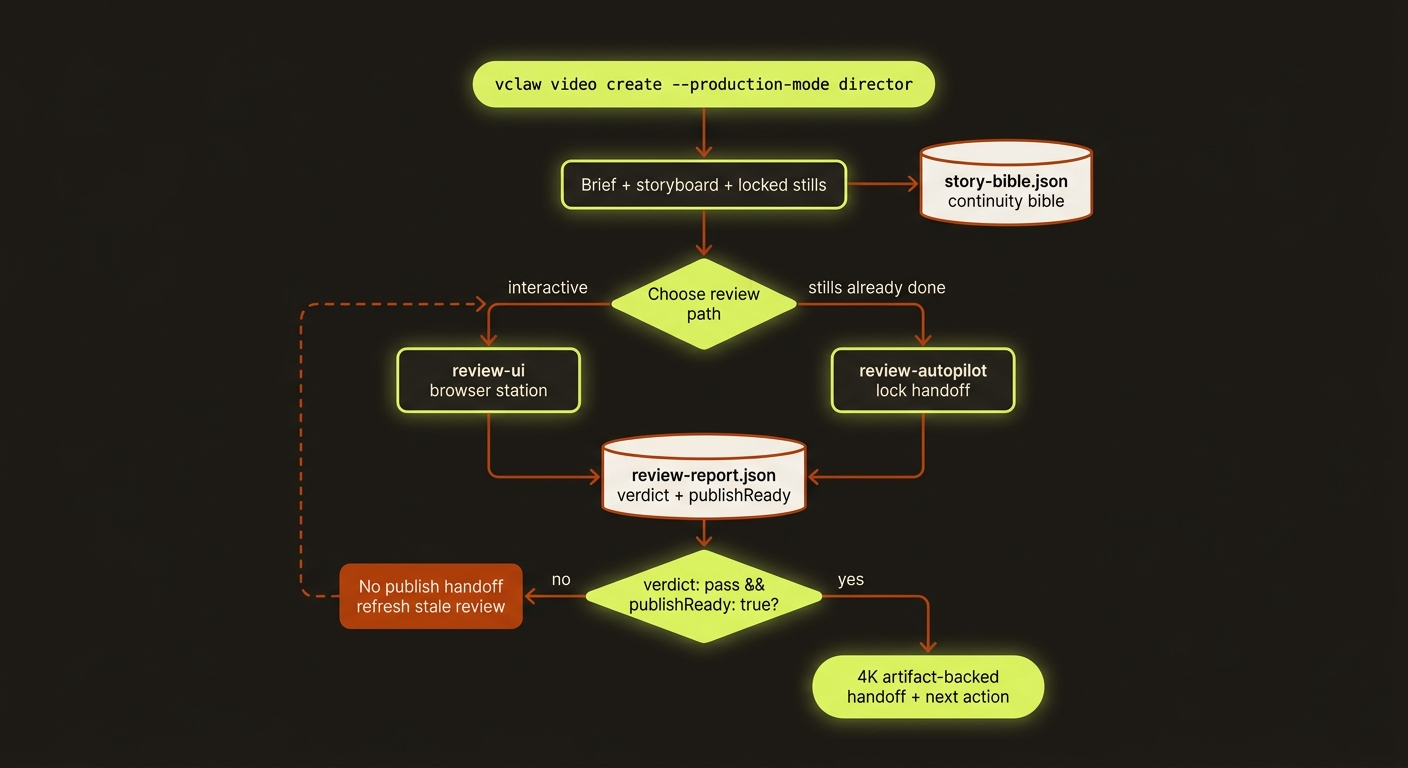
Diagram source (live Mermaid)
VideoClaw should feel like one reliable production workflow, not a catalog of commands. Keep the advanced command surface available, but introduce users through these three doors.
If you are driving this by hand, start with vclaw studio --dry-run. It maps goals like presenter video, UGC campaign, music video, copy-reference, review, and publish to the deterministic CLI commands described below.
The matching workflow skills are:
video-production-handofffor one project from creation into review and publish handoff.video-review-ui-qafor browser review, mobile/desktop QA, and Review UI to CLI truth alignment.video-portfolio-opsfor multi-project reports, CSV/Obsidian handoff, and your own queues.video-release-readinessfor package-shape, generated-artifact, and release verification evidence.
For a short runbook that can be handed to a colleague, use OPERATOR_HANDOFF.md.
Shared planning and final-film review
For new agent-led films, use the shared filmmaking workflow: record format, purpose, audience, outcome and shot directions with video storyboard --film-plan <json-path>. create still authors a legacy storyboard; adding an explicit plan is a separate authoring step. This contract adds structural validation and stale prompt/reference checks, not an automatic creative-quality judgement.
A planned film also needs current, full-playback film-edit evidence before a review pass or publish handoff. Inspect the export using video review --project <slug> --film-edit <source-json-path>, then record the five checks described in that guide. Still approval and technical QC alone do not approve the delivered film.
1. Make A Campaign Video
Use this when you have an intent and needs a reviewed, provider-ready short-form video project.
vclaw video create "A 20s product story for ..." --project <slug> --production-mode director

# Choose one review path.
vclaw video review-ui --project <slug>

# Or, when completed storyboard still candidates already exist:
vclaw video review-autopilot --project <slug>

vclaw video status --project <slug>
review-ui serves the packaged Review UI by default, so installed CLI users do not need a source checkout or a project-local assets/review-station/index.html. Reserve --ui-path for testing a local replacement UI. review-autopilot is the non-interactive counterpart: use it instead of browser review only when the project already has completed storyboard still candidates and you want the agent to lock the handoff.
The expected result is a project with a brief, storyboard, locked stills, artifact-backed 4K handoff assets, a passing review report, and one clear next action. The system must not claim a publish handoff until review-report.json has verdict: "pass" and metrics.publishReady: true.
Every storyboard-producing command (create, storyboard, clone-execute, storyboard-from-clone, storyboard-review, and director-preflight --apply-content-fixes) also emits artifacts/story-bible.json at storyboard-write time — a deterministic continuity bible (cast, settings, props, per-scene timeline, and continuity notes) derived from the brief, storyboard, and character profiles. It spends no credits and calls no providers; its path is surfaced as storyBiblePath in the command JSON output and recorded on the storyboard checkpoint. Downstream generation reads it so scenes and regenerations stay continuity-consistent. After director content-fixes are applied, the bible is regenerated to match.
2. Review And Fix A Project
Use this when a project exists but you are unsure whether it is safe to continue.
vclaw video status --project <slug>
vclaw video next-actions
vclaw video doctor-project --project <slug>
vclaw video review-ui --project <slug>
Trust order:
statustells the current stage and stale review state.next-actionstells the highest-priority human or agent action.doctor-projectverifies artifacts and checkpoints.review-uiis the visual station for fixing images, references, 4K assets, and final assembly checks.
If these disagree, treat it as a product bug and fix the canonical artifact or derived next-action logic before continuing.
3. Manage A Portfolio
Use this when multiple video projects are in flight.
vclaw video metrics
vclaw video report
vclaw video export-csv
vclaw video sync-obsidian
Portfolio views should communicate production truth for non-technical readers: what is blocked, what needs review, what is stale, what is ready to publish, and where spend or provider risk is accumulating. CSV exports include reviewReportVerdict and reviewPublishReady so spreadsheet handoffs can filter on the same review truth as the CLI and Review UI.
For release handoff, keep source checkout commands and installed CLI commands separate. In this repository, use node dist/cli/vclaw.js ... only after building. Installed users should see vclaw ... examples.
Authoring aid: multi-shot prompts
For a compressed cinematic clip, vclaw video multi-shot scaffolds a timecoded, non-repeating-camera shot plan (cinematic-15s, seedance-10s, veo-8s, or runway-10s), validates the hard rules (char budget, contiguous timecodes, metadata block), and can author prose end-to-end with --auto:
vclaw video multi-shot --plan                       # timecode scaffold + camera grid
vclaw video multi-shot --validate --file prompt.txt # enforce the rules (nonzero exit on error)
vclaw video multi-shot --plan --from-storyboard --project demo --scene 0 --route seedance-direct
It can run standalone, or hydrate action/characters/location defaults from a project storyboard scene with --from-storyboard. Project status/readiness summarize the latest persisted multi-shot-prompt artifact for review. Full reference: docs/CLI_REFERENCE.md.
Motion-graphics lane: mograph
For explainer B-roll — fleets of short motion-graphics clips under your own voice-over — the mograph lane replaces per-clip style prose with one locked motion sheet plus action-only motion pack blocks:
vclaw video mograph-sheet  --project demo --from-json sheet.json --write   # lock the look once
vclaw video mograph-pack   --project demo --init-from vo.srt --video "Demo" # VO -> beats + coverage
vclaw video mograph-pack   --project demo --check                           # anti-drift lint gate
vclaw video mograph-render --project demo --priority P1 --emit-batch out/p1.json
vclaw video batch-submit   --manifest out/p1.json --project demo --out out/p1-run # queue only
batch-submit compiles tasks without provider submission. Continue with the quote, authorisation and worker flow in Operations.
Render scope is a filter (P1 = the edit's spine); coverage means every second of the timeline has a decision, not a clip. Clips ship with sound-design SFX only (never music/narration) so they sit cleanly under the VO. Full guide: docs/MOGRAPH.md.
Production Readiness Rules
- One source of truth: review handoff readiness comes from
review-report.json. - Simple review command rule:
video review --verdict passis for projects that already have equivalent review evidence outside the Review UI. Director image handoffs should usereview-uiorreview-autopilotso publish readiness is derived from locked stills, artifact-backed 4K assets, and final approvals. - No stale approval: if storyboard content changed after
storyboard.md, refresh the storyboard review before execution. - No marker-only handoff: a 4K/upscaled still must be an artifact-backed scene candidate, not just a browser marker.
- Keep verification output separate from source: local
outputs/,.playwright-mcp/, nested projectoutputs/, and Review UI screenshots should remain ignored unless a fixture update is explicitly intentional. - No hidden provider switch: provider routes fail hard instead of silently falling back.
- Dry-run never demotes assets: the assets checkpoint preserves its
asset-manifestreference across allexecutepaths — includingexecute --dry-runwhen the plan is not yet ready — instead of overwriting it tofailed, so a dry-run preview cannot strand a project's asset stage. - Every user-facing surface should give the same next action for the same project state.