
Architecture
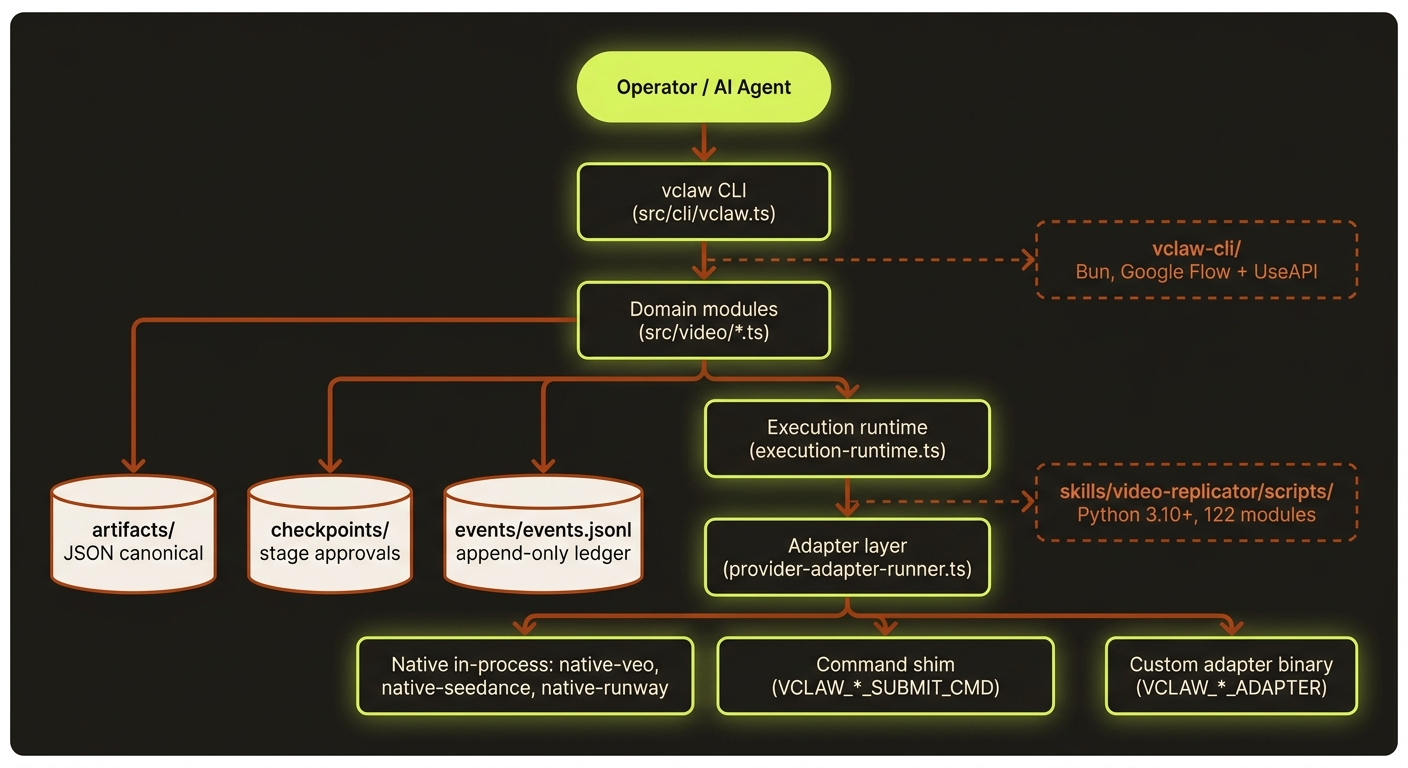
Diagram source (live Mermaid)
videoclaw (npm package: videoclaw) is a multi-provider video CLI that grew out of two predecessor codebases:
- the original
videoclawpackage (v0.11.x) which had an orchestration layer (ralph / ralplan / team / MCP servers) on top of a video pipeline - the clean-room
vclaw-video-corerebuild which kept only the video pipeline with strict on-disk artifacts + approval gates
v3 takes vclaw-video-core as the foundation, drops the orchestration layer (Claude Code / Codex now cover those concerns natively), and ports forward selected pieces from videoclaw: the vclaw-cli Bun package (formerly veo-cli), the Runway transport, a curated Python pipeline, and the Google Flow v1 + Omni Flash backend additions.
What's intentionally NOT here
The following subsystems from the original videoclaw v0.11.x are deliberately dropped. See MERGE_PLAN.md §3 for the rationale:
src/team/(tmux team coordination)src/ralph/,src/ralplan/(persistent loops + consensus planning)- Historical state / memory / code-intel / team / trace MCP servers. The current
src/mcp/is a different, read-only project introspection server. src/hooks/,src/autoresearch/,src/hud/,src/visual/,src/openclaw/,src/sparkshell/,src/runtime/,src/subagents/,src/notifications/,src/verification/crates/(would have been Rust performance components if they had ever been checked in — they were referenced in CLAUDE.md but never existed in source)
Equivalents exist in Claude Code (native subagents), the OMC plugin (ralph / team / autopilot skills), and similar host CLI tooling.
Sidecars
The core CLI runs on Node >=20.10. Optional runtimes extend it:
vclaw-cli/— Bun package (formerlyveo-cli). Multi-provider video automation: Google Labs Flow (Veo 3.x direct + Omni Flash) via Puppeteer scraping, UseAPI (Veo / Seedance / Runway), local SQLite job tracking. The main repo'snative-veo.tsinvokes this package for theveo-useapitransport.skills/video-replicator/scripts/— Python 3.12+ workflows. Modules cover the Seedance Prompt Director (compose / chain / critique / reference-validator / hooks), the bunty cricket pipeline, character sheet generation, presenter helpers, video assembly, and audio utilities. Documented atdocs/PYTHON_PIPELINE.md.
Production state and execution ownership
| Component | Owns | Runtime boundary |
|---|---|---|
| Project workspace | Briefs, storyboards, selections, review reports, checkpoints and event history | Files under the chosen workspace; distinct from installed application resources |
Cinema production store (cinema-*) | Durable tasks, exact quotes, authorisations, evidence and reconciliation | Node; workers act on saved state rather than inventing replacement submissions |
Local lane queue (lane-queue.ts) | Provider-account slot leases on one computer | External sqlite3 CLI |
Shared lane coordinator (lane-coordinator.ts) | Shared slot authority across computers | Separately deployed Cloudflare Worker/Durable Object; authenticated requests |
| Provider transports | Submit, poll, ingest and supported cancellation | Native Node transports or Bun Flow sidecar; route-specific credentials |
| Review and delivery | Candidate selection, publish-ready evidence, local portal and explicit uploads | Authenticated local HTTP; optional R2/Wrangler service configuration |
| Host agent | Task planning, user conversation and delegation | External Codex/Claude/etc.; internal job queues do not replace the host agent |
produce --auto-chain, pool and batch-submit compile canonical queue tasks without provider submission. The queued execution path is:
compile → exact quote → authorise → cinema-work → reconcile → review → deliveryA continuity task remains blocked until its predecessor has a selected output. cinema-work submits with a bound quote and authorisation where required and reconciles an existing job on subsequent calls. The quote, immutable request and provider job identity must survive interruption; an ambiguous submission must be resolved before replacement work is authorised.
Plain produce/execute still support direct execution and --dry-run. execute-status and execute-cancel apply to that direct execution report. batch-monitor is retained for already-submitted historical batch queues; it is not the worker for newly compiled Cinema tasks.
See Operations for commands and recovery boundaries and the shared coordinator runbook for multi-computer deployment. Bundling code in an npm tarball does not install Bun, Python, FFmpeg, sqlite3 or a Cloudflare service; see the installation guide.
Shared film planning and review
film-plan.ts validates the optional explicit creative plan and per-scene direction stored in the storyboard. Formats describe creative intent, separately from the storyboard/director pipeline modes. filmmaking-prompts.ts emits observable shot direction and contextual performance; execution-runtime.ts checks the plan fingerprint and local attachment evidence before reusing packets. film-reference-evidence.ts tracks attached local bytes; remote references are explicitly unverified rather than treated as a general dependency graph.
film-edit-review.ts defines ordered clip/trim, soundtrack, export and optional edit-intent fingerprints. film-edit-review-store.ts hashes actual project files and keeps review history in film-edit-reviews.json. The normal CLI review and publish handlers require current passing full-playback evidence for planned films; changed media invalidates that evidence. Technical media QC and storyboard review remain distinct. Legacy storyboards without a plan retain their existing contract, and the separate Cinema delivery route rejects explicit film plans. See Shared filmmaking workflow for exact scope.
The manager loop belongs to the external host agent: phases, assignment, review, stall recovery and a saved progress page. The CLI supplies durable artefacts and checks rather than embedding an autonomous manager.
Current layers
One declaration per route or backend. Route prerequisites live in src/video/provider-platform/route-prerequisites.ts — the five parallel tables provider-status.ts used to carry, plus declared membership of the specialist lanes (batch-queue.ts's batch routes, execution-runtime.ts's voice-reference routes) that consumers now derive rather than re-list. It imports only provider-platform/types.js, so it stays a leaf anything may depend on. src/video/capability-contract.ts composes that declaration with the route capability envelope, the Cinema route registry, the audio backend registries and the finish backend ids into one read-only CapabilityManifest (buildCapabilityManifest(), exported from src/index.ts; pure — no env, no I/O). The four id spaces stay separate on purpose: merging the core and Cinema route ids would make ADR 0001's no-silent-fallback rule unenforceable. src/tests/capability-contract.test.ts is the drift gate — it fails when a consumer, the MCP tool description, or a fenced docs table stops agreeing with the manifest.
src/cli/- user-facing command entrypoints
src/video/provider-platform/- provider route descriptors;
route-prerequisites.tsis the ONE canonical declaration of what each route needs (env vars, runtime dependencies, maturity, adapter/command env vars) and which specialist lanes it belongs to
- provider route descriptors;
src/video/provider-status.ts- environment, dependency, and route health reporting
src/video/pipeline-manifests/- built-in stage definitions for
storyboardanddirector
- built-in stage definitions for
schemas/video/- canonical machine-readable contracts
src/video/*- portfolio management, reporting, templates, readiness, character consistency, execution planning, adapter-backed execution runtime, and Obsidian export
story-bible.ts— deterministic continuity bible (buildStoryBibleArtifact,writeStoryBibleForProject) derived frombrief.json+storyboard.json+ character profiles. Pure apart from reading project files; spends no credits and calls no providers. Auto-generated at storyboard-write time by every storyboard-producing command (video create|storyboard|clone-execute|storyboard-from-clone|storyboard-reviewanddirector-preflight --apply-content-fixes, regenerated after content-fixes apply) and written toartifacts/story-bible.json(contract:schemas/video/artifacts/story-bible.schema.json). It captures cast, settings, props, and a scene timeline with continuity notes so downstream generation stays consistent across scenes/regenerations; recorded in the storyboard checkpoint, theartifact.storyboard.writtenevent payload, and the command JSON output asstoryBiblePath, and validated by the doctor layer.assemble/— the FFmpeg assemble/stitch layer.assemble/media-qc.ts(runAssembleMediaQc) runs after stitch on non-dry-run renders, ffprobing each clip + the master viaprobeMedia(issue codesprobe-failed,missing-audio,nonstandard-audio-codec,nonstandard-audio-sample-rate,nonstandard-video-codec,duration-drift,av-duration-mismatch); the report is attached toAssembleResult.qcand theassemble-reportartifact underqc, with issues surfaced asqc.<code>[<scope>]assemble warnings.assemble/narration-fit.ts(planNarrationFit) is a pure planner (adapted from Google's story-generator timing rule) that either speeds up narration within a tempo threshold or keeps speech natural and loops the visual bed.- native in-process transports:
native-veo.ts(→vclaw-cli/Bun),native-seedance.ts(SUTUI_API_KEY),native-runway.ts(UseAPI Bearer, pure-Node fetch),native-dreamina.ts(Seedance 2.0 / Dreamina via useapi.net — reusesUSEAPI_API_TOKEN+VCLAW_DREAMINA_ACCOUNT, pure-Node fetch),native-modelark.ts(the official Seedance 2.5 API on BytePlus ModelArk,ARK_API_KEY),native-reapi.ts(Seedance 2.5 via reAPI, treg or direct),native-magnific.ts(the Magnific REST route), plus two non-route transports,native-flow-r2v.tsandnative-runway-upscale.ts review-ui.ts— HTTP server (port 4317) that drives the browser-based storyboard review station atassets/review-station/index.html. Seedocs/REVIEW_UI_STORYBOARD_WORKFLOW.md.prompt-quality.ts— six Seedance-handbook anti-pattern checks (adjective soup, multiple actions, multiple camera moves, style-word overload, literary emotion language, overlong prompts) wired intodirector-preflight, warnings by default and promotable to blocking errors viaDIRECTOR_STRICT_PROMPT_QUALITY=1; also housesrunMultiShotChecks, the validator for the multi-shot prompt frameworkmulti-shot-prompt.ts— multi-shot cinematic prompt authoring utility: provider-aware presets (cinematic-15s,seedance-10s,veo-8s,runway-10s,music-video-15s,social-hook-8s),buildShotPlan(deterministic timecode scaffold, non-repeating camera grid), parsedshots[], andgenerateMultiShotPromptText(Gemini-backed or stub).video multi-shot --from-storyboardhydrates prompts from project storyboard scenes and persists source metadata.dialogue-fit.ts— short-clip dialogue duration checks wired intodirector-preflight, warnings by default and promotable to blocking errors viaDIRECTOR_STRICT_DIALOGUE_FIT=1generation-telemetry.ts— route/task/config/cost/timing/output telemetry recorded into project event ledgers and used by cost estimates when completed Seedance USD samples exist
src/video/providers/- per-provider HTTP adapter code (
runway-useapi.ts,dreamina-useapi.ts,modelark.ts+modelark-references.ts,reapi-seedance.ts+treg-client.ts,google-flow.ts,xskill.ts, the audio clients, and the sharedpublic-host.ts). Each adapter exports submit/poll/cancel functions that accept an optionalfetchImplfor test injection. Wrapped bysrc/video/native-*.tsfor production use.
- per-provider HTTP adapter code (
Principles
- No silent fallback across materially different provider paths
- Every stage should eventually have a canonical artifact
- CLI output should be machine-readable by default
- Architecture remains small until the contracts are stable
Near-term roadmap
- Add more review/publish automation around generated outputs
- Keep tightening the transport contracts without widening orchestration complexity
- Expand higher-level day-to-day ergonomics on top of the current runtime
- Keep docs/help output aligned with the actual product surface
- Add selective provider-specific polish only where real runs justify it
Current implemented flow
video init- creates canonical project workspace
video brief- writes
brief.json - marks
briefcheckpoint complete
- writes
video storyboard- writes
storyboard.json - marks
storyboardcheckpoint complete
- writes
video assets- writes
asset-manifest.json - marks
assetscheckpoint complete
- writes
video review,video review-ui, orvideo review-autopilot- writes
review-report.json - marks
reviewcheckpoint to completed, retry-required, or failed - allows publish handoff only when the saved report has
verdict: "pass"andmetrics.publishReady: true
- writes
video publish- writes
publish-report.json - marks
publishcheckpoint complete or failed
- writes
video status- resolves next stage from manifest + checkpoints
video doctor-project- validates checkpoint/artifact consistency
video doctor-portfolio- validates the whole portfolio
video metrics|workload|next-actions|dependencies
- portfolio management views
video report|report-snapshot|report-history|report-diff|trends|export-csv
- reporting and snapshot history
video export-obsidian|sync-obsidian|scaffold-obsidian-vault
- Obsidian operations layer
video playbook-list|playbook-show
- bundled prompt/playbook registry
video prompt-lib-list|prompt-lib-show
- imported prompt/reference library
video template-save|template-list|template-show|clone-plan|clone-init|storyboard-from-clone
- reusable template / clone bridge
video clone-execute
- template -> storyboard -> execution-seed -> runtime in one flow
video readiness
- artifact, character-consistency, image-input, scene-selection, and director identity-sheet readiness before runtime execution
video plan|produce|execute-status
- route selection, payload generation, dry-run validation, built-in or external adapter execution, polling, output ingestion, native Seedance direct transport, native Veo direct transport, and prompt-guided execution context
video character-add|character-list|character-show|character-consistency
- character profile subsystem and continuity enforcement
video reference-sheet-add|list|show|bind|validatevideo candidates-list|candidates-show|select-candidate|reject-candidate|reroll-scene|chain-from|unchain|candidates-migrate-from-assets- per-scene candidate registry + selection state + chain-from-prev
- partial rerun via
produce --scene <n> - role-tagged reference sheets with closed-vocabulary validation and per-scene binding
video cost-estimate- static default estimate with optional historical Seedance USD telemetry override
video multi-shot- cinematic prompt-authoring utility with standalone and project-storyboard entry paths
--plangenerates a deterministic timecode scaffold + non-repeating camera grid--validate(--file or stdin) checks prompt quality viarunMultiShotChecks; nonzero exit on errors--auto --image <path>calls Gemini to author prose from a reference image (offline-stubbable viaVCLAW_MULTISHOT_AUTO_STUB)--from-storyboard --project <slug> --scene <sceneIndex>derives action, characters, and default location from the project artifacts--provider/--routeresolve provider-shaped presets when--presetis omitted--project <slug>persists the result as amulti-shot-promptartifact; status/readiness summarize the latest artifact for review
Compatibility aliases:
video execution-plan->video planvideo execute->video produce
Commercial track + quantified prompt-craft (landed)
The prompt-craft layer is category-driven and quantified. It generalises beyond "cinematic character video" to cover commercial / product work, and locks Seedance identity through the official Asset Library. The pieces below are all implemented and on main.
Category Descriptor registry
src/video/category-registry.ts defines 15 categories (CATEGORY_IDS), each a CategoryDescriptor carrying a subjectType of character or product, a beatTemplate (three-act / ad-hook-feature-cta / turntable / lookbook), a cameraVocab, a genre, an audioProfile (diegetic / ad-mix), and hookSeconds. resolveCategory(id?) defaults to the cinematic character descriptor. The subjectType selects which branch filmmaking-prompts takes:
- character path — character sheets + storyboard-grid character lock (the existing cinematic path, unchanged).
- product path — no character sheets, no grid lock; each product in
artifacts/product-references.jsonbecomes a text-driven Seedance packet whose timeline follows the descriptor's beat template, with orbit grammar woven in for orbit/turntable vocabularies.src/video/product-references.tsreads the product references and degrades gracefully (description-only hero from the brief) when the artifact is absent.
referenceBuildOrder() fixes the identity-reference build sequence (base-ref → sheet → scene-plate) so scene lighting can't contaminate the identity anchor.
Quantified cinematography + standing prompt rules
src/video/cinematography.ts is the barrel for pure, deterministic prompt-fragment emitters whose density scales with a DetailLevel of terse | standard | rich: cameraSpec (shot/lens-mm/angle/movement, velocity in ft/s at rich) and audioMix (a dB hierarchy at rich) are defined there; lightingSpec (Kelvin / key angle / ratio) and gradeSpec (shadow/highlight hue+sat splits) are defined in lighting-grade-register.ts and re-exported, as are the hook, realism and dynamic registers below (every name stays importable from cinematography.js). It also defines five cinema modes (CINEMA_MODE_IDS: narrative, studio, action, performance, atmospheric) resolved by cinemaMode and stacked for multi-world intercuts by stackModes (adjacent modes are never merged), resolveCameraVocab, per-genre look defaults (genreDefaults), beat-template layout (beats()), and precise orbit grammar (orbitGrammar, three ORBIT_KINDS).
A library of six named 2-second opening hooks (HOOK_PATTERN_IDS: black-to-light, silence-to-sound, reverse-motion, beat-drop, match-cut-in, whip-reveal), defined in hook-register.ts, is resolved by resolveHookPattern / hookBeat, which throw on an unknown id (hooks must be explicit).
src/video/prompt-rules.ts holds the standing prompt rules as pure scrubbers: stripProperNames (swap cast names for stable visual descriptors), brandNeutralize (strip brand tokens), noFaceMorphTag (forbid identity drift), and diegeticAudioLine (diegetic audio only).
Filmmaking-prompts two-phase gate
vclaw video filmmaking-prompts (src/video/filmmaking-prompts.ts) takes a --phase storyboard|video gate: storyboard returns the storyboard / camera-language portion only (seedancePackets gated to []); video and the default (omitted) return the full video-generation packets. The same command takes --category <id>, --genre, --detail terse|standard|rich (appends a quantified cinematography suffix at rich), --panels 9|12|15|20, --aspect-ratio, --no-faces, and --storyboard-grid <path>.
Multi-shot output formats
vclaw video multi-shot --plan (src/video/multi-shot-prompt.ts) renders a deterministic shot plan in several formats:
--format default|seedance-paragraph|per-shot—composeSeedanceParagraph(Seedance native single-paragraph),composePerShotFormat(per-shotSHOT Nblocks), or the default layout.--lang en|zh|en+zh—composeBilingualwraps the rendered prompt in fenced blocks (single, translated, or EN + 中文); numeric/technical spec tokens pass through unchanged.--dialogue "<speaker>: <line> [|| <speaker>: <line>]"—parseDialogueLinewithDialogueattach one- or two-speaker spoken dialogue.
--hook <patternId>— prepends a resolved opening-hook directive.--category <id>— resolves aCategoryDescriptorto shape the prompt.
Seedance Asset Library end-to-end flow
Seedance character/product consistency on the official ark/seedance-2.0 endpoint goes through managed Asset Library avatars (Asset:// URIs), not raw photoreal URLs (which trip the "real person" content filter and don't lock identity). The end-to-end flow:
vclaw video seedance-register-assets(src/video/seedance-asset-library.ts) registers each--character <name>:<imageUrl>as an Image asset under a group, polls until it reaches the international Ark profile (sync_status: active), and writesartifacts/seedance-assets.json(contract:schemas/video/artifacts/seedance-assets.schema.json). RequiresSUTUI_API_KEY.- At runtime,
src/video/execution-runtime.tsreadsseedance-assets.json(only whenrecommendedRouteId === 'seedance-direct') and auto-resolves each scene's cast names to theirAsset://URIs, which become that scene's reference set. src/video/native-seedance.tsroutesAsset://references into the Seedancereference_imagesparam and enforces the per-generation reference budget viaassertReferenceBudget(≤9 image, ≤3 video, ≤3 audio) — validated for every task before any network call, so an over-budget task can't cause a partial submit.