
vclaw video assemble — final video assembly
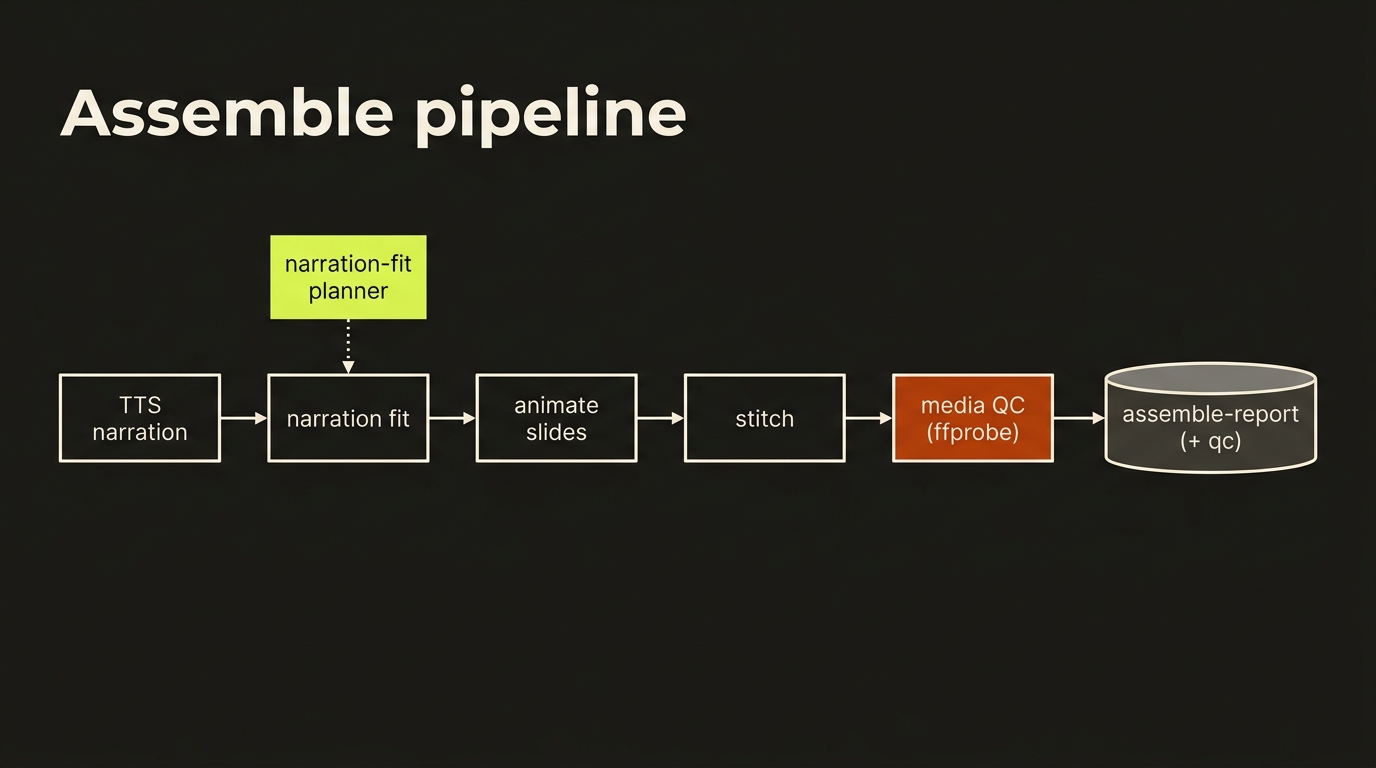
vclaw video assemble turns an approved project's storyboard + assets into a finished narrated MP4: slides → title card → TTS narration → slide animation → background music → stitched final video. It is the native-TypeScript successor to the former Python assembly pipeline (skills/video-replicator/scripts/).
Status (v3.0.0-alpha.1): code-complete and FFmpeg-validated. The pipeline runs end-to-end and produces structurally valid h264/aac MP4s. Aesthetic / content quality on real media has not yet been signed off — see Validation status.
Quick start
# 1. plan the whole pipeline without running anything (no keys needed)
vclaw video assemble --project my-project --dry-run

# 2. run for real (needs API keys + ffmpeg — see Requirements)
export ELEVENLABS_API_KEY=sk_...
export KIE_API_KEY=...
vclaw video assemble --project my-project
Output is JSON when piped (the v3 agent contract): the assemble-report.json artifact path, the final MP4 outputPath, a per-stage manifest, and any QA warnings.
Flags
| Flag | Required | Meaning |
|---|---|---|
--project <slug> | yes | The project to assemble. |
--root <path> | no | Workspace root (default: cwd). |
--brand-profile <path> | no | Path to a brand-profile.json (presenter parameters + optional assemble knobs). |
--from-clips | no | Clip-stitch mode — concatenate the per-scene rendered clips vclaw video execute wrote to outputs/scene-<i>.mp4 instead of animating slides. See Clip-stitch mode. |
--dry-run | no | Plan every step (FFmpeg commands + provider calls) without executing. No keys needed. |
Requirements (for a real, non-dry-run render)
| Dependency | Why | Env var |
|---|---|---|
| ffmpeg + ffprobe on PATH | slide animation, stitch, music-mix, duration probing | override with VCLAW_FFMPEG_BIN / VCLAW_FFPROBE_BIN |
| ElevenLabs API key | TTS narration | ELEVENLABS_API_KEY |
| Kie.ai/Suno API key | background music (only if the brand profile enables a bed) | KIE_API_KEY |
| Gemini API key | background music via Lyria 3 (Gemini Developer API, key-based — no Vertex) | GEMINI_API_KEYS / GOOGLE_API_KEYS / GOOGLE_API_KEY |
--dry-run needs none of these — it plans the pipeline and is what the smoke:assemble CI check exercises.
Pipeline stages (the order assembleProject runs)
- PDF slide extraction — if the project/brand defines a deck PDF, render each page to an image (pdfjs-dist + canvas).
- Title card — if the brand profile defines one (sharp SVG-text composite).
- TTS narration — per-scene narration audio via ElevenLabs. Computed before animation because narration length drives each slide segment's duration.
- Slide animation — Ken-Burns pan/zoom per slide into a video segment (FFmpeg), AV-locked to the narration length, 1280×720 @ 24fps.
- Background music — optional music bed via Kie.ai/Suno.
- Stitch — concatenate segments into the final MP4. Uses the concat demuxer for <8 segments (single ffmpeg call, no re-encode, exact timing) and the concat filter for ≥8 (re-encode, drift-free); per-segment audio is padded/trimmed to the video length so neither path accumulates A/V drift. Music is mixed under the narration with a tail fade-out — and voice-forward by default whenever narration is present: the bed loudnorms the narration (
I=-15:TP=-1.5), sidechain-ducks the music under it, and limits the final mix so the voice is never buried. Dialogue + SFX clips are auto-mixed as global audio layers at this step (see below). - QA — advisory local checks (dialogue lint, narration timing, image-filter risk). These return warnings; they don't block.
- Media QC — non-dry-run only: after stitch, ffprobe every slide-animation clip and the master MP4 to verify the finished media actually conforms (see Media QC).
- Music-bed loop check — non-dry-run only: ffprobe the attached bed against the finished master and, when the bed is more than a second short, warn (
assemble.music-bed-loops) naming the seam positions.-stream_loop -1repeats a short bed, which is a legitimate choice — but it used to happen silently. On a delivered short a 30.7s bed sat under a 64.1s cut and the seam landed 6.7s into the climax; nothing flagged it becausesoundtrack.jsonrecorded the 64s that was requested. The audio artifacts now record the probed length instead of the request, which is what makes this check possible. Advisory — it never blocks.
All segments share a uniform encoding (H.264 libx264 crf20, 24fps, 1280×720 yuv420p, AAC 44100 stereo) so the concat-demuxer path works cleanly.
Clip-stitch mode
The default pipeline builds its body segments by animating slides. --from-clips flips the segment source: instead of slides, it concatenates the per-scene rendered clips that vclaw video execute downloaded to outputs/scene-<i>.mp4 — turning a finished clip-based production (Veo / Seedance / Runway renders) into a single stitched MP4.
# render the scenes, then stitch the rendered clips into the final cut
vclaw video execute --project my-project
vclaw video assemble --project my-project --from-clips --dry-run   # plan
vclaw video assemble --project my-project --from-clips             # render
What changes in clip mode:
- Segments =
outputs/scene-<i>.mp4, in storyboard order. Each appears in the manifest as arendered-clipentry (generatorvclaw video execute). Scenes missing a clip are skipped with aclip-stitch:warning naming them; if none exist, stitch is skipped (warning, nofinal-video). - Audio is the clips' own — each clip's native audio (including omni-flash voice) is kept. There is no TTS narration generation step.
- The
narrate/soundtrackartifacts auto-attach. When the project hasartifacts/audio/narration.mp3(fromvclaw video narrate) and/or a selected soundtrack (vclaw video soundtrack --select, which writes the manifestsoundtrackfield), they are mixed at the stitch step: narration as a global voice layer over the kept clip audio, the soundtrack as the score bed (volume 0.55) sidechain-ducked under the narration. Neither artifact present → byte-identical legacy clip-stitch. Production origin: the hermes-do-launch film (2026-07-04) had to hand-roll exactly this mix in raw ffmpeg. - Brand music still wins. When the brand profile enables its own music bed it is mixed under the clip audio exactly as before — and a selected soundtrack is then not attached (a
clip-stitch:warning names the conflict, no double bed). The dialogue/SFX auto-mix layers are not applied in clip mode (the clips already carry their audio). - Title card, intro/outro, per-scene color grade (
colorState) and the concat demuxer/filter selection all work unchanged. The grade aligns to the clips that were actually found.
Everything else (stitch strategy, normalization pre-pass, media QC, the assemble-report.json shape) is identical to the slide pipeline.
Post-production: tail-trim, letterbox, color grade
stitch runs an optional per-segment normalization pre-pass before concat. It is fully additive — when none of these StitchInput fields are set, no prep step is emitted and the output is byte-identical to the legacy path. When any are set, each ordered segment is re-encoded to the standard (so the demuxer concat stays valid) with the requested transforms, in vf order letterbox → LUT → grade:
| Field | Effect |
|---|---|
clipMaxSeconds | Per-clip tail cut (-t). Drops the dead / freeze frames AI generators append to the end of a clip. |
letterboxRatio (+ letterboxCanvas) | Scale+pad each segment onto the canvas (default 1280×720) for cinematic bars / aspect normalization. |
gradeLut | Apply a .cube/.3dl LUT via lut3d (e.g. an operator-supplied Kodak Vision3 500T film LUT). |
gradeId | Apply a named color grade (real colorbalance/eq, not a prompt hint) to every segment. |
segmentGradeIds[] | Per-segment grade override, indexed to the ordered segments — this realizes a narrative color language (different grade per scene). |
Named grades (GRADE_FILTER_IDS): cool-steel, crimson-threat, electric-blue, kodak-500t, bleach-bypass, desaturated, teal-orange. The first three are a ready-made 3-state arc (normal-ops → breach → resolution): pass segmentGradeIds: ['cool-steel', …, 'crimson-threat', …, 'electric-blue'] to grade the calm scenes cool, the threat scenes crimson, and the resolution electric-blue.
These are real FFmpeg transforms on the rendered footage (validated against real renders: a graded frame measurably differs from the ungraded source). For the true Kodak look, supply a real LUT via gradeLut; the named kodak-500t grade is a colorbalance/eq approximation that needs no external file.
Reading holds (motion-comic)
Reading holds are an explicit motion-comic feature, not a repair tool for a bad crop or missing footage. Social reframing defaults to holdPolicy=forbid; never add tpad/cloned frames to hide a transition unless the individual shot declares and justifies a hold.
Text-dense info panels (a cast roster, a strategy map) flash by too fast when a segment animates immediately. StitchInput.readingHold prepends a short held, gently-drifting still of a designated segment's readable first frame before its motion plays, so viewers can read it first:
readingHold: { holdSec: 3.5, segments: [1, 16, 18] } // indices into orderedSegmentsFor each listed index, stitch generates a hold clip via buildReadingHoldArgs (grabs frame 0 with select=eq(n,0), holds it for holdSec with a faint zoompan drift, silent stereo audio, encoded to the segment standard) and inserts it immediately before that segment in the concat. Any reading hold forces the concat FILTER (re-encode) so the freshly-encoded holds splice cleanly with the segments. Omitting readingHold or passing an empty segments list is byte-identical to legacy (no holds, normal demuxer/filter selection); out-of-range indices are ignored. The score plays under the hold, so it reads as a deliberate beat, not a freeze.
Multi-layer audio mix (dialogue + SFX, auto by presence)
At the stitch step, in addition to the optional background-music bed, the assemble pipeline auto-mixes the project's dialogue and SFX clips as global audio layers over the concatenated video. This is presence-driven and purely additive:
- Before building the stitch input (step 6), the orchestrator discovers
artifacts/dialogue.json(per-character TTS turns, see thevclaw video dialoguesection below) andartifacts/sfx.json(sound effects, see thevclaw video sfxsection below), resolves each clip's project-relative path to an absolute path, and skips any whose file is missing on disk. - If any dialogue/sfx clip is found,
buildAudioLayers({ dialoguePaths, sfxPaths })produces the extra layers, which are passed tostitchvia the newStitchInput.audioLayersfield.stitchprepends the music bed (if any) as amusiclayer and mixes the whole set throughbuildMultiLayerMixArgs(singleamix, music looped, dialogue at full volume, SFX at its own level — SFX is never a ducking sidechain). The events log records anaudio-mix: …entry and the stitch plan shows amulti-layer-mixstep. - If a project has no
dialogue.jsonand nosfx.json(or their clip files are absent),audioLayersis left unset and the stitch is byte-identical to the legacy path — the music-onlybuildMusicMixArgsmix, or the no-audio concat — so existing projects render exactly as before.
Per-scene narration is still baked into each slide segment during animation (steps 3–4) and is unchanged by this mix; only dialogue, SFX, and the music bed are added as global layers here.
Silent picture (clips with no audio stream)
A raw provider clip can arrive with no audio stream at all (not silence — no track), and so can a silent intro sting. Every mix graph used to reference the concat's own track as [0:a], which on such a concat is an ffmpeg failure ("matches no streams", exit 234) reported as an opaque ffmpeg_failed after the whole concat had already rendered. stitch() now probes the concat once before the mix: when the picture is silent, the designed layers (bed, narration, dialogue, SFX) ARE the mix, the audio is padded to the picture and the output is capped at the picture length with -t (a looped bed has no picture-length anchor once [0:a] is gone). The plan step recorded in the report carries the real graph. Nothing changes for a picture that has audio — those graphs are byte-identical.
The master must still carry audio: a silent concat with NO designed audio attached renders a silent master, and media QC reports missing-audio[master] as an error exactly as before. Under --drop-clip-audio the source tracks are discarded by contract, so a picture-only source clip is no longer flagged missing-audio on the clip; without that flag a silent source under a mix is still a missing-audio error that fails that clip's QC row, because a talking-avatar clip that came back without its native voice is precisely what that check exists to surface.
Known gap: segments that MIX silent and audio-bearing clips go through the demuxer concat with -c copy, whose audio follows the first segment; that case is not detected here.
Soundtrack A/B (choosing the music bed)
The background-music bed (stage 5) takes whatever soundtrack the project has selected. To pick that track from multiple options, use vclaw video soundtrack — a music A/B layer that sits in front of assembly:
# Generate one candidate per available music backend (suno, lyria, …)
vclaw video soundtrack --project <slug> --prompt "driving synthwave, 110bpm" --duration 30
# Compare them in the preview portal, then commit one:
vclaw video soundtrack --project <slug> --select lyria
Each candidate is written to artifacts/audio/soundtrack-<backendId>.mp3 and recorded in the typed soundtrack.json artifact. --select <backendId> writes the chosen candidate's path into the project manifest soundtrack field, which the preview portal renders as the headline player and which downstream tooling can read as the project's score. Candidate generation reuses the proven generateMusic() Kie.ai/Suno transport (the suno backend) plus any other configured backend; --dry-run plans + writes the artifact with no keys. See CLI_REFERENCE → Soundtrack A/B.
Music backends
| id | provider | credential | notes |
|---|---|---|---|
suno | Kie.ai/Suno V5 | KIE_API_KEY | submit → poll → download MP3 |
lyria | Google Vertex AI Lyria | Vertex project + token (GOOGLE_CLOUD_PROJECT / VERTEX_PROJECT + ADC/GOOGLE_ACCESS_TOKEN) | LYRIA_MODEL (default lyria-002); returns WAV |
lyria3 | Google Lyria 3 on the Gemini Developer API (key-based, NOT Vertex — no project/billing) | a Gemini key from GEMINI_API_KEYS / GOOGLE_API_KEYS / GOOGLE_API_KEY | LYRIA3_MODEL selects lyria-3-clip-preview (default, 30s clip) or lyria-3-pro-preview (full song, ~184s). Returns MP3 (audio/mpeg); output is always written .mp3. Optional image-to-music conditioning: pass imagePath and the reference image is attached as an inlineData part in the same request. durationMs is estimated from durationSec (or 30s clip / 180s pro default) — true MP3 duration parsing is out of scope. Availability is gated on a resolvable Gemini key (same pool as gemini-tts). |
flowmusic | Lyria 3 Pro vocal songs via useapi.net (FlowMusic) | USEAPI_API_TOKEN (same token as runway-useapi) | soundtrack --lyrics / --instrumental; submit → poll → download MP3 |
Narration / TTS (vclaw video narrate)
The TTS narration that assembly stitches under the slides can be produced ahead of time with vclaw video narrate — a standalone TTS layer over the same audio-platform registry the soundtrack A/B uses, but for the tts backend kind:
# Synthesize narration to artifacts/audio/narration.wav + narration.json
vclaw video narrate --project <slug> --text "Welcome to the show." --voice Kore
# Or load the script from a file, and embed a fit plan against a known video length:
vclaw video narrate --project <slug> --text-file script.txt --video-duration-ms 12000
Two TTS backends are registered (pick with --backend):
gemini-tts(default) — the Gemini APIgemini-2.5-flash-preview-ttsmodel (an API-key product, not Vertex; resolves a key fromGEMINI_API_KEYS/GOOGLE_API_KEYS/GOOGLE_API_KEY). Returns raw 24kHz mono PCM wrapped in a 44-byte WAV header;durationMsis computed deterministically from the PCM byte count (no ffprobe). Requires the GeminigenerativelanguageAPI to be enabled on the key's project (it 403s otherwise).elevenlabs-tts— the ElevenLabseleven_multilingual_v2model (--backend elevenlabs-tts). RequiresELEVENLABS_API_KEY;--voiceis an ElevenLabs voice_id (default "Rachel"). Returns mp3;durationMsis estimated from text length (~14 cps). A Gemini-free alternative — use it whengemini-ttsis unavailable.
Automatic fallback chain. When you DON'T pass --backend, narration tries the available backends in registry order — gemini-tts first, then elevenlabs-tts — and falls back to the next if one fails at runtime (e.g. gemini-tts 403s because the generativelanguage API isn't enabled, even though the key is present). The backend that actually synthesized is recorded in narration.json as backendId, and the ones that failed first are recorded in fallbackFrom (omitted when the first backend wins). Passing an explicit --backend is strict — that backend is used and never falls back, so the failure surfaces directly.
When --video-duration-ms is given, narration.json also embeds a narration-fit plan so the assemble step can speed-fit or loop-video. --dry-run estimates duration from text length and writes a placeholder WAV with no network call. Schema: schemas/video/artifacts/narration.schema.json. See CLI_REFERENCE → Narration / TTS.
Per-character dialogue (vclaw video dialogue)
When a project needs spoken dialogue rather than a single narration track, vclaw video dialogue synthesizes one TTS clip per turn over the same tts audio-platform registry:
# One clip per turn → artifacts/audio/dialogue-<i>-<name>.wav + dialogue.json
vclaw video dialogue --project <slug> --turns "Alice: Hello || Bob: Hi there"
# Apply a single voice to every turn:
vclaw video dialogue --project <slug> --turns "Alice: Hi || Bob: Hey" --voice Kore
Turns are separated by || and each is split on the first : into { name, line }. The only TTS backend today is gemini-tts; --dry-run estimates duration per turn and writes placeholder WAVs with no network call. Schema: schemas/video/artifacts/dialogue.schema.json. See CLI_REFERENCE → Per-character dialogue.
Sound effects / foley (vclaw video sfx)
Discrete sound effects (whooshes, impacts, ambience) are generated with vclaw video sfx over the sfx audio-platform backend kind:
# One clip → artifacts/audio/sfx-<n>.mp3, appended to sfx.json
vclaw video sfx --project <slug> --prompt "whoosh" --duration 3 --prompt-influence 0.5
The only SFX backend today is elevenlabs-sfx (the ElevenLabs Sound Generation API — requires ELEVENLABS_API_KEY). Each call appends a clip to sfx.json (numbering continues after existing clips). --dry-run writes a placeholder clip with no network call. Schema: schemas/video/artifacts/sfx.schema.json. See CLI_REFERENCE → Sound effects / foley.
Narration fit
The TTS stage (stage 3) is computed before slide animation because narration length drives each slide segment's duration — every narration manifest entry now carries its real durationMs (previously 0), so each Ken-Burns segment is cut to match the speech it plays under rather than a fixed guess.
planNarrationFit (src/video/assemble/narration-fit.ts, re-exported from src/video/assemble/index.ts) is the pure planner that reconciles a scene's narration against its generated video, adapted from the timing rule in Google's story-generator skill. Given { voiceDurationMs, videoDurationMs, maxTempo (1.25), tailPadMs (500) } it returns { tempo, loopVideo, targetDurationMs, warnings }:
- Voice fits the video (
voice ≤ video) —tempo 1, no loop; target is the voice length. - Voice slightly long — fit it into
video − tailPad; if the required speed-up is≤ maxTempo, speed the narration up via FFmpegatempo(warningvoice-speedup-applied). - Voice too long — if the required speed-up would exceed
maxTempo, keep the speech natural and instead loop/extend the visual bed (warningvoice-too-long-loop-video).
Reading the report
assembleProject writes projects/<slug>/artifacts/assemble-report.json (schema: schemas/video/artifacts/assemble-report.schema.json). The finished video lands at projects/<slug>/outputs/final.mp4, and per-asset intermediates (extracted slides, TTS narration, Ken-Burns segments) under projects/<slug>/assemble/{slides,audio,segments}/. The report fields:
status—complete|partial|dry-run|failedoutputPath— the final MP4manifest— one entry per generated asset (kind,path,durationMs,sizeBytes,generator)warnings— advisory QA findings (Media QC issues are folded in here asqc.<code>[<scope>]: <message>lines — see below)qc— the full Media QC report (present on non-dry-run renders; see Media QC)events— ordered log of what ran (or what would run, in dry-run)
Media QC
runAssembleMediaQc (src/video/assemble/media-qc.ts, re-exported from src/video/assemble/index.ts) runs after stitch, on non-dry-run renders only. It ffprobes (via probeMedia in final-media.ts) every slide-animation clip and the final-video master to confirm the finished media conforms, catching problems that the structural plumbing wouldn't surface on its own.
Each clip and the master get a status of pass | warning | fail, and the report itself rolls those up to pass | warning | fail | skipped (skipped when there is nothing to probe). Issues carry a severity of warning or error and one of these codes:
| Code | Severity | Meaning |
|---|---|---|
probe-failed | error | ffprobe could not read the file. |
missing-audio | error | clip/master has no audio stream. |
nonstandard-audio-codec | warning | audio codec ≠ expected (default aac). |
nonstandard-audio-sample-rate | warning | sample rate ≠ expected (default 44100Hz). |
nonstandard-video-codec | warning | video codec ≠ expected (default h264). |
duration-drift | warning | master duration drifts from the scene-clip sum beyond tolerance (default 500ms). |
av-duration-mismatch | warning | a clip's audio and video stream durations differ beyond tolerance (default 120ms) — a demuxer -c copy concat of such segments accumulates A/V drift (the "echo"/overlapping-narration bug). Pad audio==video per segment (buildSegmentPrepArgs padAudioToVideoDuration, on by default). |
The defaults (expectedVideoCodec, expectedAudioCodec, expectedAudioSampleRate, driftToleranceMs, avMismatchToleranceMs, and the probe itself) are all overridable on RunAssembleMediaQcInput.
Results surface in two places: every issue is appended to the assemble warnings formatted as qc.<code>[<scope>]: <message> (scope is scene:<n>, clip:<path>, or master), and the full report — { status, clips[], master?, issues[] } — is attached to AssembleResult.qc and written to the assemble-report artifact under qc (the schema was extended for this).
Validation status
What's proven:
- Unit tests (arg-shape + dry-run planning) —
npm test. npm run smoke:assemble— dry-run pipeline plan (CI-safe, no keys/ffmpeg).npm run smoke:assemble-render— real ffmpeg render on synthetic inputs (ffmpeg-generated sources + sharp PNGs, no API keys). Confirms animate / stitch (demuxer + filter) / music-mix all execute in ffmpeg and produce valid h264/aac 1280×720 MP4s with correct durations + stream counts. Skips cleanly if ffmpeg isn't installed.
What still needs a human (the open checkpoint):
- Render one real project with real keys and watch + listen to the result. The synthetic smoke uses silent audio + solid-color slides, so it proves the plumbing but not that the finished video looks/sounds good — fade timing, AV-lock feel, music mix levels, narration pacing on real content.
If something looks off on a real render, the fix is almost certainly aesthetic tuning (fade durations, mix volume, pacing) rather than structural — the FFmpeg command structure is ported verbatim from the proven Python and is render-tested.
Migrating from the Python pipeline
The Python scripts under skills/video-replicator/scripts/ (TTS, stitch, etc.) are retained as the proven reference. Prefer vclaw video assemble going forward; the Python path will be retired once the TS path is validated on real renders. See docs/MASTER_PLAN_ALIGNMENT.md for the current honest status.