
Obsidian workspace
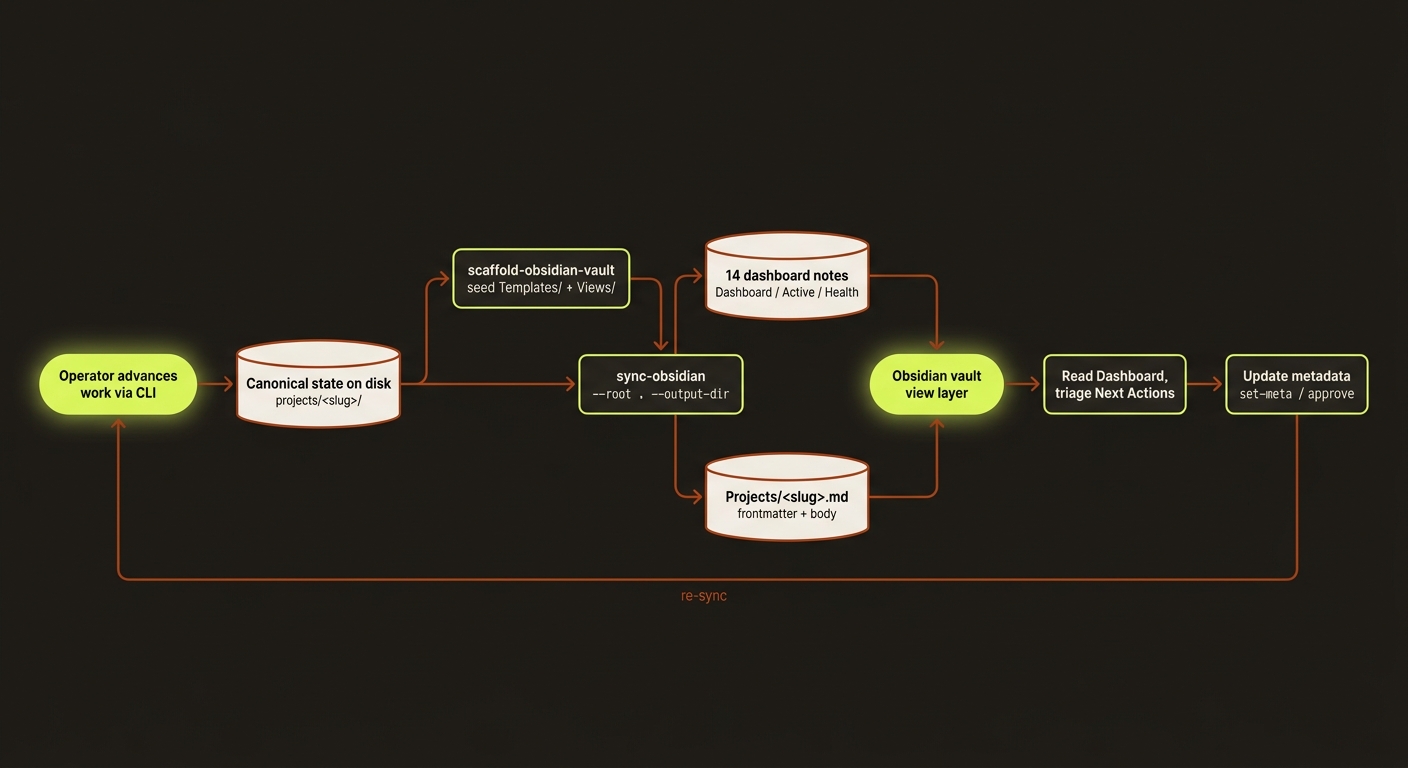
Diagram source (live Mermaid)
videoclaw ships first-class Obsidian support so you can run the production portfolio from a knowledge-base UI rather than from terminal output. The repo writes a vault of machine-generated notes that mirror the canonical project state — dashboards, queues, metrics, health, timelines, dependencies, and per-project notes — all regenerated from a single command.
Obsidian is a view, not the source of truth. The repo state on disk (
projects/<slug>/,artifacts/,checkpoints/,events/) is canonical. The Obsidian vault is a regenerable rendering of that state.
What this gives you
- A control plane that isn't a terminal. Browse the active queue, blockers, owners, dependencies, and review-state ladder from a normal Obsidian sidebar.
- Linkable, navigable history. Every project gets its own note with frontmatter, artifact references, and bidirectional backlinks into dashboard notes.
- Honest health visibility. Dashboards count missing approvals, stale reviews, blocked work, and due risk — backed by the same
doctor-portfolioandmetricsmachinery that drives reporting. - Zero lock-in. Notes are plain markdown files that live wherever you point
--output-dir. You can delete the vault any time and regenerate from canonical state with one command.
Vault layout
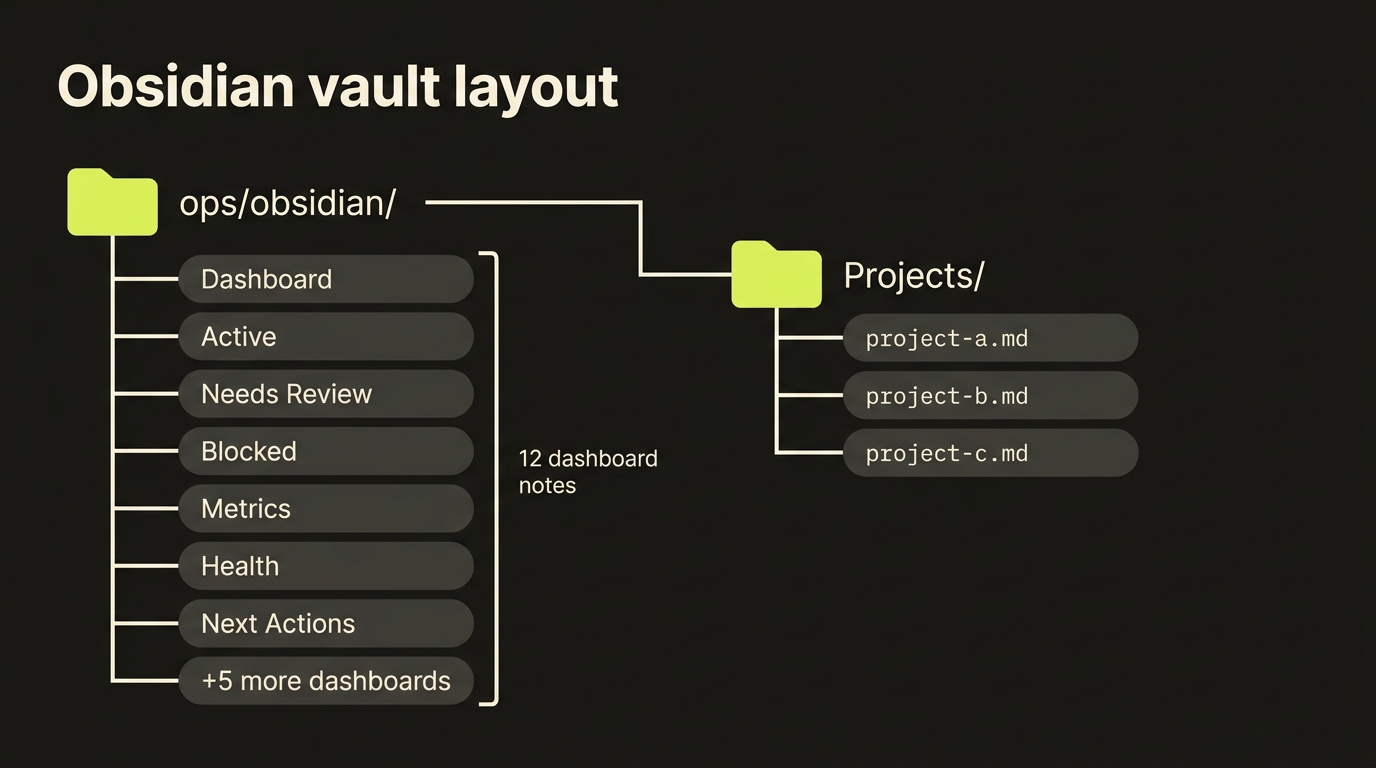
ops/obsidian/                 # vault root (path is your choice via --output-dir)
├── Dashboard.md              # top-of-vault summary; start here
├── Active.md                 # projects currently in flight
├── Needs Review.md           # awaiting director-mode storyboard approval
├── Blocked.md                # explicitly blocked-by something or someone
├── Complete.md               # published / shipped / archived
├── Metrics.md                # counts, rates, score averages, byReviewState
├── Health.md                 # doctor-portfolio rollup
├── Next Actions.md           # urgency-ordered action queue
├── Dependencies.md           # blocker graph
├── Timeline.md               # event timeline across the portfolio
├── Trends.md                 # per-snapshot trend table
├── History.md                # snapshot list
├── Changes.md                # snapshot diff narrative
├── Owner Workload.md         # owner-by-owner project load
├── Templates/                # scaffolded once; not regenerated with project data
│   └── Project Template.md
├── Views/                    # scaffolded once; not regenerated with project data
│   ├── Operations Runbook.md
│   └── Board Guide.md
└── Projects/                 # one note per project
    ├── <slug>.md
    ├── <slug>.md
    └── <slug>.md
Every dashboard note below the vault root is regenerated from canonical state on each sync-obsidian run, so the vault is safe to delete and rebuild. The Templates/ and Views/ seed notes are scaffolded once (by scaffold-obsidian-vault, which sync-obsidian also runs first) and not overwritten with project data.
Setup
One-time scaffold
vclaw video scaffold-obsidian-vault --output-dir ./ops/obsidianThis creates the vault root with a placeholder Dashboard.md, the Projects/ folder, and the Templates/ (Project Template.md) and Views/ (Operations Runbook.md, Board Guide.md) seed notes. The other 13 dashboard notes are not created here — they are written by sync-obsidian. You can open the folder as an Obsidian vault immediately.
Single-project export
vclaw video export-obsidian \
  --project my-project \
  --output-dir ./ops/obsidian/Projects
Writes one project note for my-project and nothing else. Useful for incremental updates between full syncs.
Full sync (the common case)
vclaw video sync-obsidian --root . --output-dir ./ops/obsidianRegenerates every dashboard note plus a project note for every project under --root. Idempotent — running it twice produces the same vault. This is what you call after a meaningful CLI change.
The --mode flag (storyboard or director) filters the vault to one production mode if you maintain separate vaults per mode.
The 14 dashboard notes
| Note | What it shows | When to check |
|---|---|---|
| Dashboard.md | Portfolio summary: total projects, current state breakdown, top metrics, links to other notes. | First thing every morning. |
| Active.md | Every project currently in flight (pre-publish, not blocked). | Whenever you want a "what's actually moving" view. |
| Needs Review.md | Projects in awaiting-approval (director-mode storyboard awaiting your sign-off). Includes link to each storyboard.md review file and review freshness. | Before approving any director-mode execution. |
| Blocked.md | Projects with explicit blockedBy or blockedReason set on the manifest. | When triaging — what's stuck and why. |
| Complete.md | Published, shipped, or archived projects. | Retrospectives; reuse-as-template candidates. |
| Metrics.md | Counts, rates, score averages, byReviewState breakdown (missing / current / stale). | Weekly portfolio review. |
| Health.md | doctor-portfolio rollup: missing artifacts, stale reviews while approval is pending, broken stage states, count of projects in each failure mode. | Whenever Metrics looks off, or before a release. |
| Next Actions.md | Urgency-ordered action queue. For director-mode awaiting-approval projects, links directly to the active storyboard.md review and shows review freshness. | Daily triage — what to do next. |
| Dependencies.md | Blocker graph across the portfolio (who is blocked by whom). | When unblocking work or planning a freeze. |
| Timeline.md | Event timeline across the portfolio, drawn from events/events.jsonl per project. | Investigating "what happened when?". |
| Trends.md | Per-snapshot trend table (totals, completion rate, average score, blocked / needs-review counts, platforms, legacy-import drift across persisted report-snapshots). | Tracking portfolio movement over time. |
| History.md | Snapshot list: every persisted report-snapshot with its headline counts and file path. | Finding a baseline to diff against. |
| Changes.md | Snapshot diff narrative: what's new since the last report-snapshot. Surfaces review-state transitions (missing → current, current → stale). | Before standups; before publishing reports. |
| Owner Workload.md | Owner-by-owner project load with priorities and due risk. | Resourcing conversations. |
Project notes
Each project under --root gets its own note at Projects/<slug>.md. Project notes carry frontmatter that Obsidian treats as queryable properties.
Frontmatter schema
exportProjectToObsidian (src/video/obsidian-export.ts) emits snake_case YAML keys (with a few camelCase reference-sheet keys). The fields actually written to each Projects/<slug>.md are:
| Field | Source | Purpose |
|---|---|---|
title | project.json | Note title (the slug) |
slug | project.json | Stable project identifier |
production_mode | project.json | Production mode (storyboard / director) |
target_runtime_seconds | brief | Final video length target |
clip_duration_seconds | brief | Per-clip duration |
genre | brief (director-mode) | Selected genre |
platform | brief | Target platform |
style / color_grading | brief | Creative direction |
legacy_import_* | derived | Legacy-import diagnostics (manifest_present, queue_file_present, queue_status_mismatch, nested_output_root_detected) |
ops_status | derived | Lifecycle state (active, needs-review, blocked, complete, ...) |
score | scorecard | Composite quality/health score |
score_band | scorecard | Score bucket (e.g. green / amber / red) |
owner | set-meta | Responsible person |
priority | set-meta | low / medium / high / critical |
due_date | set-meta | ISO date the project is due |
due_risk | derived | none / at-risk / overdue |
blocked_reason | set-meta | Free-form blocker description |
execution_profile_aspect_ratio / _quality / _resolution / _audio / _outputs | manifest | Execution profile, split into one key per field |
tags | set-meta | Free-form tags for grouping |
blocked_by | set-meta | Slugs of blocking projects |
next_stage | derived | Next canonical stage (or null when complete) |
storyboard_review_state | derived | missing / current / stale (the review-state ladder) |
storyboard_review_exists / _path / _generated_at / _stale | derived | Active storyboard.md existence, path, regenerated-at, and staleness |
review_report_verdict / review_publish_ready | review report | Review verdict and publish-ready truth |
referenceSheetCount / referenceSheetTypes / referenceSheetCollisions | reference-sheet store | Sheet count, comma-joined types, and whether any per-scene role collides |
sceneSelectionCoverage / sceneCandidatesTotal | scene-selection store | withSelection/sceneCount coverage string and total candidate count |
completed_stages / pending_stages / artifact_files | derived | Stage and artifact lists |
characters / character_bindings / prompt_guidance | character store / status | Character names, bindings (name:gb:refs), and prompt-guidance names |
characterProfilesandcharacterHydrationSummaryare not in the per-project frontmatter — those live only in the Dashboard table source. When a scene-candidates artifact exists, the export also writes per-scene notes underProjects/<slug>/Scenes/<i>.md.
These fields are queryable in Obsidian via the Dataview plugin if you want to roll your own ad-hoc views.
Note body
Below the frontmatter, each project note contains:
- Stage status — current checkpoint and next action
- Character bindings — referenced scene characters with stored Go Bananas IDs and reference assets
- Storyboard review — link to
storyboard.mdplus review-state and freshness - Recent events — tail of
events/events.jsonl - Artifact links — direct paths into the canonical JSON contracts
- Cost estimate — if computed, the approval-gate cost and wall-time estimate
The daily loop
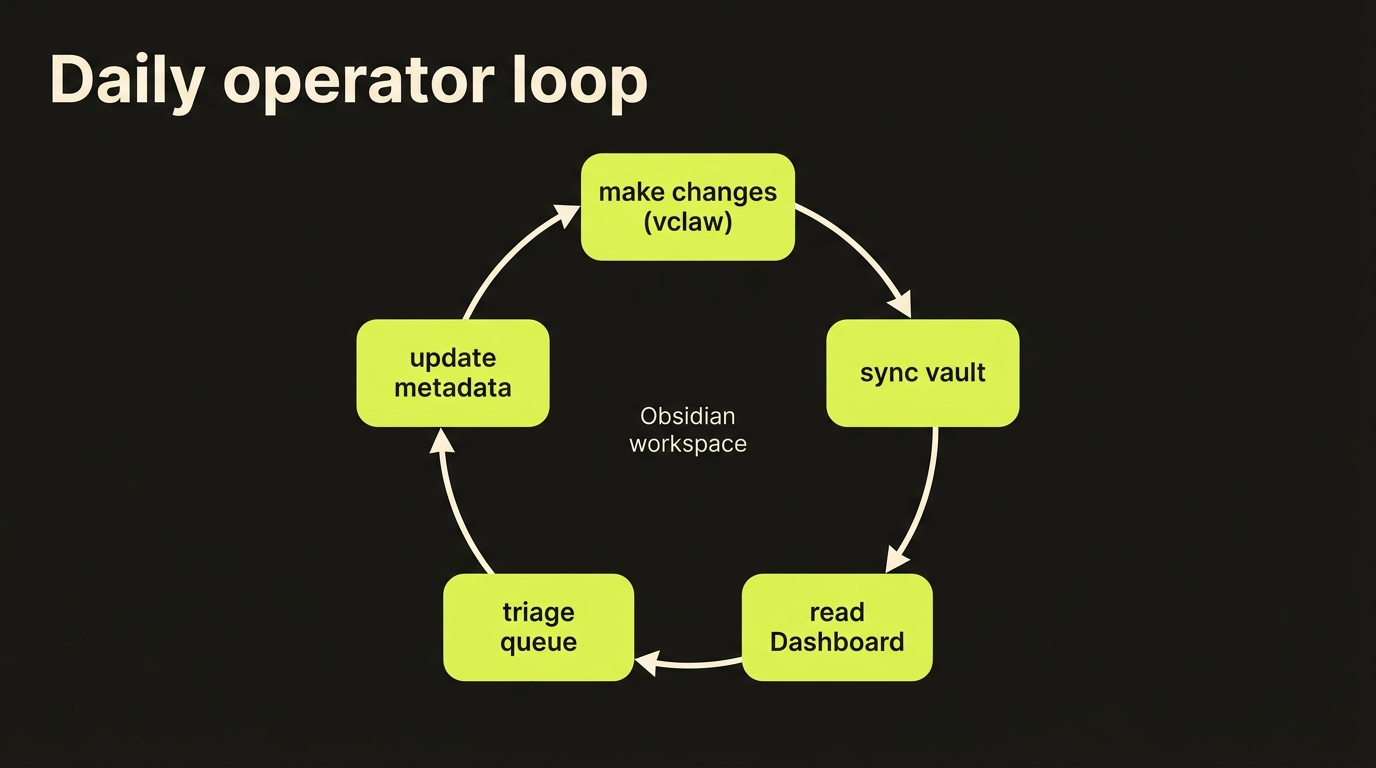
A typical day running a multi-project portfolio:
- Make changes — use the CLI to advance work:
brief,storyboard,produce,review,publish,set-meta,approve, etc. - Sync the vault —
vclaw video sync-obsidianregenerates every dashboard note plus all project notes from canonical state. - Read the Dashboard — open
Dashboard.md, then drill intoActive.md,Health.md, andNeeds Review.mdfor the high-signal views. - Triage the queue — open
Next Actions.mdto see the urgency-ordered action queue. Director-mode approvals link straight to the activestoryboard.md. - Update metadata — change owners, priorities, due dates, blockers, or approval state via the CLI (
set-meta,approve). Repeat from step 2.
The loop is intentionally one-directional: you never edit notes by hand and expect them to flow back to canonical state. The CLI is the only writer.
Common workflows
"What needs my approval today?"
vclaw video sync-obsidian- Open
Needs Review.md - Click into each project; expand the linked
storyboard.md - Run
vclaw video produce --project <slug> --mode director --approvefor the ones you sign off on - Re-sync
"What's blocked and on whom?"
- Open
Blocked.mdfor the explicit blockers - Cross-reference with
Dependencies.mdfor the blocker graph - Use
set-meta --blocked-by <slug> --blocked-reason "<text>"to update state from the CLI
"Who is overloaded?"
- Open
Owner Workload.mdfor the owner-by-owner picture - Sort by priority/due risk
- Reassign via
set-meta --owner <name>
"What changed since yesterday?"
- Run
vclaw video report-snapshotonce a day to persist a baseline - Open
Changes.mdfor the diff narrative — this surfaces review-state transitions and snapshot deltas - Use
report-diff --from <snapshot-path> --to <snapshot-path>for explicit point-to-point comparison
"Is the portfolio healthy?"
- Open
Health.mdfor the doctor-portfolio rollup - Cross-reference
Metrics.mdforbyReviewStateand approval-queue depth - Use
vclaw video doctor-project --project <slug>to dive into a specific project
Maintenance loop
Recommended local rhythm:
vclaw video metrics                          # quick sanity check
vclaw video next-actions                     # what's urgent
vclaw video doctor-portfolio                 # health rollup
vclaw video report-snapshot                  # persist baseline for diffs
vclaw video sync-obsidian                    # regenerate the vault
Run after meaningful CLI changes. The packaged pre-flight is the safer alternative if you want to catch regressions before syncing:
npm run check:release-readiness-liteTips
- Treat the vault as a build artifact. Don't hand-edit notes. Rebuild instead.
- Pin
Dashboard.mdas the Obsidian default note so it's the first thing you see. - One vault per mode if you run both
storyboardanddirectorat scale — pass--modeto filter. - Combine with Dataview for custom queries on the project frontmatter (e.g. "show all director-mode projects with stale reviews owned by X").
- Version the vault in a separate git repo if you need historical state — but remember canonical history already lives in
events/events.jsonlandartifacts/history/.
Source of truth
The repo state on disk is always canonical. The Obsidian vault is a regenerable view.
If a vault note disagrees with the CLI, the CLI is right — re-sync. If the CLI disagrees with what actually shipped, the artifact JSON in projects/<slug>/artifacts/ is right — let doctor find the drift.
canonical state on disk
        │
        ▼
    sync-obsidian       ← regenerates everything
        │
        ▼
  Obsidian vault        ← view layer; safe to delete
See also
README.md— repo front doordocs/SKILLS.md— comprehensive skills referencedocs/OPERATIONS.md— day-to-day maintenance loop, including the preview/delivery portal and the overnight batch video queuedocs/CLI_REFERENCE.md— full CLI surface