
Operations
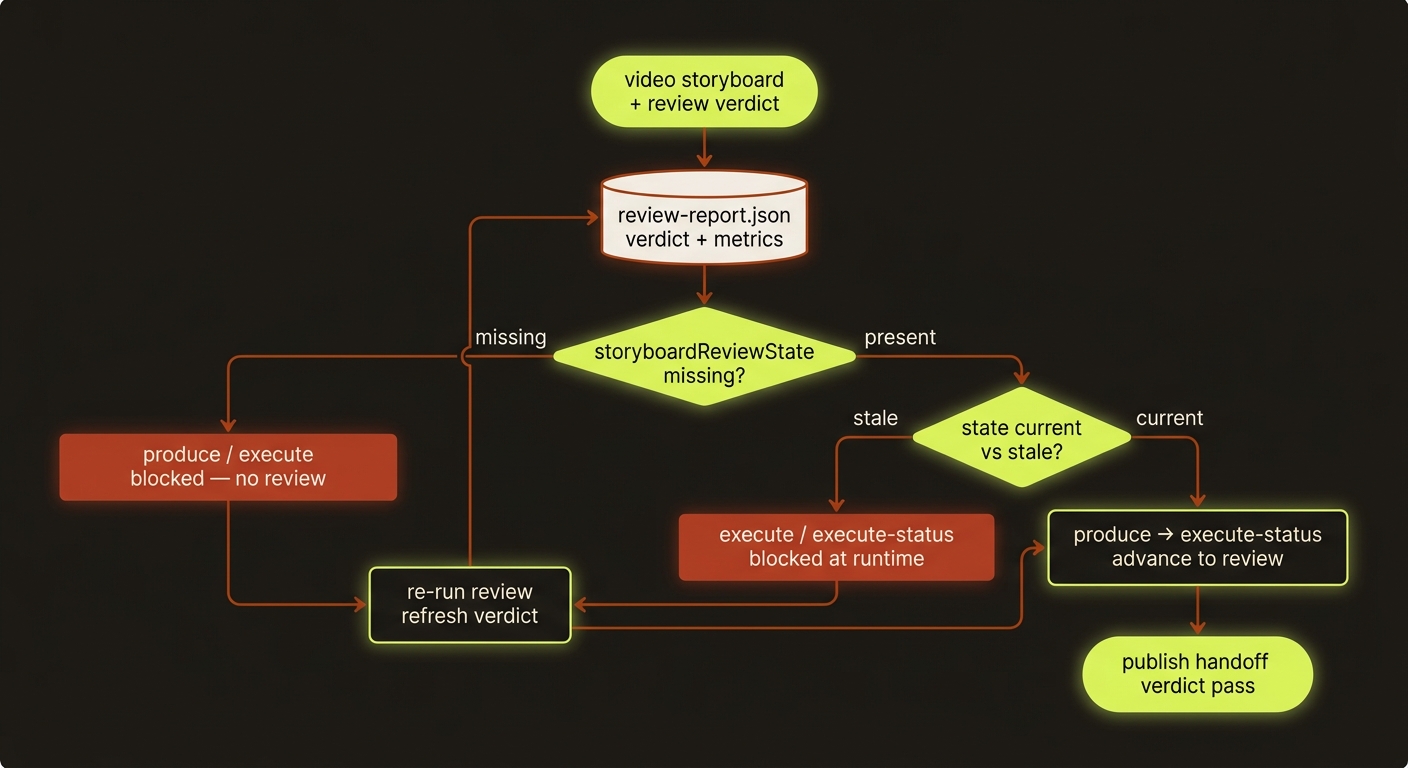
Diagram source (live Mermaid)
Canonical project flow
video initvideo briefvideo storyboardvideo assetsvideo review-uiorvideo review-autopilotfor production handoff;video review --verdict passonly when equivalent review evidence already existsvideo publish
For new planned films, attach the explicit plan at storyboard authoring and review the completed export with video review --film-edit ... --film-review .... The current full-playback evidence is required before passing a planned film; publish rechecks the media bytes. See Shared filmmaking workflow for the exact inputs and supported routes. Image handoff approval does not replace final-film playback.
Publish handoff is canonical only when review-report.json has verdict: "pass" and metrics.publishReady: true.
Recommended maintenance loop
- Run
vclaw video metrics - Run
vclaw video next-actions - Run
vclaw video doctor-portfolio - Run
vclaw video report-snapshot - Run
vclaw video sync-obsidian - Run
npm run smoke:runtimeafter meaningful runtime changes - Run
npm run smoke:native-veoafter changing the built-inveo-useapi(native Veo) path - Run
npm run smoke:character-hydrationafter changing create-time cast hydration or approval-gate cost behavior - Run
npm run smoke:execution-cancelafter changing adapter cancel behavior or the project-level cancel path - Run
npm run smoke:portfolioafter changing index/report/CSV visibility - Run
npm run check:movie-director-wrappersafter editing bundled Director helper scripts - Run
npm run check:cleanroom-docsafter editing clean-room-facing docs and skills - Run
npm run check:skill-frontdoorafter editing repo-local skillSKILL.mdfiles - Run
npm run check:artifact-schema-coverageafter editing JSON Schemas underschemas/video/or canonical artifact contracts - Use
npm run check:release-readiness-litewhen you want the fast all-in-one local verification bundle, including the isolated image-storyboard E2E
Management views
metrics: counts, rates, score averagesworkload: owner-by-owner project loadnext-actions: actionable queue ordered by urgencydependencies: blocker graphreport: full machine-readable portfolio statereport-diff: compare portfolio snapshotstrends: historical trend points
Delivery (preview & delivery portal)
The review/delivery portal is the ops surface for shipping finished work to clients:
portal --project <slug> [--client <name>] [--run <id>] [--surface edit|review|client-review|preview|compare|index]generates the standardized HTML surface(s) locally.publish-preview --project <slug> --client <name> --bucket <bucket> [--run <id>] [--surface ... (default preview)] [--public-base-url <url>] [--wrangler-bin <path>] [--dry-run]builds a deterministic R2 upload plan from the HTML file and its local refs, then runswrangler r2 object putper item;--project,--client, and--bucketare all required. Keys land underclients/<client>/<project>/runs/<run>/(each segment slugified).publish-portal-index --bucket <bucket> [--client <name>] [--public-base-url <url>] [--wrangler-bin <path>] [--dry-run]uploads a client or global index linking into the published run folders.
See docs/preview-portal-audit.md for the full publish contract.
Overnight batch video queue
For unattended, many-job backfill runs (e.g. consistency tests or draft fan-outs):
batch-submit --manifest <path> --project <slug> [--route runway-useapi|dreamina-useapi|seedance-direct|reapi-seedance|seedance-modelark]compiles into the shared durable queue and performs no submission. The former--executenative loop is retired and fails before provider access; use the returned queue tasks withcinema-work-quote, authorization, andcinema-work.- For an already-submitted historical
batch-queue.json,batch-monitor --out <dir> [--once] [--max-minutes <n>]can still poll and download accepted jobs idempotently. Its former auto-resubmit flags are retired and fail before provider access. batch-status --out <dir>reports that historical queue state without polling.
Execution and health model
Start with doctor-project --project <slug>, readiness --project <slug> and plan --project <slug>. They validate saved artifacts, gates and route configuration. providers and verify-env describe local configuration, not live account entitlement or a successful provider render.
Durable queued work
- Choose a compiler:
pool --project <slug>for independent pending scenes,produce --project <slug> --auto-chainfor continuity dependencies, orbatch-submit --manifest <path> --project <slug>for a prepared manifest. These write queued tasks and make no generation submission. - Inspect the returned task IDs and
cinema-status --project <slug>. - Use
cinema-work-quote --project <slug> --task <id> --quote-adapter <executable>for the exact current request. A quote can contact the provider; it is not a render. Record its currency, amount, ID and content hash. - Persist the user's approval with
cinema-authorize, bound to that quote and hash, a maximum spend, expiry and evidence. An existing storyboard approval is not a substitute for this exact authorisation. - Submit through
cinema-workusing the task, quote/hash, authorisation and quote adapter plus--confirm-spend. Runway explore's provider-free worker instead requires--confirm-provider-callbefore its first external submit. - Call
cinema-work --project <slug> --task <id>to reconcile an existing job. Review/select the result before dependent continuity tasks can proceed.
The CLI reference contains the complete “Draining a queued Flow task” example. Do not add --dry-run indiscriminately: auto-chain compilation rejects it, while pool --dry-run previews without saving. batch-monitor observes historical queues only.
Direct execution compatibility path
Plain produce --project <slug> / execute still submit directly when readiness allows; without --dry-run, this is a live command. Director mode checks storyboard approval, but this path is not the exact quote/authorisation worker. Use produce --project <slug> --dry-run to inspect that payload, execute-status to poll/ingest the direct execution report, execute-cancel to attempt supported cancellation, and execute-abandon to stop waiting on a Runway or Dreamina job that will never finish (the provider job keeps running). Do not confuse those commands with Cinema task state.
While a direct produce is still inside its submit window, execute-status answers execution-in-flight (pid, start time, route, scene scope) and leaves the previous report untouched; execute-cancel says the same instead of "no live adapter job id". A run marker left under projects/<slug>/state/execution-runs/ after its process has died is a killed run, not a live one: the next execute-status reaps it and appends execution.run.abandoned to the event log. Re-run produce (the provider never received that submission) or, if the process is genuinely wedged, confirm it first (ps -p <pid> -o command — pids are reused) and only then kill it. status and Mission Control read markers but never remove them; only execute-status reaps.
For seedance-direct and veo-useapi, the built-in adapters are the normal path; command shims or a full adapter override are optional. The native Seedance transport uses SUTUI_API_KEY and is reached only when VCLAW_SEEDANCE_DIRECT_NATIVE=1 selects it: with the bundled free engine unusable and no such opt-in, seedance-direct refuses (execution_blocked_by_readiness, activeTransport: blocked) rather than moving renders onto the paid API — read vclaw video providers before diagnosing that refusal as a provider outage. Flow additionally needs its Bun sidecar setup. set-execution-profile retunes ratio/quality/audio/outputs; re-plan and obtain fresh review/authorisation when a change invalidates saved evidence.
Cost and recovery evidence
cost-estimateis planning guidance, not an authorisation quote. It uses static defaults until completed Seedance USD telemetry exists, then reportsestimateSource: "historical-telemetry".- Inspect project events for
generation.telemetry.recordedand retain task, provider job and receipt identifiers when investigating a failed poll or missing output. Subscription inclusion is not the same as no external cost. - After a worker interruption, inspect saved task/provider state and reconcile that job before creating replacement work. An unknown submission result is not proof nothing was charged. Follow the task's blockers; do not delete its receipt or force a new submit to make a queue look healthy.
- For multiple computers sharing an account slot, use the authenticated shared coordinator. Check service health, lane ownership and lease history. A local SQLite queue coordinates one machine; copying/syncing its live database does not coordinate multiple workers.
Review, delivery and operational data
review-ui defaults to loopback and a launch-token exchange. Remote access is explicit (--allow-remote with a concrete host); do not treat its authenticated review server as the public client portal. Publishing still requires the saved review truth: verdict: "pass" and metrics.publishReady: true.
Back up project manifests, artifacts/history, checkpoints, events, referenced media and delivery outputs together. Include Cinema state and local lane data in the recovery plan; pause writers or use a consistent database backup before copying mutable stores. Keep credentials outside source control and ordinary client deliveries. After restoring, inspect project and queue state, confirm provider jobs and lane ownership, then reconcile before resuming submissions. A deployment needs a rehearsed restore procedure; no automated backup service is implied by the CLI.
Google Flow: a missing download link is not a failed render
Google mints Flow's signed media URLs from an endpoint that rate-limits by network address, so it periodically refuses useapi's outbound calls and returns an "unusual traffic" block page instead of a link. Since the useapi API change of 2026-07-27, POST /videos, /videos/upscale and /videos/extend omitvideoUrl / thumbnailUrl / fifeUrl / servingBaseUri in that case rather than returning a link that does not work.
The render still completed and was still charged. Treat a missing URL as a retry condition, never as a failure — a generation that genuinely failed never carries a URL and never will (check mediaMetadata.mediaStatus.mediaGenerationStatus). It is uncommon (useapi's logs show two episodes in seven days, ~4 h and ~40 min) but while it lasts it affects a large share of link requests, not the odd one.
Recovery is automatic across every Flow route in this repo (src/video/flow-media-url.ts, and resolveMediaUrl/rawAssetUrl in the vclaw-cli useapi backend), in the documented preference order:
- Re-poll
GET /jobs/{jobId}— completed video jobs re-resolve missing URLs by themselves and the recovered link is saved. Jobs under 24 h only, and at most one re-resolve per minute: a tight retry loop lengthens the block instead of shortening it. This floor applies only after completion — in-progress polling is unchanged. GET /assets/{mediaGenerationId}— the link route when the job is gone. A503carries aRetry-Aftersaying how long to wait; a404is permanent.GET /assets/{mediaGenerationId}?raw=true— streams the bytes through useapi over a Google route the block does not touch, so it keeps working throughout. Video only, and the whole file transits useapi — it is the way out of a stuck download, not the normal download path.
Images never need any of this: when fifeUrl is missing, POST /images carries the picture inline as base64 in encodedImage instead, so gen-image --backend flow writes the file either way.
If recovery is exhausted, the error names the mediaGenerationId — the clip exists on Google's side and can be pulled by hand once the block clears, which is cheaper than re-rendering it.
Generation telemetry
Live and dry-run execution append generation.telemetry.recorded events to the project event ledger. Submitted runs record route, task, prompt, duration, and reference-count metadata. Poll refreshes record pending/completed/failed status, output counts, provider cost fields, provider timing fields, and issues.
Only completed seedance-direct records with provider-reported USD are used as cost-estimate samples. Credits are stored as telemetry but not converted to USD.
Full guide: docs/GENERATION_TELEMETRY.md.
execution-plan and execute remain available as compatibility aliases over plan and produce.
Project metadata expectations
Recommended project metadata:
ownerprioritydueDatetagsblockedByblockedReason
Reports and snapshots
reportgives the current full statereportincludes execution profile and prompt guidance when availablereport-snapshotpersists the current state toreports/history/report-historylists snapshotsreport-diffcompares snapshotsexport-csvwrites spreadsheet-friendly exports
Reproducible smoke
Use:
npm run smoke:runtime
npm run smoke:native-veo
npm run smoke:character-hydration
npm run smoke:execution-cancel
npm run smoke:portfolio
npm run smoke:reference-sheets
npm run smoke:scene-candidates
npm run check:movie-director-wrappers
npm run check:cleanroom-docs
npm run check:skill-frontdoor
npm run check:artifact-schema-coverage
This validates the documented local happy path and prints the generated machine-readable artifacts so runtime regressions are easier to spot than with tests alone.
For a packaged one-command pass that builds once, runs the Node suite once, and then executes the main smokes, isolated image-storyboard E2E, and guardrails:
npm run check:release-readiness-lite