
Publishing
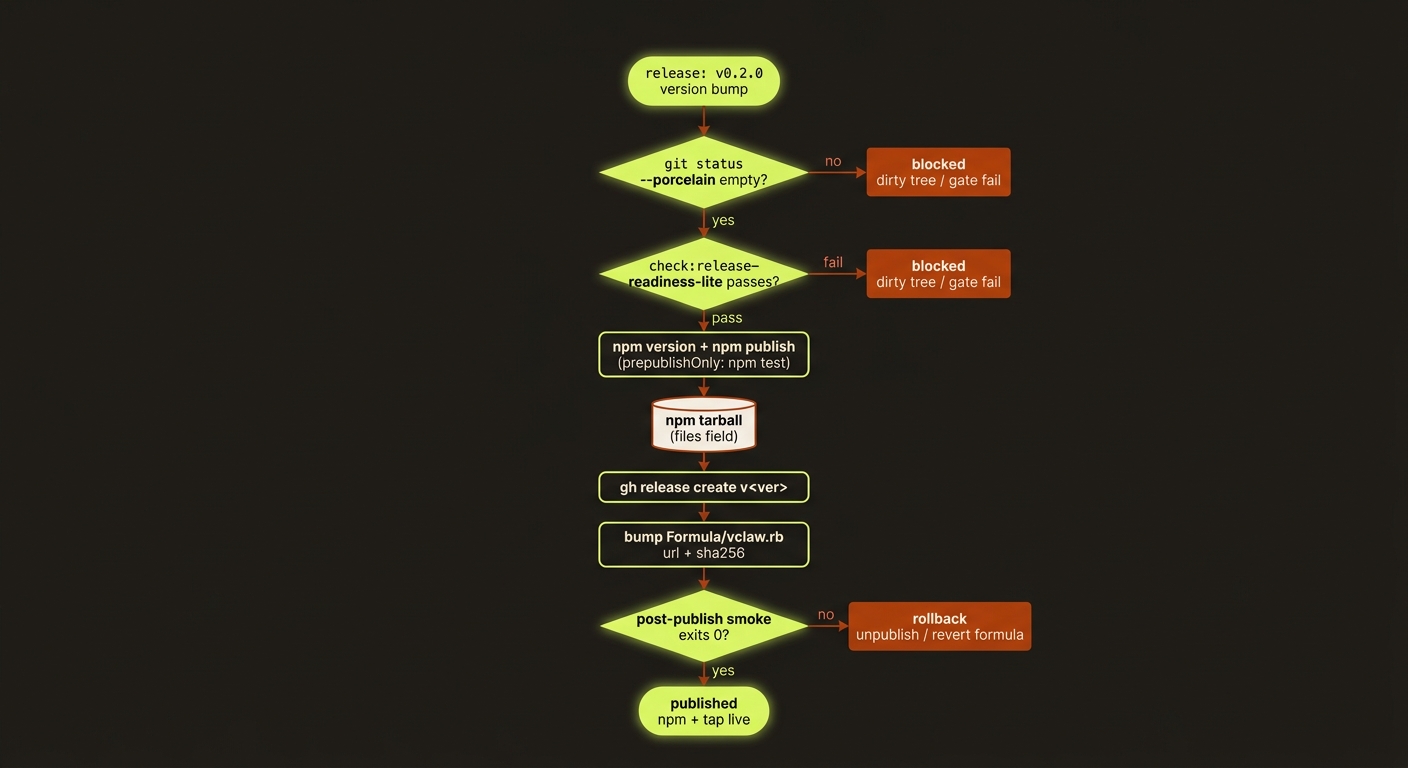
Diagram source (live Mermaid)
Release the CLI package, documentation site and optional shared coordinator as separate deliverables. A successful docs deployment does not publish npm or prove the installed CLI and live providers work.
Choose a version and channel
The repository currently uses a 3.0.0-alpha.* prerelease series. Select the release version and npm dist-tag explicitly. Prereleases publish to alpha. Until the first stable release, latest tracks the newest alpha that passed the release matrix, and the two tags move together — a bare npm install -g videoclaw must never resolve to an older build than @alpha (decided 2026-09-09, when latest had sat five prereleases behind at alpha.7; promoted with npm dist-tag add videoclaw@3.0.0-alpha.12 latest, confirmed by npm dist-tag ls videoclaw). Verify the result on the channel you changed; npm view can lag the authoritative npm dist-tag ls by minutes.
Before changing version or publishing, record the source commit, intended version/channel and the release-readiness results. Use a clean checkout and keep the lockfile version aligned. npm publishing requires an authenticated release account and its required authentication.
Verify the actual package
package.json → files is the authoritative allowlist. Do not maintain a second manually copied list here or add a competing .npmignore. The package needs its compiled CLI, schemas, application resources, Review UI, and declared workflow/sidecar source resources. Local provider config, credentials, browser profiles, installed dependencies, generated media, project workspaces and nested tarballs must remain excluded.
npm run check:release-readiness-lite
npm run check:docs-site
npm pack --dry-run --json
npm pack --json
Review the dry-run inventory, then install the resulting tarball in a fresh directory outside the repository. Run schema discovery, a temporary project lifecycle and representative bundled-resource checks from that directory. Provider discovery alone does not prove the resources needed by a command are present. Record the tarball filename, version, checksum and smoke results.
Optional Flow and Python helpers still need their own runtimes/dependencies; verify their documented setup separately. A package that contains sidecar source is not evidence that Bun dependencies were installed automatically. The source package tests and clean-directory smoke should enforce the actual allowlist and runtime behaviour as it evolves.
Historical May 2026 tarball inventories and earlier release test counts are retained in release history; they are not acceptance evidence for a new tarball.
Publish and verify the selected channel
After the release gates pass and the version change is committed/tagged:
# Prerelease channel only; choose the version before creating its release tag.
npm publish --tag alpha
npm view videoclaw@alpha version
npx -p videoclaw@alpha vclaw schema --json
npx -p videoclaw@alpha vclaw video providers
prepublishOnly currently runs npm test; it does not replace tarball, sidecar, docs or live-provider acceptance checks. Push the release commit/tag and create the GitHub release with notes describing the shipped version, changes, installation prerequisites and known limitations. Do not reuse an old tag or attach success claims from a different commit.
For a stable release use the deliberately selected stable version and --tag latest, and verify videoclaw@latest instead. Check the actual published version equals the intended version; a successful command on an older tag is not verification of the new release.
Documentation and shared-service deployments
Reference pages under docs-site/reference/ are generated from the explicit reference manifest. Run npm run docs:sync after canonical docs/ edits and npm run check:docs-site before commit. Independently authored guide/feature pages need their own content review. Build the docs site and verify deployed pages against the intended source revision.
The shared lane coordinator has a separate Cloudflare deployment and secret configuration. Record its revision and authenticated health/coordination checks independently. Never infer shared-service deployment from a CLI merge or documentation deployment.
Homebrew status
packaging/homebrew/vclaw.rb is an unconfigured template: it still points to the predecessor package and has a placeholder checksum. It is not an install-ready formula, and this document does not claim a working tap exists.
To support Homebrew, first update the formula to the verified videoclaw tarball URL and checksum, current metadata and dependency requirements. Test installation and CLI/resource behaviour in the intended tap, then publish specific tap instructions. Do not advertise brew install vclaw as a supported release path until that has been verified.
Recovery from a bad release
Prefer a corrective version and clear release notes. If changing a dist-tag back to a previously verified version, confirm that exact version remains available and state which channel changed. Do not assume an unpublish window or that reverting a Homebrew formula automatically downgrades installed users. Preserve affected release evidence and document any project-data migration implications before recommending rollback.