
Skills
videoclaw ships a curated library of skills — reusable, agent-invokable workflows that either produce a video (the video category) or orchestrate the work around it (the workflow category). This doc is the comprehensive per-skill reference. For the machine-readable index see skills/catalog.json; for the full how-to of any individual skill, follow the linked SKILL.md for that skill.
Ecosystem map
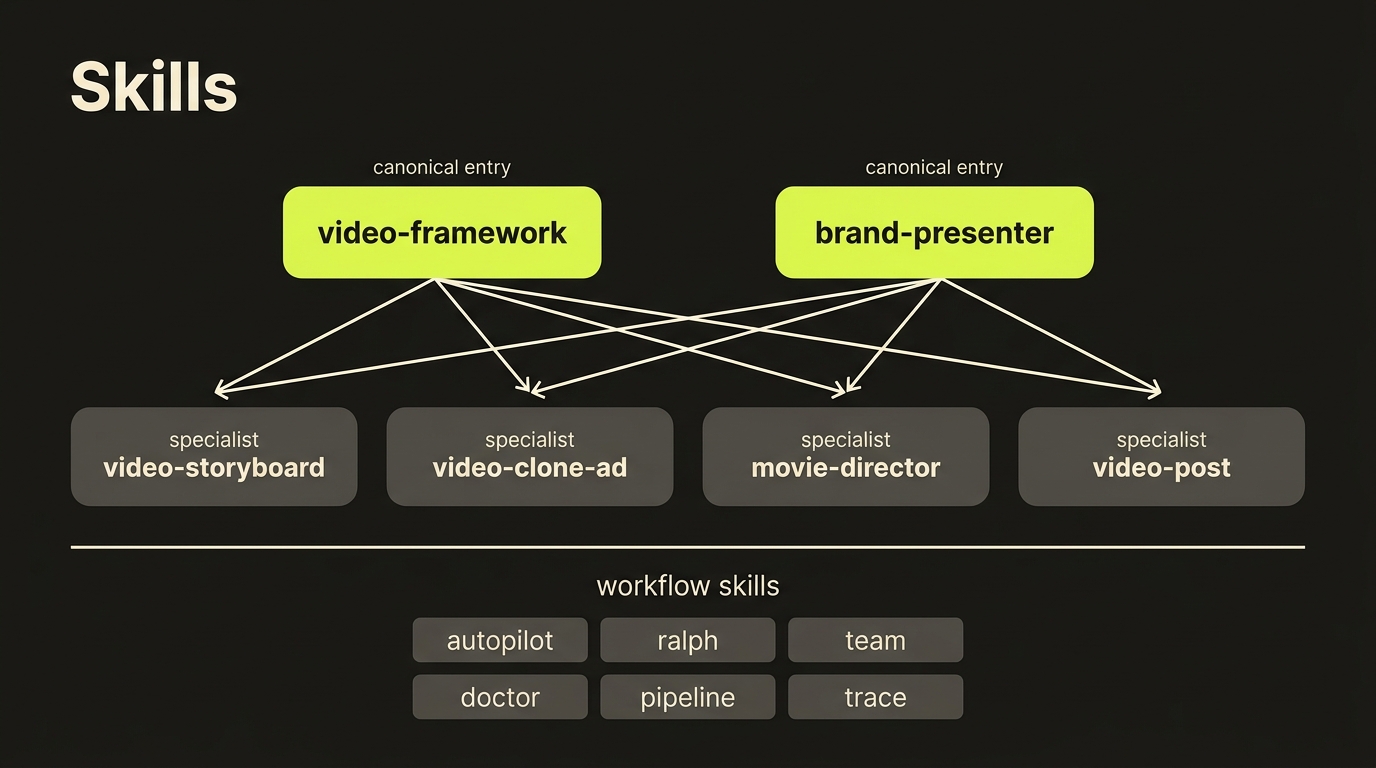
How skills relate
The library is not a flat bag of equally-preferred entry points. It uses a small hierarchy:
| Role | Examples | When you reach for it |
|---|---|---|
| Canonical entry | video-framework, brand-presenter | Generic or unspecified video request — the entry skill routes into a specialist. |
| Specialist | video-storyboard, video-clone-ad, movie-director, video-post, ... | The mode is clearly known up front (e.g. "clone this ad", "storyboard these 6 scenes"). |
| Compatibility alias | davendra-presenter, david-sales-presenter, nex-presenter, bunty | Personal/brand presets that exist for discoverability — they all delegate into brand-presenter. |
| Workflow | deepsearch, ai-slop-cleaner, web-clone, ... | Exploration, code-cleanup, and web-clone utilities — independent of any one production mode. |
Rule of thumb: start at a canonical entry, specialize only when the mode is clearly known, and treat aliases as discovery handles rather than first-choice workflows.
Skill index
| Group | Skill | Status | One-liner |
|---|---|---|---|
| 🎯 Canonical | video-framework | imported | vclaw-native front door that routes across copy/create/narrated/presentation/long-form/film/UGC. |
| 🎯 Canonical | brand-presenter | native generic | Generic narrated presenter-video workflow over a branded host profile. |
| 🎬 Video | garden-days | native generic | Baby Ram & Sita three-lane series factory: writers → GB identity images → Runway/Higgsfield/Veo queues → automated finish. |
| 🎬 Video | dance-breakdown | native generic | Reference dance video → measured per-shot choreography breakdown (moves sentence for sung windows, timecoded blocks for no-voice windows). |
| 🎬 Video | match-highlights-local | native generic | Cricket highlights read off the broadcast scoreboard overlay — one ffmpeg pass, template OCR, a monotonic ball-count prior; no model, no network, no spend. |
| 🎬 Video | vox-explainer | native generic | Vox-inspired collage explainers from an approved narration and real archival photos — freely licensed only, object-capable cutouts, a contact sheet approved before anything renders; no generation, no spend. |
| 🎬 Video | ad-intel | native generic | Competitor ads torn down with our own tools: the public Meta Ad Library via the Higgsfield browser session (or one public video URL) → whisper → Gemini → per-ad artifacts, a brand teardown and a review page; no third-party API. |
| 🎬 Video | video-storyboard | native clean-room | Brief or clone plan → scene-by-scene storyboard artifact. |
| 🎬 Video | video-analyze-template | native clean-room | Reference video → reusable template packet. |
| 🎬 Video | video-clone-ad | native clean-room | Saved template → new product/brand using clone-execute. |
| 🎬 Video | video-thumbnail-lab | native clean-room | Final render → thumbnail + platform variants. |
| 🎬 Video | movie-director | imported | Short-film production across 12 genres with interview/auto/hybrid entry modes. |
| 🎬 Video | video-replicator | imported (deep-surface) | 7-mode professional pipeline: COPY/CREATE/NARRATED/PRESENTATION/LONG-FORM/FILM/UGC. |
| 🎬 Video | video-post | imported | Post-render verify, social variants, thumbnails, archival. |
| 🎬 Video | higgsfield-generate | external bridge | Higgsfield CLI bridge for Marketing Studio, product photoshoots, Soul IDs, and virality scoring. |
| 🎭 Cast | character-creator | imported | Create Go Bananas characters with profile + multi-view reference sheets. |
| 🎭 Cast | character-library | imported | Audit, list, patch, and delete entries in the shared Go Bananas library. |
| 🎞️ Prompts | seedance-prompts | imported | Browse and apply the clean-room Seedance prompt reference library. |
| 🎞️ Prompts | multi-shot-prompt | native clean-room | Reference image or storyboard scene → timed multi-shot cinematic prompt sequence, validated against provider-aware videoclaw presets. |
| 🎞️ Prompts | mograph | native clean-room | Style-locked motion graphics: one motion-sheet style authority + action-only motion-pack blocks, rendered through the batch queue with zero style drift. |
| 📺 Audio | youtube-audio | imported | Download audio (MP3) or video (MP4) from YouTube using yt-dlp + FFmpeg. |
| 📣 UGC | ugc | imported | Belief-driven UGC campaign generator (E5 method) with multi-video output. |
| 🎤 Aliases | davendra-presenter · david-sales-presenter · nex-presenter · bunty | aliases | All delegate into brand-presenter with a personal/brand profile. |
| ⚙️ Workflow | deepsearch | imported | Thorough codebase search. |
| ⚙️ Workflow | ai-slop-cleaner · web-clone | imported | Operational utilities (anti-slop cleanup, website cloning). |
| 🎬 Video | 3d-animation-short | native generic | A one-line story idea → a finished stylized 3D animated short: story spine, labelled cast, no-people plates, a per-second shot table gated by six automated checks before anything renders. |
| 🎞️ Prompts | ai-director | native generic | AI Animation Director: locks a project-level visual blueprint (identity, colour system, lighting grammar, camera language) via director-blueprint + cinema-profile. |
| 🎞️ Prompts | ai-film-director | native generic | Platform-aware scene director: a minimal idea (plus character / first-frame / last-frame references) → a complete production prompt for Seedance or Google Veo, with continuous multi-scene handoff. |
| 🎞️ Prompts | ai-filmmaking | native generic | Production-grade prompt chain the videoclaw way: character sheet → storyboard grid → Seedance packets over filmmaking-prompts, storyboard-grid, prompt-lint. |
| 🎬 Video | brand-agency | native generic | Full creative-agency brand launch: brand-extract + brand-definition seed several films and a brand kit from a client website. |
| 🎬 Video | brand-explainer | native | Narrated 60–70 s brand explainer films in the house motion-graphics style: one shared engine + a .brand data pack per film. |
| 🎬 Video | character-ad | native generic | A short character-led ad the native Google Veo way: a registered Flow character shows off a product via flow-r2v + stitch-ad. |
| 🎯 Canonical | videoclaw | alias | Persona alias of concierge — the same guided front door; /videoclaw. |
| 🎯 Canonical | concierge | native generic | The front door for humans, speaking as VideoClaw: a guided menu from idea to finished video, plan → preview → spend, never spending without a go-ahead. |
| ⚙️ Workflow | graphify | imported | Turns code, docs and media into a persistent knowledge graph (graphify-out/) you query instead of grepping. |
| ⚙️ Workflow | improvement-run | native generic | Whole-codebase improvement pass: parallel audit → adversarial verification → plan gate → batched PRs with fresh verifiers. |
| 🎬 Video | motion-reel | native clean-room | Turns an existing talking-head video into a reel with speech-synced motion-graphics overlays via motion-overlay. |
| 🎬 Video | rap-avatar-mv | native generic | A portrait + a supplied or generated track → rap MV variants: measured vocal windows, image and voice references, clip reuse, timing checks and verified delivery. |
| 🎬 Video | rhyme-factory | native generic | Character pack + nursery-rhyme idea → a YouTube-ready SUNG music video (song, sing-along captions, polish, thumbnail, upload pack) on top of garden-days. |
| 🎬 Video | runway | native clean-room | Draft renders on Runway through its free queue; paid credits stay opt-in. |
| ⚙️ Workflow | skills-auditor | ported-from-videoclaw | Audits the skill surface for wrong commands, missing resources, routing overlap and catalogue drift. |
| 🎞️ Prompts | story-bible-builder | native generic | Interview-driven canon builder: a story world → one dense story bible that ai-director and the storyboard consume. |
| ⚙️ Workflow | ui-ux-pro-max | imported-from-video-creation-projects | UI/UX design intelligence for admin panels, CMS pages and dashboards (styles, palettes, font pairings, chart and stack guidance). |
| 🎬 Video | video-portfolio-ops | native clean-room | Portfolio operations: many projects at once — metrics, report, trends, next-actions, doctor-*, CSV/Obsidian exports. |
| 🎬 Video | video-production-handoff | native clean-room | Moves a project from create/storyboard/assets into review: status, readiness, next-actions, Review UI handoff. |
| 🎬 Video | video-release-readiness | native clean-room | Release pre-flight for the repo itself: source checkout, package dry-run, npm handoff and the verification report. |
| 🎬 Video | video-review-ui-qa | native clean-room | QA for the local Review UI: storyboard handoff, review-autopilot, browser behaviour and the decision copy-blocks. |
Generic orchestration skills that duplicated the global plugin set (
autopilot,ralph/ralph-init/ralplan,team,cancel,trace,hud,git-master,code-review,security-review) and the removed-toolingomx-setupwere culled from the repo — use the global versions.
🎯 Canonical entries
video-framework
Role: OMX-native front door for any "make a video" request. What it does: Routes the request across the seven established workflows — COPY, CREATE, NARRATED, PRESENTATION, LONG-FORM, FILM, UGC — by classifying the intent and reusing proven legacy engines behind clean adapter boundaries. Picks the right specialist instead of forcing the user to. Key features:
- Single intake surface for both clone-style and from-scratch video requests
- Adapter pattern preserves legacy engine quality without inheriting legacy mess
- Hands off to a specialist (storyboard, clone-ad, movie-director, replicator, Higgsfield bridge, ugc, ...) once the mode is decided
- Useful as the default first-touch when the user's intent is ambiguous
When to reach for it: Any open-ended video request — "I want to make a video", "can you do a video for X?" — where the production mode hasn't been picked yet.
Full guide: skills/video-framework/SKILL.md
brand-presenter
Role: Canonical (generic) presenter-video workflow. What it does: Turns a slide deck or structured topic into an intro/slides/outro narrated presentation using a branded host profile (avatar + voice + intro/outro framing). Personal/brand presenter skills (davendra-presenter, david-sales-presenter, nex-presenter, bunty) all delegate here with a different host profile. Key features:
- One generic workflow with swappable brand profiles (no copy-paste forks)
- Slide-deck-aware framing (cover slide → body → call-to-action)
- Lip-synced intro/outro plus TTS narration over body slides
- Works for product explainers, internal updates, social-first brand cuts
When to reach for it: Anything narrated and host-led — explainers, demos, brand intros, presentation videos. Pick a personal alias instead if a specific host identity is required.
Full guide: skills/brand-presenter/SKILL.md
🎬 Video specialists
garden-days
Role: Series-factory skill for the "Garden Days" (Baby Ram & Sita) autonomous series factory — status, new episodes, driver relaunch, troubleshooting, QC, and franchise cloning across three render routes (Runway free / Higgsfield free / Veo omni-flash credits). State lives in the vclaw workspace (BRS-SERIES.md, SERIES-PLAYBOOK.md, lane queues/drivers); identity lives in Go Bananas characters 347/348 and Higgsfield reference elements. Triggers: /garden-days, "garden days", "baby ram and sita", "new episode", "series status", "lane A/B/C". References: references/writer-bible.md, references/lanes.md, references/failure-modes.md, references/franchise-cloning.md.
dance-breakdown
Role: Video specialist (native generic). A reference dance video → a measured per-shot choreography breakdown: scene detection (or a supplied cut list), each shot's own footage sent inline to a multimodal model, one record per shot with a single moves sentence (for a window that sings — no seconds, the audio is the clock), timecoded blocks (for a window with no voice), framing, camera move, subject count, body-in-frame and hands-at-face facts. Names, titles and "60fps / 4K / hyper-real" lines are stripped; moderation nouns the free route rejects are flagged for you.
Triggers: /dance-breakdown, "break down the dance", "choreography from this video", "dance moves from the video".
References: skills/dance-breakdown/SKILL.md, skills/dance-breakdown/scripts/breakdown.py; consumed by skills/rap-avatar-mv (shot-refs stage).
skills/rap-avatar-mv/scripts/song_breakdown.py reuses this skill's Gemini plumbing (api_keys, call_model, the cooldown) for a second unit of analysis — the sung PHRASE rather than the shot: section, singer and a choreography cue per lyric line, advisory, with whisper keeping the clock (SONG_BREAKDOWN=1 in a rap pack). Both scripts take an opt-in --processing agentic (Gemini's agentic video understanding through the Interactions API — call_interactions, upload_file, gemini-3.8-flash; the song breakdown reads the whole film by reference in one call, the dance breakdown one shot per call); the default static path is unchanged.
match-highlights-local
Role: Video specialist (native generic). A cricket match → its boundaries and wickets, read off the broadcast scoreboard overlay instead of out of the picture. The overs counter ticks once per legal ball and the total says what that ball scored, so one ffmpeg pass sampling the score cell at 1 fps recovers every delivery: template OCR with a grammar and a monotonic ball-count prior reads the cell either side of each change, the delta types the ball (four, six, wicket, wide, dot — a no-ball four is typed by the batter's runs so it still reaches the reel), the clip is anchored on the overlay change and made long enough to hold the ball whatever the scorer's lag was, and the proven cutter renders an all-events reel and a highlights reel with an EDL and a filmstrip beside each. The cell is FOUND from the blue block in the lower band, not assumed. An innings change and a scorer's correction are held and confirmed over two reads rather than trusted or dropped. Nothing in it can reach a network — a test asserts that — and providerCalls is 0 in every file it writes. The zero-cost sibling of vclaw video match-highlights, measured against that lane's own verified reels over the same four-part match: 443 of the 448 balls the overlay itself recorded (98.9%), and 57 of the 61 boundaries and wickets whose rendered clip shows the run-up AND the shot (93.4%), at a mean clip of about 31 s. Clips are long on purpose: the overlay is exact on which ball and what happened and only approximate on when — the scorer's keystroke lands a median 10.5 s after the run-up and a p90 of 21 s, with wickets the slowest (median 16.5 s, up to 29.4 s) and one four in this match entered 53 s late — so the window is anchored on the change and made wide enough to hold the ball. Anchoring on the audio instead was measured and is worse to watch. For tight cuts, hand these events to vclaw video match-highlights. At $0.
Triggers: /match-highlights-local, "cricket highlights without the API", "scoreboard highlights", "highlights from the scoreboard", "free match highlights".
References: skills/match-highlights-local/SKILL.md, skills/match-highlights-local/scripts/overlay_read.py (the pure reader), skills/match-highlights-local/scripts/scoreboard_highlights.py (the ffmpeg runner), skills/match-highlights-local/references/frogbox-templates.json (one broadcaster's glyph set — --build-templates makes another).
Templates are per-overlay-font, not per-sport: the committed set is FrogBox at 1280×720, and a different broadcaster needs its own built from labelled crops of that overlay. --eval scores a run against a verified delivery list and splits its timing statistics by anchor, which is how the fallback lead was tuned.
vox-explainer
Role: Video specialist (native generic). An approved narration becomes a collage explainer in a Vox-inspired design vocabulary (no affiliation with Vox), adapted from the Apache-2.0 HyperFrames vox-explainer skill. A small per-film pack (skills/vox-explainer/packs/<slug>.vox.json) splits the narration into beats. Each beat carries archival search queries and one of seven frame recipes (evidence stack, zoom-isolation, two-panel compare, specimen grid, lower-third, newsprint layering, circle reveal). The pack is refused when its beats, joined, differ from the approved narration text, so a pack cannot add a claim the narration never made. Phase 1 searches Wikimedia Commons and the Library of Congress and keeps only public domain, CC0, CC BY and CC BY-SA files; everything else, anything without machine-readable licence metadata, and anything categorised as AI-generated is rejected with a named reason. It records source URL, author, licence and licence URL per file in credits.json, and lifts subjects (objects as well as people) off their plates with a local ONNX model, refusing a cutout that keeps under 2% of the frame. It then writes an HTML contact sheet that shows every candidate, the chosen one, and any subject with no free real photograph. Nothing renders until a person approves that sheet; a swap or a changed file after approval makes the approval stale. Phase 1 makes no generations, calls no paid API and spends nothing. Phase 2 transcribes the approved voice-over for word times and generates one HyperFrames composition from the pack (recipes keyed to the words, 12 fps element motion over a smooth camera, continuation cuts, an inverse-zoom arrival on the payoff, and an end card crediting every photo's author and licence). It refuses a scene with a large empty area, a stretch over 3 s without an event, and a failed hyperframes check. It then renders, ducks the music under the voice at -16 LUFS, and sweeps the render for still stretches and empty-ground holes. Generated illustrations are optional; each is sha-checked and labelled on frame.
Triggers: "vox explainer", "vox-style history of", "collage explainer", "archival photo explainer".
References: skills/vox-explainer/SKILL.md, skills/vox-explainer/references/rulebook.md, skills/vox-explainer/scripts/vox.py (the CLI), skills/vox-explainer/references/THIRD_PARTY/NOTICE.md (Apache-2.0 credit).
ad-intel
Role: Video specialist (native generic). A brand name, a keyword or one Library ID → the advertiser's ACTIVE ads from the public Meta Ad Library, fetched with the Higgsfield browser session the seedance-direct engine ships (its own profile, never the logged-in Higgsfield one; no login, no cookies, no third-party API) → each card's text, start date, version count, landing link and the ad video → whisper primed with the card's own words → Gemini reads the video with its sound under references/teardown-framework.md → one artifact per ad (verbatim hook, structure, claims, offer, CTA, proof, objections, angles by the skills/ugc belief vocabulary, creative pattern, a UGC script in our voice), a brand teardown (angle clusters, hooks swipe file, longest-running and most-repeated, what they appear to be testing, tests for us) and a self-contained page. It invents no spend or performance numbers; "active" is not "winning", repetition and age are the signals. Single public TikTok / Instagram / Facebook / YouTube video URLs and local files work too.
Triggers: /ad-intel, "competitor ads", "ad library teardown", "what are their ads saying", "tear down this ad", "hooks from their ads".
References: skills/ad-intel/SKILL.md, skills/ad-intel/scripts/adlib_fetch.py, skills/ad-intel/scripts/ad_intel.py, skills/ad-intel/scripts/answer_plan.py, skills/ad-intel/scripts/assemble_answer.py, skills/ad-intel/scripts/before_after.py, skills/ad-intel/scripts/lib/adlib_extract.js, skills/ad-intel/references/teardown-framework.md; schemas ad-intel, ad-intel-teardown; consumed by skills/brand-agency (Phase 2 competitor angles), skills/video-replicator/references/finding-ads.md (Methods D/E) and skills/ugc research.
video-storyboard
Role: Brief or clone plan → explicit scene-by-scene storyboard artifact. What it does: Generates a storyboard.json artifact with optional character-to-scene bindings. Scenes can come from raw --scene strings or from a registered storyboard template; characters can be bound per-scene with --scene-character <sceneIndex:name>. Key features:
- Mode-aware (
storyboardvsdirector) so the right pipeline manifest applies - Storyboard-template aware — supports parameterised templates (environment, character A/B)
- Per-scene character binding flows into character-consistency enforcement
- Output is canonical JSON and validates against
schemas/video/
When to reach for it: "storyboard this brief", "turn this plan into scenes", "assign characters to scenes".
Full guide: skills/video-storyboard/SKILL.md
video-analyze-template
Role: Reference video → reusable template packet. What it does: Analyzes a source video (path or URL) and writes a normalized analyze-output.json that can be saved as a reusable template via template-save. With --auto, drives the analysis through the Gemini key pool to fill pacing, beats, keep/change guidance, and reusable variables automatically. Key features:
- Manual mode (hand-driven beats/keeps/changes) and auto mode (Gemini-backed)
- Round-robin Gemini key rotation with per-key cooldown for resilient analysis
- Endpoint override via
VCLAW_GEMINI_API_ENDPOINTfor local Gemini-compatible targets - Output composes directly into
template-save→clone-plan→storyboard-from-clone
When to reach for it: "analyze this video style", "break this ad into reusable structure", "turn this reference into a template".
Full guide: skills/video-analyze-template/SKILL.md
video-clone-ad
Role: Saved template → new product/brand via the canonical clone-execute flow. What it does: Adapts a known template to a new intent while preserving execution structure (scene count, motion, pacing). Drives the clone-plan → storyboard-from-clone → execution-seed → execute chain in one logical workflow. Key features:
- Template-driven so structural quality is reused, not re-derived per project
- Mode-aware (
storyboardfor fast iteration;directorfor full approval-gated runs) - Execution-profile carrier (aspect-ratio, quality, resolution, audio, outputs) flows into the brief
--dry-runlets you validate the payload shape before any provider submission
When to reach for it: "clone this ad", "adapt this launch ad to a new product", "reuse this template for a new campaign".
Full guide: skills/video-clone-ad/SKILL.md
video-thumbnail-lab
Role: Final render → click-driving still + platform packaging pass. What it does: Generates thumbnails for a finished render. Social video variants route to video-post, which owns shot-planned reframing and strict QC. Key features:
- Project-aware (works against the canonical asset trail) and file-mode (works against any local mp4)
- Optional
--text <title>for a simple overlay thumbnail - Explicit handoff to
video-postfor vertical/square/loop delivery - Output naming and locations follow the canonical project layout
When to reach for it: "generate a thumbnail for this render", "make square and vertical promo cuts", "package this final video for YouTube/Shorts/social".
Full guide: skills/video-thumbnail-lab/SKILL.md
movie-director
Role: Short-film production across 12 genres with structured entry modes. What it does: End-to-end movie production via VideoClaw Director mode. Supports interview-driven, auto-mode, or CLI-hybrid entry. Covers action-thriller, storybook, documentary, UGC-ad, music-video, romance, horror, sci-fi, fantasy, western, short-film, and custom. Bundles cast building, style/color presets, Seedance-safe prompt engineering with content-filter auto-fix, multi-key Gemini rotation, and the storyboard-review gate. Key features:
- 10 style presets × 9 color gradings × 12 genres
- Cast building via Go Bananas library lookup or auto-creation from a JSON seed
- Content-filter auto-fix for Seedance-safe prompts
- Bundled scripts: verification, interview, auto-mode, cost estimation, iteration, narrated re-mux
When to reach for it: Cinematic, narrative, or multi-genre film work where the bundled genre material and entry-mode structure pays off.
Full guide: skills/movie-director/SKILL.md
video-replicator
Role: Deep-reference 7-mode professional video production pipeline. Status: Deprecated for user-facing use — superseded by video-framework (catalog status deprecated-reference). Reach for it only when the canonical entry routes you here. What it does: The legacy comprehensive pipeline: COPY (replicate/clone with subject swap), CREATE (original from scratch), COPY NARRATED (replicate with continuous voiceover), PRESENTATION (slides to animated video), LONG-FORM (10+ minute, 20+ scene batches), FILM (full cinematic with screenplay), or UGC CAMPAIGN. Kept as a deep-surface reference behind video-framework. Key features:
- 7 distinct production modes covering most real-world video asks
- SEALCAM+ video analysis for COPY workflows
- Long-form batch generation across 20+ scenes
- Image-to-video and text-to-video both supported through the same surface
When to reach for it: When the canonical entry has routed you here, or when an existing legacy workflow needs the deeper reference. Otherwise prefer video-framework first.
NOT for: single image generation, FFmpeg-only scripts without the pipeline, video-player debugging, or static slide deck creation without video output.
Full guide: skills/video-replicator/SKILL.md
video-post
Role: Post-render verification, variants, thumbnails, and archival for clean-room outputs. What it does: Closes the loop after render. Verifies final outputs (codec/resolution/duration/audio, first/mid/last frames, contact sheet and media QC), creates shot-planned social variants, and archives finished projects into a tarball with optional cleanup. Key features:
verify-finalprobes structural correctness of the rendermake-vertical --write-plan-template ...to detect shot boundaries and seed explicitly unverified subject anchors for reviewmake-vertical --reframe-plan ... --strictfor verified, subject-centred, caption-safe portrait variants- explicit
--quick-center-cropcompatibility mode for accepted blind crops thumbnailwith optional--textoverlayarchive-projectpackages a finished project asarchives/<slug>-<timestamp>.tar.gz
When to reach for it: Anything that happens after render — verification, packaging, distribution prep, archival.
Full guide: skills/video-post/SKILL.md
character-creator
Role: New Go Bananas character creation with reference sheets. What it does: Creates Go Bananas characters with profile images and multi-view reference sheets so the same character can be regenerated consistently across scenes. Inputs feed the character-consistency subsystem and the per-project characters/characters.json store. Key features:
- Profile image plus multi-view (front / 3/4 / side / back) reference sheet generation
- Output binds into project character profiles for downstream scene-character mapping
- Companion to
character-library(creator owns creation; library owns audit/patch/delete) - Triggers on natural-language asks like "create a character", "new character with reference sheet"
When to reach for it: "create a character", "design a character", "build a character reference", "set up characters", "new character with reference sheet".
Full guide: skills/character-creator/SKILL.md
character-library
Role: Audit and hygiene for the shared Go Bananas character library. What it does: Browses the library, flags polluted entries, patches base prompts in place, and deletes bad anchors — without leaving the repo-local skill surface. Companion to character-creator. Key features:
library findfor exact-name discovery from intent textlibrary cleanwith dry-run candidate discovery (by ids, name regex, or bloated prompt size)- In-place prompt patching for a single character without recreating it
- Drives the
vclaw video libraryCLI surface
When to reach for it: "list my characters", "audit the character library", "patch this drifting character", "delete polluted characters", "fix library hygiene before a director run".
Full guide: skills/character-library/SKILL.md
seedance-prompts
Role: Reference library and prompt-quality assistant for Seedance-targeted scene writing. What it does: Browses the clean-room Seedance prompt reference library and applies current provider guidance to Seedance prompt writing. Built on the actual prompt-lib-list / prompt-lib-show surface. Key features:
- Searchable Seedance formulas, examples, and prompt-structure guidance
- Backed by prompt-library references that actually exist in this repo (no hallucinated examples)
- Triggers on "seedance prompt", "expand prompt for seedance", "prompt quality"
- Output composes into
storyboardandexecuteflows
When to reach for it: When you need Seedance-specific prompt help, formulas, or examples.
Full guide: skills/seedance-prompts/SKILL.md
multi-shot-prompt
Role: Reference image → timed multi-shot cinematic prompt sequence. What it does: Generates structured multi-shot video prompts from a reference image, output as a timed shot sequence validated against the videoclaw cinematic-15s preset. Drives the real CLI: vclaw video multi-shot --plan to scaffold the shot structure, author cinematic prose per shot, then vclaw video multi-shot --validate to enforce the hard rules. An --auto --image <path> path runs the full sequence without manual authoring steps. Existing projects can use --from-storyboard --project <slug> --scene <sceneIndex> to hydrate action, characters, location defaults, and source metadata from the storyboard artifact. Key features:
- Timed shot sequences anchored to the
cinematic-15spreset with hard-rule validation - Image-grounded prompting — reference image drives visual continuity across shots
- Manual (scaffold → author → validate) and automated (
--auto --image) entry paths - Machine-readable preset discovery, provider-shaped defaults, issue explanations, and parsed
shots[]artifacts for downstream agents - Prompt-library reference via
vclaw video prompt-lib-show --name multi-shot-framework
When to reach for it: "multi-shot prompt", "shot sequence", "cinematic prompt", "video prompt from this image", "shot breakdown".
Full guide: skills/multi-shot-prompt/SKILL.md
mograph
Role: Style-locked motion graphics from a script or transcript. What it does: Locks a project's motion-graphics look ONCE into a motion sheet (a master style-reference image + a ≤120-word style lock persisted as artifacts/motion-sheet.json), then turns the voice-over into a motion pack (artifacts/motion-pack.json) of time-coded, action-only clip blocks tagged P1/P2/P3. The engine assembles style lock + SHOT + AVOID per block and compiles batch-eligible blocks into a manifest. batch-submit saves durable Cinema tasks without submitting; use the quote/authorisation/worker flow to render. Shared style text reduces instruction drift, but the actual clips still need visual review. Key features:
- Built-in style-family register (
mograph-sheet --families) + deterministic master-board prompt composer - Anti-drift lint gate (
mograph-pack --check): style words/hex codes banned from actions, quoted on-screen text budgets, SFX-never-music, coverage-map integrity - Plan-only render (
mograph-render) — exact prompts + refs reviewed before any submission; v2v blocks routed to omni-flash or prompt-only, never dropped silently - Real brand marks via
mograph-logos(keyless Clearbit/SimpleIcons/favicon ladder)
When to reach for it: "motion graphics", "explainer B-roll", "kinetic typography", "style lock", "turn this transcript into clips".
Full guide: skills/mograph/SKILL.md · CLI contract: docs/MOGRAPH.md
higgsfield-generate
Role: External-provider bridge for Higgsfield AI generation. What it does: Reuses the public MIT-licensed higgsfield-ai/skills command intelligence as a thin videoclaw skill. It routes agents to the official higgsfield CLI for Marketing Studio ad videos, product photoshoots, marketplace cards, Soul Character identity training, generic image/video generation, and finished-video virality scoring. Key features:
- Keeps
higgsfieldoptional rather than making it a videoclaw dependency - Uses Higgsfield's dedicated product-photoshoot and Marketing Studio commands instead of generic prompt guessing
- Gives agents a clean hand-off rule: standalone Higgsfield URLs directly, project-tracked outputs through existing videoclaw artifacts
- Captures the upstream source commit and MIT reuse boundary in the skill itself
When to reach for it: "use Higgsfield", "make a UGC ad in Marketing Studio", "product photoshoot", "train Soul ID", "score this video's virality".
Full guide: skills/higgsfield-generate/SKILL.md
youtube-audio
Role: YouTube → MP3 audio or MP4 video using yt-dlp + FFmpeg. What it does: Downloads audio or video from YouTube videos and playlists. Supports trimming, resolution selection, and audio quality settings. Key features:
- Single videos, playlists, or batch URLs
- Audio-only, video-only, or both in one pass
- Trim to clip ranges
- Requires
yt-dlpandffmpeg
When to reach for it: "download audio from this YouTube video", "grab the MP4", "extract music from a playlist".
Full guide: skills/youtube-audio/SKILL.md
ugc
Role: Belief-driven UGC campaign generator using the E5 method. What it does: Generates a multi-video belief-targeted UGC campaign (30–60s each) from a product URL and intent. Produces N videos with subtitles plus a campaign report. Key features:
- Belief-journey decomposition (E5 method: Examine, Educate, Emote, Evidence, Empower)
- Multi-video campaign output rather than single-clip
- Per-video subtitles and aggregate campaign report
- Triggers on "UGC campaign", "belief-driven ads", "E5 method"
When to reach for it: When the goal is a marketing campaign rather than a single creative video.
Full guide: skills/ugc/SKILL.md
🎤 Video aliases
These exist for discoverability and personal/brand handoff — they all delegate into brand-presenter with a different host profile. Treat them as compatibility surfaces; the canonical workflow lives in brand-presenter.
| Alias | Profile | Trigger |
|---|---|---|
davendra-presenter | Davendra (asset/voice) | "davendra video", "davendra presenter" |
nex-presenter | Nex (asset/voice) | "nex video", "nex presenter" |
david-sales-presenter | David Sales (Essex comedian, cricket) | "david sales", "cricket comedy video" |
bunty | Bunty — cricket commentator (orange blazer) | "bunty thing", "match day analysis", "cricket scorecard video" |
⚙️ Workflow skills
Workflow skills are independent of any one production mode. They orchestrate, debug, review, or operate on top of the production layer.
Diagnostics & exploration
deepsearch
Thorough codebase search. Use when grep/glob isn't enough and you need an agent to actually understand the codebase as it searches. Full guide
Operational utilities
ai-slop-cleaner
Run an anti-slop cleanup/refactor/deslop workflow. Removes the kinds of half-baked artifacts that unsupervised agents leave behind. Full guide
web-clone
URL-driven website cloning with visual + functional verification. Full guide
Adding or modifying a skill
The skill set is curated, not auto-generated. To add or modify a skill:
- Add or edit
skills/<name>/SKILL.md— the canonical guide for the skill - Update
skills/catalog.jsonwith the skill's id, category, status, and anyspecializes/aliasOf/specializationsrelationships - Add a section here in
docs/SKILLS.mdand link it from the index table - Run
npm run check:skill-frontdoorto verify the repo-local skill front door stays consistent - Run
npm run check:cleanroom-docsto verify clean-room-facing docs and skills don't reference stale paths
See also
README.md— repo front doordocs/CLI_REFERENCE.md— full CLI surfacedocs/OBSIDIAN.md— Obsidian workspace deep guidedocs/ARCHITECTURE.md— layer mapskills/catalog.json— machine-readable skill index