
Troubleshooting & FAQ
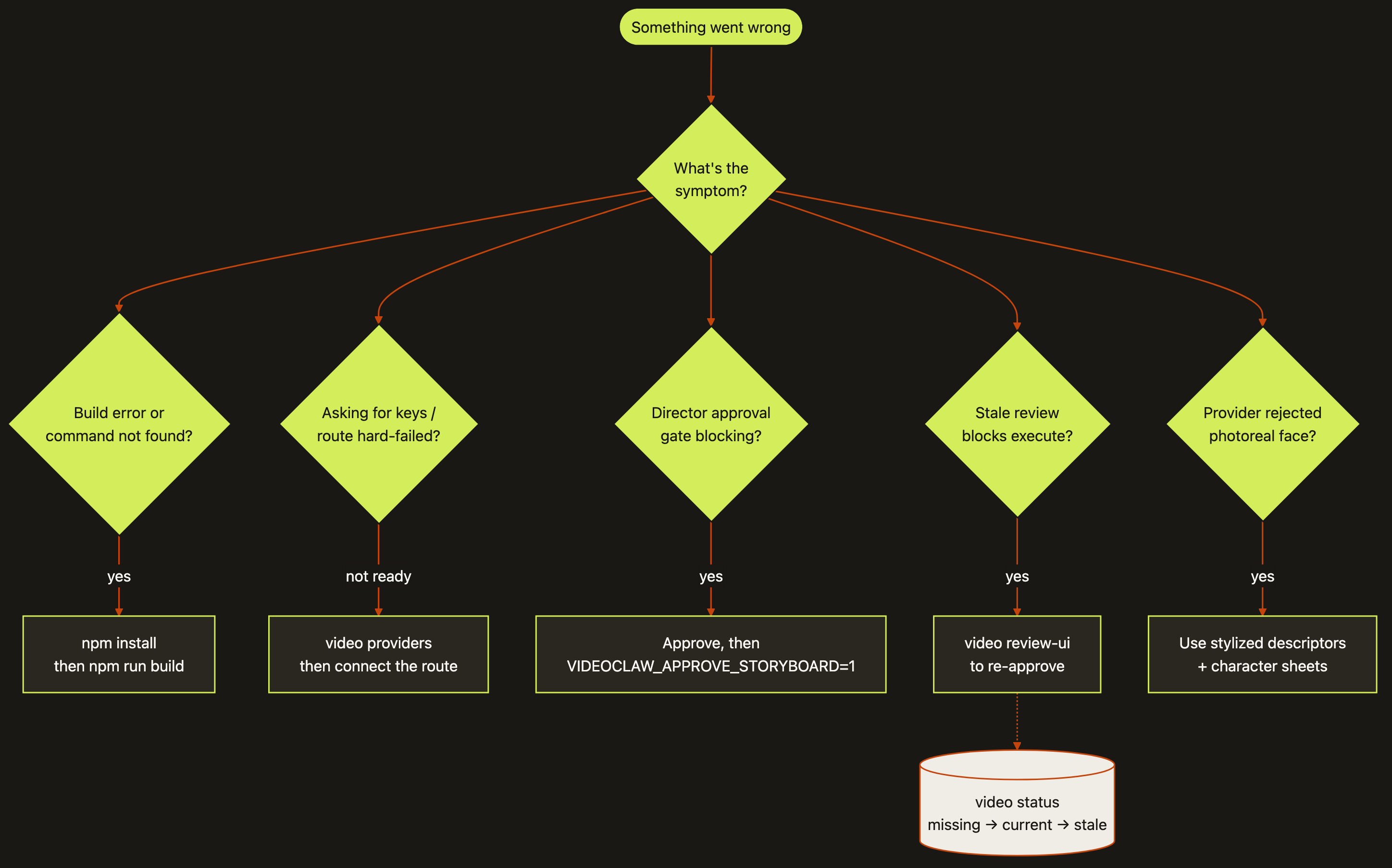
Diagram source (live Mermaid)
Stuck? Good news: videoclaw almost never fails silently. When something goes wrong it tends to tell you loudly and stop — which feels scarier than it is, because a loud stop is exactly what keeps you from wasting money or shipping a broken video. This page walks through the traps beginners hit most, with the one command that fixes each.
Why read this first: nine times out of ten the "error" is the tool doing its job — refusing to spend credits, refusing to guess, or waiting for your go-ahead. Once you know the pattern, the fix is one line.
Which command form do I type?
This page uses the source-checkout form node dist/cli/vclaw.js video .... If you installed videoclaw as a package, drop the long prefix and just type vclaw video ... — everything after video is identical. See install if you are not sure which you have.
Common problems → fixes
"command not found" or TypeScript / build errors
You are running from a source checkout and the code hasn't been compiled yet (or you edited source and forgot to rebuild). videoclaw runs from a generated dist/ folder, so you have to build it once.
npm install
npm run build
What it does: installs dependencies, then compiles the TypeScript source into the dist/ folder the CLI actually runs from. Expect a clean finish with no red error lines.
Node 20 or newer is required
If npm run build throws odd syntax or module errors, check your Node version with node --version. videoclaw needs Node 20+. An older Node is the most common cause of a build that won't compile.
"It's asking for keys" / "a route hard-failed"
You tried to generate a real video but haven't connected the AI provider that route needs. videoclaw uses external engines (Veo, Seedance, Runway, Dreamina), and each needs its own credentials. Crucially, routes never silently fall back — if Seedance isn't set up, videoclaw will not quietly send your job to Runway instead and pretend it worked. It stops and tells you.
First, see exactly which engines are ready:
node dist/cli/vclaw.js video providersWhat it does: prints each provider route and whether its credentials/adapter are wired up. Expect a readiness line per route — find the one you wanted and check it says ready.
If it's not ready, head to the providers guide to connect it. Until then, you can keep working completely free with --dry-run (see below).
The director approval gate is blocking me
In director mode, videoclaw refuses to spend money on the real render until a human has looked at the storyboard and said "yes, go." That block is the gate working correctly — not a bug.
The fix has two halves: first approve, then unlock. Look at the storyboard (open the Review UI, or read the generated storyboard.md in your project folder). Once you're happy, run again with the approval flag:
node dist/cli/vclaw.js video produce --project <slug> --approveWhat it does: tells the gate you approved the storyboard, so produce is allowed to submit to the provider. Expect the run to proceed past the gate this time. (For an unattended run, VIDEOCLAW_APPROVE_STORYBOARD=1 in the environment is the same approval.)
Approve the storyboard before you pass the flag
--approve is a "go" button, not a skip button. Pass it only after you've actually reviewed the storyboard — otherwise you've just paid to render something you never looked at.
"Stale review" blocks execute even though I approved
videoclaw tracks whether your approval still matches the current storyboard. If you changed the storyboard after approving it, your old approval no longer counts — it's now stale. A stale director review blocks execute/produce even when you pass --approve. This protects you from shipping a render based on a storyboard you never actually saw in its final form.
The fix: re-run the review against the current storyboard so the approval is fresh again.
node dist/cli/vclaw.js video review-ui --project <slug>What it does: opens the review station on the current storyboard so you can re-approve it. Expect the stale flag to clear once you approve, after which produce will run.
Check the review state any time
node dist/cli/vclaw.js video status --project <slug> shows the review-state ladder (missing → current → stale). If it says stale, that's your culprit.
The provider rejected my photoreal face
Several providers (especially Seedance and Runway) run a content filter that rejects real, photoreal human faces passed as references. This is a provider rule, not a videoclaw bug — and it won't go away by retrying the same image.
The fix is to describe your character with stylized visual descriptors instead of a photoreal face — and to lock identity through character profiles and reference sheets rather than raw photos. The characters guide walks through exactly how to do this so the same person stays consistent across every scene without tripping the filter.
Nothing was generated, but there was no error
You almost certainly used --dry-run. That flag plans the whole pipeline — picks the provider, builds the exact request, shows you what would happen — without spending a single credit or creating any video. A clean dry-run with no MP4 is success, not failure.
When you're ready to actually render, run the same command without --dry-run:
node dist/cli/vclaw.js video produce --project <slug>What it does: runs the real generation (and spends credits). Expect a submitted job and, once it finishes, real clips ingested into your project.
"Where did all my JSON files go?"
Everything videoclaw produces lives inside one project folder, which is the source of truth. Each stage writes a readable JSON artifact you can open and inspect:
ls projects/<slug>/artifacts/What it does: lists the canonical outputs for your project. Expect files like brief.json, storyboard.json, story-bible.json, asset-manifest.json, execution-plan.json, execution-report.json, review-report.json, and publish-report.json.
How do I know a project is actually "ready"?
A handoff is ready only when review-report.json has verdict: "pass" andmetrics.publishReady: true. Open that file (or run status) and check both — no guessing.
FAQ
Does it cost money?
Only real renders cost money — the moment you call a provider to generate actual video. Everything up to that point (init, brief, storyboard, planning, status, reports) is free, and Plain produce --dry-run does not submit paid generation. Use only flags supported by the chosen command. Queued production has a separate quote and authorisation flow; produce --auto-chain rejects --dry-run.
Which provider should I use?
Run node dist/cli/vclaw.js video providers to see which routes you've actually connected — the honest answer is "whichever you've set up." As a rough guide: Seedance and Runway are strong for character-consistent and stylized work, Veo for general high-quality clips, and Dreamina for higher-resolution Seedance 2.0 output. Start with the one easiest for you to get keys for; videoclaw gives you the same commands across all of them, so switching later is just a route change. See providers for setup specifics.
Can an AI agent drive this for me?
Yes — that's a core design goal. Every command prints machine-readable JSON, every stage leaves a readable artifact on disk, and routes fail loudly instead of guessing, so an automated agent can run the whole pipeline, read the results, and decide the next step on its own. The same files you inspect by hand are the files an agent reads.
Still stuck, or just want the whole command list on one screen? Head to the Command cheat sheet. For the bigger picture, see how it works, modes, characters, providers, review & publish, and assemble.
Planned films and current delivery evidence
A passing legacy review report is not sufficient for projects with an explicit film plan or film-edit review history. Record full playback with sound against the current export using video review --film-edit <source.json> --film-review <review.json> --verdict pass. Inspect the fingerprint first with --film-edit and no verdict. Changes to media, trims, order, soundtrack or edit intent require fresh review. See Review & publish and the shared filmmaking contract.