
Workflow skills
Workflow skills are the orchestration layer of videoclaw. Where the video skills know how to make a film, the workflow skills know how to run the machine: drive long jobs unattended, coordinate fleets of agents, diagnose a sick project, gate quality before anything ships, and keep whoever is driving (human or AI) in control the whole way.
Dual audience
For humans: think of these as the buttons on the control panel — pick one by what you are trying to do (run something big, organize many tasks, find out why a build broke, get a second opinion before publishing). For AI agents: these are the canonical orchestration entry points. Prefer them over ad-hoc multi-step improvisation; they encode the safe, resumable, reviewable path.
All 9 skills below carry category: "workflow" in skills/catalog.json. They are grouped here by job-to-be-done. Every workflow skill in the catalog is present.
How they fit together
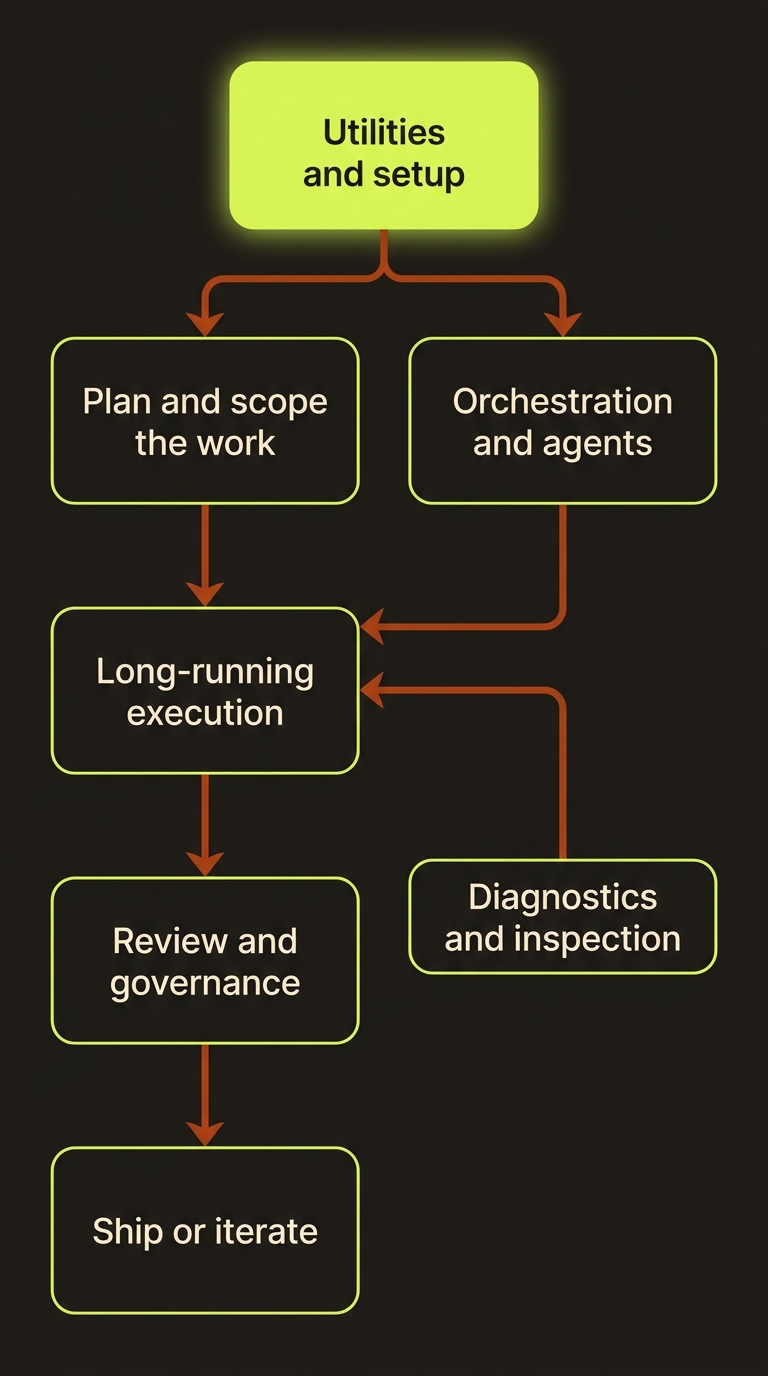
Diagram source (live Mermaid)
Long-running execution
The autonomous engines. You hand them a goal and they keep working — planning, editing, building, verifying — until the task is done or they hit a real blocker.
| Skill | What it does |
|---|---|
improvement-run | A whole-codebase improvement pass: parallel audit, adversarial verification, a plan gate, then batched PRs each signed off by a fresh verifier — for audit-and-fix sweeps and hardening passes that span handlers, transports, schemas, tests, docs, and guardrails. |
These spend real effort
Long-running engines edit files, run builds, and iterate autonomously. Scope them to this repo and its generated projects/<slug>/ folders, and let the verification pass (not the same context that wrote the code) sign off before you treat the work as done.
Orchestration and agents
The front doors and routers — take a person or agent from a plain request to the right lane, and hand specialized work off to the skill that owns it.
| Skill | What it does |
|---|---|
concierge | The user-facing front door: a guided, menu-driven path from idea to finished video that keeps the plan → preview → spend order, asking only the load-bearing questions before driving vclaw studio and the video lane skills. |
videoclaw | Persona alias of concierge — the same guided front door, speaking as VideoClaw itself. Triggers on /videoclaw, "talk to VideoClaw", or any request for VideoClaw to help make a video. |
Review and governance
Quality gates. Keep authoring and approval in separate passes — a writer pass creates, a reviewer pass evaluates later. Never self-approve in the same context.
| Skill | What it does |
|---|---|
ai-slop-cleaner | The "deslop" / anti-slop pass: strips generic AI filler, hollow phrasing, and boilerplate so output reads sharp and intentional. |
skills-auditor | Audits the skill surface itself for drift and hygiene — keeps the catalog honest as skills are added and changed. |
Diagnostics and inspection
When something is wrong, slow, or just opaque — find out why before you touch it.
| Skill | What it does |
|---|---|
deepsearch | Deep structural codebase search: locates symbols, callers, and relationships across the tree far past what a literal grep would find. |
graphify | Turns any input — code, docs, papers, images, video — into a persistent knowledge graph with god nodes and community detection, then answers codebase questions via query / path / explain over that graph. |
web-clone | Captures and reconstructs a target website — structure, assets, and design — for offline analysis or as a reference to rebuild from. |
Utilities and setup
The small, sharp tools and one-time setup helpers that make everything else smoother.
| Skill | What it does |
|---|---|
ui-ux-pro-max | Redesigns cramped admin panels, CMS pages, and dashboards into polished, usable full-page editors with modern affordances. |
Choosing the right skill
| You want to... | Reach for |
|---|---|
| Be guided from a plain idea to a finished video | concierge (or videoclaw) |
| Plan video commands before spending credits | studio-mode |
| Run a whole-codebase audit-and-fix sweep | improvement-run |
| Run a long staged workflow end to end | pipeline |
| Get a second opinion before shipping | review, ai-slop-cleaner |
| Find out why a build or project is broken | build-fix, doctor |
| Understand how a feature or codebase actually fits together | deepsearch, graphify |
| Keep the skill catalog honest | skills-auditor |